
 Calin
Calin Hi TheZugzwangBlog, usually this problem get solved be deleted and reinstall the tagDiv Composer plugin (this need to be reinstall from Newsmag > plugins).
If the problem is still not solved, please contact us via email and we’ll check the situation as quick as possible.
Thank you!
 stringbenderb5
I have several sites with Newspaper Theme that are built with TagDiv and they are crashing. Our server provider is telling us thad there is a compatibility issue now between TagDiv Standard Pack, TagDiv Composer and the Newspaper Theme.
The Newspaper themes have been updated to 11.2 TagDiv Standard Pack plugin to 1.2 and TagDiv Composer plugin to 2.8
However, 3 websites keep crashing. Below are some of the error logs.
Can you provide us with a fix ASAP Please???
[Wed Aug 11 18:24:40.987470 2021] [php7:error] [pid 10910] [client 191.96.106.159:45964] PHP Fatal error: Uncaught ArgumentCountError: Too few arguments to function td_block_17::inner(), 2 passed in /nas/content/live/sumnercountyso/wp-content/plugins/td-composer/legacy/common/wp_booster/td_block.php on line 2857 and exactly 3 expected in /nas/content/live/sumnercountyso/wp-content/plugins/td-standard-pack/Newspaper/includes/shortcodes/td_block_17.php:125\nStack trace:\n#0 /nas/content/live/sumnercountyso/wp-content/plugins/td-composer/legacy/common/wp_booster/td_block.php(2857): td_block_17->inner(Array, 2)\n#1 /nas/content/live/sumnercountyso/wp-content/plugins/td-standard-pack/Newspaper/includes/shortcodes/td_block_17.php(107): td_block->get_block_js()\n#2 /nas/content/live/sumnercountyso/wp-content/plugins/td-composer/legacy/common/wp_booster/td_global_blocks.php(27): td_block_17->render(Array, ”)\n#3 /nas/content/live/sumnercountyso/wp-includes/shortcodes.php(343): td_global_blocks::proxy_function(Array, ”, ‘td_block_17’)\n#4 [internal function]: do_shortcode_tag(Array)\n#5 /nas/content/live/sumnercountyso/wp-incl in /nas/content/live/sumnercountyso/wp-content/plugins/td-standard-pack/Newspaper/includes/shortcodes/td_block_17.php on line 125, referer: https://sumnercountysource.com/
[Wed Aug 11 18:24:42.804328 2021] [php7:error] [pid 10910] [client 191.96.106.159:46062] PHP Fatal error: Uncaught ArgumentCountError: Too few arguments to function td_block_17::inner(), 2 passed in /nas/content/live/sumnercountyso/wp-content/plugins/td-composer/legacy/common/wp_booster/td_block.php on line 2857 and exactly 3 expected in /nas/content/live/sumnercountyso/wp-content/plugins/td-standard-pack/Newspaper/includes/shortcodes/td_block_17.php:125\nStack trace:\n#0 /nas/content/live/sumnercountyso/wp-content/plugins/td-composer/legacy/common/wp_booster/td_block.php(2857): td_block_17->inner(Array, 2)\n#1 /nas/content/live/sumnercountyso/wp-content/plugins/td-standard-pack/Newspaper/includes/shortcodes/td_block_17.php(107): td_block->get_block_js()\n#2 /nas/content/live/sumnercountyso/wp-content/plugins/td-composer/legacy/common/wp_booster/td_global_blocks.php(27): td_block_17->render(Array, ”)\n#3 /nas/content/live/sumnercountyso/wp-includes/shortcodes.php(343): td_global_blocks::proxy_function(Array, ”, ‘td_block_17’)\n#4 [internal function]: do_shortcode_tag(Array)\n#5 /nas/content/live/sumnercountyso/wp-incl in /nas/content/live/sumnercountyso/wp-content/plugins/td-standard-pack/Newspaper/includes/shortcodes/td_block_17.php on line 125, referer: https://sumnercountysource.com/
[Wed Aug 11 18:25:03.756237 2021] [php7:error] [pid 11272] [client 191.96.106.159:47680] PHP Fatal error: Uncaught ArgumentCountError: Too few arguments to function td_block_17::inner(), 2 passed in /nas/content/live/sumnercountyso/wp-content/plugins/td-composer/legacy/common/wp_booster/td_block.php on line 2857 and exactly 3 expected in /nas/content/live/sumnercountyso/wp-content/plugins/td-standard-pack/Newspaper/includes/shortcodes/td_block_17.php:125\nStack trace:\n#0 /nas/content/live/sumnercountyso/wp-content/plugins/td-composer/legacy/common/wp_booster/td_block.php(2857): td_block_17->inner(Array, 2)\n#1 /nas/content/live/sumnercountyso/wp-content/plugins/td-standard-pack/Newspaper/includes/shortcodes/td_block_17.php(107): td_block->get_block_js()\n#2 /nas/content/live/sumnercountyso/wp-content/plugins/td-composer/legacy/common/wp_booster/td_global_blocks.php(27): td_block_17->render(Array, ”)\n#3 /nas/content/live/sumnercountyso/wp-includes/shortcodes.php(343): td_global_blocks::proxy_function(Array, ”, ‘td_block_17’)\n#4 [internal function]: do_shortcode_tag(Array)\n#5 /nas/content/live/sumnercountyso/wp-incl in /nas/content/live/sumnercountyso/wp-content/plugins/td-standard-pack/Newspaper/includes/shortcodes/td_block_17.php on line 125, referer: https://sumnercountysource.com/wp-admin/
 thenaykar
Hi, I have been trying to design my sidebar for 2 days as I want. However, I have some problems… I think, explaining my problem will be a bit difficult.
1 – If I try to design my sidebar by using Widgets, I cannot change the title style and so on. For example, I add a search box by using Widgets, but I cannot change its title and button style, and color. I can do it if I use TagDiv Composer. However it is not effective, because, then I cannot see the same sidebar in my posts. I mean, the sidebar that I design with TagDiv Composer is not universal. If I use widgets to design my sidebar, I can say that it is universal, I can see the same sidebar in all my posts, however, as I said, I cannot change the style of the sidebar elements by using Widgets. I hope it is clear…
2 – I want to use a plugin for called “Social Icons Widget & Block by WPZOOM” in my sidebar, rather than using TagDiv’s social counter. However, when I add it into my sidebar by using widgets, I cannot see it in TagDiv Composer…
Shortly, designing a sidebar is very easy and effective if I use tagDiv’s plugin, but it is not universal for all my pages, I just see it on my home page. Designing a sidebar with Widgets is universal, but I cannot style the elements of the sidebar as I wanted. I may not be clear as it is difficult to explain without showing it in a detailed way. I hope that everything is clear.
I’m waiting for your help. Thanks
 msakande
Dear,
I use “Local News” as prebuilt site.
The problem is that all the block after the video playlist cannot been edit buy TagDiv Composer.
You cannot select any place to edit.
https://iev.wju.mybluehost.me/wp-content/uploads/2021/08/local-news.jpg
 Vlad S
 Hello!
If you’re using a PRO demo template. Everything can be changed using tagDiv Composer. In theme panel, you can set ads if they are not already set in the AdBoxes. Logos can also be edited from theme panel but on PRO demos they are automatically set.
You can take a look at our youtube guides for more tips and tricks: https://www.youtube.com/user/tagdiv
Thank you!
 siarheikavaliou
 Tag div composer does not suit me. I cannot assign roles as in wp backary composer. Dynamic pages in tag div are defined as post pages. I need them to be static pages.
For example, this page looks like a post, but it is not a post.
 Anamaria
 Hi,
What blocks do you want to add because, in tagDiv composer, there are different blocks that you can adjust? https://i.imgur.com/RpZHPJl.png -> https://forum.tagdiv.com/big-grid-flex-settings/ -> https://forum.tagdiv.com/flex-block-settings-guide/
We strongly recommend using only one of those plugins with our theme (WP Bakery or tagDiv Composer, but not both)-> https://forum.tagdiv.com/how-to-use-visual-composer/
Thank you!
 Laura
LauraHello,
after the Update my Website is completely broken. My custom templates aren’t showing and all of my settings are gone. I needed to install the Composer again and the Social plugin. It says I need to activate the theme again.
What just happened?
 gabrieltanase
 Hi Calin,
I need a little help too. I’m trying to create a field that I can see in “new article” but also in “td composer”. I want that field to be filled in when I write the article and in the composer to appear to me in the same way as “source” or “subtitle” appears. I use afc, I created the field in afc but I don’t see it in the new article …
I’m waiting for an answer from you
 otggamer
My site was running fine, but after updating from Newspaper 11 to Newspaper 11.2 my Logo will no longer display.
It just shows the TEXT LOGO and TEXT TAGLINE info.
No matter what I’ve tried it is not showing the logo.
Oddly, even if I empty the tagline field, the default “Discover The Art of Publishing” tagline text is STILL displaying, like it’s not really saving the data.
I tried removing and re-uploading my logos, no luck.
I tried going back to Newspaper 11 and it no longer works.
I NEED to get my logo back, how do I FIX this? Please help.
Site URL is http://appaddict.net
UPDATE: IT”S EVEN WORSE THAN I THOUGHT!
PAGES WON’T EVEN LOAD NOW!
I see the following when it tries to load pages.
wp_booster error:
td_api_base::mark_used_on_page : a component with the ID: single_template_6 is not set.
/chroot/home/appaddic/cphomeorig/public_html/wordpress/wp-content/plugins/td-composer/legacy/common/wp_booster/td_api.php
wp_booster error:
The path of the single_template_6 template not found. Did you disable a tagDiv plugin?
/chroot/home/appaddic/cphomeorig/public_html/wordpress/wp-content/plugins/td-composer/legacy/common/wp_booster/td_api.php
Anamaria Hi,
If you’re seeing only NAVER please make this adjustment in the tagDiv Composer plugin -> wp-content/plugins/td-composer/legacy/common/wp_booster/td_first_install.php
=>https://www.screencast.com/t/yO3iU8E5JhH
Then hit a save in the theme panel and then revert the code back to the original, this will make the social icons appear properly again -> https://forum.tagdiv.com/design-post-pages-using-default-templates/.
If you don’t have success you can send us an email at contact@tagdiv.com and provide
– wp-admin URL and credentials
– cPanel URL and credentials
We will fix the problem. Include a link to this topic in the email.
Let me know the results!
Thank you!
Anamaria Hello,
Using our theme you can choose from 3 mobile versions
-> mobile responsive => https://www.screencast.com/t/oJ2ShOp47
-> mobile theme plugin => https://forum.tagdiv.com/the-mobile-theme/
-> mobile page => https://tagdiv.com/newspaper-10-3-7-update-brings-customizable-and-fast-mobile-pages/
This is a video about Responsive Newspaper Theme, AMP & Mobile Theme, Mobile Pages & Templates -> https://www.youtube.com/watch?v=SpGkOnJeNZY
So, the mobile responsive is what you see then that you select the viewport on phone => https://www.screencast.com/t/matV17hH, so some settings may apply for each viewport(where is the border blue), and others are not(where the border is black).
The mobile page has the mobile templates from Cloud Library => https://www.screencast.com/t/YCcZ8rL8, so you need to add the newsletter submission box on the mobile page.
The mobile theme comes with its own templates for page, post, category, 404 etc so your current templates from the desktop theme will get converted to the mobile theme layout, the page content is made without builders in mobile editor => https://www.screencast.com/t/xbgZG8kH also, the options that are provided to edit the mobile theme version are limited (this keeps the things simple).
Mobile responsive version of the theme and the mobile page editor can be edit with tagDiv Composer, the mobile theme plugin not.
For example, you can have the mobile theme plugin activate and use the mobile page/mobile responsive version for the homepage/pages, but for the categories page/404 page you can’t use the mobile page/mobile responsive version if you have the mobile theme plugin activate.
Also, please provide some screenshots with “Further more the same changes (e.g. the newsletter submission box) appear on single post pages.”
Thank you!
Anamaria Hello,
Yes, because you have a Pro Prebuilt Website, only some settings from the Theme Panel will apply to a Pro Prebuilt website, and you need to edit/add with tagDiv Composer the elements.
Thank you!
Anamaria Hello,
Please send screenshots with what you see in the theme panel, to be able to help you.
Normally, if you have the standard pack plugin activated the header style well should display like this => https://i.imgur.com/Qv6sO9u.png
Also, if you previously had a cloud header, please go to the homepage and edit with tagDiv Composer, select the Manager (Website Manager) please check if you don’t have set “No Header” => https://i.imgur.com/f9dkBqJ.png
Thank you!
Vlad S Hello!
You can use the column text element in order to render shortcodes or use codes.
Simply copy the shortcode and insert it in the text area of the column text as you can see here: https://www.screencast.com/t/UEMEsVKog
Column text is an element from tagDiv Composer.
Thank you !
Anamaria Hello,
Please edit with tagDiv Composer, select the Header Menu Sticky zone, and set the sticky type to “Always” => https://i.imgur.com/wzzBZu6.jpg
Thank you!
Anamaria Hello,
You can find the WP Bakery in this path Newspaper-tf\code\other_plugins
We strongly recommend using only one of those plugins with our theme (WP Bakery or tagDiv Composer, but not both)-> https://forum.tagdiv.com/how-to-use-visual-composer/
Thank you!
 SP1
SP1Hi,
Can someone please help me with how to change the mobile menu background image. We went to tag div composer, but when we click on the menu icon, there is no option to click on the mobile menu background change or maybe we missed the right step.
We imported the style news demo, hence the image of the style news demo appears when we click on the mobile menu. Can someone help how to change it or change it to a colour/gradient?
Thanks
motorbridge.com
siarheikavaliouHi
How can I use on my site wp Bakery Page Builder?
If I activate it instead of tagdiv composer the theme panel disappears. Then there is no way to insert blocks on the page. I don’t see an option to use wp Bakery Page Builder instead of tagdiv composer.
How can i do this?
Thanks
 ashdagar
 I am facing the same issue, Theme panel changes are not reflected on the website…. I tried to change the setting in the composer to default but was not able to do that… need your help
 Christiaan
Hi. I purchased newspaper template and i am using The critic like a single template, but i have a problem. Sharing only show Naver like a unique social networks. This template don’t have disable Facebook, Twitter, Instagram for sharing. What is the solution. Even when yo use edit composer, it allow this social network (Naver), but no facebook, etc.
My website i http://www.elpirata.pe
 e_tietze
Sire URL: http://www.ozarksfn.com
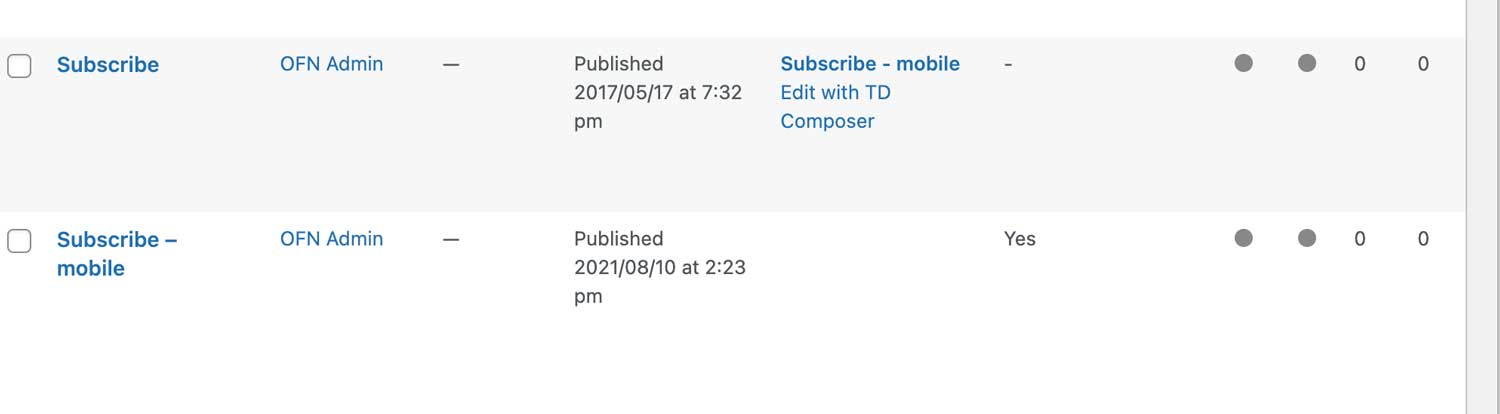
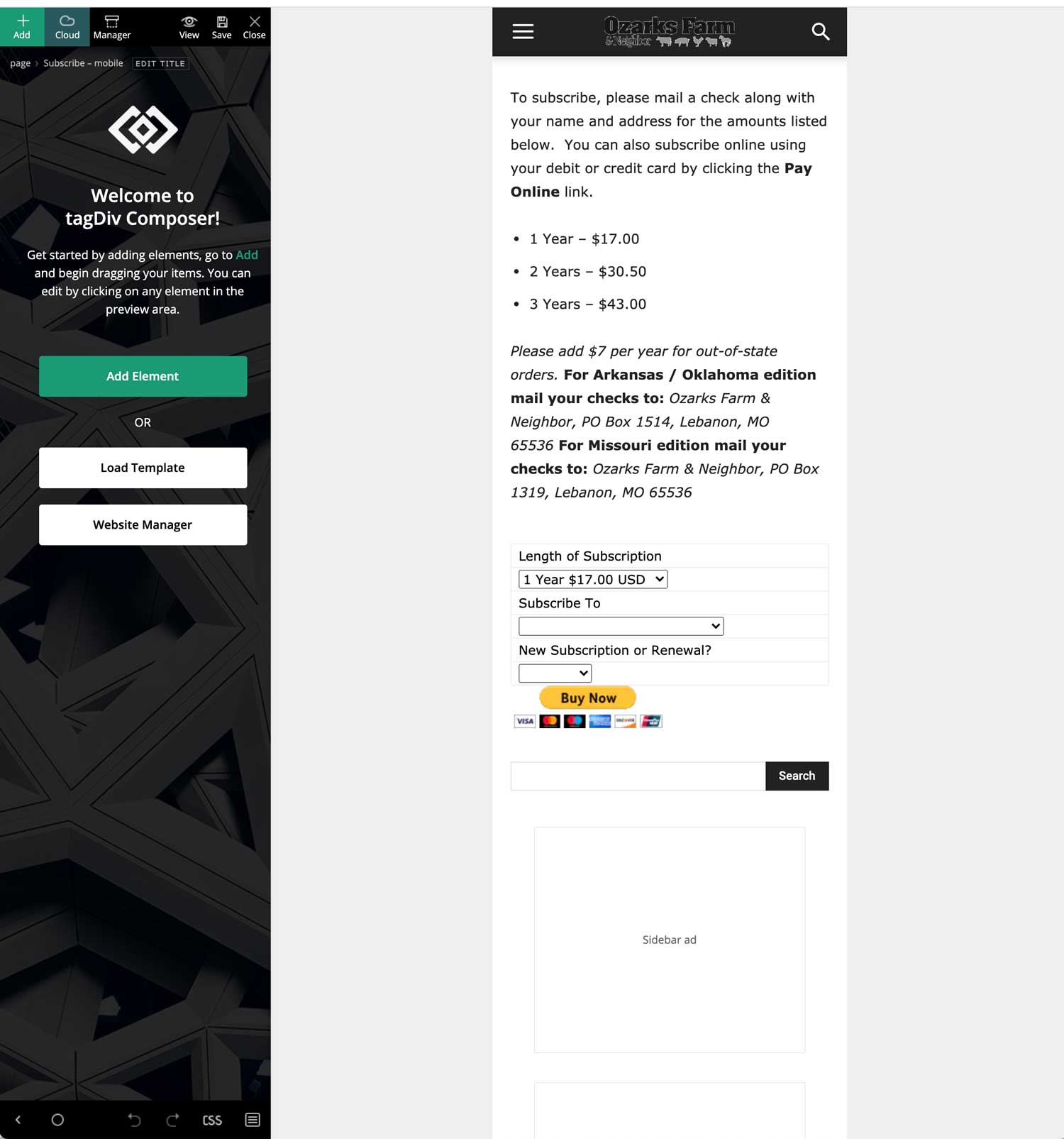
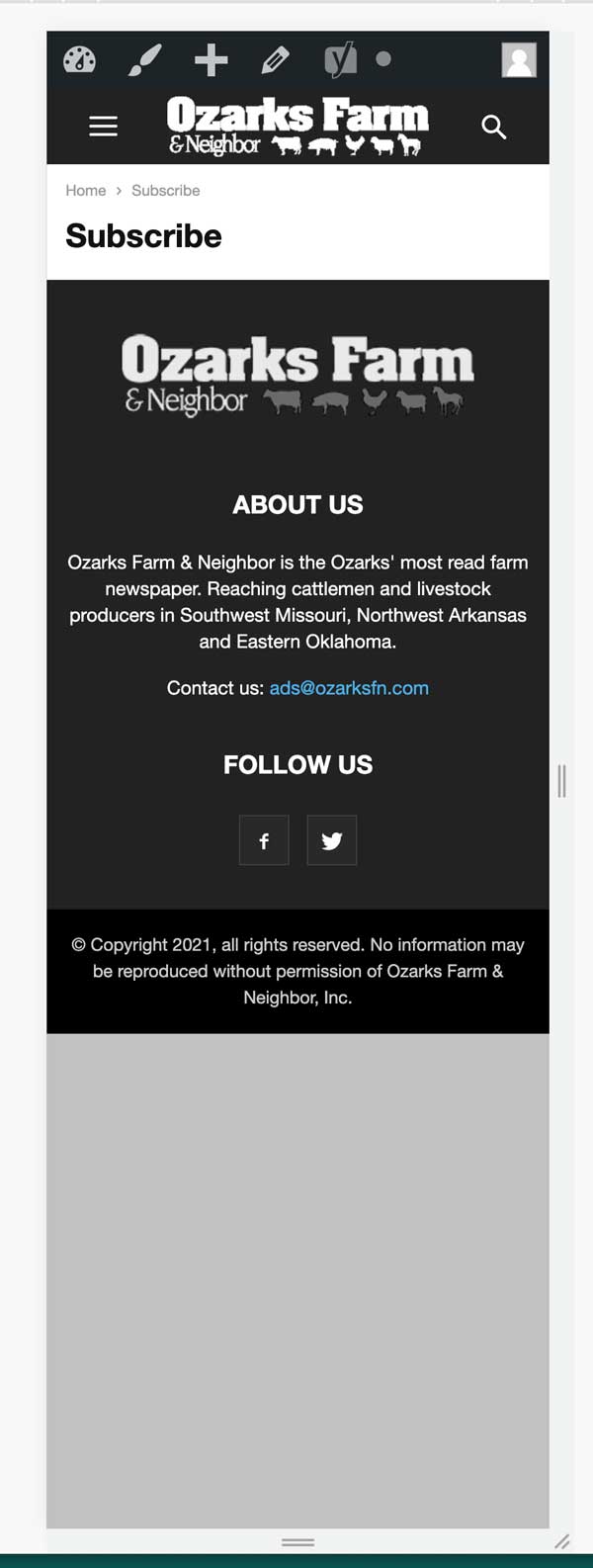
My site doesn’t seem to be properly loading mobile pages. I initially hadn’t made specific mobile pages but went ahead and made one for the one particular page I was looking at just to figure out the issue. When I go into my dashboard and pages it shows the mobile page linked to the non-mobile page (image below) and when I edit in TagDiv Composer it appears as it should (image below). But, when I pull it up on a mobile device or look at it in mobile mode on my computer it doesn’t show any of the content. It is doing this on multiple pages, I believe all of them actually, but not on posts. The posts appear just fine.
 Anonymous
 Does that mean if i need to make changes in pre-built demos i need to do it through TagDiv composer? Theme panel won’t work for those themes?
 kaitlin
 Thanks, Bettina and Ged. That process as outlined by Bettina did seem to work for me.
The only outdated plugin I’m running is Visual Composer b/c the update has not been packaged with any recent Newspaper releases. Perhaps that was the issue?
 Bettina
 Hello!
If your problem wasn’t fixed by the plugin try to follow those steps for both plugins:
1. disable TagDiv Composer
2. uninstall(delete) TagDiv Composer
3. clear cache (if cache plugin exists)
4. install TagDiv Composer
5. activate TagDiv Composer
6. clear cache (if cache plugin exists)
Let us know the results!
Make sure your plugins are not outdated!(it is a warning in Newspaper -> Welcome)
Thank you!



