
 Bettina
 Hello @phase3av!
Unfortunately, there are no options that correspond to this condition.
Every element can be hidden using the CSS tab option : https://prnt.sc/a694nQat_PFR
Thank you!
 Yoshiyu
 Hi @Anamaria
Can you please share the example css code?
 Calin
Calin Hi,
Yes, that is caused by this code
.single .page-nav a[href$="/2/"] {

width: 100%!important;

margin-left: 0!important;

}
You can remove it from your css and should be ok.
 Anamaria
 Hello,
So, I did a test with your steps; I added the embed code in the shortcode element from Gutenberg, and for me works -> https://i.imgur.com/cWFauVf.png -> https://i.imgur.com/zqbFDnH.png
Maybe the problem is caused by the cache plugin https://i.imgur.com/aUa0OOJ.png. Does this plugin have the option to optimize the css/js?
Thank you!
 Amitty
 Hi Calin,
Thanks, it worked.
One more thing, Can you please help me with the next/prev buttons that are broken on /3/ page? (it’s not caused by new CSS code, it was before)
Bettina Hello Tamas!
You need to edit the pages with the TagDiv Composer, click on every row and apply the paddings in the CSS tab of the row.
Thank you!
 sebpre0805
 Hello,
No, I use Firefox and Chrome. both look the same. I just deactivated all plugins except for all of TagDiv. Looks exactly the same, nothing has changed.
The live search is of course switched on. Do you want to take a look at the site? Then I would send you a temporary admin account.
updated:
I got this solved with the live search. There was a custom css from the old theme version, which I apparently overlooked. I apologize for my mistake.
But what is still not solved is the issue with the Composer menu on the left, which could not be fixed despite deactivating the plugins. I really have no more ideas. The right edge stays cropped no matter what I do.
Another question about a CSS solution?
-
This reply was modified 3 years by
sebpre0805.
Calin Hi dkempdesigns,
Let’s try to take each subject in turn:
To change the background color for some rows, select the row and check the css tab – https://i.imgur.com/OJ8d9Kl.png – for element menus colors you can check in style tabs (if elements have this tab).
‘Also I can create menus but the menus that are already there are what I want to access. I need to know what their names are as the names in the theme do not edit the existing menus I sent you pictures of.‘ – the menus are made in appearance > menu – https://i.imgur.com/MoqB5OQ.png from there you can edit the current element from the menu (add/delete) or you can make new menus.
Now to assign the menu on your website you need to edit it with tagDiv Composer the header, this can be done from the homepage – https://i.imgur.com/DVOZkt7.png select the menu and choose the menu you want to use – https://i.imgur.com/eDeupRH.png
‘ The blog page still does not have the sidebar (I chose the template with a sidebar) and the paragraph is shrunken and not full width under the featured image. I did include pictures and explain that I have used all your documentation. Please state clearly what each menu is called and where it is edited. State clearly why the template with sidebar for individual blog posts is not loading properly.‘ – I believe you are referring to this https://gjz.5cc.myftpupload.com/sharon-steele-unapologetic/ here you have a default post template that will use the widget sidebar elements, just make sure that you have elements in the widgets sidebars – https://i.imgur.com/FvnKPfB.png also you can use a single post template from the cloud and you can edit it using the tagDiv Composer.
‘I did not ask to remove image from footer, I asked why the default footer would not load properly on new pages when it was assigned specifically.‘ – I believe this is a plugin conflict, usually this is happening when you are using cloud templates and wpbakery plugin, we recommend to not using them together.
If I miss something, please let me know!
Thank you!
Anamaria Hello,
Did you use Safari? Please use another browser.
Also, did you deactivate the live search? Did you use a plugin to optimize the css? Maybe this interferes with the settings that you made.
Thank you!
 Krimiwa
 Hi Anamaria,
where can I set image height and weight?
I have set “thumbs on Modules/Blocks” in Theme Panel –> Block settings. But that is not what you meant, right?
PHP Version 8.0
I am using WP-Optimize plugin for cache and js/css minification
Calin Hi,
Please try this custom css
.page-nav.page-nav-post {

    width: 100%;

}
Set the code in the theme panel > custom code > custom css > advance cess > phone css – https://i.imgur.com/9DndL2V.png
I hope this will help you!
Anamaria Hello Krimiwa,
Please let me know if you have set the image weight and height.
Also, what PHP version do you have? Did you use a plugin to optimize the css and js?
Thank you!
sebpre0805 Hi,
website is https://phuketastic.com
By the way, the mobile search works very well and the article meta is also displayed there.
Yes, I have a mouse with a scroll wheel, but it doesn’t work. I can scroll from top to bottom within the composer with the wheel but not from left to right. My resolution is 1920×1080 everywhere.
The width of the bar also has nothing to do with the resolution, even with the highest resolution the Composer menu is not wide enough. Can’t this be adjusted with CSS?
Thank You
-
This reply was modified 3 years by
Calin Buna,
Te rog incerca acest css pentru deskto:
body .td-header-wrap .td-header-main-menu, .td-header-menu-wrap.td-affix {

backdrop-filter: saturate(180%) blur(5px);

    background: rgb(55 25 25 / 29%);

}
Daca nu este ce trebuie, te rog sa-mi dai un exemplu de cum sa fie.
Calin Adding multiple authors to your articles
Content
In this tutorial we will show you how to implement multiple authors to your posts using the Co-Authors Plus plugin.
We will make the implementation in the child theme so it will be easier to manage on theme updates. You will need to install and activate the Co-Authors Plus plugin first.
Adding the multiple authors is a three step process.
- Step 1 – Adding the required functions in your child theme functions.php file.
We created 2 custom functions for the author and for the author box which we can then call on the post styles and not have to use the entire functions each time.
Add these functions in your Child theme functions.php file: https://pastebin.com/ciYrSZvQ These will create the custom implementation to add the co-author and the author box for each co-author in particular.
- Step 2 – Adding the single post templates to your child theme.
In your main child theme folder, you will need to create the following folder structure:
Newspaper-child/parts/single
Then, under the “single” folder add both the single-template and the loop-single files for each of the post styles you use on your articles.
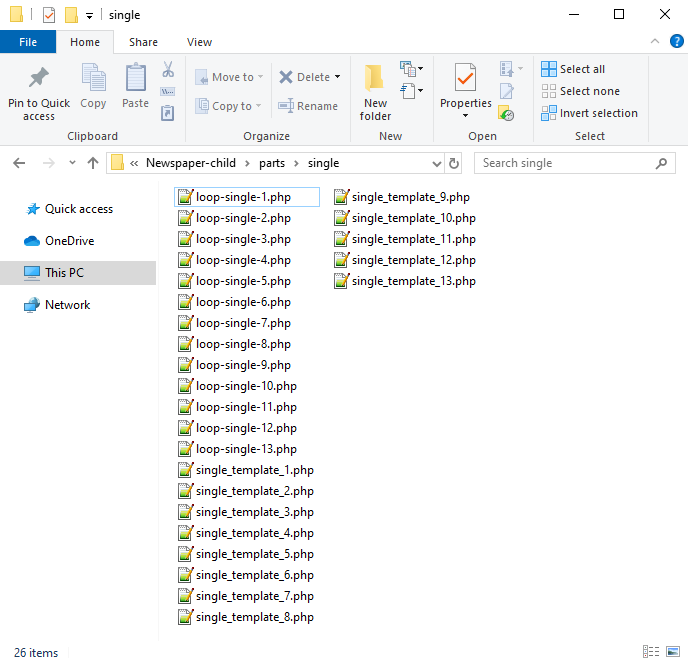
Now you will have to identify where the author is being called in each post style.
For styles 1, 5, 9 and 10 you will find the author code in the loop-single files while for styles 2, 3, 4, 6, 7, 8, 11, 12 and 13 the code is fount under the single_template files.
Edit the files corresponding to the style you want to apply the co-authors to and then call the functions added at step 1. Replace the default author and author box codes:
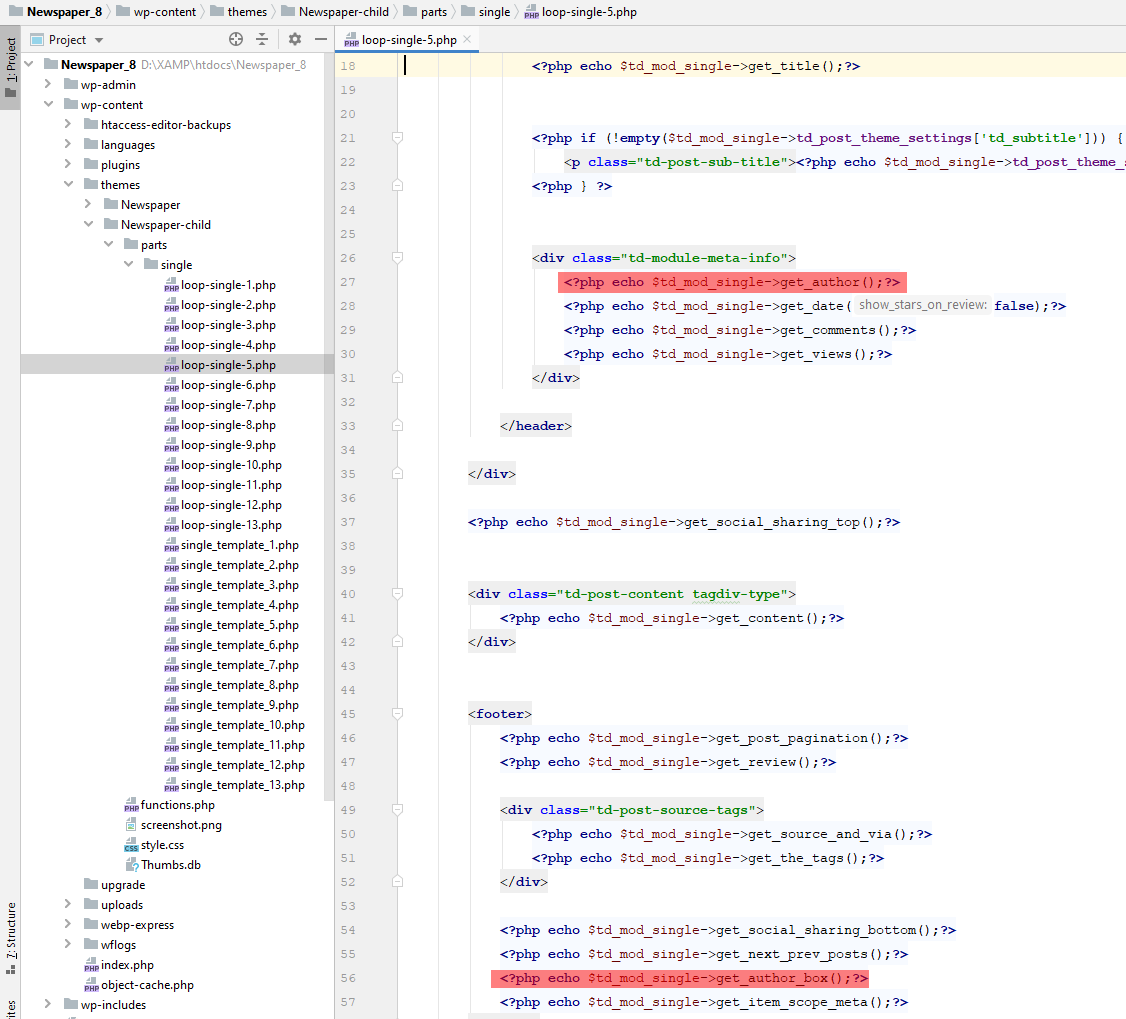
Replace the highlighted code with the following codes:
<?php echo td_get_post_coauthors();?>
and
<?php echo td_get_post_coauthors_box();?>
Maintain the codes position in the .php file though for proper results. \
- Step 3 – CSS styling
In order for the co-authors to position properly we also need a bit of CSS code to ensure proper styling so please add the following CSS code in the the theme panel under custom code-> custom CSS:
https://pastebin.com/dRaStewQ
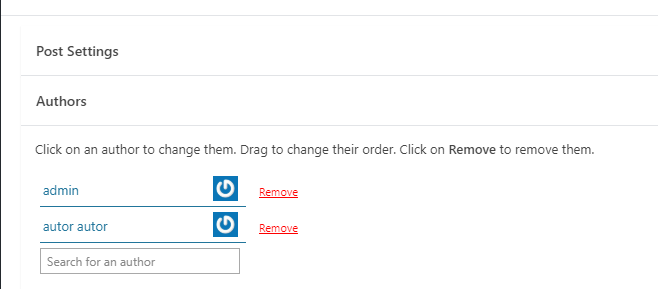
Now you simply need to edit your post and add multiple authors using the plugin author field:
Calin Hi Amitty,
I can help you with a custom css, for this I will need a link to your website where I can inspect a post with pagination. In this way, I can inspect the problem and I can make the necessary css for everything to look good.
Thank you!
Calin Buna,
De obicei pe forum scriem in engleza pentru a ajuta si alti utilizatori, dar acum o sa facem o mica exceptie.
1. Se poate folosi acest css pentru desktop
.td-header-menu-wrap.td-affix{

backdrop-filter: saturate(180%) blur(20px); /* Blurry */

background: rgba(255,255,255,0.7); /* White Opacity 70% */

}
Pentru mobil
body .td-header-wrap .td-header-main-menu, .td-header-menu-wrap.td-affix {

    backdrop-filter: saturate(180%) blur(20px);

    background: rgba(0,0,0,0.1);

    background-color: transparent !important;

}
Va trebui ca pentru elementele din meniu sa schimbati culoare de pe alb pe negru.
2. Trebuie sa setati cu tagDiv Composer pe elementul de featured image in viewport-ul mobil in tabul de css margine stanga si dreapta cu -20 – https://i.imgur.com/q7ShD5r.png
3. Dca functioneaza pe desktop se poate si pe versiunea mobila, trebuie sa selectati elementul in viewport-ul mobil si sa setati elementul the share sa fie inline – https://i.imgur.com/9c2SQUn.png poti fi mai multe solutii dar acum nu vad acest buton pe site pentru a oferi un exemplu mai concret.
Sper ca raspunsurile mele sa va ajute!
 ilouie
Hi, I am trying to create a modal page and I’d like to place a Vertical Menu in it. I’ve tried including the Header Main Menu composer but, I can’t find a way to display vertically, and show submenus horizontally. It only displays horizontally. I tried setting the width and it looks like it’s doing it, but then the links get cut. Does anyone know if it’s possible to create a vertical Menu here or do I have to create my own html and css code. Thanks in advance. I am trying to make the menu display like in https://www.forbes.com/?sh=289d4daf2254.
Amitty Hi Calin,
I want this same pagination style in my articles. After implementing the CSS codes you mentioned on this topic, I got the same issue: the Next page button on mobile appears small.
Do you have any solution now on how I can style the Next page button on mobile to be 100% width just like on desktop?
Anamaria Hello,
The blocks and elements are the same as they are presented in the documatation, only the design changes -> https://forum.tagdiv.com/newspaper-theme-documentation/
You can ask if you don’t know something specific, and we will try to help you.
For example, if you have set an image or color, usually, it is set on the row, so you need to edit with tagdiv Composer, select the row, and in the tab css, you will find it.
Please check this video about how you can create a website from scratch https://www.youtube.com/watch?v=SoGQ0d5kIBg.
Thank you!
 bo
bo Hello,
yes the code was:
.td-main-menu-logo img {

position:fixed;

}
I removed it but I still see the problem.
Yes I have wp-rocket with minifying the css and js. Is there any way to exclude it?
Thanks
Anamaria Hello,
Please check if you have set a custom code for the logo in the Theme panel -> Mobile Theme -> Custom code -> custom css.
Also, do you use a plugin for minifying the css and js?
Thank you!
Bettina Hello @mdev!
Unfortunately, you can not modify the pages created by bb
Press or any other plugin with our TagDiv Composer builder.
We have a tutorial about how to setup a form with this plugin: https://forum.tagdiv.com/how-to-install-bbpress-forum/
About the CSS issues, they can be corrected by using a custom CSS code: https://forum.tagdiv.com/create-custom-code-using-the-browsers-inspector/
Thank you!
Anamaria Hello,
Did you use a plugin to optimize the CSS and Js? If yes, can you please disable those options, purge the cache and check it in the incognito tab?
Thank you!
Calin Hi,
It looks like the element you use for the gallery has a stronger css than the one from the theme.
If you want to set them nicely on 2 columns you can use this custom css:
figure.wp-block-gallery.has-nested-images {

    display: flex;

    flex-wrap: wrap;

}
Set this css in the theme panel > custom code> custom css.
Also, if you want to remove the click from images on the gallery you can use this custom css.
.wp-block-gallery.has-nested-images.is-cropped figure.wp-block-image:not(#individual-image) a {

    pointer-events: none;

}
I hope this will help you!



