
- NewspaperWP Rocket and Newspaper Theme: Optimization Guide
- TutorialsFrom WPBakery to tagDiv Composer
- TutorialsDefault Block Settings Guide
- TutorialsHow to use custom fonts
 mgiannelis
Hello
I am finding it impossible to get the theme to run at an acceptable speed and performance metric.
I have two sites running at the moment. My original live site and the staging site
Live original http://www.techbusinessnews.com.au
Staging test site before moving to live https://www.techpressmedia.com/techbusinessnews/
These are both on the same very fast lightspeed cPanel server.
I have migrated my site data over to the test stage. So it is exactly the same site. Same plugins ect ect
My original site is highly optimised and I have applied all possible optimisations to the staging site
My big issue is un-cached pages.
My life site will load an un-cached page in less than 2 seconds.
The staging site will take up to 7 seconds to load an uncached page.
Strangely enough turning OFF lazyload actually increased performance.
I have plugins down to the bear minimum also
I have manually minified everything
I have optimised images as far as possible
I am using CDN – (But the big problem is dead slow uncached paged and I need to purge often)
I have also come across many bugs. For instance. Bu turning off lazyload this made my admin bar disappear and I had to force it back with this CSS
function admin_bar(){
if(is_user_logged_in()){
add_filter( ‘show_admin_bar’, ‘__return_true’ , 1000 );
}
}
add_action(‘init’, ‘admin_bar’ );
I have been optimising websites for many years heavily. This seems to be the first theme I have come across that loads non cached pages so slowly.
My current live site has constant 98 to 100 page speed and cached and non cached pages. The newspaper theme I cannot get over 60% is giving very poor page experience.
I have also used the CSS analyser on top
I have tested with both litespeed plugins and wp-cache and also using a combo of both for different functions.
I am also constantly having my server resources spike and max out causing 503s
I have done everything possible. No site speed here for non cached pages and also poor metrics
What am I missing with this theme?
 Racesport
Hi guys,
We cannot create a template on the product page with your composer. Other pages did work. Is there a way to solve this?
When we press the button in the header to edit it create a template. Nothing happens. Checked the console. No errors there.
Also..
How can we use the same template for the standaard shopping page and category pages. They are different now and this is very annoying, especially because this page https://www.racesport.nl/shop looks different on mobile (don’t have products on the smallest screen size) and CSS is not being used which i filled in).
Different then this page https://www.racesport.nl/kleding/
This last link/page works how we want. The https://www.racesport.nl/shop doesn’t work correctly and we’re not able to get this page to work the same as /kleding/.
Also still having issues with creating a template for the product page. As you can see, it looks awfull: https://www.racesport.nl/unisex/1n23456/. On this page WP Bakery is being used in the regular description field, but i don’t want to use this because this needs allot of effort with filling in all the products. I want to use a template which i could build or download as a standard template from your composer, but this button doesn’t work at all.
 Anamaria
 Hi,
I answered you on this topic https://forum.tagdiv.com/topic/mobile-menu-settings-css-not-saving/ please check it.
Thank you!
Anamaria Hi,
To change the font size or other for these elements you need to use a Custom Code CSS ->
.td-post-sub-title{

font-size: 25px;

}

.td-crumb-container .entry-crumbs

{

font-size: 25px;

}

.logged-in-as

{

font-size: 15px;

}

.form-submit .submit

{

font-size: 25px;

}
The code needs to be set in the theme panel > mobile theme > custom code> css.
I hope this will help you!
Thank you!
 Calin
Calin Hi,
I just checked the situation and it looks that it is only on desktop and for some blocks, o mobile for me everything seems to be ok.
Can you make a test and set a new block to see if this is working. Also, you can make a test using only the tagDiv plugins (and in case that you are using a child theme or some custom css, then please remove them and try again).
Let us know the results!
Thank you!
 mode8.jp
 Hi,
I found the solution, but I should not write how I did it on here, since it is a customizing the file.
“For the tag there isn’t this symbol “:” in our theme. ”
No, it is on your plugin, meaning it is on your theme.
I do understand your team gets a lot of questions everyday and it is a hard work.
Still, before you answer, please read our issues carefully before you do.
Deactivating plugins, changing with other themes…, we are not great wp users or professionals like you, but some users are already done what you always tell us to do. = spending a lot of time to solve…
“Or try to delete it with some CSS” ?? Please do not mention anything if you will not provide any ideas. CSS will not delete the word, it is only hiding it.
Anyway, if you do not want to leave this message or topic, please erase it.
I do really love this theme and your great work, but sometimes your voices are “too light” or “no knowledge for solving issues” for customers even if we understand how difficult to keep up the customer support.
All the best,
 FrasL
FrasL Hi @Bettina
The gradient slider is functioning fine, and adjusts the gradient without any problems, the menus & search just aren’t transparent. Cache has been cleared etc, incognito used, still the same issue.
Is there any additional css that can be added in order to fix this? It seems to have happened when AMP was enabled.
Thanks!
 Bettina
 Hello @mode8.jp!
For the tag there isn’t this symbol “:” in our theme. It could come from a plugin that you use and it is not tested with our theme. Or try to delete it with some CSS.
Thank you!
Bettina Hello @nick_lse!
Unfortunately, there is no option in order to achieve this. But, you can try to apply some CSS there: https://forum.tagdiv.com/create-custom-code-using-the-browsers-inspector/
Thank you!
 A-Jenkins
 I would like to add, I am getting the same issue but for the rest of my pages (categories, search page etc.)
https://www.gymtechreview.com/?s=reebok+jet+100
In the DivTag builder you can set the image height and image width (percentage based). It looks like something has gone wrong here, it should be minimum image height and width, not depending on the image size and width of your initial image. Which is why they are all different sizes.
I can fix this with CSS, but it would mean writing it all again for desktop/tablet/mobile, but there should be a fix for this soon.
It’s also an issue on your demo theme.
https://demo.tagdiv.com/newspaper_parenting_pro/?s=and
The images are all different sizes.
-
This reply was modified 4 years by
A-Jenkins.
Calin Hi,
I think that this solution can be solved if you overwrite the css in the child theme css file. In this way you’ll no longer need to remove the width: auto\9; after each theme update.
I will also make a notice to our developers to check and see if they can replace the css code with a better one, but I can not promise that this will be done for the coming update.
Thank you!
 kimstipguide
Hi.
The following URL is the content of the question.
https://kimstipguide.com/wp-content/uploads/2022/03/22-03-14-100.jpg
If all applied to Hidden,
Afterwards,
How do I ‘show’ again?
How do I make an invisible part visible again with Hidden?
thank you.
Bettina Hello @tw144!
A workaround there could be only to add some CSS code: https://forum.tagdiv.com/create-custom-code-using-the-browsers-inspector/
Thank you!
Calin Hi,
Yes, there is a new theme update, you can see here what was added/fixed.
I can help you with the css, but for this I will need a link to your website and a screenshot with where to be indicate the elements where you want to have the space, in this way I can provide the css and make sure that it is apply on the right place.
Thank you!
 maxonline
Hi guys
I tried hard to get good results with WP super cache, but on mobile this solution doesn’t seem to work fine.
So I’m triyng with WP-Rocket which boosts my performance by 15 point on google page speed.
Further optimization could be done with the “remove unused css” feature, but there is a problem with loading some images.
This seem due to a feature in Style.css sheet. Can you help me ?
I paste the solution from wp-rocket support.
thank you in advance
Max
sample page: https://www.massimobasso.com/partire-per-gli-stati-uniti-le-cose-importanti-da-sapere/
—-
I reproduced the problem on my testing environment and found the root cause of the issue.
The issue was caused by Remove Unused CSS feature in WP Rocket, but it is coming from an underlying issue in one of the stylesheets.
This stylesheet: https://www.massimobasso.com/wp-content/themes/Newspaper/style.css?ver=11.4.2 contains an error.
It has a non-valid value width: auto\9;.
Please see the validation error report: https://jigsaw.w3.org/css-validator/validator?uri=https%3A%2F%2Fwww.massimobasso.com%2Fwp-content%2Fthemes%2FNewspaper%2Fstyle.css%3Fver%3D11.4.2&profile=css3svg&usermedium=all&warning=1&vextwarning=&lang=en
The \9 is a hack to make the rule only readable by IE8 up to IE11.
This error is negated on the non-cached page. The browser simply removes this non-existing value.
See the screenshot: https://i.imgur.com/NpugXvX.png
When Remove Unused CSS is enabled and the stylesheet is processed, the value is parsed as width: auto; and added to the Used CSS this way. This value is valid and therefore it is preserved by the browser. But the presence of this value breaks the layout.
See the screenshot: https://i.imgur.com/kcnZ97U.png
The solution would be to resolve the underlying error in the https://www.massimobasso.com/wp-content/themes/Newspaper/style.css?ver=11.4.2
stylesheet.
Removing width: auto\9;
line from the CSS stylesheet will resolve the problem for you.
The issue will be back when you update Newspaper theme. You would need to remove the line again.
Calin Hi,
The “-” from the post can be removed only using custom css. You can use this code:
.single .td-post-author-name .td-author-line {

display: none;

}
The code need to be set in the theme panel > custom code> custom css.
In case that you are using mobile theme plugin, then please set the code in the theme panel > mobile theme > custom code> css too.
I hope this will help you!
 theasiandigest
Yesterday I updated the newspaper theme to the latest version of WordPress. But then, it was working fine. But when today I started working with WordPress, I found that the newspaper theme has been automatically deactivated and twenty-one is directly installed.
When I reactivated the theme it came complete in broken pieces like all the CSS were looking and the header was missing the logo was missing. Some elements are in place while some elements are nowhere seen. Please help me to figure out the problem as there has been no change done from my side and everything was working quite efficiently and fine. Please help me.
Now I tried to do everything best from my side and the theme looks fine but still, I’m trying to figure out why the theme got deactivated and another theme got installed.
 Balint
 I’ve seen that the new update for the theme arrived in that day.
But can you help me with the CSS? I use the Single Post Template 2 for my articles page. What CSS code should is post to the Custom CSS to add space (20px) between the text element and the add.
I use all the ad places from the single post theme.
Thanks.
 Eighthats
Currently, when using the tagdiv editor, changes made to the mobile menu, such as selecting which menu it should use,
do not save when the page is updated.
The mobile menu always pulls up the menu from the main header, even if the menu itself is set to a different menu.
This page is using a different overall header:
https://www.rcrwireless.com/qualcomm-analyst-day-2022
The mobile menu will not retain the settings so we’ve had to leave the horizontal menu layout in place.
I have also been unable to change the CSS on the page. Any changes made are erased when the page is updated.
Theme status page:
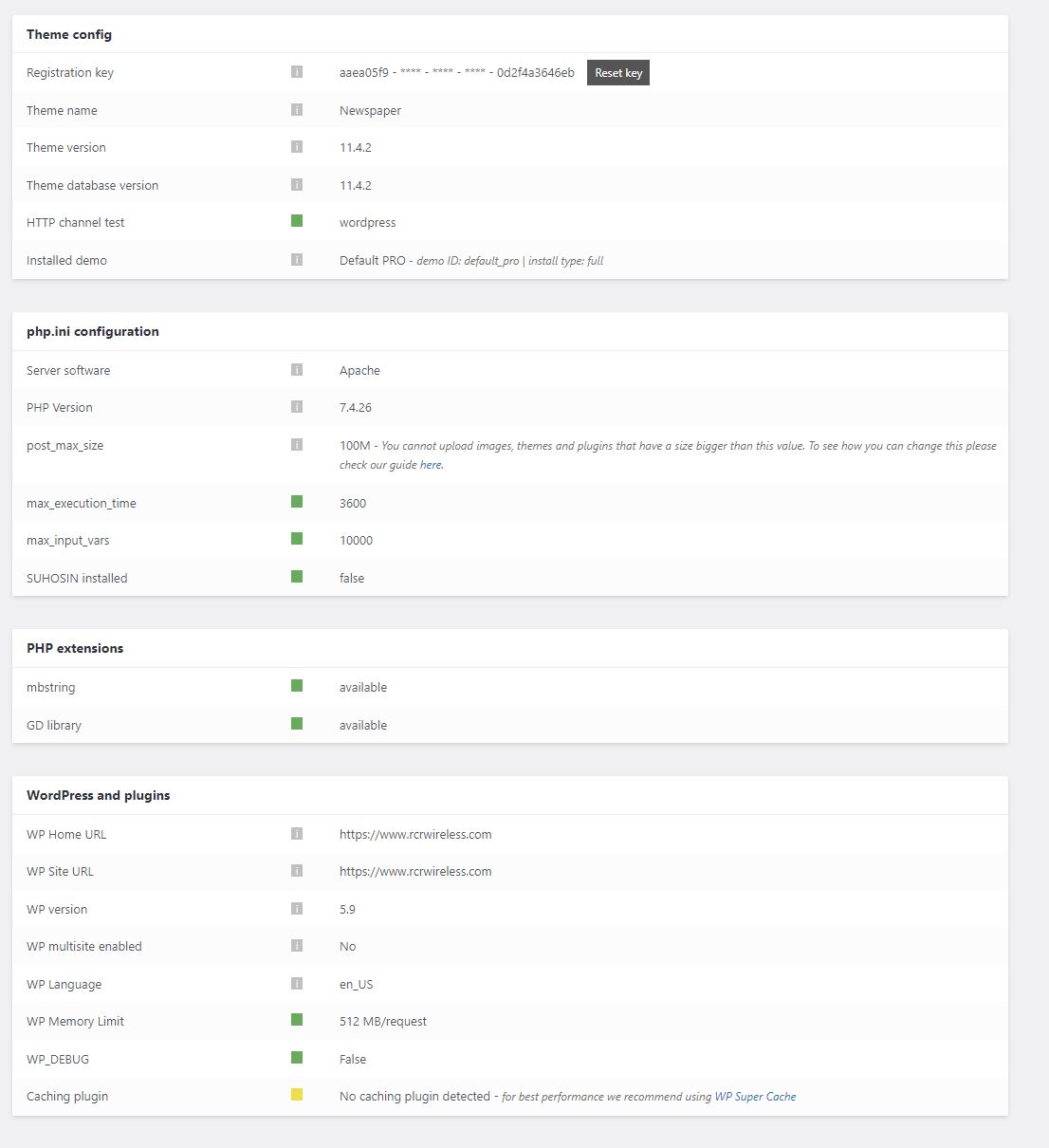
 westropMEF
Hello,
I find that when images are inserted into a post and aligned center the ‘aligncenter’ class overrides the image size and makes it the full width of the page.
Do I just need to override this in the CSS or is there a more general setting I can change? It seems odd that this is default behavior so wondered if we’d messed something up on our end.
Anamaria Hello,
For this error, please check our guide -> https://forum.tagdiv.com/tagdiv-composer-not-working/ also, try to revert a revision => https://i.imgur.com/jbmCnzm.png and after set the CSS code in the element Raw CSS and the iframe in the column text, in the text area.
Thank you!
 Champion88
Hi all,
I need to add the player live streaming below:
<!– css –>
<link rel=”stylesheet” type=”text/css” href=”https://player.streamshow.it/hosted/assets/video-js/css/player-frame-wrapper.css”/>
<!– iframe –>
<div class=”player-frame-wrapper”>
<iframe src=”https://player.streamshow.it/hosted/unotv.php?autoplay=false&muted=false&posterimage=https://” class=”player-frame” frameborder=”0″ marginwidth=”0″ marginheight=”0″ scrolling=”no” mozallowfullscreen webkitallowfullscreen msallowfullscreen oallowfullscreen allowfullscreen allow=”autoplay”></iframe>
<div class=”player-frame-wrapper-ratio”></div>
I’ve created a new page and set the rows + columns and used raw HTML to add the code and saved it.
When I open the page I experienced that the columns are not sided by side, view below:
backend: https://imgur.com/qtFmi3G
Frontend:https://imgur.com/R3yADcy
Also when I want to edit the page again, the error below comes up:
Thanks in advance
Best
Vincenzo
 catalingeangos
Hi, just wondering how to fix this issue. Im not sure if is happening to some other articles too because there are too many to check them out but i checked a few and it seems is the only article showing up so far.
article link
Im using the classic editor. I checked the code and it seems alright.
screenshot
thanks
Bettina Hello @roc-100!
Try to add this CSS code in Newspaper -> Theme panel -> Custom code -> Custom CSS.
Thank you!
Calin Hi,
The theme functions were moved in the theme plugins, this was a requirement from envato -> https://tagdiv.com/updating-the-core-of-tagdiv-themes/
The css can be minified using a cache or optimize plugin, also you can try the CSS Analyzer tool -> https://forum.tagdiv.com/how-to-make-the-site-faster/
Thank you!



