
- NewsmagtagDiv Composer Tutorial
- NewsmagBlock settings tutorial
- NewsmagLogo & Favicon
- NewsmagFooter templates
- NewsmagUsing other ads
- NewsmagUsing Typekit fonts
 kanal1
Hi.
Is there a way to switch the buttons in the category bar at the top of the category page to the latest instead of the oldest? I know there is not at way in frontend but is there a way in either css or php?
Thank you.
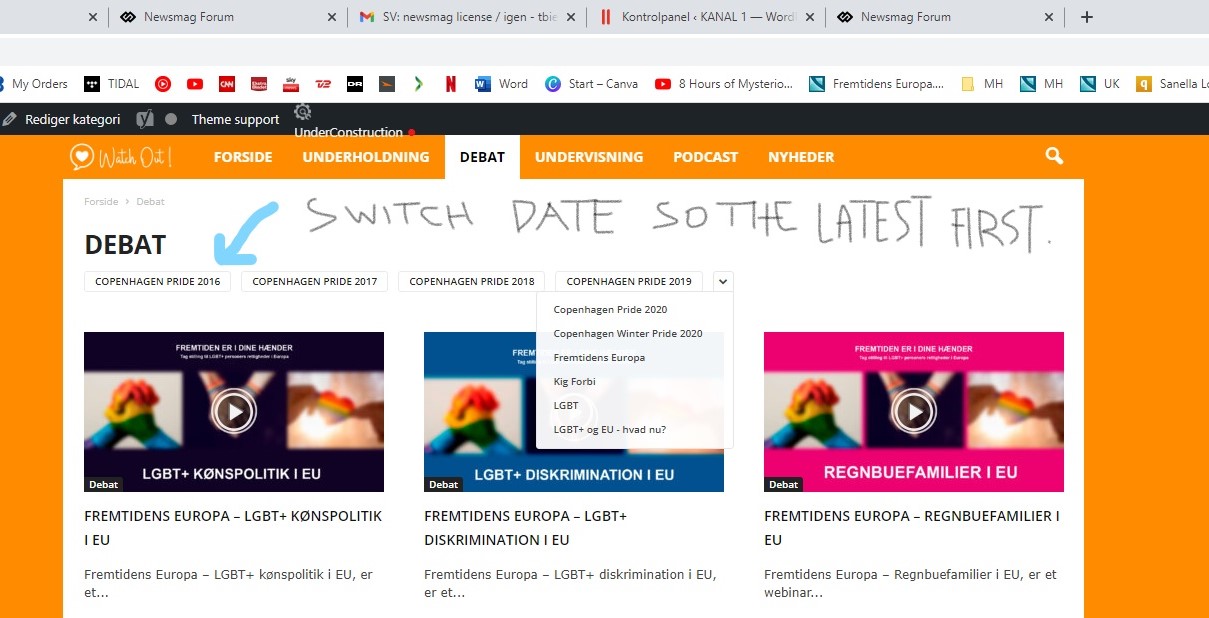
Site url: https://watchout.dk/
From Thomas Biehl, Mediehuset Copenhagen. Denmark.
 Calin
Calin Hi,
The stars colors can be changes with this css
.td-review .td-icon-star:before {

    color: blue;

}
The score with this css:
.td-review .td-review-final-score {

font-size: 34px;

color: red;

}
and the text with this one
.td-review span {

font-size: 14px;

color: red;

}
If you want you can add more css on them, just let me know what you need, also, here is a guide that can help -> https://www.w3schools.com/css/css_text.asp
Thank you!
Calin Hi Lalit, as far as I know the border radius is acting like that since the option was added, and is not about the background color -> https://i.imgur.com/kvPAyqb.png bat can be more easy adjusted, now when a background color is set, then this will be set rectangular -> https://i.imgur.com/7NYVMlH.png also the elements are setting on different elements, the border radius is set on the flex element and the background color is set inside it on element -> https://i.imgur.com/Oj7Yos8.png -> https://i.imgur.com/MIpyN3U.png
Unfortunately, the border can not overwrite the blocks setting because those will be damaged.
The only solution that I see in this case is to remove the border and border radius from css tab and set on that element a class, then on that class set the border radius like this -> https://i.imgur.com/XCy0UQ2.png -> https://i.imgur.com/BhBIB0n.png after that just add the extra class on those elements where you want to have that layout.
.border-class .td-element-style{

border-radius: 50px!important;

border: 2px solid #000;

}
The css need to be set in the theme panel > custom code> custom css.
I hope this will help you!
 arqsanchezmota
 Incredible, thank you very much for your great help, the truth is that your support and collaboration is first rate and very professional.
I have other doubts, I list them in the image and I will detail them here:
1- How can I reduce the height of the main menu container in the template settings or using CSS?
2- How can I make the white line of separation of the menu reach the height of the container and the categories are closer together?
3- Adjust the weather option, but the temperature is not correct for my country.
I attach the image.
This is an example of what I am looking to achieve, I appreciate your help in advance.
 mattohern
 Hi AnaMaria, when I followed the steps you just provided above, I still got the following error message:
“Unpacking the package…
Installing the theme…
The package could not be installed. The theme is missing the style.css stylesheet.
Theme installation failed.”
Please advise on how to proceed.
Thanks.
– Matt
 c386
c386 Calin, that’s excellent, exactly what I was looking for.
Would rather not edit files for the sake of long-term compatibility, so I’ll keep the review element at the bottom of the page for now.
In the interest of customising it further, what CSS code would I need to change the background and text colours?
 creativeopole
 It is implemented in your template, however it is not scripted and css styled. Therefore, it does not work properly.
However, when you click into the inscription, a window opens with the option to create an account.
https://ibb.co/Q8np8jZ
Only after clicking on the create an account field, the field for creating an account will appear. It is not very intuitive and nobody knows that you have to click.
So there is no checkbox or information that you need to select this field to create an account.
Please check it on your template.
Calin Hi,
What you can do to remove the elements you can use this css
.td-review .td-review-header,

.td-review .td-review-row-stars,

.td-review-footer .td-review-summary{

display: none;

}
This code need to be set in the theme panel > mobile theme > custom code> css.
To move the review at the top of the post, you’ll need to edit the code, the file is this one wp-content/plugins/td-composer/mobile/single.php and you need to move this code -> https://i.imgur.com/atConWX.png you can set it before, between or after those elements -> https://i.imgur.com/p4WIf8I.png
Unfortunately, those changes can not be saved in a child theme so, when the plugins will be updated those will be removed.
Thank you for your understanding!
Calin Hi,
For the problem with slow css, we’ll like to take a closer look. If you agree, please make a full backup and contact us via email at contact@tagidv.com please provide wp-admin and cPanel access. We’ll check it as soon as possible.
I think that you are referring to this https://i.imgur.com/hMpDRnH.png this login need to be removed using tagDiv Composer, edit the homepage and use the right click on that element to delete it.
You need to do the same on posts, edit the single post template with tagDiv composer,
select the comments section and using the right lick delete that element.
Thank you!
 decode
hi,
After upgrading to version 11, some SHORTCODE appear in the front page. could you help?
[td_block_15 custom_title=“最新” category_ids=“65, 1, 113, 73, 74, 112, 71″ limit=“2″ tdc_css=“”]
[td_block_9 custom_title=“研究報告” category_ids=“65, 1, 113, 73, 74, 112, 71″ limit=“4″]
 Anamaria
 Hello,
Please try this custom code CSS -> https://i.imgur.com/COSYLG1.png
.td_block_big_grid_mob_1 h3 {

    background-color: transparent;

}
The code needs to be set in Theme Panel> Mobile Theme > Custom code> CSS.
Thank you!
c386Hi,
When a post is marked as a review, the mobile plugin automatically adds the Review Overview and Summary to the foot of each post.
How can I edit this to remove everything but the overall score?
On desktop I’m using a custom cloud template, but I’m hoping a bit of CSS will do the trick on mobile. All I want it to show is the star icons (i.e. three stars out of five). Better still, if I could the stars to the top of the post, rather than the footer, that would be ideal.
Thank you for your help.
Calin Hi Marica,
Indeed, it can be a little difficulty at the begin when you use the theme builder, but once you learn how is working you’ll see that you can do almost anything.
If you want to set margins or paddings around an element/block, select it and check the css tab -> https://i.imgur.com/YaysPFn.jpg also most of the elements can be edited per view port (if is not edited, then will inherit the options set on desktop).
Here is a video made by one of our designers on how to create a page from scratch with tagdiv Composer -> https://www.youtube.com/watch?v=SoGQ0d5kIBg this should help you to find more answers and tricks.
Thank you!
Calin Hi,
I just checked your website and this is now loading faster, I think that you have now set a cache. If you want to check some pagespeed indications, you can check our guide https://forum.tagdiv.com/how-to-make-the-site-faster/
About generate critical css, from what is see in the screen that you provided seems to be some js problems. It can be because a plugin conflict, if you want, you can make a test only with tagDiv plugins, the problem should no longer persist. In case that the problem persists, please let me know.
Thank you!
Calin Hi SAMYTHEBIGJUICY, this can be done with a custom css.
What you can do is to set an extra class on the flex block that you want to remove the clicks/links -> https://i.imgur.com/gTOlmo6.jpg -> https://i.imgur.com/xTTzgV8.jpg then just add the class on the blocks that you do not want to be clickable (you can use the class from my example).
The css is this one
.no-links a{

        cursor: default;

        pointer-events: none;

        text-decoration: none;
}
You need to set it in the theme panel > custom code > custom css.
I hope this will help you!
Calin Hi,
This is quite strange, the divider should be added to, at least for me is when I test the css on your website -> https://i.imgur.com/YSK9XK9.png
Please check the css in the theme panel and make sure that the code is correctly, because I see some problems for the content: ”; -> https://i.imgur.com/0L0tkp4.png and I think that is way is not display the divider.
Thank you!
 taraktalluri
custom code is disabled for me. how to enable it.
 andreaskas
Hi,
I purchased and installed newspaper theme but i am facing an issue with the CSS.
On the first load of the page, without any cache for example in icognito mode, i see a white page with just the text and after a while the css is being loaded. See attached image for reference.


Also, when trying to generate the critical CSS, i am seeing the following console errors and the generate button does nothing.
Error: <svg> attribute viewBox: Expected number, "\\\"0".
xe @ jquery.min.js?ver=3.6.0:2
He @ jquery.min.js?ver=3.6.0:2
append @ jquery.min.js?ver=3.6.0:2
u @ js_files_for_plugin_analyze_css.min.js?ver=381db5cebf26144e1b1ab5f0477be694:3
u @ js_files_for_plugin_analyze_css.min.js?ver=381db5cebf26144e1b1ab5f0477be694:6
(anonymous) @ js_files_for_plugin_analyze_css.min.js?ver=381db5cebf26144e1b1ab5f0477be694:24
z @ js_files_for_plugin_analyze_css.min.js?ver=381db5cebf26144e1b1ab5f0477be694:21
(anonymous) @ js_files_for_plugin_analyze_css.min.js?ver=381db5cebf26144e1b1ab5f0477be694:34
dispatch @ jquery.min.js?ver=3.6.0:2
v.handle @ jquery.min.js?ver=3.6.0:2
c @ rocket-loader.min.js:1
load (async)
t.addEventListener @ rocket-loader.min.js:1
add @ jquery.min.js?ver=3.6.0:2
s.event.add @ jquery-migrate.min.js?ver=3.3.2:2
(anonymous) @ jquery.min.js?ver=3.6.0:2
each @ jquery.min.js?ver=3.6.0:2
each @ jquery.min.js?ver=3.6.0:2
Ee @ jquery.min.js?ver=3.6.0:2
on @ jquery.min.js?ver=3.6.0:2
success @ js_files_for_plugin_analyze_css.min.js?ver=381db5cebf26144e1b1ab5f0477be694:34
c @ jquery.min.js?ver=3.6.0:2
fireWith @ jquery.min.js?ver=3.6.0:2
l @ jquery.min.js?ver=3.6.0:2
(anonymous) @ jquery.min.js?ver=3.6.0:2
load (async)
send @ jquery.min.js?ver=3.6.0:2
ajax @ jquery.min.js?ver=3.6.0:2
s.ajax.s.ajax @ jquery-migrate.min.js?ver=3.3.2:2
(anonymous) @ js_files_for_plugin_analyze_css.min.js?ver=381db5cebf26144e1b1ab5f0477be694:32
dispatch @ jquery.min.js?ver=3.6.0:2
v.handle @ jquery.min.js?ver=3.6.0:2
c @ rocket-loader.min.js:1
jquery.min.js?ver=3.6.0:2 Error: <circle> attribute cx: Expected length, "\\\"50\\\"".
xe @ jquery.min.js?ver=3.6.0:2
He @ jquery.min.js?ver=3.6.0:2
append @ jquery.min.js?ver=3.6.0:2
u @ js_files_for_plugin_analyze_css.min.js?ver=381db5cebf26144e1b1ab5f0477be694:3
u @ js_files_for_plugin_analyze_css.min.js?ver=381db5cebf26144e1b1ab5f0477be694:6
(anonymous) @ js_files_for_plugin_analyze_css.min.js?ver=381db5cebf26144e1b1ab5f0477be694:24
z @ js_files_for_plugin_analyze_css.min.js?ver=381db5cebf26144e1b1ab5f0477be694:21
(anonymous) @ js_files_for_plugin_analyze_css.min.js?ver=381db5cebf26144e1b1ab5f0477be694:34
dispatch @ jquery.min.js?ver=3.6.0:2
v.handle @ jquery.min.js?ver=3.6.0:2
c @ rocket-loader.min.js:1
load (async)
t.addEventListener @ rocket-loader.min.js:1
add @ jquery.min.js?ver=3.6.0:2
s.event.add @ jquery-migrate.min.js?ver=3.3.2:2
(anonymous) @ jquery.min.js?ver=3.6.0:2
each @ jquery.min.js?ver=3.6.0:2
each @ jquery.min.js?ver=3.6.0:2
Ee @ jquery.min.js?ver=3.6.0:2
on @ jquery.min.js?ver=3.6.0:2
success @ js_files_for_plugin_analyze_css.min.js?ver=381db5cebf26144e1b1ab5f0477be694:34
c @ jquery.min.js?ver=3.6.0:2
fireWith @ jquery.min.js?ver=3.6.0:2
l @ jquery.min.js?ver=3.6.0:2
(anonymous) @ jquery.min.js?ver=3.6.0:2
load (async)
send @ jquery.min.js?ver=3.6.0:2
ajax @ jquery.min.js?ver=3.6.0:2
s.ajax.s.ajax @ jquery-migrate.min.js?ver=3.3.2:2
(anonymous) @ js_files_for_plugin_analyze_css.min.js?ver=381db5cebf26144e1b1ab5f0477be694:32
dispatch @ jquery.min.js?ver=3.6.0:2
v.handle @ jquery.min.js?ver=3.6.0:2
c @ rocket-loader.min.js:1
jquery.min.js?ver=3.6.0:2 Error: <circle> attribute cy: Expected length, "\\\"50\\\"".
xe @ jquery.min.js?ver=3.6.0:2
He @ jquery.min.js?ver=3.6.0:2
append @ jquery.min.js?ver=3.6.0:2
u @ js_files_for_plugin_analyze_css.min.js?ver=381db5cebf26144e1b1ab5f0477be694:3
u @ js_files_for_plugin_analyze_css.min.js?ver=381db5cebf26144e1b1ab5f0477be694:6
(anonymous) @ js_files_for_plugin_analyze_css.min.js?ver=381db5cebf26144e1b1ab5f0477be694:24
z @ js_files_for_plugin_analyze_css.min.js?ver=381db5cebf26144e1b1ab5f0477be694:21
(anonymous) @ js_files_for_plugin_analyze_css.min.js?ver=381db5cebf26144e1b1ab5f0477be694:34
dispatch @ jquery.min.js?ver=3.6.0:2
v.handle @ jquery.min.js?ver=3.6.0:2
c @ rocket-loader.min.js:1
load (async)
t.addEventListener @ rocket-loader.min.js:1
add @ jquery.min.js?ver=3.6.0:2
s.event.add @ jquery-migrate.min.js?ver=3.3.2:2
(anonymous) @ jquery.min.js?ver=3.6.0:2
each @ jquery.min.js?ver=3.6.0:2
each @ jquery.min.js?ver=3.6.0:2
Ee @ jquery.min.js?ver=3.6.0:2
on @ jquery.min.js?ver=3.6.0:2
success @ js_files_for_plugin_analyze_css.min.js?ver=381db5cebf26144e1b1ab5f0477be694:34
c @ jquery.min.js?ver=3.6.0:2
fireWith @ jquery.min.js?ver=3.6.0:2
l @ jquery.min.js?ver=3.6.0:2
(anonymous) @ jquery.min.js?ver=3.6.0:2
load (async)
send @ jquery.min.js?ver=3.6.0:2
ajax @ jquery.min.js?ver=3.6.0:2
s.ajax.s.ajax @ jquery-migrate.min.js?ver=3.3.2:2
(anonymous) @ js_files_for_plugin_analyze_css.min.js?ver=381db5cebf26144e1b1ab5f0477be694:32
dispatch @ jquery.min.js?ver=3.6.0:2
v.handle @ jquery.min.js?ver=3.6.0:2
c @ rocket-loader.min.js:1
jquery.min.js?ver=3.6.0:2 Error: <circle> attribute r: Expected length, "\\\"50\\\"/".Hi,
Indeed for some elements the underline option on hover is not present, but you can use a css link this one -> https://i.imgur.com/SxbcaAG.png
.tdm-btn:hover span{

border-bottom: 2px solid;

}
Set this code in the theme panel > custom code> custom css.
I hope this will help you!
Calin Hi djzah71, for the moment the theme do not have some options to customize the bbpress layout, but I can help you with some css, only let me know how it should look and provide a link to our website where to inspect how is looking right now.
Thank you!
Calin Hi,
This is happen because are displayed the last posts that do not have an divider https://i.imgur.com/rRbtIKv.png
What you can do is to use this custom css
body .td_flex_block_3 .td_module_flex_3:nth-last-child(2) {

    margin-bottom: 20px !important;

    padding-bottom: 20px !important;

}

.td_flex_block_3 .td_module_flex_3:nth-last-child(2):before {

content: '';

    position: absolute;

    bottom: 0;

    left: 0;

    width: calc(100% - 48px);

    height: 1px;

    margin: 0 24px;

    border-width: 0 0 1px 0;

    border-style: dashed;

    border-color: #ffffff;

}
Set the code in the theme panel > custom code > advance css > mobile section (to apply it only on mobile).
I hope this will help you!
Calin Hi,
It looks that on Firefox some css options are not recognize, in this case is about the display flex, here is a topic about this https://stackoverflow.com/questions/45495680/flex-not-working-properly-in-firefox/45495919
The fix is to add and min-width: 1px; per display flex.
Please try this custom css:
body .tdc-content-wrap .tdc-row-content-vert-center, body .tdc-content-wrap .tdc-row-content-vert-bottom {

min-width: 1px;

}
Set the code in the theme panel > custom code> custom css.
I hope this will help you!
Happy New Year!
Calin Hi,
I see that you have auto ads https://i.imgur.com/h4iLTHg.png
Unfortunately our theme do not have an option to control the auto ads where to de display.
The only thing that I can do is to provide a css to remove those ads from home
.home .td_block_11 .google-auto-placed {

 display: none!important;

}
The code need to be set in the theme panel > custom code> custom css.
I hope this will help you!
Calin Hi,
I do not think that the problem is from that css.
As I know, the css for the slide is added at the first load of page when is detecting the device position portrait-landscape. If you change it from one position (portrait) in other (landscape), the slider will be correctly resize only if you refresh the page (to load again the css style for that position).
Indeed, there should be find an way to correctly resize the slider without reloading the page. I will add this on our list.
Thank you for your understanding!
Calin Hi djzah71, the sidebars for buddypress & bbpress can be set using widgets -> https://i.imgur.com/t5D0kan.png -> https://i.imgur.com/KyqSGYP.png also the group is using widget sidebars, but if there is no elements in default sidebar then there is nothing to display.
To make the group you need to use the global option -> https://prnt.sc/258tizv but then there will be no sidebars on bbpress . An alternative will be to use a custom css -> https://i.imgur.com/jVWhC50.png
.groups .td-pb-span8{

width: 100%;

}

.groups .td-pb-span4. td-main-sidebar{

display: none;

}
Set this css in the theme panel > custom code> custom css.
I hope it will help you!



