
 Anamaria
 Hello,
If you want you can add the HTML code in an element called “Raw HTML” and the CSS in the element called “Raw CSS” or you can add the whole code in one of these elements in column text or text with title in text zone => https://www.screencast.com/t/yzHiFcS8g8 -> https://www.screencast.com/t/uDXaxJ8JSKFB and see if this work. The shortcode is automatically saved.
Hope this helps you!
Thank you!
 vorilask
 This is Konstantinos Vorilas and I have completed a replying e-mail to the e-mail address that you have indicated.
It regards custom code (CSS, jQuery, Javascript) that I am using at the bottom of every single article of 2 particular categories of bet3.GR website:
https://www.bet3.gr/category/stoixima-prognostika/stirigma-tis-imeras/
https://www.bet3.gr/category/stoixima-prognostika/over-tis-imeras/
It is about the appearance of tables in AMP version. They work properly in desktop version.
Thank you very much in advance for your time and help!
Best regards,
Konstantinos Vorilas
 Page52
 Hello, was there a solution for this? I’m also struggling. I’ve added CSS to the parent element ‘.td-pb-span4.td-main-sidebar’ so that there is padding around my sidebar widgets, however that parent element doesn’t apply to the sticky sidebar when you scroll down.
 Akhar
AkharHi Team,
Whenever am doing some changes on the admin panel side it’s not reflecting on the domain.
and also theme setting header option is not showing. lots of bug in the theme.
https://akhar.in/
vorilaskHello. I have added some custom code for tables on Newspaper X Theme. In Theme Panel -> Custom Code, I have successfully added Custom CSS, jQuery and Javascript for desktop version.
I exclusively use AMP version for mobile devices and tablets (I use the Transitional Template Mode on AMP installed plugin) and I would like to add this particular code (Custom CSS, jQuery and Javascript) in AMP version as well. I tried to insert code on Mobile Theme -> Custom Code->Your own CSS, Your Custom Javascript, but on no avail. The code classes and commands are not displayed.
Please, if possible, I recommend to follow this example URL both from desktop and from any mobile device, to understand the issue in the display of the tables (they use JSON from Google Sheets for table content and TablePress plugin for structure and auto import): https://www.bet3.gr/stoixima-prognostika/stirigma-tis-imeras/den-kanei-aggareia-i-verona/
Do I have to transform CSS, jQuery, Javascript to AMP oriented code? I do not really know to develop under AMP requirements. Any help?
Looking forward for a reply from your team. I would like to thank you very much in advance for your time and help.
Best regards,
Konstantinos Vorilas
Anamaria Hello,
To align this element => https://www.screencast.com/t/Js7sAl0i, please try this Custom Code CSS
.wpb_text_column .span-reading-time .rt-label, .wpb_text_column .span-reading-time .rt-time{

position: relative;

top: 5px;

}
This code needs to be set in Theme Panel> Custom code> Custom CSS.
Thank you!
 rafpigna
 I understand, but Learnpress is the world first or second most used learning management system on wordpress, not a plugin that no one uses, it would be great to support it. I would be happy to keep newspaper theme with my site but since that issue makes impossible for my vistors to use what they pay for, I will have to not use newspaper anymore but use another theme that will support it.
Thanks anyway.
p.s.
about the header, really you dont have any css way to not show the header in a page via a custom css? It’s hard to believe, seems crazy to me. But also in this case, thanks anyway.
I always tought Newspaper was the #1 wordpress theme for it’s quality, developing and support but seems I was completely wrong, and I’m really sorry for that.
-
This reply was modified 5 years by
rafpigna.
 dmxsta
 Hello Bettina,
There is not only CSS changes I have CSS with HTML changes also with custom template
 Bettina
 Hello!
If you have the Mobile Theme plugin installed and active, it could be possible for some CSS code to be overwritten, that’s why, you can uninstall it and it will display the responsive version of your desktop.
Thank you!
rafpignaHello, I’m having an issue with the theme.
It seems that in certain page the site header is “covering” the page. Please check this example page
https://www.ilcrudoeilcotto.it/corsionline/test-course/quiz/test1/
The page is created by a plugin (Learnpress) and since This issue happens only in the learnpress pages (courses or lessons pages) and other part of the whole site seems ok, I think maybe is a CSS issue with the Newspaper CSS.
Can you help me to identify the problem and fix it?
And please: there is a way to COMPLETELY HIDE THE HEADER in some pages? I would like to hide the header in that pages and use maybe a footer menu.
Thanks
 ashwintembhekar
Please Guide me how i can inline critical css in this theme . i have a critical path css but dont know how to incorporate it.
 thcp2020
Good morning,
I need help aligning a column text within a row in a template.
Please see attached – https://paste.pics/CG6G3
We ideally want the read time to be inline with the other elements. CSS doesn’t seem to work
All the best
Thomas
Bettina Hello!
Please try not to reply multiple times in the topic if possible, this will only delay our response. Replying multiple times will refresh the topic date and move it to the back of the line, we answer from oldest to newest.
Unfortunately, there is no button to hit and your score is high or your page speed is very high. You need to try to optimize your website.
If you follow the steps which are presented in this tutorial here: https://tagdiv.com/how-to-increase-page-loading-speed/ you’ll be able to increase the speed of your website.
Also, to increase the page speed you can check these similar topics for more solutions:
– https://forum.tagdiv.com/topic/optimize-script-to-improve-site-speed/
– https://forum.tagdiv.com/topic/a-few-tips-for-newspaper-x-speed-high-cpu-usage-issues/
– https://tagdiv.com/how-to-increase-page-loading-speed/
Please note that page speed is not covered by the support team: https://forum.tagdiv.com/newspaper-theme-support/
Please give it a try and follow the steps which I presented above about page speed.
Also, check our guide from here: https://forum.tagdiv.com/how-to-make-the-site-faster/
Please make sure to use our newest tool called tagDiv CSS Analyzer which comes in handy to resolve some of your issues. Take a look at the video guide here: https://www.youtube.com/watch?v=tnkVapqhIHc
“This custom tool performs an automatic test to find missing CSS rules applied by user interaction. Moreover, you can manually interact with a chosen section/component from the page while the tool records all the involved CSS. It will generate the final CSS file for this page and also will split the rules in Critical CSS to be loaded in the website’s header.” ( https://tagdiv.com/whats-new-in-the-newspaper-theme-10-4-update/ )
Our tool is running only on normal pages and not for posts or categories for example.
We tested our tool on our demos, and we have such great results!
Take a look in this topic because it could help you: https://forum.tagdiv.com/topic/css-analyzer-step-by-step-and-doubts/
Thank you!
Anamaria Hello,
At the moment the tagDiv CSS Analyzer is a beta version and it seems that after some fixes made it blocked the tool.
Thank you for your understanding!
 sirms
sirms Hi, no as you can see in the screenshot it works on mobile as well.
But I do not know how I can integrate this with defoult article boxes / or how to set up completely my own.
A better alternative is to use rem and em to make the text dynamic. I want the text to fill in the column (article box) – so that I do not have to change the text size of each article.
From developer:
However, I’m afraid, this is something you’ll have to check with your theme support, as the layout is using the Tag Div Composer there isn’t an easy way that could be recommended regarding this via CSS.
Using VW as stated by you in the following thread you have shared will only work if the parent HTML is relative to the size of the container which isn’t the case when I check:
https://stackoverflow.com/questions/16056591/font-scaling-based-on-width-of-container
What could be suggested would be to apply CSS based on standard screen size, but this won’t be perfect and the layout will change based length of the text added.
———–
Screenshot of how i want the articel text to be:
New Playlist(4)
-
This reply was modified 5 years by
sirms.
Anamaria Hello,
To remove the space, you need to use a custom code CSS => https://www.screencast.com/t/Hqo28jXFxM
.td-a-rec-id-header_mob

{

margin: auto;

}
Set the code in Theme Panel -> Mobile Theme -> Custom Code => https://www.screencast.com/t/St204VtFl3NU
You can inspect the mobile theme as you did for the PC, select the Toggle device toolbar https://www.screencast.com/t/uRjvUM0No57e and refresh the page and you will see the mobile theme version.
Thank you!
Anamaria Hello,
If I understood correctly, you want to make the header and footer full width, so you need to edit with tagDiv Composer, select the header/footer zone and in the tab called “CSS” delete the width =>https://www.screencast.com/t/lvcU0Ru1Df after you can stretch the row => https://www.screencast.com/t/bCE7GHgkZf9L
Hope this helps you!
Thank you!
Anamaria Hello,
Unfortunately, we don’t have a code for Nginx fast CGI to recognize which theme to serve.
Also, to increase the page speed you can check these similar topics for more solutions:
– https://forum.tagdiv.com/topic/optimize-script-to-improve-site-speed/
– https://www.infophilic.com/get-almost-100-pagespeed-newspaper-theme/
– https://forum.tagdiv.com/topic/a-few-tips-for-newspaper-x-speed-high-cpu-usage-issues/
– https://tagdiv.com/how-to-increase-page-loading-speed/
By the way, we have such a great result with this new update and with our new tool: https://www.youtube.com/watch?v=tnkVapqhIHc
Our tool is running only on normal pages and not for posts or categories for example.
“This custom tool performs an automatic test to find missing CSS rules applied by user interaction. Moreover, you can manually interact with a chosen section/component from the page while the tool records all the involved CSS. It will generate the final CSS file for this page and also will split the rules in Critical CSS to be loaded in the website’s header.” ( https://tagdiv.com/whats-new-in-the-newspaper-theme-10-4-update/ )
Our tool is running only on normal pages and not for posts or categories for example.
Thank you!
Bettina Hello!
It seems that you have a cloud template, which means you can edit the homepage, click on that row from your header, access the CSS tab of the header’s element and there you can find options to add padding in the top and in the bottom. So, in this mode you can adjust the height of your header.
Thank you!
 indochine
I’m having a fatal error when updating the theme to 10.4 version
here’s the error message:
Fatal error: Uncaught ArgumentCountError: Too few arguments to function {closure}(), 4 passed in /srv/users/preprodmypopecomph/apps/preprodmypopecomph/public/wp-includes/class-wp-hook.php on line 287 and exactly 5 expected in /srv/users/preprodmypopecomph/apps/preprodmypopecomph/public/wp-content/plugins/td-composer/css-analyze/css-analyze.php:510 Stack trace: #0 /srv/users/preprodmypopecomph/apps/preprodmypopecomph/public/wp-includes/class-wp-hook.php(287): {closure}(NULL, 10775, ‘tdc_google_font…’, true) #1 /srv/users/preprodmypopecomph/apps/preprodmypopecomph/public/wp-includes/plugin.php(212): WP_Hook->apply_filters(NULL, Array) #2 /srv/users/preprodmypopecomph/apps/preprodmypopecomph/public/wp-includes/meta.php(676): apply_filters(‘get_post_metada…’, NULL, 10775, ‘tdc_google_font…’, true) #3 /srv/users/preprodmypopecomph/apps/preprodmypopecomph/public/wp-content/plugins/td-composer/legacy/common/wp_booster/td_wp_booster_functions.php(572): metadata_exists(‘post’, 10775, ‘tdc_google_font…’) #4 /srv/users/prepr in /srv/users/preprodmypopecomph/apps/preprodmypopecomph/public/wp-content/plugins/td-composer/css-analyze/css-analyze.php on line 510
 Medhealth
Lot of CSS errors are appearing for this theme. Not used other plugins also.
Website: https://grcoutlook.com/
Kindly help to resolve the issue.
Thanks,
Shashirekha S
Bettina Hello!
If you follow the steps which are presented in this tutorial here: https://tagdiv.com/how-to-increase-page-loading-speed/ you’ll be able to increase the speed of your website.
Also, to increase the page speed you can check these similar topics for more solutions:
– https://forum.tagdiv.com/topic/optimize-script-to-improve-site-speed/
– https://forum.tagdiv.com/topic/a-few-tips-for-newspaper-x-speed-high-cpu-usage-issues/
– https://tagdiv.com/how-to-increase-page-loading-speed/
Please note that page speed is not covered by the support team: https://forum.tagdiv.com/newspaper-theme-support/
Please give it a try and follow the steps which I presented above about page speed.
Also, check our guide from here: https://forum.tagdiv.com/how-to-make-the-site-faster ; make sure your WordPress and plugins are up to date(specially Standard Pack installed and active if you use default templates).
Sometimes, the issue can be from a plugin conflict, that’s why, please deactivate ALL plugins except tagDiv ones, also if you are using a cache plugin, deactivate it, clear all cache(also from your browser) and try again.
We recommend using WP Super Cache plugin https://forum.tagdiv.com/cache-plugin-install-and-configure/
We tested our tool, and we have such great results!
Take a look in this topic because it could help you: https://forum.tagdiv.com/topic/css-analyzer-step-by-step-and-doubts/
Thank you!
Anamaria Hello,
You can change the color for category template 7, using this custom code => https://www.screencast.com/t/TxFpyF4sowT3
.td-grid-style-1 .td-post-category {

    background-color: rgba(255, 0, 0, 0.7);

}
The hover color is the accent color from Theme Panel -> Theme Colors -> General => https://www.screencast.com/t/IYIBnEc4s4I
This code needs to be set in Theme Panel> Custom code> Custom CSS.
If you used cloud templates then you could set color with tagDiv Composer.
Thank you!
 Neil264846
Hello,
Please do you have an idea how to change background colors on the whole width for header and footer on the picture on the link WeTransfer below :
https://we.tl/t-r44kJh6aA4 (header)
https://we.tl/t-IOWomXjjf0 (footer)
No problem for the rest of the site, I disabled the “background boxed layout” in “Theme Panel” -> “Theme colors” -> “General theme colors”.
But impossible but to extend the white background on all the width for the header and the black background for the footer.
I have read this forum and tried some CSS and HTML codes but nothing worked.
Thank you in advance.
 dharma3d
On mobile theme I have a header ad, but there is some white space above and below. I would like it with no space. How can I do it?
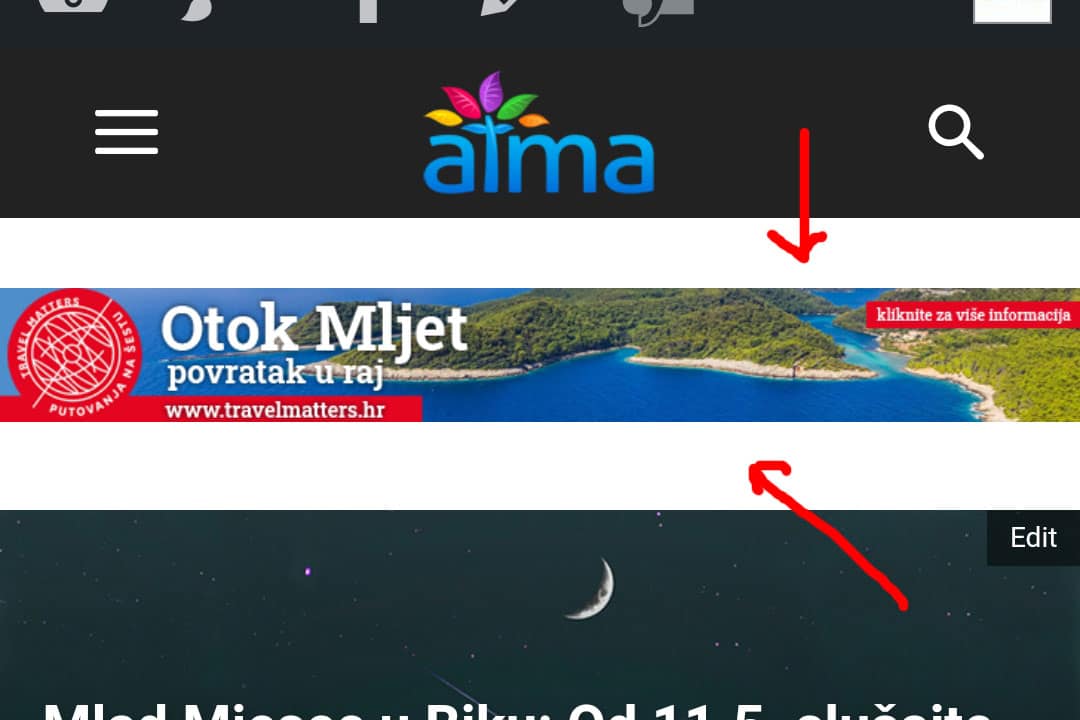
Second related question is – How can I check the CSS for mobile theme so I can customize a few CSS things? With regular theme I would go to Chrome on my desktop PC and do Ctrl+Shift+I
My website is https://atma.hr/
