Calin
Calin Hi,
Unfortunately there is no option for this, but it can be done using a css:
.tdb_single_author a,

.tdb-author-info a,

.td-post-author-name a {

pointer-events: none;

}
Set the css in the theme panel > custom code > custom css.
I hope this will help you!
Calin Hi,
Just select the single post comments element and change the layout – https://i.imgur.com/srFslG7.png (also use the provided css)
Thank you!
Calin Hi,
For this make sure that you have disabled this option ” Other comment settings Comment author must fill out name and email” – https://i.imgur.com/TGChDnr.png then use this css
.comments .td-form-email,

.comments .td-form-url {

display: none;

}
This css can be set directly in single post template with tagDiv Composer in raw css.
I hope this will help you!
Calin Hi raghavendra,vikram02 I think that you are using something to compress/optimize cache the images. The elements used set the image as background using css and the optimization used by you is interfering. If the image is set using html img than it’s display – https://i.imgur.com/ZZ4szbf.png
Hi flcahill1, please try check if you are adding a new block in that block is displaying the image?
 sirakghroyan
Hi team,
I’d like to recreate a sidebar submenu similar to the one shown in the attached screenshot — with “Politics”, “Style”, and “Travel” listed and underlined as a visual indicator.
Could you please guide me on how to implement this in tagDiv?
Is there a widget or module you recommend, or should I use custom HTML/CSS inside a text widget?
Website: https://desinance.com/
Looking forward to your advice!
Best regards,
Calin Ok, now, please select the row and in css tab select the background color and set the transparence to 0 https://i.imgur.com/YeeMRWT.png – https://i.imgur.com/jmgbkzk.png
Calin Hi,
For video problem try this custom css:
.Elite_video_player iframe{

      height: revert-layer!important;

}
Set the code in the theme panel > custom code > custom css – https://i.imgur.com/xFgOaaP.png
For the situation with the flag up if you can provide a link to it I will adjust it (the one provided before no longer work https://i.imgur.com/UXhBGui.png)
Calin Hi,
1. Most of the time when you make some changes in tagDiv Composer and those are still there when you re-open tagDiv Composer then the situation is related to an object cache or extra cache that is apply on the website when you are logged in.
2. The arrows for next and previous use a custom css to look like this https://tinyurl.com/29wlxnh9 – https://i.imgur.com/ViC2lmS.png if you removed the code you can get it from here or you can import that section from the cloud – https://i.imgur.com/tAJauO7.png
3. For this you need to use the opt-in builder and lock the articles you want to be exclusive.
Thank you!
 RENATO
 In this case, the theme is pulling up, you don’t have to do anything. I’ve already uninstalled the theme and installed it from scratch. The error persists. I liked the theme, so I’m insisting on it. I need to solve the problem. This specific problem occurs on YouTube and in posts that have HTML.
Two pages, for example, are happening on YouTube.
A video
https://glostv.com/youtube-teste/
A live broadcast
https://glostv.com/teste-youtube-2/
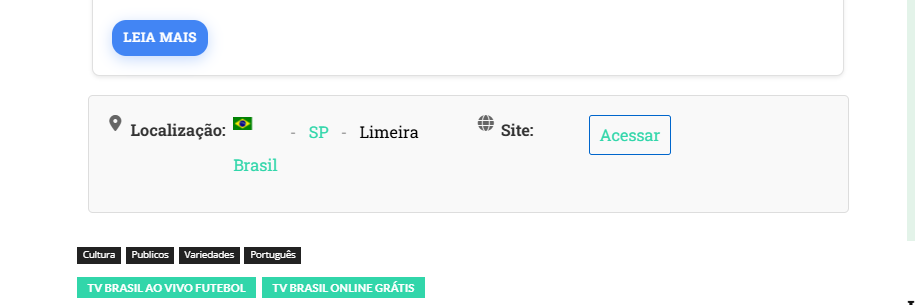
Regards, the code you sent me has improved, but it’s still messy, as shown in the video. I added a code where it was quite messy. The Brazilian flag appears straight in the code preview, and when you publish, the CSS of your theme pulls the flag up, and it was pulling everything. I fixed it using a code. I just couldn’t fix the flag. Check out the video. And then I showed the players where the CSS of the theme is pulling up a lot.
where the black bar cuts the image in half.
https://app.screencast.com/murtzKTKUfxQL?conversation=MyiYHLltrbUWHKXActQtSQ
I ask that you contact the owner or person responsible for the theme, ask them to make a static page, fix this. Because I’ve been stuck on this for over a month, looking for a solution, I recently discovered that the theme is causing this headache.
Calin Hi,
To resolve the problem with the image use this css
img {

    width: auto;

}
In case that this is not strong enough you can add the body class like this:
body img {

    width: auto;

}
The css can be set in the theme panel > custom code > custom css so it will apply globally – https://i.imgur.com/njCC3jR.png
This one “theme pulling up and black bar appears on youtube broadcast. https://glostv.com/youtube-teste/” for me is not displaying any video – https://i.imgur.com/hyqEn9B.png maybe you have remove it.
Calin Ok, so now you want to have only the link from custom field clickable, right? for this you need to use a css to select the image and title.
You can use those css:
.tdb_flex_block_builder .tdb_module_title_0 a,

.tdb_flex_block_builder .tdb_module_img {

     pointer-events: none;

}
Also you can set a class on flex builder and replace in the css code so the code will apply only on that block.
Thank you!
 imkimc
 Update – I even went as far as to reset the CSS for the author box and replaced the author box with the default author box and the error continues.
Calin Hello RENATO, I understand your frustration, but please note that despite the fact that you no longer have support for the theme since 2017, we have tried to help you with what is strictly related to the theme (options, settings …), but in cases like this where you have clearly mentioned that you are using a plugin or custom code (in your case you add HTML in articles), we have no way to help you, these things are clearly specified in our list of what support is offered for – https://i.imgur.com/1C3kvrZ.png – https://forum.tagdiv.com/support-policy-2/
Just a quick note: it would’ve been helpful to include a link to the site so we can check the solution directly. If it’s a matter of CSS, there’s a good chance we can help with that. However, please keep in mind that we’re not able to make changes to the theme’s core code.
Have a beautiful day.
Calin Hi,
If the right css is removed and the layout is still the same it can be a cache or object cache that is apply on website and needs to be cleared, this is the only situation that can be related to the case if the right css is removed from the page/theme panel…
Thank you!
Calin Hi,
This situation is caused by the cache that is apply on the website. Please check the cache settings for css and js, usually those are the settings interfering with the theme layout and functionalities.
Thank you!
Calin Hi,
Most of the time this situation is related to the cache plugin in specially to the settings related to css and js.
I cached now the website and it appears that you manage to resolve the situation – https://i.imgur.com/qGUWDvj.png
Thank you!
RENATOGood evening, I asked for help on the previous tropic, because your theme is faulty, I need a solution, I can’t put a simple HTML command that doesn’t look straight, it’s completely crooked and out of context, I recorded a video to show, besides the theme damaging other plugins, I received a response from Calin that I need a developer for your theme? It can only be that! Because on a clean page with nothing, the HTML code is all twisted, inframe of the page as I explained, it keeps pulling the page, it’s not stable, no icons. nothing. I have serious problems with the player running and out of nowhere black screens appear, HTML and CSS codes impossible to make the command work correctly. I need a solution for the theme to be stable, look at this.
look at this I can’t put any HTML code that gets crooked and misconfigured.
https://app.screencast.com/qA2cQ6mHEMbpF?conversation=1PCbACJTV0l3lpghdD9zLK
I tested the same code in an HTML test and it was supposed to stay that way,
https://app.screencast.com/ZFGYevEMUURy5?conversation=Q4zgwFSErhlrUP3dHvCMuZ
here where I explained what mess the theme is making in the plugin.
https://forum.tagdiv.com/topic/newspaper-it-misconfigures-plugins-and-messes-up-the-iframe-and-even-html-settin/#post-531446
 Rovshan
 Hi.
Thank you for your response. But I have already tried all that you’ve mentioned above. I used to write CSS in the additional CSS section in order to make some changes to the Contact Forms and header section, but recently I decided to make changes and deleted all the CSS that I wrote. Despite I deleted them I didn’t see any changes, I mean those parts where changes made by CSS did not get to the previous version. I checked whether the additional CSS section has the problems, but not, it works with other codes. So, it seems the changes that I made using CSS remained even after I deleted the CSS codes. Could you please check it?
Thanks in advance!
Calin Hi,
According to the message you have set in a filed on (I think it is in CSS tab) of element single author on single post test an none numeric value (you have a text not numbers). Use tagDiv Composer, select the element and check the css tab – https://i.imgur.com/fZrz4xw.png – https://i.imgur.com/aYRDenF.png check all fields
Thank you!
Calin Hi,
1. It will be need to use tagDiv Composer to edit the page, select the element and select the module there the background color can be changed – https://i.imgur.com/nZyjONM.png
2. For this you need to edit with tagDiv Composer and go down on page and select the last css from content and remove the css or adjust it – https://i.imgur.com/cFAN4o8.png
3. This situation – https://i.imgur.com/twW9Ykc.png is because you are using the tagDiv mobile theme plugin and the responsive version will be used.
Thank you!
Calin Hi,
If you no longer want the website to be boxed check in the theme panel to be sure that you do not use a background color – and the boxed version is unchecked – https://i.imgur.com/s6xkqkR.png also you are not using any background image – https://i.imgur.com/GfALDMv.png
Related to Contact forms, make sure that you remove the css from all places, the css can be set in the theme panel, can be set using live css, can be set inside tagDiv Composer using a css element or even in a child theme, after that you need to make sure that the cache is cleared.
Thank you!
Calin Hi,
Yes, those settings are related to check plugin you’ll need to check the settings for css and js, most of the time the situation is caused by the options action on CSS and JS.
Unfortunately, we didn’t tested the LightSpeed cache plugin officially with our theme, therefore we can not say exactly what are the settings that can create the problems.
How to Make the Site Faster
Thank you!
Calin Hi,
You can use a css like this one:
.tds-title-over-image:before {

    border-radius: 5px;

}
This will apply globally on all images that are display using this element, but if you want only on some of them, you can use an extra class on element and add the extra class to the css.
Thank you!
RENATO I’m using a translator and it doesn’t come out perfect. I said that for a month I tried to resolve it with the plugin owner. We put some CSS codes, “additional CSS”, in customize, it didn’t work. I deleted it, I did everything, I uninstalled the theme, I restored the site, I did everything, nothing worked. I’m tired, you know, I’m late to finish the site, because of this problem. Everything was done. I ask that you resolve this. A position from the creator of this theme.
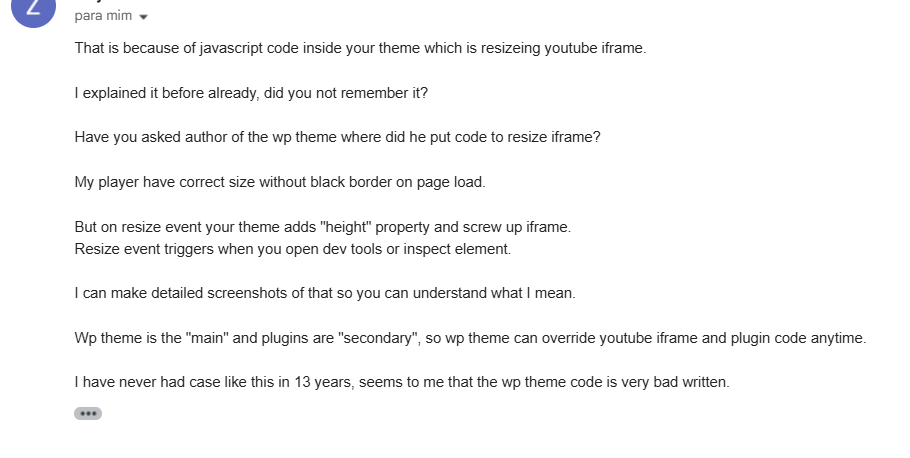
RENATOGood evening, For a month now I have been trying to resolve a major problem with the creator of a video and m3u8 player plugin. He always warned me that it was the theme and I didn’t believe it, until I put in some codes and the problems actually started. What’s going on? Newspaper themes are messing up my site. I bought a YouTube video plugin and other live videos. What’s happening is that black bars appear covering half of the live broadcast, whether it’s a YouTube video or a live broadcast. I asked the owner of the plugin to analyze my site. He told me that it’s the Newspaper theme. The plugin owner said, “Something in your theme is dynamically adding these CSS properties to each iframe on the page.” He also said, “It seems to me that the WP theme code is very poorly written.” The alignment is crooked in HTML. When you type code to make the same line, as shown in the screenshot. I recorded a video for you to see the black bars in videos caused by the theme. The screenshot was taken by the plugin owner, who had access to my site and saw that the theme was the cause of the problem. Check everything out. Please support me with this. I’ve never had any support. I bought a theme. This year I decided to change it and I have this big problem. Please help me solve it. Check out the screenshot from the plugin owner, and also the misalignment. And the video.
Plugin owner support said about the theme problem: screenshot
https://i.postimg.cc/kXKmW6BL/Screenshot-1520.png
https://i.postimg.cc/JnMDWVSz/Screenshot-1518.png
Videos show theme problem that pulls and makes black bars appear on the player
https://app.screencast.com/MJkIiOuLEBJxd?conversation=A9syM6Fg9s9tNmGS6bmyhE
https://app.screencast.com/ZsV9V21yHYRsM?conversation=SmeQsFxBRWcdZcPEb2iGof
Another problem, I’ve already written and put icons, I tried everything in the screenshot, the icons appear higher and the text doesn’t stay aligned
https://i.postimg.cc/4yKhWvr6/Screenshot-1519.png