
No search results were found in Documentation!
 shenal2233
 https://moviegango.com my post are not showing up i have publish two post under
MOVIE NEWS and TV NEWS post are not showing up on landing page but under BEAUTY category
” DISCOVER 5 TRAVEL OUTFITS THAT ARE COMFORTABLE AND ALSO VERY CHIC” post is showing up i need my category MOVIE NEWS , TV NEWS , GAME NEWS , REVIEWS , TOP MOVIES ,TECH,UPCOMING post to show up on landing page i went to tagDiv Composer clicked the demo content post and clicked element and filter and Category filter: i selected MOVIE NEWS it should show my post on the landing page but it says that no posts i don’t know what to do
-
This reply was modified 6 years by
shenal2233.
 Fatihtufekci
Hello, I use the theme with dental studio demo. I modified the demo for my website bu i have some problems. I tried to add images on the homepage in the td composer and got error. You can see the error in the link bellow.
https://drive.google.com/file/d/1YkxrIza7c6R8FtUrlaKoC8iT4bSVbe63/view?usp=sharing
I also resized resolutions of immages same as the example images. I can’t add any. I also have same problem on the gallery page.
Can you help me about the problem?
Thanks
PS: Sorry about my English 🙂
 Calin
Calin Hi CEDFeducation,
That is the featured image from post template, also if I’m right this is a custom post type, if you want to use a small featured image, you need to use single post template 1, this will look like this -> https://demo.tagdiv.com/newspaper/td-post-400k-for-whisky-most-expensive-foods-and-drink-auctioned/ also the dimension can be change from theme files -> https://i.imgur.com/tJy9MUy.png
Hope this will help you!
 Vlad S
 Hello !
All the PRO demos are built using tagDiv Composer and in order to change the background color / image you will have to edit all the ROWS as you can see here: https://www.screencast.com/t/QlYxvmdoUxea
Thank you !
 hesen
hesenHello
I am using News Magazine demo on https://saglamxeber.az/
I want to add coronavirus counter instead of header banner but I can’t found that header template in Cloud Template.
How can I add coronavirus counter to the header section, not changing the current one?
Thank you
 ton1985a
Hi,
I have enabled the “Sticky” option for the menu, but it doesn’t work. In the print bellow, you can see that the menu is not sticking, like it is on the demo that you have online. Any help?
Thanks.
 Eficiencia-Laboral
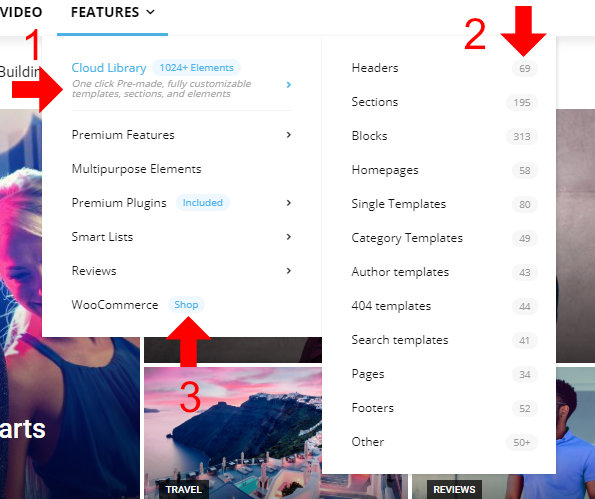
Hello I hope they are fine, since I bought the theme and tried to customize the image, I have achieved almost everything, except for some menu items, there are some items that I would like to integrate into the site that come in the theme of Newspapar Default (this: https : //demo.tagdiv.com/newspaper_pro/) but as much as I see the settings I can’t get the same results, could you tell me how can I get the following menu settings?
Could you tell me how I can make these three settings in the menu that is not megamenu?
1.- Show the description in the menu
2.- Show the quantity in the menus
3.- show the labels
I attach the image of what I mention
https://i.ibb.co/NKFqxX0/elementos-menu.jpg
I have been able to make the megamenu, but I have not been able to make it show the catagory label
This is the image
https://i.ibb.co/YQJxdRr/megamenu.jpg
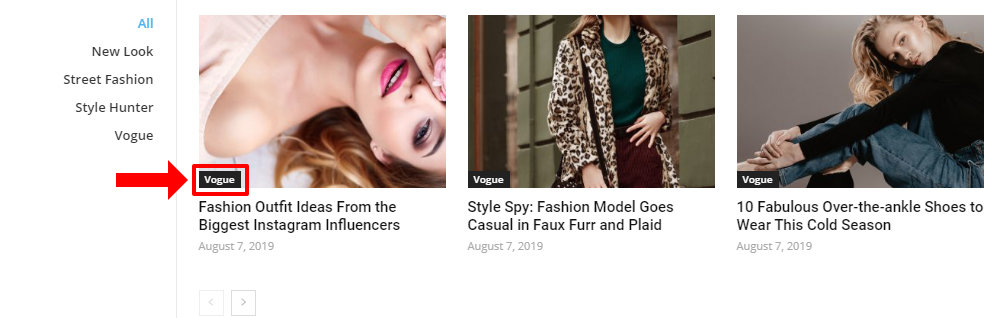
I hope and can help me, I have days trying to achieve these results and I have not succeeded
 jammybb2016
Hi
I just bought newsletter X theme for It’s best Demo of “Gadgets Pro”.
I am on VPS with 4GB/8Cores with Plesk Obsidian. PHP 7.4.8(FPM Application served by Apache) and I have set all php.ini settings to high.
Theme gets install successfully along with all necessary plugins required by Theme.
Import of “Gadgets pro” also completes successfully.
Right After Import, when I load the Homepage, it gives 500 error…I tried almost everything suggessted in wpbeginner blog post but nothing worked for me. 🙁
Please resolve this asap, otherwise my money just wasted.
 srampia
I am not able to save any changes in the theme panel- Not able to change the demo logo, theme colors etc. After making the changes, when I click on ‘SAVE SETTINGS’, it does not go further, it is shown as progressing for long. I have contacted the server end and they told that from their side everything is fine, it is the issue with theme.
Calin Hi,
The standard Pack from Newspaper X is for standard style/templates, using standard plugin all the style from the theme will be loading in your website, if you rebuild your website only with cloud templates then you can deactivate the standard package, then you should be able to see an improvement, the cloud templates will load only the necessary style. Please make a test on a staging website, get the Newspaper from your themeforest account install a PRO demo and deactivate the standard package check the results and after that try with a standard templates with standard pack enable.
If you follow the steps which are presented in this tutorial here -> https://tagdiv.com/how-to-increase-page-loading-speed/ you’ll be able to increase the speed of your website.
Also you can check this similar topic for more solutions: -> https://forum.tagdiv.com/topic/optimize-script-to-improve-site-speed/
Thank you!
Calin Hi,
If you want to add the Revolution Slider only for mobile theme plugin on pages, then you can use the mobile editor and you can set there the shortcode from Revolution Slider -> https://forum.tagdiv.com/the-mobile-theme/ -> https://i.imgur.com/ypAakBd.png
Thank you!
srampiaI have installed one of the demos of Newspaper theme to my new site. But its images are not displayed. Not able to see any images in Media Library too, even the images which I have added.
 Pixel Cities
Hi Guys,
I am creating a business directory page, with one main page and lots of custom links as sub menus.
These custom links include the full url of the page plus an anchor.
This all works fine on desktop, but on a mobile menu the links do not work?
Please see below my own demo website for now, as work on main website is ongoing.
Kind Regards
Mark
 bhaveshgajjar
 Thanks i was able to install plugins but it didn’t work, when i was importing demo it issued an error with alert written technicall error please contact us on our email. it was not able to import demo later website was showing technical difficulties error, when i removed tagdiv Composer plugin the error was resolved,
so exactly how can i import data, if you need i can give you website access
 EliasLeguizamon
Hola, he comprado el tema Newspaper hace aproximadamente 1 mes y todo ha ido de maravilla, he encontrado absolutamente todas las modificaciones que he querido hacer, excepto por la versión móvil. Cuando veo la página en mi teléfono parecen dos cosas distintas respecto de la versión escritorio y no logro encontrar cómo personalizar para que se vean igual a como me mostraban en los demos de Themeforest donde se veía que quedaba perfecto tanto en escritorio como en móvil. Espero que se haya entendido mi consulta y me puedan ayudar, gracias.
https://elnomade.com.ar/
 gabriel1988r
 Everything working fine but when i import demo theme i can’t make changes 🙁
-
This reply was modified 6 years by
gabriel1988r.
-
This reply was modified 6 years by
Calin Hi,
If you are using PRO demos, the settings from theme panel will no affect website, because PRO Demos are build suing cloud template from tagDiv Cloud Library and are build/edit with tagDiv Composer. So if you want to edit the pages or templates you need to do it with tagDiv Composer, for pages -> https://i.imgur.com/FIDsl3X.png or cloud templates -> https://i.imgur.com/QUul6Mj.png
Thank you!
Calin Hi,
The related articles from standard post style can be remove using the settings from theme panel -> https://forum.tagdiv.com/design-post-pages-using-default-templates/
If you are using a PRO demo or a single post template, then you can edit it using tagDiv Composer and use the right click to remove the related articles.
Thank you!
Calin Hi rlwilkinson80,
Unfortunately I do not have access to any of these links that you provide -> https://i.imgur.com/M24t5oo.png
But if I’m right you are not using a pro demo, you are using a standard one, these can be edited from theme panel -> https://i.imgur.com/17z3ssR.png for more details you can check our guide from here -> https://forum.tagdiv.com/logo-favicon/
Also the color for buttons can be assign from general color -> https://i.imgur.com/ilKTJO5.png
Hope this will help you!
Thank you!
Calin Hi,
If you are using a pro demo, the footer is a cloud template, then you’ll need to edit it from a page, for example, you can edit the homepage, click on edit with tagDiv Composer -> https://i.imgur.com/uweNRrc.jpg after that go down to the footer end edit it how you want (now you can customize the the whole web-page from fronted).
Also you can use the right click to remove the element you do not need-> https://i.imgur.com/m5fCx8j.png
Thank you!
ton1985aHi,
How do I make a specific category post page like in the demo, with a background image on top and some text? (like the image showing it in the demo).
Thanks.
Calin Hi dokterzuhdy,
All our demos has the same SEO rules, because all of theme are made using the theme builder (tagDiv Composer) and the plugins.
For a better SEO we recommend to use Yoast SEO plugin -> https://yoast.com/wordpress-seo/
Hope this will help you!
Thank you!
Calin Hi,
If you are using a pro demo, the footer is a cloud template, then you’ll need to edit it from a page, for example, you can edit the homepage, click on edit with tagDiv Composer -> https://i.imgur.com/uweNRrc.jpg after that go down to the footer end edit it how you want (now you can customize the the whole web-page from fronted).
Thank you!
Calin Hi magnavialife,
There are two types of demos, PRO and standard, only the PRO demos are using cloud templates and can be edited using tagDiv Composer, standard demos (these demos do not have the PRO text in there name) are build with standard templates/styles and these can not be edited with tagDiv Composer, these can be edited only for theme files.
Newspaper Theme 10: Standard Pack or tagDiv Cloud Templates?
Thank you!
Vlad S Hello !
You will have to replace all the blocks that no longer render. We recommend you using a PRO Demo or replacing all the blocks that you use with Flex Blocks. Those are the 2 options that you have in order to deactivate the standard pack.
Also you will have to use Cloud library templates for all the features available, post template, category template, etc.
Thank you !



