
No search results were found in Documentation!
 Calin
Calin Hi,
Please do not replay multiple times in topic, will only delay the time until you get the answer, we answer in topics from oldest to newest.
@fatih-2 you can use tagDiv Composer and the Big Grid Flex elements or slide element or the revolution Slider.
How to install Revolution Slider v5 -> https://forum.tagdiv.com/how-to-install-revolution-slider-v5/
Import Revolution Sliders on demos -> https://forum.tagdiv.com/import-revolution-sliders-on-demos/
@soham24 please try to install/update the plugins one by one from here -> https://i.imgur.com/s7BJQEF.png
Please make sure that all the settings are like in our requirements, please follow the guide carefully
– https://forum.tagdiv.com/requirements-for-newspaper/
and please increase all requirements that are lower, and follow all steps.
Thank you!
Calin Hi,
Usually this issue is related to a firewall or security module which blocks admin-ajax.php request. Please verify the console for error while saving the settings on the Theme Panel, usually it displays a 403 or 404 error.
If you don’t use a security plugin, please ask your host about this, maybe you have a security module which blocks this.
If you use a plugin like Wordfence please set it in learning mode.
If you are using a PRO demo or cloud templates, that is why the theme panel settings are not apply. Using cloud template from tagDiv Cloud Library, you’ll need to edit the cloud template using tagDiv Composer and set on the elements the color and style you want
For example in order to change the share style, please edit the single post template wit tagDiv Composer, like this -> https://i.imgur.com/ZpxtjbP.jpg click on the share buttons and choose a style https://i.imgur.com/jyYrNlL.png after that do not forget to save the changes.
If you are using single post template you need to edit it with tagDiv Composer like this -> https://i.imgur.com/6BRfOox.png and use the right click to remove the elements you do not want -> https://i.imgur.com/sKWxCCb.png
Let me know the results!
Thank you!
 marclaude
Dear TagDiv Team,
I have just updated the Newspaper Theme from 9.7 to the latest 10.3.3 version, the update worked fine, thank you.
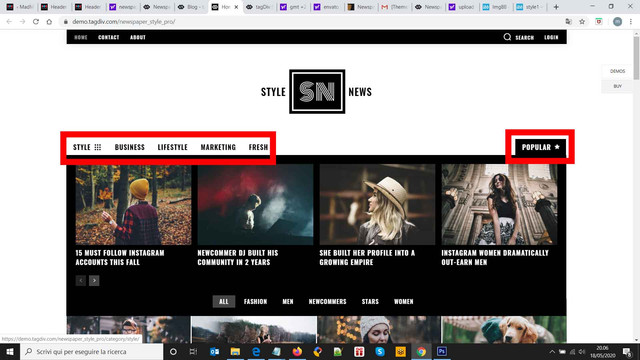
I want to make a new header, I wonder if you can explain me how the Style Demo Template Header works, because it seems like that they are two Header Menus with Mega Menu on the same header menu position.
I really cannot understand how the POPULAR item works.
I imported the Header 63 – Style Demo Template Header, but it allows me to edit on the same position only one header main menu, but on Style Demo Template Header it seems that there are two menus on the same row, or at least the POPULAR item is separated and aligned on the right, with its own Mega Menu.
Style Demo Template Header
Import
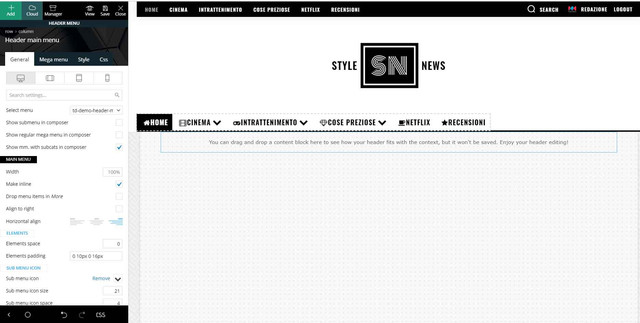
The final result is really nice, but I really cannot understand how to set a header main menu on the left and then add another item with its mega menu on the right on the same row / available position.
I hope I was able to explain you my need.
I really I hope you can help me – I have renewed the support for this – because I think that with 10.3.3 version I can further improve the style of my magazine.
Waiting your courteous reply,
Best Regards,
Marco
Calin Hi,
I think that you are using a pro demo, if is so then the ads fro theme panel will not reflect on website, because pro demos are using cloud templates and these can be edited with tagDiv Composer, you can check our documentation from here https://www.youtube.com/watch?v=biTpVVlr8j8 to add ads.
Thank you!
Calin Hi,
This https://terraincognita.earth/page/3/?cat=-1 is the blog pagination that contains all posts that you website has, also this if you set in all our demos this “page/3/?cat=-1” in url you’ll get the same results -> https://i.imgur.com/XdTXAc3.jpg if you want you can try -> https://demo.tagdiv.com/select_demo/select_demo_newspaper?utm_source=live_preview&utm_medium=click&utm_campaign=demos&utm_content=demos_button#demos
Thank you!
 MARTINSMITH
 Hi i have import podcasts demo but it doesn’t not showing audio in my page please have look here is my website https://hbculegacy.com/podcasts. i have show this audio https://prnt.sc/siqzs3 using plugin. but i want our page like this https://cloud.tagdiv.com/homepage-podcasts/ can you please help.
Thanks
 FietsersbondHZ
Hi,
I have installed the bbpress plugin, created a page called “forums” and added the shortcode [bbp-forum-index] and a forum displays when I view the page.
The problem I have is that it’s not clear what steps to take to make my page look like this: https://demo.tagdiv.com/newspaper_tech/forums/, so just forum on the left and a sidebar on the right with forum related topics.
I have added the shortcode to the text field but what is next? Should I select a template under page attributes and then click tagdiv composer? If I click tagdivcomposer I get the message that the page was not created by tagdivcomposer and an error: “Error at zones: 6(models) : 5(dom). The model does not match the content Current state has involved an issue.”
Any advice on how to properly set the layup up? Thanks.
 owais78666
Hi,
I have imported the header Law Firm and changed the logo on desktop version, but when checking the website via mobile (mobile plugin is disabled btw) I still see the logo from Law Firm demo.
 hoster
After installing the new ‘London News’ demo with content, we are unable to edit it in tagdiv composer. The following error pops up: “Errors at columns elements: 1(models) : 4(dom). The model does not match the content Current state has involved an issue.”
System status shows all values are OK, and disabling security plugins has no effect. On a similar post we found your answer to include adding <IfModule mod_substitute.c> SubstituteMaxLineLength 10M </IfModule> to the .htaccess file, however this causes a server error. Do you have any other suggestions please?
 les.thomas@gmail.com
I’m using the Car Enthusiast demo
When I added posts to an existing category they display ok
However, when I add a new category and label the menu item to correspond it does not show the corresponding posts
Pls advise where I can find the setting that makes a menu item display the posts in a specific category
 dmiu
dmiuHi,
I have imported the header Law Firm and changed the logo on desktop version, but when checking the website via mobile (mobile plugin is disabled btw) I still see the logo from Law Firm demo.
 Thegazettenews
I am using the Newspaper X theme. In that I am using the Black Version Pro demo. But I want the mobile menu style (only mobile menu not the desktop one) like the Medicine Pro demo. But the mobile menu must have to be transparent like current. Only the pattern, which is like at first the Menu Button, then at the middle the logo and then the search button(from left), like Medicine Pro.
What I need to do?
Please help!
 terryally
I’ve got two questions.
I am using the Romania News demo. There is a flex Box 5 which does not display the Special Filter: Category: Current Category. I deactivated all plugins except TagDiv but no joy. Can you please advise how to fix this?
Secondly, adverts from the Theme Panel are not working on the Romania News demo templates. The only way that I can display ads is to edit the template and add them there. Is this how it is meant to operate?
Thanks
 littlesaves
Hi, I want to have a menu that is exactly like the example in your Sports header. https://demo.tagdiv.com/newspaper_sports_pro/header-preview/
In this example, if you see under the Menu option called “Football”, you will see that instead of a Mega Menu, there are three columns that have Gossip, Leagues & Cups etc. Under them there are articles. How can I design a menu like this?
Also, for the same example, how can I make the menu sticky from the Template editor?
Thanks.
 ted
tedHello, our menu is correctly displaying inline with the logo on our site’s home page (https://regulatory.news/), but is incorrectly expanding and not inline with the logo on individual posts, such as this one here: https://regulatory.news/sec-announces-new-investor-advisory-committee-members/. In both locations, we’re using the same menu, which is a modified version of td-demo-header-menu. Any suggestions on how we can fix this issue?
Thanks for the help!
terryallyI have imported the full default demo and am customising it. I want to import another single post template as I cannot edit the current one. However, I am not able to load Cloud Templates despite following all your instructions and having a green system status. See screen capture of the system status.
All system requirements are met as per https://forum.tagdiv.com/requirements-for-newspaper/. You can see my server specs.
Looking at other solutions, on this forum, I tried with WP Super Cache installed and uninstalled.
I also deleted the cache.
I am not using CDN.
Can you tell me what is the solution?
Thanks
 rnbjunk
 Now the H1 are 2 instead of 3, still h1 from demo Stylenews

Calin Hi,
I think that you use the settings from theme panel, that is way it not work, you care using a PRO Demo, these are build using cloud templates from tagDiv Cloud Library and it can be edited only with tagDiv Composer -> https://i.imgur.com/Bth8Kwn.jpg click on the elements you want to change and change the colors -> https://i.imgur.com/Dv9k7N0.jpg
Hope this will help you!
Thank you!
 Vlad S
 Hello !
In order to install the theme please follow our tutorial here: https://forum.tagdiv.com/install-via-wordpress/ and for the demos: https://forum.tagdiv.com/installing-demos/
Thank you !
Calin Hi,
Yes, there is one live demo that has the amp plugin enable, you can check this demo here -> https://demo.tagdiv.com/newspaper_local_news/
Thank you!
Calin Hi,
The plugins is set as required for old users that have the website made with standard templates, but if you are using a pro demo, these are using cloud templates, therefore is no longer need to have tagDiv Standard Pack activate and you can deactivate it ( is not need to delete it).
Thank you!
Calin Hi,
I think that you are referring to this -> https://i.imgur.com/KgIOYpH.png on this element is set a class from demo magazine that will overwrite the settings from theme panel -> https://i.imgur.com/AbTw4ak.png, there are two ways to change it, one, remove the class from demo to can apply the theme panel style -> https://i.imgur.com/pfavlVT.png or use a custom css -> https://i.imgur.com/LokZTCq.png
The code will apply only on footer
.td-newsmag-magazine .td-footer-container .block-title > span {

 color: #111;

}
Hope this will help you!
Thank you!
 justinlakra
HI,
I have purchased Newspaper theme from you and i have the purchse code. It worked well for a week, but there was a attack on my website from some hackers so i had to delete the theme and re-install it. After re-instaling the theme i’m not able to see my homepage layout as it was in demo. Please do let me know how to get back my homepage as it is shown in demo.
And after reinstalling the Theme i’m not able to see the TAG DIV composer, please tell me how to get back the TAG DIV composer.
Thanks
Justin
 bjames1000
Hi, I am going nuts trying to figure this out. Only found partial answers in lots of searching here. (I can’t share the URL as its password protected under development).
After customizing colors of the theme, the text in the “Even More News” footer block (footer template style 1) is now the same color as the background, so it cannot be seen. But I cannot for the life of me find where I broke this. I believe the demo has the text links in white.
I’m the Magazine homepage and the default template style.
I have determined that this auto-generated info content is Module 6. But when I got to Block Settings and change Module 6 to white, it changes it everywhere.
What did I do to change it to dark gray and how do I get it back to white without using custom CSS?
 sultanmehmet01


