
- NewsmagInstalling pre-built websites
- NewsmagIntroduction
- NewsmagSmart Lists
- NewsmagTheme thumbs
 Caesaryk
 yes, the demo header shows. this is weird as I did not change anything related to the background when I imported it.
any fix suggestions?
 nick_lse
I have installed the 1.2 version of tagDiv Cloud Library plugin, but when I want to use a template for single, i don’t see singles templates, or search, or category or another templates. I just have Blocks, Footers, Homepages, Pages and Sections templates. Please help me, because I have installed a full demo of classy magazine and the single template doesn’t work fine. The ‘sidebar’ column that have the single template doesn’t work and it going down in the single layout and not properly in right side.
This is an example of my page and a single post with the problem, please scroll down for see the problem: https://elestatal.mx/ultima-hora-levantan-al-periodista-marmiko-en-veracruz
 Calin
Calin Hi,
If your website is loading like our demo from here -> https://demo.tagdiv.com/newspaper_gaming/ this is because of the loading animation.
If you want to optimize the speed of your website please check this topic -> https://forum.tagdiv.com/topic/website-load-speed/
If there is still a problem, you can send us an email at contact@tagdiv.com and provide admin login, as well as cPanel or FTP if possible. We will take a look. Include a link to this topic in the email and provide as many details you can and some screenshots.
Thank you!
 Vlad S
 Hello !
In order to use the tagdiv composer we suggets istalling a demo from the Demo library: https://tagdiv.com/newspaper-theme-installing-demos/. And for posts you can add a single post cloud library template and edit it after: https://tagdiv.com/customize-articles-with-single-post-templates/
You can find more information and know hows on our documentation section here: https://tagdiv.com/category/documentation/
Thank you !
 Simion C.
 Hi,
That looks like the black demo. This demo has CSS customizations in order to display like that. As long as the demo is installed the CSS should apply.
I have logged in, I see it is installed. But the specific body class is missing, I have added it – http://prntscr.com/o0ulhc
Now the design can load – http://prntscr.com/o0ulkq
If you have more questions let me know.
As a note, please don;t post login details on the forum, all forum users have access to the topics. Provide sensitive information by email only, at contact@tagdiv.com. I will remove them.
Thanks
Simion C. Hi,
I see the website like this at the moment – http://prntscr.com/o0ui2c it’s not as in the screenshot. If you want a black overall background color, you could install the black demo
– https://demo.tagdiv.com/newspaper_black/
This will load the CSS necessary for the black background colors.
Thanks
 Scrawf
Hi
We’re building a new site on a test environment at the moment and need some help on identifying why the initial load time is either: 1) slow, or 2) delayed/animated upon loading. We have used your gaming demo as a base. I’m referring to the top ‘slide’ image with a black background. However the black background takes a while to load (starts off white for some reason). Can you contact me directly so that I can provide login details to access the site for you to review?
Thanks
Simion C. Hi,
The demo uses a cloud header template, you ca customize it’s desktop and mobile version as needed. Edit the header template with the composer – http://prntscr.com/o0r2sn and make the modifications you want. For mobile, select the mobile viewport
– http://prntscr.com/o0r361
What exactly is this news festival? Some more details would be helpful. Let me know.
Thanks
 Chela33
buen día me gustaria saber si alguna person a instalado newspaper en un subdominio de WordPress, ya que lo eh intentado pero me arroja un error de capacidad… se puede instalar alguno de los demos de newspaper sobre el mismo dominio donde tengo instalado newspaper con licencia.
gracias por su ayuda
 Aceon
Aceon 
Hi, I delete all the elements, and an empty row was left there, how could I delete this empty row please?

Hi, please check this screenshot, I think I imported them from demo, but why I can not delete these elements? I can delete others no problem, thanks
 rickman
Hello,
We have been having this problem for a few months and we have been doing all kinds of tests all this time to try to solve it.
The problem:
We use the infinite scroll and some articles overlap as you scroll (the photos overlap, it does not let you read some articles that are hidden and there comes a time when you can not keep scrolling, it hangs).
It happens with Google Chrome and Firefox (we don’t know how it works in other browsers)
And it happens both in desktop and mobile devices (also tablets)
Screenshot of the problem: https://imgur.com/YCbnMo0
System status:
– We accomplish all the requirements that you request (https://forum.tagdiv.com/requirements-for-newspaper/)
Tests we have done:
– We have disabled all the plugins.
– We have tried to reduce / enlarge the post number of infinite scroll.
– We have tried with unmodified custom templates (from the theme)
– We have tested with the Child Theme, without the Child Theme, removing CSS, checked with different types of posts, changed the post settings … everything! (We can not think of more options).
Deductions:
– We have detected that the problem is generated by the ads (we use Google Adsense, nothing more common)
– We disabled the plugin that we use for the ads and we have introduced the ads manually in the posts to do the test.
– We have changed the Google Ads settings (different dimensions, manual / automatic)…
With all this, the problem keeps happening, so we can only infer that it is a problem generated by the Theme ¿?
We have another website where we use the same Theme and we have the same problem of overlaping posts.
As you can imagine, for us it is vital that both advertisements (it is our way of monetizing) and infinite scroll (to generate permanence and that more ads are displayed) work correctly.
You can test it here: https://www.flipa.net/ayahuasca-sanacion-milagrosa-experiencia-demoniaca/ (or entering any post)
please croll down until you get the error (you will sure get it, but it might not show if you only scroll down a few times).
Can you give us a solution?
We wait for your answer!
Simion C. Hi,
That option will appear when viewing a static homepage or page, or a cloud template. If it doesn’t appear for the homepage it must mean the website is using the default wordpress blog page which cannot be edited with any page builder
– https://forum.tagdiv.com/homepage-how-to-build-and-set-it/
If a static page built with the composer is set as homepage, the option will show. So if you like a demo you can install it with content, the static homepage will be provided.
If you just want the homepage you can import it from here
– https://cloud.tagdiv.com/#/load/Homepages (not all demo homepages are here at the moment).
Let me know if you have more questions.
Thanks
Simion C. Hi,
Does it show if you check with an iPhone the demo header? https://cloud.tagdiv.com/header-template-36/
Or what if you change the image to own of your own, does the image appear then? Please let me know. Try changing it only on mobile – http://prntscr.com/o0b8qb then check with the phone.
Thanks
Calin Hi,
The Fast News demo have set as footer a Footer Page -> https://www.screencast.com/t/1CS8XTlxGS in title text you need to set the elements for link -> https://www.screencast.com/t/Fta31fXIBu -> https://www.screencast.com/t/I3x8fJL2u
Thank you!
 pageone.ph
How do i change or delete the content of the footer, the one with “Where I’m now”, “Follow Me”, “Stay in Touch”
Simion C. Hi,
If you mean a drop-down menu, this won’t display thumbnails – http://prntscr.com/o09kw9
Only mega-menus display thumbnails – https://forum.tagdiv.com/mega-menu/
The Gadgets menu item from the demo is a mega-menu without sub-categories.
The thumbnails will be created from the images you set as featured for the posts
– https://forum.tagdiv.com/theme-thumbs/
If you have installed the theme and you have existing posts, please regenerate the thumbnails – https://forum.tagdiv.com/existing-content/
If there is a problem or you have more questions, let us know.
Thanks
 shawshawshaw
 Update: I meant to write “Edit with TD Composer” doesn’t work. It works when I install a demo website WITH content. When I install a demo website WITHOUT content I don’t see “Edit with TD Composer” anywhere on the top bar.
 danrolph
Downloaded a demo with template – how do I edit the header/footer? So confusing with all of these cloud templates!
 debashisd
Hi,
I am using the Health Blog demo with Newspaper theme. On the homepage I can only edit a certain portion after which the TD composer is not working meaning the lower half after the video and the advert banner below is not getting highlighted.
Please help.
Thanks.
 Gul Klud
I can’t get the images to show in my menu drop down – Where is the setting to select/upload the images that are shown in your theme demos?
I.e. theme demo Default Newspaper – hover Gadgets – Drop down appears w. images
Where is the setting for that?
Thanks
Claus
Calin Hi,
Please make sure that all the settings are like in our requirements, please follow the guide carefully
– https://forum.tagdiv.com/requirements-for-newspaper/
and please increase all requirements that are lower, and follow all steps.
Please make sure that you have the tagDiv Cloud Library activate.
Also please make sure that you do not have a plugin conflict, please deactivate all non theme plugins, also if you are using child theme or cache plugin, please deactivate them, clear all cache and try again.
Installing Demos -> https://tagdiv.com/newspaper-theme-installing-demos/
If there is still a problem, please provide some more details and some screenshots.
Thank you!
Simion C. Hi,
To change the overall width in general is not possible. In locations where the composer can be used (like pages and cloud templates) the content can be stretched, rows have a few width settings for it – http://prntscr.com/nzt6tu This will allow wider layouts.
Some of the newer theme demos make use of these width settings for rows, you can check them out here – https://demo.tagdiv.com/select_demo/select_demo_newspaper
Also be sure to check some cloud template designs made by us
– https://cloud.tagdiv.com/#/load/All
The composer can be used to design most templates WordPress uses, posts categories, search etc. If you have more questions let me know.
Thanks
Simion C. Hi,
An example would be helpful, which links should jump and where. Maybe there is a way.
For example this demo’s menu items jump to specific locations in the homepage
– https://demo.tagdiv.com/newspaper_dentist/
Or links in the page content like in this topic – https://forum.tagdiv.com/topic/smooth-scrolling-html-menu/
Thanks
 k2point0
Hello,
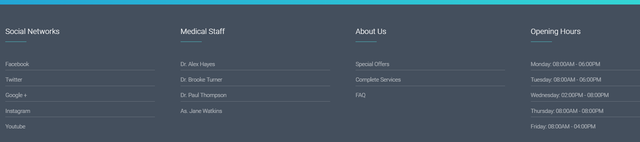
I am trying to remove the footer area in the dental demo theme.
 pojunis
tagDiv,
I am new to Newspaper9 but I think that it could be awesome for a lot of our projects.
I use Elementor as a website builder. I have had no issues importing templates from Elementor into Avada and BeTheme, but I just tried importing a new template into a new install of Newspaper 9.7.
I have the main demo installed with content. I have the base of the plugins that I typically use installed (yes I deactivated them and still got the same error that I am writing about) into the site and I was about to start pulling in pages (Elementor Templates).
I imported my template from Elementor theme (Stratus) and imported it into Newspaper9.
I made sure that I created a new page that was set up correctly in Newspaper9 and imported the template.
The issue is that there is NOT an option for parallax in the Elementor Editor / Style. I compared both installs…
This is what it should look like, the part I circled in blue: https://www.screencast.com/t/yXEvpFdsfj
This is what I am seeing on Newspaper9, NO Parallax option:
https://www.screencast.com/t/RcLEBnZe7T
I went through these forums and Google searched this to death and I couldn’t find any solutions. I know that Elementor is NOT listed as one of your tested plugins, but it absolutely should be.
This is the only real issue that I could identify… If this can be solved, then Newspaper9 + Elementor = Amazing design with quick development!
Any and all help is appreciated!
Thank you in advance!
P.S.
Working Parallax on STRATUS Theme: http://propoolstheme.wpengine.com/home-parallax/
Not working on Newspaper9 Theme: https://propoolslasvegas.com/try-new-home-page-parallax/
