
- NewsmagInstalling pre-built websites
- NewsmagIntroduction
- NewsmagSmart Lists
- NewsmagTheme thumbs
 Simion C.
 Hi,
You must create an image logo with the size you want in mind and upload it as shown, in the logo section. The logo size in the car demo is originally 1920x580px – https://www.screencast.com/t/3ACC4b5GMW and is displayed in it’s native size.
If you use that css code you are just stretching the 300x91px current logo to 1920px – https://www.screencast.com/t/WRyFiIJH hence the blur on the image.
Thanks
 Catalin
 Hello ahmedkhalil13,
First of all, you should provide your website URL so I can take a closer look at it. You should check our demo and there you will see how one should look smarlist 1, like this -> http://demo.tagdiv.com/newspaper/smart-list-style-1/7/ You will bring this layout for smartlist 1 if you will set this feature according to our documentation here -> https://forum.tagdiv.com/smart-lists/ Also, if you are using some untested plugins, please try to disable all of them, leave just Visual Composer to active, clear all your caches and install only the plugins that come bundled with the theme packet and rule out any conflicting plugins. Notice that the smartlist is too sensible feature and it is possible that some untested plugins to interact with the code and cause a lot of unknown issues.
Thanks for your understanding!
 darel
darel I even got almost the same problem with your demo site, here’s the picture – http://i.imgur.com/ObiJHjX.png
Im using Android 4.3 version and its default browser, I know its old but some of my site visitors were reporting this problem and I wanted to check.
Android 5.0 works fine even on default browser.
Catalin Hello darel,
Please notice that our theme does not have this behavior, as you can see in our demo preview here -> http://demo.tagdiv.com/newsmag/ Also, I have checked your website and I did not saw any problem with the blue screen. Also, if the problem is still there, you should check all your theme customizations or plugins. Try to revert the theme to the default state.
Thanks for the message!
 crialta
hello,
i have intalled the demo “fashion” but i want the same header thna the demo “car” with a big image. i dont’t found the possibility of this. The image of logo “car” is largest tha 500 préconised for head styl 9,10,11.
Escuse my poor english !
please help !arge
 haqemcom
Why i check my theme at GTMetrix my blog loading is very slow and get C and Total Page Size is 2.82MB and time 6.9s i.is.cc/1jchlZ8x.png
and i check theme for demo is less from my blog Get A and Total Page Size is 1.44MB and time is 3.5s i.is.cc/1jcvVryR.png
i have less Blog post and picture than demotagdiv, but why my blog slow loading and my score very bad ? any people or staff can help me please
Catalin Hello ahmedkhalil13,
Please check the demo on smart list section and the Post navigation bar is there, as you can see here -> https://www.screencast.com/t/OnRiFxPr This is not what you mean? Provide more details about what exactly you want to achieve so I will be able to provide a more accurate response.
Thanks for your understanding!
Simion C. Hi,
The grid used in Category top post style 10 – https://www.screencast.com/t/uLIzlJlo is Big grid 10 shown here in the demo – http://demo.tagdiv.com/newspaper/big-grid-10/ and you can add it on a page in Visual Composer – https://www.screencast.com/t/xOo8g3M4jFQm
Thanks
 Bogdan B.
 Hello,
Please try it a few more times as the server can get hung up at times. If you still cannot install a demo, please contact us on our email address at contact@tagdiv.com and provide a link to your site and wp-admin (login information and admin rights) so we can login and investigate. Please also include a link to this conversation.
Thank you!
Bogdan B. Hello,
The call for that image is not found in our theme. Please check your custom modifications as there is no such call for a licensed picture that is not meant to be distributed. The images you get with the theme are not the same ones as the ones on our demo because the ones on our demo are licensed and not meant for public use.
Thank you!
Catalin Hello crika1,
Please keep in mind that our theme is fully compatible with the Reviews on Google SERP section as you can see on our demo preview, like this -> https://www.screencast.com/t/QKiV76MwlA In order to achieve best results in this regard, you should use the Seo Yoast plugin to do these changes and optimizations. You should try to read the plugin documentation and also, you can read the following guide which explains you these steps -> https://yoast.com/snippet-preview/
Thanks for your understanding!
Simion C. Hi,
Try using this code, enter it in Theme panel->Custom Css, it sets a background for the category style 8 template (change the image link to what you want to use, it is just an example image for testing)
.td-image-gradient-style8 {

background: url(http://demo.tagdiv.com/newspaper/wp-content/uploads/2016/05/login-mod.jpg);

background-repeat: no-repeat;

background-size:100%;

}
Result – https://www.screencast.com/t/bbvnXnDwS1Ou
Thanks
 songhy
Dear TagDiv,
After I review your Newspaper Fashion demo ( http://demo.tagdiv.com/newspaper_fashion/ ), I really Love the ways you put the playlist video youtube in your website.
But when I install full demo, it is not include this playlist.
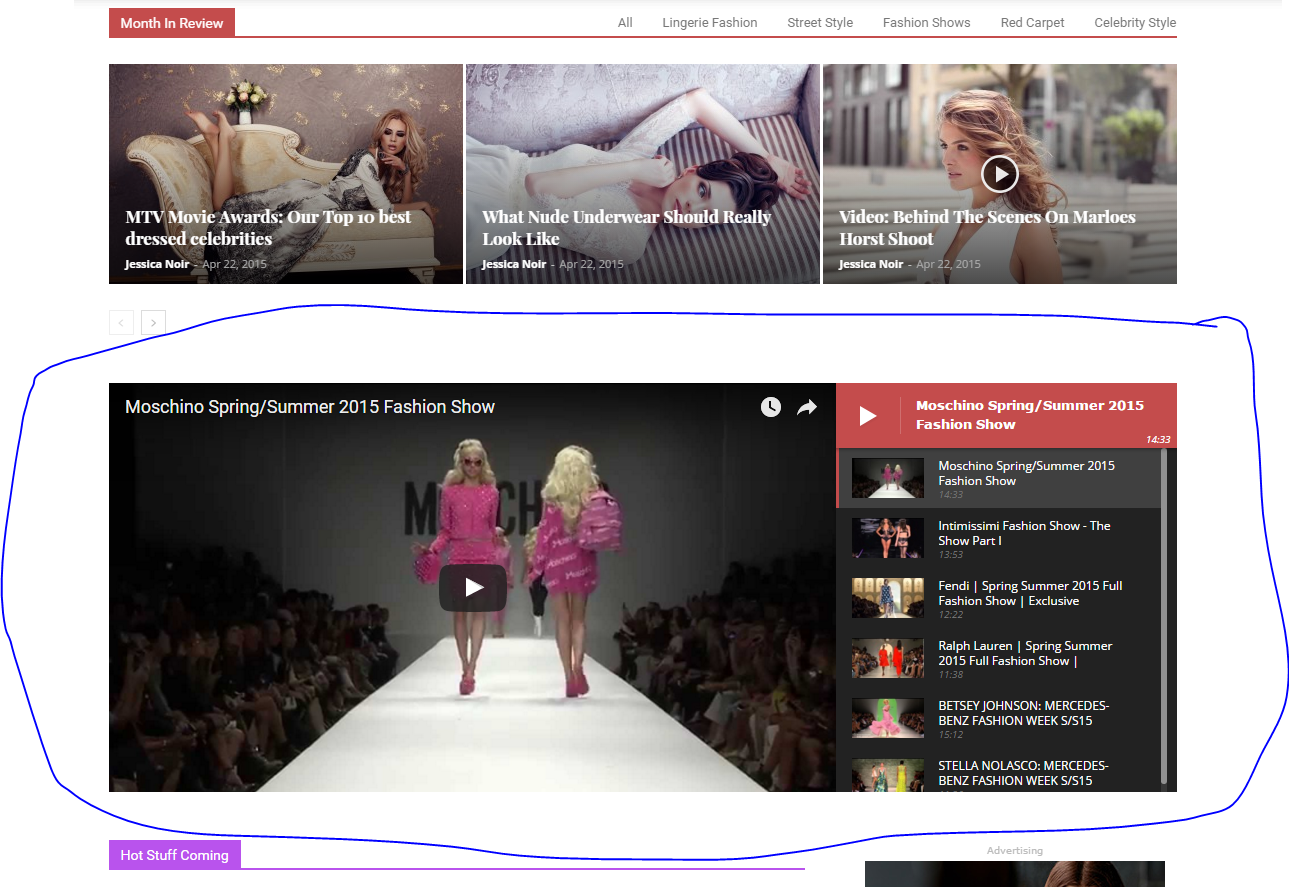
Could you please guide me to add playlist to my website like your playlist in Newspaper Fashion demo?
Thank you in advance
Bogdan B. Hello,
1) I’m not sure what you are referring to. The mobile content is full width, not narrow and the mobile theme is not supposed to show up on tablets. It is limited to 768 px width. Anything over 768 pixels will get the standard responsive version of the theme You may be experiencing some issues with the mobile theme on your site. Please provide a link so I can inspect it.
2) Disqus is not a tested and recommended plugin. Untested plugins could have css styling issues.
3) Please test this gallery on your tablet and see if it’s the same: http://demo.tagdiv.com/newspaper/td-post-aston-villa-beat-liverpool-to-join-arsenal-in-the-fa-cup-final/
Thank you!
Bogdan B. Hello,
Maybe you installed the demo without dummy content. Please use this guide: https://forum.tagdiv.com/installing-demos/
Thank you!
 TueNguyen
Hello TagDiv,
I’m newbie for Newspaper theme. I run the newspaper demo, on tag “LIFESTYLE NEWS”, i want to config this tag like this:
https://gyazo.com/47396d3d912e702a781b2108ce04f634
But when i run on your demo, it shows:
https://gyazo.com/ad62b3db4b5ce8d672683357c6b2e8cc
I try to config something like this:
https://gyazo.com/602115c0f47ab544c6c1042d5796f8cc
But it’s not work.
Please help me.
 Ingente
Hello, can you help me? I want put icons at menu labels
Example: http://demo.tagdiv.com/newspaper_animals/
Thanks!
 john low
Hello sir,
i want make an article with navigation button how can i do that with smart list what should i do to have an exelent post with navigation button without any issue
like this http://demo.tagdiv.com/newspaper/smart-list-style-1/
i haven’t features menu on my install demos to see css code
thank you
 peppefark
When I install the demo content gives me this error message:
tagDiv importer detected an error. The importer will try to recover and continue to install the demo after you click ok on this dialog.
Steps to troubleshoot:
– Check the permissions on your upload folder
– Please make sure that WP_DEBUG is set to false in wp-config.php
– Contact our support via email contact@tagdiv.com (please provide your product license key)
I checked and WP_DEBUG is configured to false and permits the upload folder to 755
 gentlifestyle
Hi everyone!
I’m using a Comodo SSL certificate on my website, but I noticed that the green padlock disappeared.
I checked on Whynopadlock.com/ and it shows only one insecure item:
Insecure URL: http://demo.tagdiv.com/newspaper/wp-content/uploads/2016/01/couple.jpg
Found in: https://xxxxxxxxx.com/wp-content/themes/Newspaper/style.css?ver=7.5
Apparently, that image came with the Theme, but I can’t find it. Does anybody has had the same problem? Any idea how to find and delete that image?
Thanks!
 sshanto13
Hello, hope things are fine with.
In your Newspaper theme, I can’t edit demo layout with visual composer. If i make any change visual composer does not save the changes. Such as News- Front page default template:
Please provide us a quick solution.
 matthews
 RitaLorraine
 Hi Bogdan,
YES, that’s exactly what happened. After I updated, I went to Appearance>themes. The previous default theme was still active and version 7.6 (the updated theme) was showing but had not been activated. So I activated version 7.6 and that’s when all my sidebars were stripped. I had the “Default” demo installed.
NEW QUESTION: So what do I do? I’m going to plod back thru and try to reinstall 14 tedious sidebars, because I’m afraid that using the previous backup might destroy my site. But what’s going to happen when it’s time to update again? How can I avoid this happening again?
 betapolar
 Thank you for the theme punch link.
My question more precise: Shouldn’t there be an “active” instead of “optional” at Revolution Slider after installing the plugin?

I installed and activated the travel blog demo. Shouldn’t there be a place for choosing a slider? Some demo sliders are installed and inside the Revolution Slider config area they’re working fine.
Jan
 Edward
 You can also use different formats for Quote like here: http://demo.tagdiv.com/newspaper/blockquotes-pullquotes/



