
No search results were found in Documentation!
 digitics
I have upgraded the newspaper 12 and selected the real estate pro pre-built demo, however I wanted to use this demo for different type of business (not a real state), I wanted to create a listing directory for digital products, so how can I change the source of custom fields and make adjustments over the script?
for example I want to add product fields instead of property fields in “add your own listing” as well as changing all property types and functions.
Are you having a listing prebuilt demo that works for any domains?
 nwnuyhs
First,I import this demo:https://demo.tagdiv.com/newspaper_eastcoast_check_pro/
Then,I found this demo has some CPTs,please the picture below:
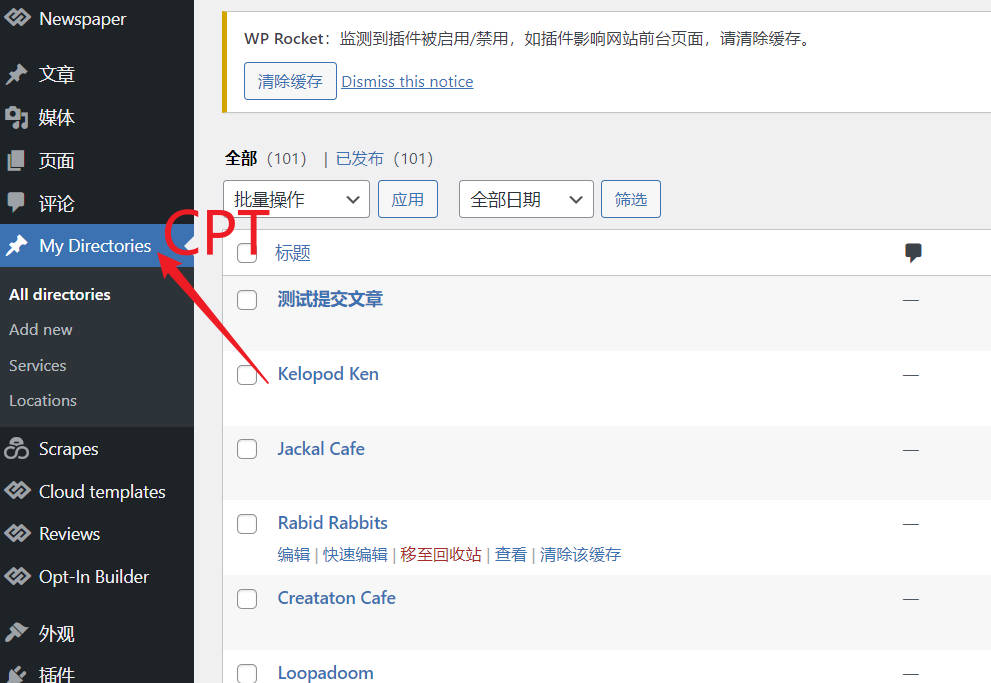
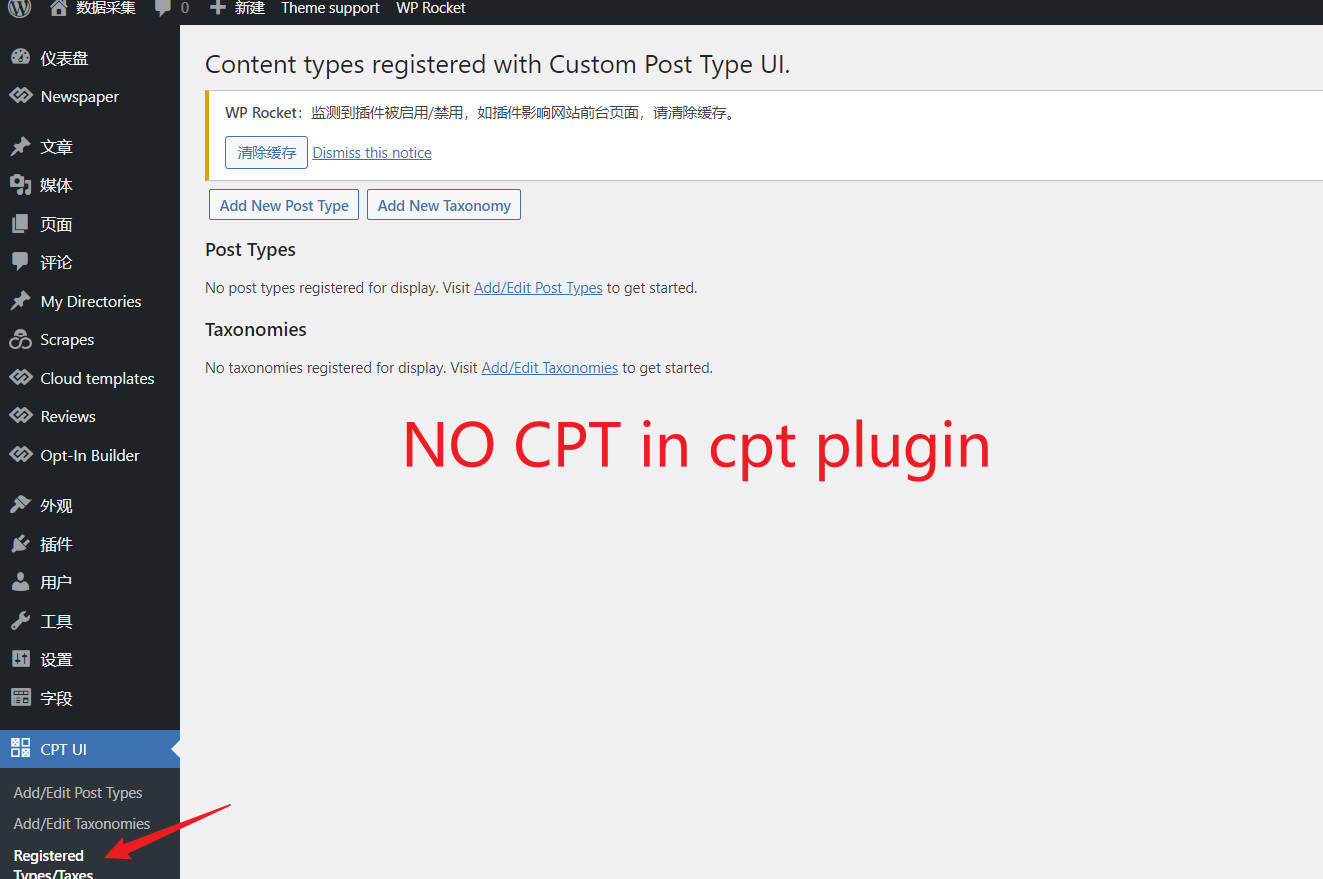
However, I did not find the CPT created in the CPT plugin.
How is the CPT of the demo website created? thank you very much.
 gono
gonoHi
Couple of things I found and questions I have:
Permalink looks strange?
In your demo, it appears the permalink does not go by categories, please have a look here
https://demo.tagdiv.com/newspaper_eastcoast_check_pro/tdcpt_directories/dental-health-2/
1. Instead of tdcpt_directories it should read either the location or service category?
2. Similar to tdtax_services/cafe/ it should read either service/cafe or something we choose.
Now, is that something we can influence? I certainly don’t want to show tdcpt_ and tdtax_ in my URLs.
Filter not working?
Please have a look at your demo:
https://demo.tagdiv.com/newspaper_eastcoast_check_pro/tdtax_services/entertainment/
1. In locations, Albany shows the number 5 but when you click on Albany, not entries are shown.
2. You can’t deselect a filter for example if you have chosen two locations like Albany and Georgia. You need to click on “Clear All Filters”
Single post image
The image you show in the category listing view, here, example “Fish ‘n Chips”: https://demo.tagdiv.com/newspaper_eastcoast_check_pro/tdtax_locations/georgia/
is all stretched in the single page view, here:
https://demo.tagdiv.com/newspaper_eastcoast_check_pro/tdcpt_directories/fish-n-chips/
Payments
Please link to a guide that explains how payments for submitting listing works. Can I charge the user for submitting a basic listing and also allow them a tiered version like more photos for silver and video for gold?
Thank you.
 Anamaria
 Hello,
Because you have a pro demo and you made the changes in Theme Panel, only some settings from the Theme Panel will apply to a Pro Prebuilt website, and you need to edit/add with tagDiv Composer the elements.
You need to edit with tagDiv Composer and change the font for each element that you want https://i.imgur.com/xp4zoTb.jpg
-> https://www.youtube.com/watch?v=SoGQ0d5kIBg -> https://www.youtube.com/watch?v=jQvA64uTLkI
Also, on our channel https://www.youtube.com/channel/UCOT1RiNysIPCTPSnVZskwtQ, you can find more videos that can help you and documentation https://forum.tagdiv.com/newspaper-theme-documentation/ and you can ask us here on the forum if you have any questions.
Thank you!
Anamaria Hello,
Because you have a pro demo and you made the changes in Theme Panel, only some settings from the Theme Panel will apply to a Pro Prebuilt website, and you need to edit/add with tagDiv Composer the elements.
You need to edit with tagDiv Composer and change the font for each element that you want https://i.imgur.com/xp4zoTb.jpg
-> https://www.youtube.com/watch?v=SoGQ0d5kIBg -> https://www.youtube.com/watch?v=jQvA64uTLkI
Also, on our channel https://www.youtube.com/channel/UCOT1RiNysIPCTPSnVZskwtQ, you can find more videos that can help you and documentation https://forum.tagdiv.com/newspaper-theme-documentation/ and you can ask us here on the forum if you have any questions.
Thank you!
 mgiannelis
Hello
Currently my site has over 100 internal links on front page alone because all the images are also being clunted as links (this is very bad for seo causing page authority to bleed interally causing a lower global rank
I want to (should be able to) do exactly as this sample. This site sample only the titles are clickable. This is very verey good because its not causing hudrends of un nessasry internal links. You will see. You can’t click on the image, there is no link. Only the title is a link. (this is very good for seo)
Please tell me how to acheive this basic very good seo optimisation factor with newspaper. If you dont have this fuction (dont see why you dont) please add it to your next uodate because this is a massive help for SEO and not causing bad seo problem.
I hope this can somehow be done currently. Can you?
.
mgiannelisI have just become aware of the new update.
It would seem that tagdiv is still not really listening to it’s customers, feedback or suggestions.
Personally, these new themes are just terrible looking. There has been no creativity or design flare put into any of these at all. The single post pages are still all so dull, still look the same and not very appealing at all.
It would seem my countless suggestions, ideas and demontrations in the past of fallen on deaf ears. There is just nothing “Special” here at all. Many of these single post templates just look yuck.
The following is an example of what an actual beautful and very appealing single post looks like HERE and an beautful category page
However, the new theme gives us things like this lifeless dullness plan looking dull sheet of paper.
I hope in future releases newspaper actually comes up with some creative flare in its designs and not have everything look the same all the time
 thatdev
 Hi,
Sorry for the confusion, I didn’t mean blank page as search result. I meant the pages I get as result are blank pages or templates.
Ideally, when you search for a word, it should return list of posts that has the same word in posts title. Please click on this url https://demo.tagdiv.com/newspaper_crypto_gaming_pro/?s=one and try to click on the posts returned as search results. you will see some white cards and when you click on those they will return blank pages or some other things.
So, if search functionality works fine, it should not return those white cards as search result but the correct posts for the searched words.
let me know if you need more clarification.
Thank you!
 thatdev
I’m using theme https://demo.tagdiv.com/newspaper_crypto_gaming_pro/. When I search for any word it’s showing blank pages. see results here https://demo.tagdiv.com/newspaper_crypto_gaming_pro/?s=one . https://imgur.com/a/p1XhOfp
 PeteMason
I guess it is not possible to install a new pre-made site to test it, without disturbing the existing site?
I guess I have to set up test site on a different hosting platform and install newspaper again? and I guess get a second licence?
Specifically, we are using the magazine pre-made demo and are interested in trying https://demo.tagdiv.com/newspaper_today_news_pro/
I assume if I install it using my current installation, which is live, it will overwrite my existing templates which have been heavily customised.
Anamaria Hello,
You should use the theme.
As I said, this is how the WooCommerce and theme works, you can check on this demo -> https://demo.tagdiv.com/newspaper_shop_kids_store/.
Thank you!
thatdevHi,
I am using newspaper theme ( https://demo.tagdiv.com/newspaper_crypto_gaming_pro/) There is no prev/next blog link on blog pages (like => https://imgur.com/a/YeikFet ) when using single template =>https://imgur.com/a/0eHcGIj . How can I add it? I’m trying to find the file being used to render blogs but can’t find it.
What the file plugin is showing this file tdb_view_single.php is being used but i can’t see it in file list of my theme. Please suggest how to show prev/next article.
Thankyou!
 alalemanx
 I did what you told me but it doesn’t work (or did I do something wrong?)
I created the category “Medio Oriente” in the posts menu as a subcategory of Discover -> https://imgur.com/Zbm83xd.
Then I added the category in td-demo-custom-menu. -> https://imgur.com/zH6kruR, but the result is this, the category “Medio Oriente” appears next to the menu and not as part of it -> https://imgur.com/LtyJ3gC.
The I move the category “Medio Oriente” as a submenu of “Discover” in td-demo-custom-menu, as shown here: https://imgur.com/CLNh6Ny, but the result was this: the menu appears above “all” category (it should apper below it and in alphabetical order) and it doesn’t has the look and feel of the other menu items: https://imgur.com/ZPoqfsz
What am I doing wrong?
Plese help.
Anamaria Hello,
You need to add the category in td-demo-custom-menu and make sure the category that you created is a subcategory for discover -> https://i.imgur.com/SbLqggp.png
Thank you!
Anamaria Hello,
The Revolution Slider that we provide is a Bundled Plugins in our theme. No need to activate it, simply ignore the activation messages and you can use it for the sliders that our theme is providing -> https://forum.tagdiv.com/import-revolution-sliders-on-demos/.
What is a bundled plugin?
– https://help.market.envato.com/hc/en-us/articles/213762463-Bundled-Plugins
If you want to have full access to this plugin, then you’ll need to buy a license key for it, the license key that you get to activate the theme is working only for our theme, you can not activate other themes or plugins with it.
Thank you for your understanding!
 mylove007
An issue has been encountered while trying to validate your license key
can you please help us to install the demo
alalemanxI’m using the prebuilt Travel Memories Pro Site. This one has a “Discover” menu at the left side of the main menu.
This Discover menu displays six submenus: All, Africa, Americas, Asia, Europe and Oceania. I want to add one more called “Medio Oriente”. So I created the category, and added it to the td-demo-footer-menu, but it doesn’t work, this new subitem doesn’t show at all in the desktop version of the site.
Oddly enough it appears in the cellular version of the site.
Can you help me?
 Rohit1234566
Hi I have purchased the item “Newspaper – News & WooCommerce WordPress Theme”. But when i try to download the template option doesn’t come to me and it download the files without giving me selection of the template I need.
I want to use below template but i am not able to download this template. Can you help me in this?
https://demo.tagdiv.com/newspaper_week_pro/
 magrofyinc
when I am trying to set up the header then I am not able to fix it as shown in the demo. Please check our website. Please help me with this as soon as possible.
 Calin
Calin Hi,
This can be possible only if you do a staging or you use a subdomain where you can test all of those. Another possibility are to duplicate all the pages and cloud templates that comes with the pre-build website you have now, or instead to install another pre-build website, install only the cloud templates from it (use tagDiv cloud library).
-> https://forum.tagdiv.com/installing-demos/
Thank you!
Calin Hi noozteam, do you use the RTL demo?
Normally the RTL demo has only a view elements that need to be adjusted.
What you need to do first is to be sure that you set in WordPress a RTL language, after that the with tagDiv Composer, you can adjust the layout of the website.
For example -> https://i.imgur.com/qRQg1c9.jpg -> https://i.imgur.com/AIlzL1A.jpg -> https://i.imgur.com/WkkzBSd.png
Thank you!
 mujeebdazeCalin
 Hi,
1. Normally if the settings are like in our guide -> https://forum.tagdiv.com/autoptimize-install-configuration/ then the size should not grow so fast.
Also, you can check the answers from the Autotomize forum about this “problem” -> https://wordpress.org/support/topic/autoptimize-cache-filling-up-quickly/
2. That option should work on all demo. If the tag is displayed on posts, and the problem is only when you click on it, then it can be an option from the Yoast SEO. Please do a test with the Yoast plugin disabled, if is working, the is an option from that plugin.
Thank you!
 arulnathan
Hi,
I have installed the Newspaper theme on Main Domain.
Main domain: http://www.sample.com,
Sub Domains:
http://www.tech.sample.com
http://www.beauty.sample.com
http://www.food.sample.com
Can I install Theme on subdomains with different Demos, And with the same License Key?
Thanks
thatdevI am using this newspaper theme https://demo.tagdiv.com/newspaper_crypto_gaming_pro/ . I have added new categories, but now categories are not filtering blogs. All pages are showing blogs from all categories.
Default category url was like https://demo.tagdiv.com/newspaper_crypto_gaming_pro/category/reviews/ but somehow after adding my categories it looks like https://website.com/?cat=8



