
- NewsmagSocial counter styles on Newsmag
- NewsmagNewsmag documentation
- NewsmagtagDiv Social Counter tutorial
- NewsmagIntroduction
- NewsmagCategory grid styles
- NewsmagTheme colors introduction
- NewsmagPage templates
 aditya58singh
I am using block 21, Big Grid Flex 6 and Big Grid Flex 1, I want to change td-module-title h3 to h2 on the front page as H2 is an important tag. How to change that?
 Calin
Calin Hi,
There are some blocks that have thumbs like 16:9 -> https://www.screencast.com/t/yRPYMOlBt4eI -> https://forum.tagdiv.com/thumbnails-vs-featured-image-size/
Also you can use some flex blocks, those can be set -> https://www.screencast.com/t/8mixJv0vEZ5 ->https://tagdiv.com/discover-flex-blocks-customization/
Thank you!
 Simion C.
 Hi,
Default blocks and grids don’t have the options that flex blocks and flex grids have. Also default header styles versus cloud header styles (cloud header styles have an option for the category tag color – http://prntscr.com/n5tefg )
However this could be done with some CSS. For example this code should allow you to change the background color and text color for normal and hovered caetgfory tags in the header
– http://prntscr.com/n5tgd0
#td-header-menu .td-post-category {

background-color:red;

color: yellow;

}

#td-header-menu .td-post-category:hover {

background-color:yellow;

color: red;

}
Use the colors you want in the code, then enter it in the theme panel custom CSS code section.
If you want to change it in other places let me know where and I will give you a solution. A link to the respective page and more details will be helpful if possible. Let me know.
Thanks
Calin Hi,
1. Please check our documentation for footer -> https://forum.tagdiv.com/footer-templates/
Please provide me a link were you do not have the footer or sub-footer on your website.
2. In order to change the color for the links from footer and sub-footer please use this custom css
https://www.screencast.com/t/QAYpAuwU
.td-footer-wrapper .td-footer-info .footer-email-wrap a,

.td-sub-footer-container .td-sub-footer-copy a  {

  color: #fff;

}
3. In Order to change the background color for categorys on modules you can use flex blocks, those have more options -> https://www.screencast.com/t/YMahsrWRhMd -> https://www.screencast.com/t/ekEfe2XQ6r or if you want you can use a custom css
https://www.screencast.com/t/WORbzu7fK
.td-post-category {

    background-color: red;

}
Feel free to change the color.
Thank you!
 stuartmasson
Hi guys,
Is it possible to number the posts in a block?
I’m using a Flex Block 1 block to display ten posts, and I’d like to number them so that they are numbered in the style of Smart List 5 (number in the top-left corner of the image). Can this be done?
Many thanks,
stuart
 bob@mrrogersweborhood.com
 Yes, this is exactly what I’m doing on http://mrrwebdev01.org/wp-admin/post.php?post_id=36026&td_action=tdc&tdbTemplateType=page#/
I have 3 ‘rows’, but when changing the bottom ‘row’ from full to 2/3, 1/3 it changes all rows to 2/3, 1/3. I just cannot get it to work. Apparently I’m just not smart enough to use the Tagdiv editor.
If you can make the change to the page http://mrrwebdev01.org/HomeTest and save your work, I would be very interested to see the results.
If we’re unable to manage this theme with tagdiv composer, we’ll be forced to use wp-bakery composer. If we do that, not all of the elements, specifically flex blocks, are listed in the bakery editor.
Can you please advise us on what to do? I thought this was going to be an easy switch to tagdiv. It seems to be a really good editor, perhaps just not for us…
Many thanks again.
 Modo
Modo 1. AMP
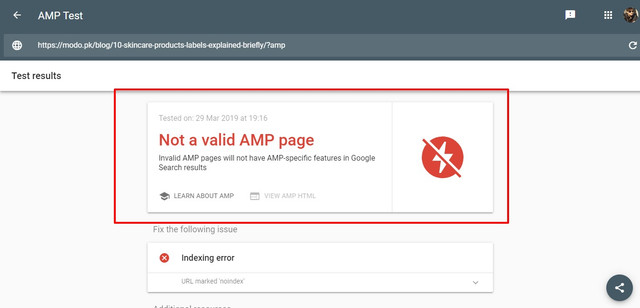
2. Search Template Default VS Custom
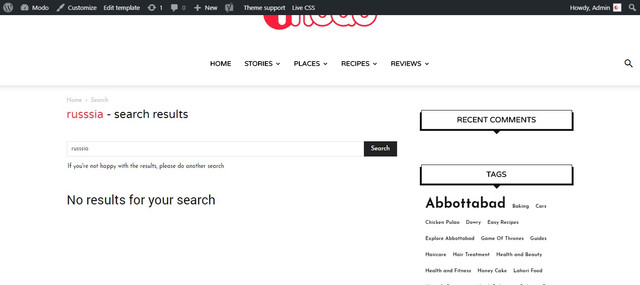
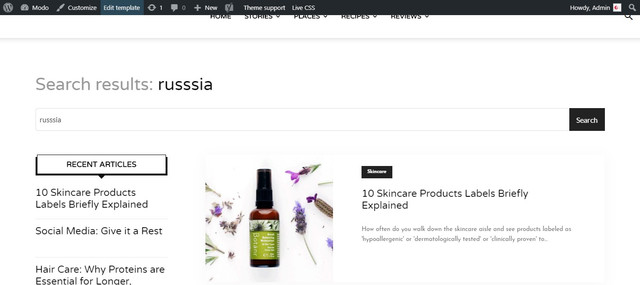
3. Composer layout for search template maybe this is an issue

4. Comments it was an additional feature request A dropdown/actual stars would be a cool addition in order to allow users to rate recipes
I have seen many themes that allow to leave rating with comments.
5. Safari Issue

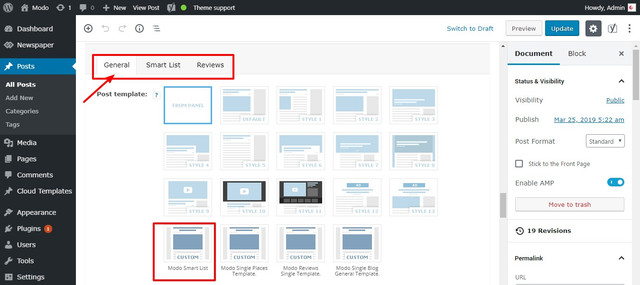
6. Smart List Template
7. Print
Here is how it looks.
https://modo.pk/wp-content/uploads/2019/03/War-of-the-Words-Game-of-Thrones-Best-Dialogues-%E2%80%93-Modo.pdf
Calin Hi,
Unfortunately this is the only way to do it for pages ( if you force with css the blocks will break ).
For article/post and category you can use some template from TagDiv Cloud Library stretch the template and apply that single post template on post ( global in the panel -> https://www.screencast.com/t/Ni3iAlcwjf7 ) and all post/article or category which will have that template set will be stretch.
If you stretch the content you need to use flex blocks or full blocks, only those will stretch to full with that you set.
Thank you!
 ceskmrozi
Hi,
Is it possible to show the hour when a new post on the Module Flex 1?
Regards,
Cesk
 mwhouston
Hi Team,
Just having some issues with the page builder after playing around with some stuff.
1) The black drop down bar along the top of the screen disappears when you move from the dashboard to any page and appears as a long list at the bottom of the page.
2) In particular Flexi Box 1 has decided to begin showing the category tags despite the option being set to hidden. Switching between hidden and show does not make a difference.
Not sure if they are related but both started happening at the same time. I am assuming I have edited something that I obviously was not supposed to. Any ideas on how to fix?
Cheers,
Matt
Calin Hi,
I think that will be more easy if you choose to use some flex blocks, those flex have some more options, you can set the layout of those on each device, in this way you’ll not need to hide a block for desktop and show it on mobile.
You can use a flex block and set settings per each device
On desktop: https://www.screencast.com/t/6HKNJjl35i
On mobile: https://www.screencast.com/t/Ik42eacS3DgK
Thank you for your understanding!
Simion C. Hi,
That is true, when designing a cloud header template what you set in it for desktop will not appear on mobile. So you have to add elements when on mobile. So for example I have this content on desktop
– http://prntscr.com/n3kwyw and this on mobile – http://prntscr.com/n3kx50
Both the desktop header content and the mobile content are loaded, it is just that when on desktop the mobile header is hidden, and when on mobile the desktop header is hidden. But the elements are still there and loaded, just hidden.
The purpose of the mobile theme is to simplify the mobile pages greatly, that is why with it active the results are noticeably better when testing with speed tools. Now it can also be used together with the AMP official plugin.
We will improve it’s current functionality in future updates. If it’s not active the same exact content and resources from desktop will be loaded on mobile, and now with the somewhat new Google algorithm when testing it will take into account each website visitors loading speed on mobile and provide a score based on this.
The issue with the background loading transition is known, we will find a solution for it. The quick fix for the moment would be to enter this code in the theme panel analytics section, enter it as the first code there (before all other codes you have entered)
<style>.td-element-style {

opacity:1!important;

}</style>
Flex blocks use one of these thumbnails – http://prntscr.com/n3l80s This allows greater flexibility by for example setting a custom height or width for the module. But it also means that the image may not be exactly as the module, like with predefined blocks.
However from what I can see the flex block in the homepage on your website isn’t using a theme created thumbnail, instead the original image is resized
– http://prntscr.com/n3lb1r
I suggest that you regenerate the thumbnails so that they are created properly
– https://forum.tagdiv.com/thumbnails-fix-strange-looking-images-on-blocks/
Also disable the jetpack image optimization module for images
– https://jetpack.com/support/site-accelerator/
Or begin by disabling this module first, and check if a thumbnail is loaded, before regenerating.
Thanks
Simion C. Hi,
Grids and Full grids cannot be placed in split rows, only flex grids can be used like that
– http://prntscr.com/n3j1nm
Please use a flex grid if you want to use such a layout. There are multiple flex grids to choose from – http://prntscr.com/n3jaok Even flex blocks can be made to look like grids. These have many customization options.
Thanks
 axehorde
 sorry for the 2 reply. WordPress support also tell me that in mobile version there are many off screen images. They talk about some problems with the thumbs.
I wouldn’t know what changes to make. I used custom height for module like slider and flex block. In the “Thumbs on Modules/Blocks” i don’t change anything.
what should I do? I was told that in the mobile the photos are loaded large even if the thumbnail is much smaller.
Calin Hi,
Indeed that demo do not use the thumbs size, that demo have a problem and we’ll fix it as soon as possible, if you want to have the same results you can replace the blocks with flex blocks, on those you can change the image size and set it on full size
-> https://www.screencast.com/t/l9LSJuuZzc20
Sorry for the inconvenience!
Thank you for you understanding!
Simion C. Hi,
1. That depends on what the page contains, maybe other factors if used, like row stretching, backgrounds, CSS styling. Best way to check if there are issues would be to copy the homepage content from the backend, into a test page and edit that with WPBakery. Do what is needed, then update and view the page.
A simple page containing normal theme blocks and grids (no flex or cloud library elements) should work just as well with both builders.
To avoid any possible issues it would be best to use just one page builder at all times, if possible.
2. This I can’t say exactly, I have seen users that use such extensions for WPBakery. In some cases there were some issues, but I don’t remember which add on was it about or what the problem was.
If it is possible, ask them if they have a trial version or if they can provide a refund in case there are problems. Be sure to test while the tagDiv composer is inactive, there could be conflicts.
Thanks
Simion C. Hi,
At the moment something like that is not possible by a theme setting. It may be considered to add an option specifically for a flex block to make it capable of this functionality, if this request will become more popular. Sorry for the inconvenience.
Thanks
 Catalin
 Hi,
You can take a look at our list of Flex Grid elements and if these do not satisfy you, you can try to create your own Flex Grid, using the API implementation. For more information about this case, you need to check our Developer Info section from here -> https://forum.tagdiv.com/developer-info/ Notice that if you are not aware of the steps which are needed to take in this case, please consider hiring a freelancer/developer to help you because we cannot provide custom work at the moment, sorry!
Thank you!
 justpaulo
 This is only for one specific Flex block, not all links. Help Please.
Calin Hi,
1. In order to make the flex block to have the same height -> https://www.screencast.com/t/RSClg8m4 you’ll need to go in Theme panel> Excerpts and set the excerpts type on letters -> https://www.screencast.com/t/1joLOGQ2 , after that you need to edit the homepage with tagDiv Composer -> https://www.screencast.com/t/BUKPsqtn
2. You need to use the TagDiv Composer , change from General to style and set the size there for example 32px and 1px line height for post title -> https://www.screencast.com/t/aNypzCreDDi
3. Please check our documentation for How category settings work -> https://forum.tagdiv.com/how-category-settings-work/
Thank you!
justpauloI really need the Flex Block to open the articles in a new tab, how I can do that?
Thanks,
 PatWire
Please bring the amp plugin back for non-mobile theme users
I would happily pay for it separately – other plugins on .org are all faulty in some way or not flexible enough
I’m sure you would make everyone very happy!!
 Avazar
How difficult would it be to create a new flex block: one with Block 5 on top of Block 11 within a 2/3 column?
 jakobe75
I know that TagDiv newspaper doesnt natively support RSS feed import, but was hoping somebody could give some advice on this.
I want to be able to put an RSS feed in a news block and have it show the featured image, title, author, date and a short excerpt. and then I want the “read more” to point to the rss origin site.
I was using the FeedWordpress plugin and then using Auto Post Thumbnail Image Pro plugin to get a featured image out of the RSS.
for the most part this works, but the FeedWP plugin doesnt give much control as to what is pulled.
although it does pull the article into a category which is essential for TagDiv composer to make a newsblock out of.
But FeedWP doesnt allow for you to set the amount of posts and sometimes it runs wild pulling way too many updates.
I was able to successfully get the featured image and feed to appear and behave using a flexi block.
but since the FeedWP plugin grabs the image as part of the feed the image would show up twice, thus ticking the box to “hide image” in the flexibox worked. but the image from the feed excerpt doesnt resize uniformally since it is embedded from the feed plugin and not a featured image. and the excerpt length or content cannot be controlled using the flexiblock layout settings.
So even thought this combo works, it isnt perfect and customization seems a little janky.
Thus this combo doesnt work for me.
I am now using the plugin called WordPress Automatic, (it’s a fantastic plugin btw, and under $30 which is very worth it as it can pull almost anything from anywhere into your site, feeds, articles, Amazon, Youtube ect.)
but it pulls the full content into the site as a post and not just as a feed, thus making the user click the article from the block, then the article is displayed in the same site, which doesnt help to direct traffic to the origin site.
although you can set a template structure to add links to the source, you cannot automatically trim and automatically have newsblock “read more” point to the origin site easily and automatically.
Has anyone had any success in creating soemthing like this and have it behave well using news blocks?
basically, my question is how do I pull in RSS feeds, display the necc desired content and have it link to the original site?
Thanks in advance for any tips or examples.
**also, a note to the developers…Tagdiv is great, easy and robust but not having a native built-in RSS function on a template system that is primarily centered around displaying “News” seems a little disconnected.
and it would be nice if there was some better options for Woocommerce since it is becoming the goto pluign for wordpress ecommerce. There should be better native support and stlying included for product display and newsblocks, styling ect.
thanks again.
 nickhowley
I’ve just started experiencing a problem when using any module that displays a list of posts. For example, when creating a flex module with three posts, it looks fine on the tagdiv composer:

But does this on the actual page:

And here’s the HTML showing the nesting:

This also happens when using
Why would it suddenly do this?
Looking more closely, it seems to be related to the excerpt, which doesn’t show even when I set it to “show”:

