
- Apitd_api_header_style::delete
- Apitd_api_header_style::update_key
- Apitd_api_header_style::update
- Apitd_api_header_style::add
- ApiAPI – Header style – Introduction
- Apitd_api_top_bar_template::update_key
- Apitd_api_top_bar_template::update
- Apitd_api_top_bar_template::add
- ApiAPI – Top Bar Template – Introduction
- Apitd_api_single_template::update_key
- Apitd_api_single_template::update
- Apitd_api_single_template::add
- ApiAPI – Single Template – Introduction
- Apitd_api_footer_template::update_key
- Apitd_api_footer_template::update
- Apitd_api_footer_template::add
- ApiAPI – Footer Template – Introduction
- Apitd_api_smart_list::update_key
- Apitd_api_smart_list::update
- Apitd_api_smart_list::add
 janabi
 Hello:)
How are you doing? Happy Easter
Sorry for the late reply, I way away for a while.
So, I did what you indicated and changed the header background on mobile from black to white. However, it is still showing the same thing. May be you check it for me on your mobile?
Thank you very much in advance
Ahmed
 cenkerinan
Hi,
I create a popup modal in the header template. It works on all pages except homepage where it says the page id isn’t set. But it is as it works on the other pages.
Why is this?
cenkerinanThe TagDiv Newspaper Temeplate does not support more than one mobile menus. You can have two on Desktop view. eg. like a top menu and a header menu but this is not possible in mobile (mainly because there is only one variale for menu on mobile [ header-menu-mobile ]. There needs to be header-menu-mobile_right & header-menu-mobile_left if the user chooses to have two menus)
 MetkaS
Hi,
I have two questions about the menu.
TOP HEADER MENU – how to delete both login and logout links? I would like to replace it with short white text. I added the text but I dont know how to change the color to white.
Link: https://antiaging.si/
HEADER MENU – I wonder if I could change menu items into two rows (I have longer text in menu).
Something like that
https://photos.app.goo.gl/5Pm5Sk244G1eiZaV7
Thanks
 Birdie
How can I configure mobile options, layout, also remove header ad for mobile
 Rhonda
 Please disregard the question. I used another header.
RhondaCould you please tell me how to change this white row in the header to black and also the line under the header image from white to black? Thank you.
https://emeraldcoastvoice.com/wp-content/uploads/2023/04/Screenshot-2023-04-08-at-3.45.39-PM.png
 juniordiscart
Hi
I’d like to report a bug with the ‘Slide’ element for images where the ‘Autoplay slider (at x seconds)’ setting makes our website freeze or crash after x seconds.
For our desktop version of the website, we have a Slide element in our header, showcasing some bigger stories. On desktop, this all works fine.
On our mobile version of the website, the header does not contain this Slide element, but it makes the website crash nonetheless if a value has been filled in that particular setting. After x seconds, the website stops loading images and backgrounds become white and becomes unresponsive. After a while, the browser notifies that a script is blocking the page and I’m asked to stop it from running. This only happens on our mobile header.
Desktop: 
Mobile: 
 PIF21
PIF21Hello,
I’m having problems trying to change the header advertisement on my website. Currently the header advertisement is the default Newspaper banner “Image Ad.” The size of the banner Image Ad has been modified from its original size because I made the logo next to it larger–this subsequently shrunk the image ad to 575 Width x 90 Height. I’ve tried to add html ads, such as Google Adsense html or Amazon ad html in the Custom Ad tab within Element options, however Custom Ad doesn’t seem to to override the Image Ad. Also, the Custom Ad html code I enter does not save when I press Save.
How would you recommend removing the default Newspaper header banner ad and how would you recommend adding custom html such as Google Adsense or Amazon ads? Do the Width and Height dimensions of the Element or Column have to match the ad for it to save and appear? Thank you.
 anonymous anonymous
 The logo for this header is looking extremely big and I want to remove the extra white space from above and below the logo how can I do that?
-
This reply was modified 3 years by
 Calin.
 pepperandplatinum
Every update so far including the recent update to Newspaper breaks my header image back to the text (image attached)
I have reuploaded them via Theme Panel and nothing works to get my image back.
 Anamaria
 Hi,
1. The colors from Theme Panel, are general colors, you need to edit with tagdiv Composer, to change the style -> https://i.imgur.com/djPDZSH.png -> https://i.imgur.com/oKNcGyv.png
2. Usually, the ads are set in the element AD BOX, and you can remove it, edit with tagDiv Composer, select the Ad box element and with right-click you can delete it => https://www.screencast.com/t/2GfCVx9BCAw7 or with drag & drop place it into the deleting red zone from the bottom right of the page
3. You have set the global background color, if you delete the global background color then this color will apply-> https://www.screencast.com/t/7Os0qyqggHRR, please let me know what you want exactly to achieve.
4.You can use a different template for every category if you use a cloud template. You can duplicate a template, install a new one and assign it to the category you like, or create one from scratch by importing a blank template and building it as you like.
Check this topic: https://forum.tagdiv.com/topic/different-logo-in-categorypage/; Here is explained how to duplicate a header correctly and make some changes for a category template or other templates.
You can assign the template for each category in Theme Panel -> Categories.
Thank you!
 Calin
Calin Hi ilouie,
The header on the mobile will disappear regardless of whether the one on the desktop is sticky or not because another header is used on the mobile version, which in turn may or may not be sticky.
Also, our theme offers the possibility to choose between 3 options for the mobile version: the responsive version of the theme, mobile theme plugin and mobile page template (these can also be used in combination) – https://www.youtube.com/watch?v=SpGkOnJeNZY
Thank you!
 libertylens
I am experiencing two issues related to signing up / signing in:
1. The option to log in or sign up is not appearing on my header.
2. When a visitor attempts to sign up (to leave a reply or comment), the form appears, but times out when you try to submit it. I have had one user send me a screenshot that had a banner saying that the “Captcha verification failed”.
Appreciate some help.
Ken
 ilouie
 I think you missed this: ” if I make it sticky, then I go back to the original problem I always had and that is, the mobile part of the header will disappear, hence the reason I created a Mobile Template,”….
Anamaria Hi,
So, do you want to have more also, on sticky? If yes, then please edit the menu that is on the sticky header.
Thank you!
Calin Hi,
You can enable/disable the sticky menu using the header manager – https://i.imgur.com/sn6BVIW.png or you can select the row that you want to become sticky and activate the sticky option for it -https://i.imgur.com/9nuSbub.png
Thank you!
 danshul
Hi
I am trying to add Google Tag and Adsense script in the header and body section in the theme file editor but it’s either gets removed or not implemented (It doesn’t show in source code or developer tools).
I had to use a third-party plugin for this and it’s working fine.
ilouie The only way I were able to fix this issue was by installing a Pre-built website and deleting the Mobile template. It shouldn’t have to be this way. I’m now using Header Template – Italy Report PRO, but now I have a different issue. I can’t figure out how to make the header sticky. I don’t want it to show the second dropdown part of it showing the logo and the menu. If I make it sticky, I can’t find the row that would stand still, unless I delete the top row with the adbox. Also, if I make it sticky, then I go back to the original problem I always had and that is, the mobile part of the header will disappear, hence the reason I created a Mobile Template, and unfortunately that didn’t work either. I like this theme, but it seems to have some issues. Please show me what I’m doing wrong. The fix you gave me for the other issue didn’t work either. Thanks
Anamaria Hi,
I answered here -> https://forum.tagdiv.com/topic/header-ads-banner-is-not-display-on-mobile-home/ Please check if added the banner for all devices.
Thank you!
 socius
I lost the header and using unknown tricks I was able to remove the error message. I tried everything that can be found on the forum about this topic, but nothing helped. I was able to add a login on the home page. Everything else, for example when I open one of the categories, it does not allow me to change. It installs over the cloud for hours and eventually fails to install or add the header. Please help me!
Site: oaza.pro
 Bettina
 Hello!
Edit the page with the TagDiv Composer and type “post” in the post type option : https://prnt.sc/UIkd5fOAdHAf for the posts loop and header search live elements.
Thank you!
 ngotuannghia
 To display the ad in the header of mobile, you need to edit with tagDiv Composer, select the viewport on phone, add a row and in the row add “ad box” and set the code for the ad.
It not working 🙁
-
This reply was modified 3 years by
ngotuannghia.
ngotuannghiaDear Admin,
I am sorry for bother you.
I have a issue relate show header banner.
Althrough do not disable header banner on mobile, but it still not show
(show as normal on Desktop mode)
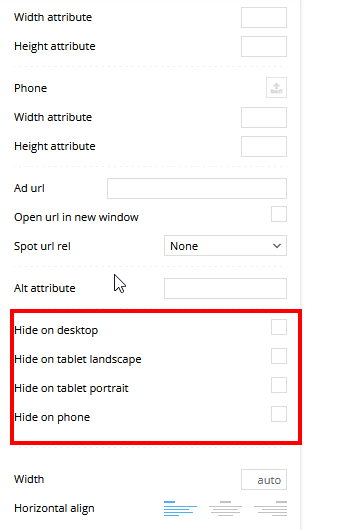
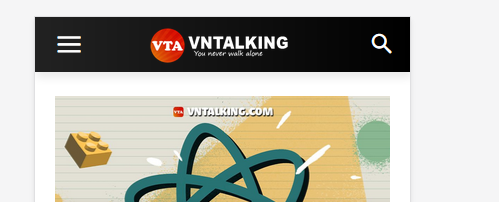
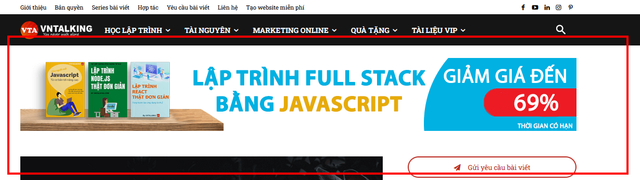
Please help or guide me what i wrong.
Thank
 zvonchuk
Hello,
I need to show three banners in turn in the site header in one place.
Can you tell me if this can be done with a theme?
if not, please tell me how to place the SHORTCODE in the right part of the page?
Thank you in advance.



