
- NewsmagHeader styles
- NewsmagHeader ads
- NewsmagtagDiv Composer Tutorial
- NewsmagCategory templates
- NewsmagSmart list ads
- NewsmagWeather Widget
- NewsmagInstagram widget
- NewsmagPage Menu
- NewsmagMain menu
- NewsmagTop bar templates
- NewsmagLogin – how to enable the user registration
- NewsmagLogo & Favicon
- NewsmagFooter templates
- NewsmagCategory grid styles
- NewsmagCategory top post styles
- NewsmagHow category settings work
- NewsmagTheme colors introduction
 radioheadcastro
Hi, the header ad was showing correctly until we updated the theme.
Header ads are showing fine on desktop and tablet. You can take a look here:
 argozero
 I’ve found the issue and like to share it for whoever might also have an issue with CLS…
I had the top header ad within a div tag. That caused the whole problem. Now the ad shortcode (Advanced ADs Plugin) is directly in the header ad placement and CLS is fixed.
 Scholars
 I’m not looking for a popup, I’m looking to add a button in the mobile header
Scholars Please check out a reference site https://www.onedegree.hk/en-us. When you open it up in mobile version you can see the ‘quote’ button on the header. Is it possible to do the same with tagdiv?
 luisle
 Hi, look the left screen (is the home page) and see the header, and look the right screen (is a single post page) and see the header, you can see that are different, and i want the same, the global header for all, and the global header is the header that you see in the left screen.
Regards.
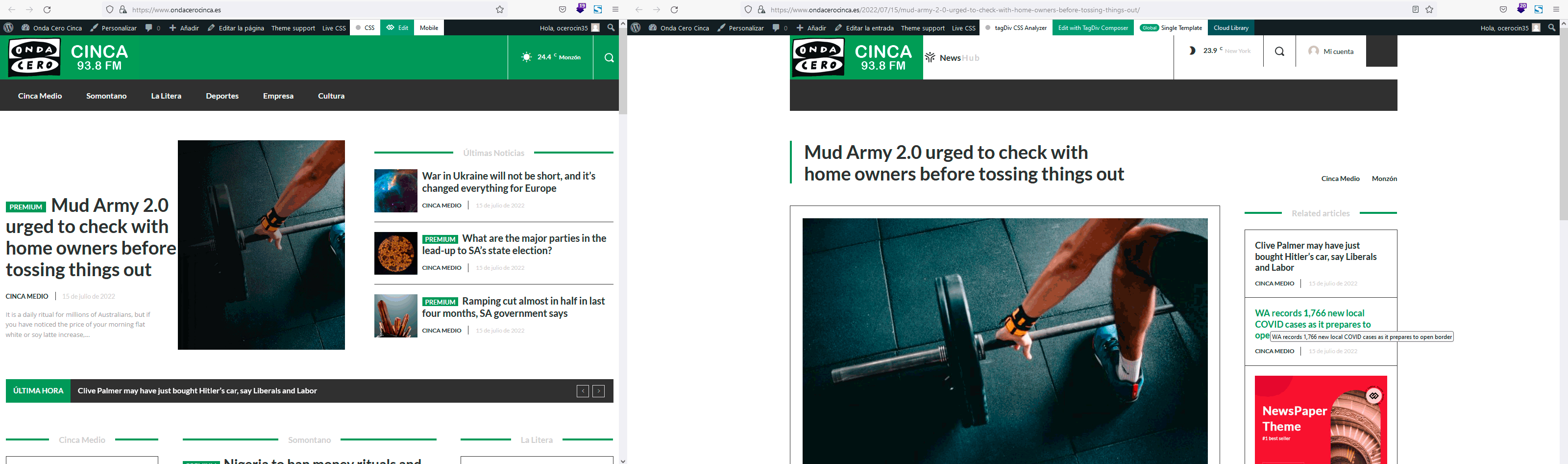
 Anamaria
 Hello,
You can create a custom modal popup for login, you need to create a page and add in that page the element header login -> https://forum.tagdiv.com/modal-popup/ and after set the trigger for a button. Set the modal popup in the phone viewport in mobile menu -> https://i.imgur.com/cuBYIrq.png
Thank you!
ScholarsHi, I would like to add a button (something like an apply now button) on the header of the mobile version layout. Is there any template layout/instruction on how to do so? I tried to add a button but it seems it cant fit with my logo, mobile menu icon and search icon.
luisle Ok, but what happend with single post page? it doesn’t have the global header and i don’t know why.
Regards.
 Bettina
 Hello!
If you have a global header template, then any page you create it will have the same header.
Thank you!
luisle I have that you say, but when i go to a post, the header is not the global header, so that my question, i only have the problem with posts, and i don’t know if i will have the same problem with the single pages (i have not create any at this time).
Regards.
Bettina Hello!
Check in the Website Manager, open the dropdown with your header template and set it as global. Also, you can set it from Dashboard -> Cloud Templates as in the example below:
https://prnt.sc/b5qFjeb2Jgvb
Thank you!
Bettina Hello!
Go to Dashboard -> Cloud Templates and set the header template as global.
Thank you!
 drjeff_007
 Hi Bettina,
Thanks for your help and it fixed most of the problems.
Just 2 other things I could use help with on the header
are in this video: https://www.screencast.com/t/lFxb7DI10JY
Thank you!!!
-
This reply was modified 4 years by
drjeff_007.
luisle Ok, i have change correctly colors and head in homepage, but… what i need to do to show the same in the other pages? because if i go to a any single news, the header is different.
Regards.
Bettina Hello!
There is a sticky header. Please follow the video to see where you can find and build your sticky header on mobile and desktop too: https://www.screencast.com/t/l6v2Belt
Make sure you have there the element called ” Header main menu “.
Thank you!
Anamaria Hello,
You need to add the favicon, in Theme Panel -> Header -> Logo and Favicon => https://www.screencast.com/t/H4ucPC2wwz
Also, on the homepage there’s an option Customize icon => https://www.screencast.com/t/I2uVvP4b -> Site identity -> Site icon -> Change image -> publish => https://www.screencast.com/t/lY9WEOZEj
Please make sure that you have cleared your cache.
Also, you can check this article https://developers.google.com/search/docs/advanced/appearance/favicon-in-search
Thank you!
Anamaria Hello,
1. You have a standard header, so to change the logo please go to Theme Panel -> Header -> Logo and delete the text https://i.imgur.com/CuLt5Rx.png, please check if you have a header template here, if yes, please assign it -> https://i.imgur.com/PN54b7A.png
2. Please check if you have set a margin-top or padding-top on the content https://i.imgur.com/fhu0tBx.png
Thank you!
Anamaria Hello,
Please check this topic: https://forum.tagdiv.com/topic/different-logo-in-categorypage/ ; Here is explained how to duplicate a header correctly and do some changes for the category template.
Thank you!
drjeff_007Hi,
I created a video to explain the issue I’m having…
https://www.screencast.com/t/jZ8bxZ8u8
https://thesidehustlehacker.com/
Would really appreciate your help as been trying to figure it out for over an hour.
Thanks!!!
 atahualpa
Hello,
Please, I need your help. I have migrated to Newspaper 11 and now I have two problems with my website. https://atahualpa.com/
1. I want to delete the extra Logo Header on my website. I am trying to click on the logo header but I can’t; the rows below are selected but the logo header no.
2. The home menu is not showing correctly on all the pages. I want the menu like on this page: https://atahualpa.com/about-us-2/. But it shows different on the other pages, like here: https://atahualpa.com/student-accommodation-in-quito-ecuador/
Thanks for your help
 casprom
 Hi guys,
Just a follow up for future reference to whoever finds himself in the same situation and needs this:
After my last reply in here I decided to try contact the support through email and Tagdiv team was quick to help. Through access to the website back office we were able to find that Cloud Header and Cloud Footer were sending too many requests, specially as all of them were mega menus. So we switched the Cloud Footer one to a normal menu and on mobile we set them all to normal too, and it provided stability to the website.
Thank you all for the support.
 Calin
Calin Hi,
For this you need to edit in tagDiv Composer a mobile page template – > https://i.imgur.com/C9pkUh6.png then from manager convert the header and footer -> https://i.imgur.com/iGvv083.png -> https://i.imgur.com/ygtknwT.png
I hope this will help you!
Calin Hi,
I believe that you can try something like this, set the shortcode in the mobile header ad
section then use a custom css to display that shortcode in the top.
#td-outer-wrap {

    margin-top: 100px;

}

.td-a-rec.td-a-rec-id-header_mob{

    position: absolute;

    top: 30px;

}
Set the code in this place -> https://i.imgur.com/Lptdv4Y.png
I hope this will help you!
Thank you!
 News Door 24
 Theme Panel – https://im.ge/i/FTbUYL
Custome Code – https://im.ge/i/FTb9zJ
Header – https://im.ge/i/FTbmOy
Anamaria Hello,
Maybe you have a header style set from Theme Panel, please make sure you the tagDiv Standard Pack. Also, the same for the footer.
We do not encourage you to use Wp Bakery at all. Please note that the WP Bakery has a conflict with the TagDiv Composer. Please use only one builder and not both. So, I gladly recommend you to shift from WPBakery to Composer, because WPBakery is an old builder plugin. Please check our guide to know how to shift from WPBakery to Composer: https://www.screencast.com/t/6xLVMmlsY ; https://www.screencast.com/t/zWHrRmK1LQC ; https://www.screencast.com/t/vuFdT9Stx ; https://www.screencast.com/t/DWbSf3qj ; https://www.screencast.com/t/QuHyGccTK71v
Thank you!



