
- NewsmagHeader styles
- NewsmagHeader ads
- NewsmagtagDiv Composer Tutorial
- NewsmagCategory templates
- NewsmagSmart list ads
- NewsmagWeather Widget
- NewsmagInstagram widget
- NewsmagPage Menu
- NewsmagMain menu
- NewsmagTop bar templates
- NewsmagLogin – how to enable the user registration
- NewsmagLogo & Favicon
- NewsmagFooter templates
- NewsmagCategory grid styles
- NewsmagCategory top post styles
- NewsmagHow category settings work
- NewsmagTheme colors introduction
 passion-for-ocean
 Thank you for your reply. How is that possible – the imported header from the cloud (hero) also show a video on all screens but the mobile phone.
/Lena
 Brigitta
Hi,
in my search results I need to get not only posts with matching titles but also posts with matching content. Since I was not sure if WordPress Search would get those I installed Relevanssi. Now I get the complete results in the results page but the header live search still lists only posts with matching title. How can I change that?
 Calin
Calin Hi,
The layout it looks like that because the header is set as absolute (fixed), and it is like this -> https://i.imgur.com/6t51Td0.png but should be like this -> https://i.imgur.com/1RPxy8E.png
Please check the header -> https://i.imgur.com/sWa09rf.jpg if is not set as overlay, if is, then set it as default.
Thank you!
Calin Hi,
So, if I understand correctly, in bot situations you want to edit the link only to use the Ultimate Member’s user pages. Unfortunately, the mobile menu and menu login elements do not have an option to set a custom link, so I think that a solution will be if you edit the theme files.
For the menu login you can edit the wp-content/plugins/td-subscription/includes/shortcodes/tds_menu_login.php and replace the code from herf=”” -> https://i.imgur.com/rpwDNeY.png
For the rest of login/register are more modals.
This file wp-content/plugins/td-composer/legacy/Newspaper/parts/header/td-login-modal.php is responsible for the login/register content when the login button is selected.
This file wp-content/plugins/td-composer/legacy/Newspaper/parts/login.php is responsible for the login/register using the responsive version for theme for mobile devices.
This file wp-content/plugins/td-composer/mobile/parts/login.php is responsible for the login/register using the mobile theme plugin layout.
And this file wp-content/plugins/td-composer/mobile/parts/register.phpis responsible with the mobile theme plugin to display the content for login/resister
If you want to change the link from the sign in button you need to edit this file wp-content/plugins/td-composer/legacy/Newspaper/parts/login.php (because you are using the responsive version), what you need to do is to replace the id
What you need to do is to replace the id=”login-link-mob” with href=”your-url” https://i.imgur.com/QiPAxSi.png -> https://i.imgur.com/mlnxJey.png
Hope this will help you!
Thank you!
 K2LABS
Hi,
We have a custom post template (based on Cloud Template) with a custom header assigned to that post template.
We use this for all our post.
Is it possible for us to create an additional header and assign this header for certain posts (using the post template)?
I realize we can create custom post + custom header and use that only for 1 post but is there is a simpler solution to this?
Thank you.
 propagare
Editing the mobile version of a page, I clicked Website Manager to select the mobile header for the page. As it didn’t exist, I used the conversion tool.
A new header was created and I could choose and mark it as global (https://i.imgur.com/u2f6CKg.png), but two things happened:
– Even selected and saved, it is not being displayed when I access the page from mobile
– It does not appear for editing in tagDiv Cloud Templates (https://i.imgur.com/LJboWp7.png)
How to solve this?
Calin Hi,
If you are using a standard header, then you need to use the options from the theme panel -> https://i.imgur.com/siiftyE.png
I hope this will help you!
 Bettina
 Hello!
I can see that you use a sticky header or the row is set as sticky: https://prnt.sc/iOy5k6GgBzOe
You can edit the sticky header like this and change the way it is looking: https://www.screencast.com/t/rt2wWAt3JFEY
Thank you!
 jtoney
I’m looking at the theme panel and attempting to make sense of the ad system. I have response ads setup with adsense and I’ve pasted the code within the header ads section. When I paste this it does nothing on the page. So I pasted the same within custom ad 1 and still nothing comes up.
When I goto the homepage I see its using AD BOX so I select the appropriate area, and still nothing. What am I missing to make this work?
 partharoy.heal
Hi,
Team Tag Div,
I installed the “Default Pro” prebuild website of the ‘Newspaper 11 theme’ in my website named viraljagat.com. But after customization, the header and footer are not showing properly on the mobile and desktop. Header logo also missing! Please help me to solve this problem as early as possible.
Below are the URLs of some of the photos:
1)https://sarkarijagat.in/wp-content/uploads/2022/04/Screenshot-25.png
2)https://sarkarijagat.in/wp-content/uploads/2022/04/Screenshot-27.png
3)https://sarkarijagat.in/wp-content/uploads/2022/04/Screenshot-26.png
4)https://sarkarijagat.in/wp-content/uploads/2022/04/Screenshot-24.png
5)https://sarkarijagat.in/wp-content/uploads/2022/04/Screenshot-23.png
6)https://sarkarijagat.in/wp-content/uploads/2022/04/Screenshot-22.png
My website is:https://viraljagat.com/
Gmail: info.papaisaha@gmail.com
Please help…
partharoy.healHi,
Team Tag Div,
I installed the “Default Pro” prebuild website of the ‘Newspaper 11 theme’ in my website named viraljagat.com. But after customization, the header and footer are not showing properly on the mobile and desktop. Header logo also missing! Please help me to solve this problem as early as possible.
Below are the URLs of some of the photos:
1)https://sarkarijagat.in/wp-content/uploads/2022/04/Screenshot-25.png
2)https://sarkarijagat.in/wp-content/uploads/2022/04/Screenshot-27.png
3)https://sarkarijagat.in/wp-content/uploads/2022/04/Screenshot-26.png
4)https://sarkarijagat.in/wp-content/uploads/2022/04/Screenshot-24.png
5)https://sarkarijagat.in/wp-content/uploads/2022/04/Screenshot-23.png
6)https://sarkarijagat.in/wp-content/uploads/2022/04/Screenshot-22.png
My website is:https://viraljagat.com/
Gmail: info.papaisaha@gmail.com
Please help…
 gtaaaa
What do I have to do to fix this issue?
passion-for-oceanHi,
I imported a header from the cloud (think it was “hero”). The video works super on all screens, EXCEPT mobiles. What can I do? On all screens, it is added as row background. I have stretched row and content. When I do the same on mobile header – the video just appear as a random still image (from the video). So for now, I have just added a picture for the mobile version. Website: http://www.canarywhistler.com Would love to add the same video to mobiles…
Calin Hi,
Did you checked the shadow on both row and header menu ? -> https://i.imgur.com/UDetuZX.png
Thank you!
Calin Hi,
The mobile menu can be edited using the options from here -> https://i.imgur.com/hfbUKLP.png
Also, if it is a cloud header, you can edit it using tagDiv Composer -> https://i.imgur.com/FynkKd4.png
Thank you!
Calin Hi,
I think it would help a lot if you assigned the cloud header as a general to see exactly how the site appears.
Then to increase the width of the header, you can select the row in the header and use this option -> https://i.imgur.com/wmJF9dd.png
I hope this will help you!
Calin Hi,
Maybe there is something that it is interfering, but please set the border bottom on the header menu -> https://i.imgur.com/Wknn2l0.png
Thank you!
 kimstipguide
 Calin
thank you.
You need to create a new mobile menu.
Does the first start start with a blank screen?
(Are you currently working on the mobile screen separately in cloud templates/Header Template 15?)
Please explain the most basic starting point.
————————————————————————————
Yes, I managed to catch it -> https://i.imgur.com/TaHGlxt.png
Normally that auto ad should have been positioned either above or below the mobile header.
What I can recommend is to change the structure of the mobile menu, please try those settings -> https://i.imgur.com/BgkCwwK.png drag the menu, logo and search elements and make sure that those are set inline -> https://i.imgur.com/3tbCnoj.png after that use this option on column -> https://i.imgur.com/tHPav1h.png
————————————————————————————
after that
As above method,
It looks like we should move on.
Thanks for the always great explanation.
 RobertByrne97
Whenever I use my header search button in a new tab which is not in the admin editor view my search bar and icon in my header does not work. Why is this? It leaves a # in the web address bar.
This action also works as a “to the top” button and my webpage will go up to the top of the webpage. Please help me solve this problem, it’s my 2nd time asking.
 Archerix
Need some help, there is something that I’m probably missing, I’m trying to move from the standard header to the cloud Header template default pro (trying to control the showing of ads on mobile since the bug), but I can´t get the same look as you can see in the screenshots, I can’t stretch the menu bar to the width of the page, showing tow black spots
How can I edit de Default pro to get the same look?
Live website
https://www.otakupt.com/wp-content/uploads/2022/04/Untitled-8.jpg
Edited Cloud
https://www.otakupt.com/wp-content/uploads/2022/04/Untitled-10.jpg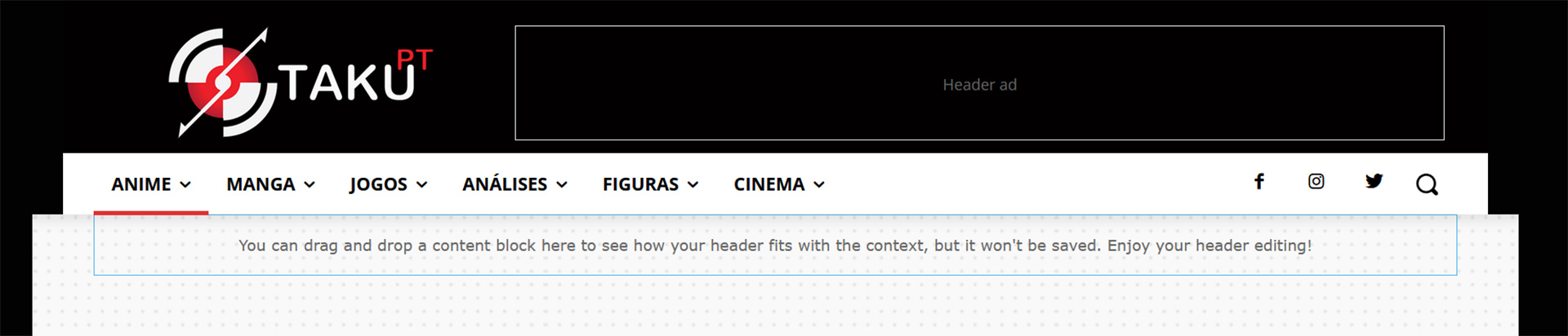
 gbmagazine
 Hi Bettina, I tried all these but its still not working, I re-imported header template but again the sticky header is not working, you can further check the backend, below is login access:
you can further check website backend, below is login access:
Bettina  drjeff_007
Hi,
I’ve been trying for 20 minutes to Remove Shadow Border on the global header.
Please see pic: https://www.screencast.com/t/yYqalsDG8bz9
Thank you!
Calin Hi,
Yes, I managed to catch it -> https://i.imgur.com/TaHGlxt.png
Normally that auto ad should have been positioned either above or below the mobile header.
What I can recommend is to change the structure of the mobile menu, please try those settings -> https://i.imgur.com/BgkCwwK.png drag the menu, logo and search elements and make sure that those are set inline -> https://i.imgur.com/3tbCnoj.png after that use this option on column -> https://i.imgur.com/tHPav1h.png
I hope this will help!
 OCLarry
I know you don’t support the GeoDirectory plug-in, but I have seen multiple examples where it is used. In specific, this one in your showcase:
https://www.siemreap.net/directory/
The theme is Newspaper. It looks the Directory landing page was built in TagDiv Composer like this (and which I am trying to have my web guy replicate):
Below the header row and breadcrumbs…
Top row is expanded to cover 100%. Within the row is a slider with local images displaying in background.
Within that row is an inner row – container with three rows inside it
Row 1 – td text with title
Row 2 – another row with a search form — (in this case, it is GeoDirectory Advanced Search so it only searches the Directory places database, not the entire site database)
Row 3 – Below that another text with tile row with a horizontal list of most popular categories
Then below that, we have another row (not extended) with a sidebar
and inside that are multiple category rows (each a horizontal list of 3 columns)
The main Nav menu would connect with this landing page as a custom link
Then the Row 3 list of category links could also be custom links (in this case to the top 3 posts in a GeoDirectory archive pages.
I know you don’t support the GeoDirectory part but does the TagDiv construction sound correct to you?
The site I am trying to build is AccessLosAl.com and I’m trying to get the Directory landing page to look like this:

Thank you for any help.



