
- NewsmagHeader styles
- NewsmagHeader ads
- NewsmagtagDiv Composer Tutorial
- NewsmagCategory templates
- NewsmagSmart list ads
- NewsmagWeather Widget
- NewsmagInstagram widget
- NewsmagPage Menu
- NewsmagMain menu
- NewsmagTop bar templates
- NewsmagLogin – how to enable the user registration
- NewsmagLogo & Favicon
- NewsmagFooter templates
- NewsmagCategory grid styles
- NewsmagCategory top post styles
- NewsmagHow category settings work
- NewsmagTheme colors introduction
 MESOTU
 I’ve done a bit of digging on this and I think Chris is right. In HTML5, if the page is properly formatted, then it is possible to use multiple H1 tags provided they are clearly attributed to the header in the header section and within the body you use <article> tags. Here’s a quick run-down: https://www.greenlanemarketing.com/blog/seo-101-seo-and-multiple-h1-tags/
I think the most important point is that, as Chris said, they must be used correctly. Was definitely a learning experience for me. Thanks for the debate guys.
Cheers
 Edward
 To customize your new Main Menu:
1. Start to add menu items from the left panels (Homepages, Pages, Links, Categories (in your case!))
2. You can manage your menus by using the drag and drop functionality and rearrange the menu items in the desired order.
3. After setting up your menu, scroll down to the bottom of the page and assign the menu to one of the 3 Theme Locations at the bottom. Select Header Main for Main Menu.
4. Click the Save Menu button
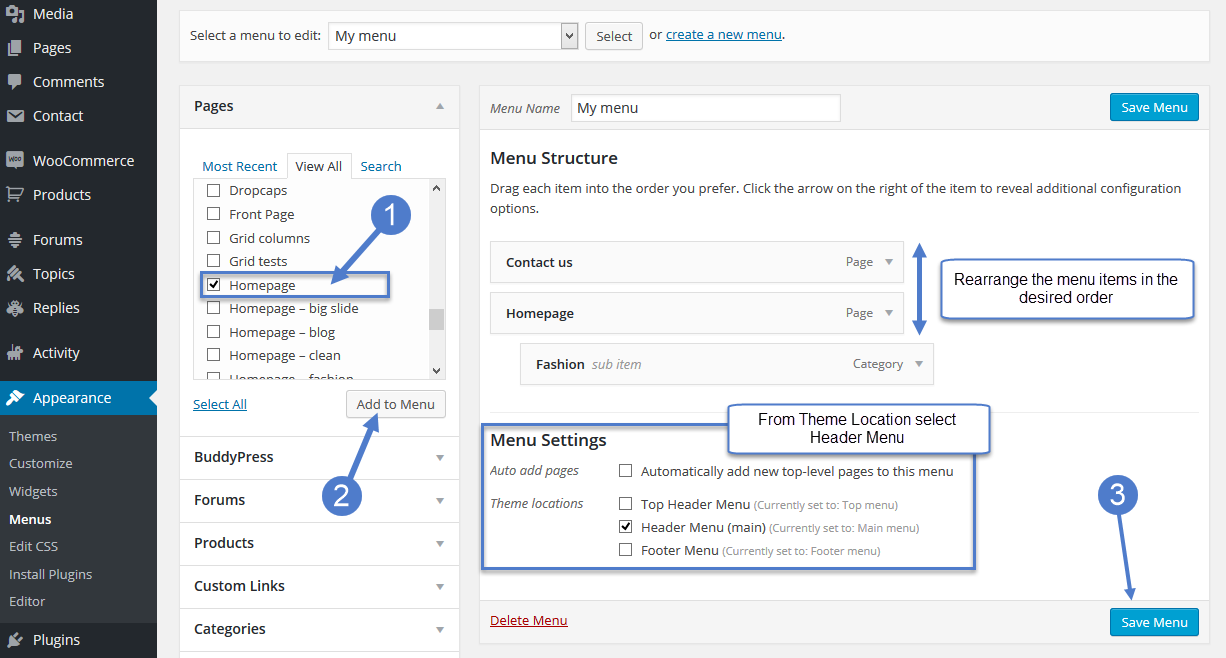
https://forum.tagdiv.com/main-menu/
-
This reply was modified 9 years by
Edward.
 lazdim
 Dear Simion,
Thank you so much for your immediate and informative reply.
I managed to fix everything, following your clear instructions, but the time.
I need to show the post’s published time in module 8, prior to the post’s title.
So, I opened the file td_module_8 and I tried the following:
1.
<div class="item-details">
<?php echo get_the_time( '', $post->ID ); ?>
   <?php echo $this->get_title();?>
2.
<div class="item-details">
<?php echo the_time('g:i a'); ?>
   <?php echo $this->get_title();?>
3.
<div class="item-details">
<?php echo this->get_the_time(); ?>
   <?php echo $this->get_title();?>
For 1 and 2, I get this result (I don’t even know where this time stamp comes from):
http://marketpost.gr/docs/result1and2.png
For 3, the website crashes and I get nothing below the header and the main menu (apparently, it doesn’t recognizes what $this-> refers to).
I would appreciate it very much if you could help me with this issue and, maybe, give me a hint or an example.
Since we are discussing about module 8, I have another question (may be more easy).
I would like to change the categories tabs on hover, not on click.
Also, I would like the posts to be preloaded and don’t load at the time I choose another category tab.
If I don’t ask for too much, could you help me with the jQuery to fix that?
Here is a very short video of what I am trying to achieve:
[video src="http://marketpost.gr/docs/module-8tabs-hover.mp4" /]
Thank you for everything in advance.
-
This reply was modified 9 years by
lazdim. Reason: correct typo
 Simion C.
 Hi,
There is a solution in this topic that you could try, to count both default post page views and AMP views
– https://forum.tagdiv.com/topic/how-to-hook-hit-counter-into-amp-header/
Thanks
 talkbox808
I can’t seem to figure out how to remove the bottom margin for the header. I want my revolution slider to have no gap between the menu and the slider. http://www.mailanihawaii.com
Thank you,
cody
 kenneth.burgos
 I just had the same problem. I have solved it by deleting javascript code fragments in the following theme options: Theme Panel> Ad> Header Ad
Theme Panel> Custom Code> Custom Javascript
You must also delete all the contents of the Cache (WP Super Cache or W3 Cache or similar)
This malwere came with the latest update of the theme Newsmag and Newspaper in the month of July / August
 simchris
 A common solution is to bypass the menu and add a sticky slide down CSS/javascript button that lives at top of screen [login] that when clicked/tapped, slide down/open the login element. This is common solution to bypass menus and logic, and to have this sitewide by simply adding to the header.php.
Edward The social icons in the header and footer represent the networks you add in the social networks filed in the theme panel: https://www.screencast.com/t/IsOGy0Ge3HE
 Torasko
 Thanks, I’ll check it out. Anything else that I should take into account with the AMP-enabled posts? Also, how about getting most of the header and footer of the normal posts into the AMP-posts?
 Bogdan B.
 Hello,
Unfortunately our theme does not have any option to remove the ads on specific pages.
If you want to remove the header ad for all pages, then you should wrap the code in a condition like so:
https://www.screencast.com/t/13pG6jQKVRmW
Thank you!
Simion C. Hi,
A simple image with a link can be inserted in the ad sections of the theme panel. Like this example for the header ad
– https://www.screencast.com/t/0PHrIbY3V
Different ad scan be displayed depending on device. Please see this guide
– https://forum.tagdiv.com/using-other-ads-non-adsense-ads/
Thanks
 Catalin
 Hello Torasko,
Please refer to the following topic here -> https://forum.tagdiv.com/topic/how-to-hook-hit-counter-into-amp-header/ and try to make all the steps which were presented there.
Thanks for your understanding!
 dwarkapuria
Hello
wWe want to remove header ads from homepage and pages, please see the url we want to remove the big adsense ad from homepage .
Thanks
 willkar
Is there a way to have a popular trending tags on header like this ? (Attachment)
It would be cool to replace or add this funcion on the “News ticker” widget.
Link image: http://imgur.com/jkoONC9
 answersbysgs
Hi,
I’ve been trying to send emails from the site but get the following error message. And also get error message stating unable to send mails while signing up as new user.
“Test Message Sent
The result was:
bool(false)
The full debugging output is shown below:
object(PHPMailer)#739 (76) {
[“Version”]=>
string(6) “5.2.22”
[“Priority”]=>
NULL
[“CharSet”]=>
string(5) “UTF-8”
[“ContentType”]=>
string(10) “text/plain”
[“Encoding”]=>
string(4) “7bit”
[“ErrorInfo”]=>
string(638) “The following From address failed: support@answersby.com : MAIL FROM command failed,Authentication Required. Learn more at
https://support.google.com/mail/?p=WantAuthError 188sm5791238pgd.20 – gsmtp
,530,5.5.1SMTP server error: MAIL FROM command failed Detail: Authentication Required. Learn more at
https://support.google.com/mail/?p=WantAuthError 188sm5791238pgd.20 – gsmtp
SMTP code: 530 Additional SMTP info: 5.5.1SMTP server error: MAIL FROM command failed Detail: Authentication Required. Learn more at
https://support.google.com/mail/?p=WantAuthError 188sm5791238pgd.20 – gsmtp
SMTP code: 530 Additional SMTP info: 5.5.1”
[“From”]=>
string(21) “support@answersby.com”
[“FromName”]=>
string(17) “AnswersBy support”
[“Sender”]=>
string(0) “”
[“ReturnPath”]=>
string(0) “”
[“Subject”]=>
string(63) “WP Mail SMTP: Test mail to vishnuprakash.a@sutherlandglobal.com”
[“Body”]=>
string(68) “This is a test email generated by the WP Mail SMTP WordPress plugin.”
[“AltBody”]=>
string(0) “”
[“Ical”]=>
string(0) “”
[“MIMEBody”:protected]=>
string(69) “This is a test email generated by the WP Mail SMTP WordPress plugin.
”
[“MIMEHeader”:protected]=>
string(395) “Date: Tue, 29 Aug 2017 19:35:44 +0000
To: vishnuprakash.a@sutherlandglobal.com
From: AnswersBy support
Subject: WP Mail SMTP: Test mail to vishnuprakash.a@sutherlandglobal.com
Message-ID: <61716cf89477db026f2a7a83fce15072@mypremiumsupport.com>
X-Mailer: PHPMailer 5.2.22 (https://github.com/PHPMailer/PHPMailer)
MIME-Version: 1.0
Content-Type: text/plain; charset=UTF-8
”
[“mailHeader”:protected]=>
string(0) “”
[“WordWrap”]=>
int(0)
[“Mailer”]=>
string(4) “smtp”
[“Sendmail”]=>
string(18) “/usr/sbin/sendmail”
[“UseSendmailOptions”]=>
bool(true)
[“PluginDir”]=>
string(0) “”
[“ConfirmReadingTo”]=>
string(0) “”
[“Hostname”]=>
string(0) “”
[“MessageID”]=>
string(0) “”
[“MessageDate”]=>
string(31) “Tue, 29 Aug 2017 19:35:44 +0000”
[“Host”]=>
string(14) “smtp.gmail.com”
[“Port”]=>
string(3) “465”
[“Helo”]=>
string(0) “”
[“SMTPSecure”]=>
string(3) “ssl”
[“SMTPAutoTLS”]=>
bool(true)
[“SMTPAuth”]=>
bool(false)
[“SMTPOptions”]=>
array(0) {
}
[“Username”]=>
string(0) “”
[“Password”]=>
string(0) “”
[“AuthType”]=>
string(0) “”
[“Realm”]=>
string(0) “”
[“Workstation”]=>
string(0) “”
[“Timeout”]=>
int(300)
[“SMTPDebug”]=>
bool(true)
[“Debugoutput”]=>
string(4) “echo”
[“SMTPKeepAlive”]=>
bool(false)
[“SingleTo”]=>
bool(false)
[“SingleToArray”]=>
array(0) {
}
[“do_verp”]=>
bool(false)
[“AllowEmpty”]=>
bool(false)
[“LE”]=>
string(1) ”
”
[“DKIM_selector”]=>
string(0) “”
[“DKIM_identity”]=>
string(0) “”
[“DKIM_passphrase”]=>
string(0) “”
[“DKIM_domain”]=>
string(0) “”
[“DKIM_private”]=>
string(0) “”
[“DKIM_private_string”]=>
string(0) “”
[“action_function”]=>
string(0) “”
[“XMailer”]=>
string(0) “”
[“smtp”:protected]=>
object(SMTP)#851 (14) {
[“Version”]=>
string(6) “5.2.22”
[“SMTP_PORT”]=>
int(25)
[“CRLF”]=>
string(2) ”
”
[“do_debug”]=>
bool(true)
[“Debugoutput”]=>
string(4) “echo”
[“do_verp”]=>
bool(false)
[“Timeout”]=>
int(300)
[“Timelimit”]=>
int(300)
[“smtp_transaction_id_patterns”:protected]=>
array(3) {
[“exim”]=>
string(21) “/[0-9]{3} OK id=(.*)/”
[“sendmail”]=>
string(29) “/[0-9]{3} 2.0.0 (.*) Message/”
[“postfix”]=>
string(35) “/[0-9]{3} 2.0.0 Ok: queued as (.*)/”
}
[“smtp_conn”:protected]=>
resource(308) of type (stream)
[“error”:protected]=>
array(4) {
[“error”]=>
string(24) “MAIL FROM command failed”
[“detail”]=>
string(118) “Authentication Required. Learn more at
https://support.google.com/mail/?p=WantAuthError 188sm5791238pgd.20 – gsmtp
”
[“smtp_code”]=>
string(3) “530”
[“smtp_code_ex”]=>
string(5) “5.5.1”
}
[“helo_rply”:protected]=>
string(222) “250-smtp.gmail.com at your service, [40.83.185.163]
250-SIZE 35882577
250-8BITMIME
250-AUTH LOGIN PLAIN XOAUTH2 PLAIN-CLIENTTOKEN OAUTHBEARER XOAUTH
250-ENHANCEDSTATUSCODES
250-PIPELINING
250-CHUNKING
250 SMTPUTF8
”
[“server_caps”:protected]=>
array(8) {
[“EHLO”]=>
string(14) “smtp.gmail.com”
[“SIZE”]=>
string(8) “35882577”
[“8BITMIME”]=>
bool(true)
[“AUTH”]=>
array(6) {
[0]=>
string(5) “LOGIN”
[1]=>
string(5) “PLAIN”
[2]=>
string(7) “XOAUTH2”
[3]=>
string(17) “PLAIN-CLIENTTOKEN”
[4]=>
string(11) “OAUTHBEARER”
[5]=>
string(6) “XOAUTH”
}
[“ENHANCEDSTATUSCODES”]=>
bool(true)
[“PIPELINING”]=>
bool(true)
[“CHUNKING”]=>
bool(true)
[“SMTPUTF8”]=>
bool(true)
}
[“last_reply”:protected]=>
string(138) “530-5.5.1 Authentication Required. Learn more at
530 5.5.1 https://support.google.com/mail/?p=WantAuthError 188sm5791238pgd.20 – gsmtp
”
}
[“to”:protected]=>
array(1) {
[0]=>
array(2) {
[0]=>
string(36) “vishnuprakash.a@sutherlandglobal.com”
[1]=>
string(0) “”
}
}
[“cc”:protected]=>
array(0) {
}
[“bcc”:protected]=>
array(0) {
}
[“ReplyTo”:protected]=>
array(0) {
}
[“all_recipients”:protected]=>
array(1) {
[“vishnuprakash.a@sutherlandglobal.com”]=>
bool(true)
}
[“RecipientsQueue”:protected]=>
array(0) {
}
[“ReplyToQueue”:protected]=>
array(0) {
}
[“attachment”:protected]=>
array(0) {
}
[“CustomHeader”:protected]=>
array(0) {
}
[“lastMessageID”:protected]=>
string(55) “<61716cf89477db026f2a7a83fce15072@mypremiumsupport.com>”
[“message_type”:protected]=>
string(5) “plain”
[“boundary”:protected]=>
array(3) {
[1]=>
string(35) “b1_61716cf89477db026f2a7a83fce15072”
[2]=>
string(35) “b2_61716cf89477db026f2a7a83fce15072”
[3]=>
string(35) “b3_61716cf89477db026f2a7a83fce15072”
}
[“language”:protected]=>
array(19) {
[“authenticate”]=>
string(35) “SMTP Error: Could not authenticate.”
[“connect_host”]=>
string(43) “SMTP Error: Could not connect to SMTP host.”
[“data_not_accepted”]=>
string(30) “SMTP Error: data not accepted.”
[“empty_message”]=>
string(18) “Message body empty”
[“encoding”]=>
string(18) “Unknown encoding: ”
[“execute”]=>
string(19) “Could not execute: ”
[“file_access”]=>
string(23) “Could not access file: ”
[“file_open”]=>
string(33) “File Error: Could not open file: ”
[“from_failed”]=>
string(35) “The following From address failed: ”
[“instantiate”]=>
string(36) “Could not instantiate mail function.”
[“invalid_address”]=>
string(17) “Invalid address: ”
[“mailer_not_supported”]=>
string(25) ” mailer is not supported.”
[“provide_address”]=>
string(54) “You must provide at least one recipient email address.”
[“recipients_failed”]=>
string(45) “SMTP Error: The following recipients failed: ”
[“signing”]=>
string(15) “Signing Error: ”
[“smtp_connect_failed”]=>
string(22) “SMTP connect() failed.”
[“smtp_error”]=>
string(19) “SMTP server error: ”
[“variable_set”]=>
string(30) “Cannot set or reset variable: ”
[“extension_missing”]=>
string(19) “Extension missing: ”
}
[“error_count”:protected]=>
int(3)
[“sign_cert_file”:protected]=>
string(0) “”
[“sign_key_file”:protected]=>
string(0) “”
[“sign_extracerts_file”:protected]=>
string(0) “”
[“sign_key_pass”:protected]=>
string(0) “”
[“exceptions”:protected]=>
bool(true)
[“uniqueid”:protected]=>
string(32) “61716cf89477db026f2a7a83fce15072”
}
The SMTP debugging output is shown below:
2017-08-29 19:35:44 Connection: opening to ssl://smtp.gmail.com:465, timeout=300, options=array (
)
2017-08-29 19:35:45 Connection: opened
2017-08-29 19:35:45 SMTP -> get_lines(): $data is “”
2017-08-29 19:35:45 SMTP -> get_lines(): $str is “220 smtp.gmail.com ESMTP 188sm5791238pgd.20 – gsmtp
”
2017-08-29 19:35:45 SERVER -> CLIENT: 220 smtp.gmail.com ESMTP 188sm5791238pgd.20 – gsmtp
2017-08-29 19:35:45 CLIENT -> SERVER: EHLO mypremiumsupport.com
2017-08-29 19:35:45 SMTP -> get_lines(): $data is “”
2017-08-29 19:35:45 SMTP -> get_lines(): $str is “250-smtp.gmail.com at your service, [40.83.185.163]
”
2017-08-29 19:35:45 SMTP -> get_lines(): $data is “250-smtp.gmail.com at your service, [40.83.185.163]
”
2017-08-29 19:35:45 SMTP -> get_lines(): $str is “250-SIZE 35882577
”
2017-08-29 19:35:45 SMTP -> get_lines(): $data is “250-smtp.gmail.com at your service, [40.83.185.163]
250-SIZE 35882577
”
2017-08-29 19:35:45 SMTP -> get_lines(): $str is “250-8BITMIME
”
2017-08-29 19:35:45 SMTP -> get_lines(): $data is “250-smtp.gmail.com at your service, [40.83.185.163]
250-SIZE 35882577
250-8BITMIME
”
2017-08-29 19:35:45 SMTP -> get_lines(): $str is “250-AUTH LOGIN PLAIN XOAUTH2 PLAIN-CLIENTTOKEN OAUTHBEARER XOAUTH
”
2017-08-29 19:35:45 SMTP -> get_lines(): $data is “250-smtp.gmail.com at your service, [40.83.185.163]
250-SIZE 35882577
250-8BITMIME
250-AUTH LOGIN PLAIN XOAUTH2 PLAIN-CLIENTTOKEN OAUTHBEARER XOAUTH
”
2017-08-29 19:35:45 SMTP -> get_lines(): $str is “250-ENHANCEDSTATUSCODES
”
2017-08-29 19:35:45 SMTP -> get_lines(): $data is “250-smtp.gmail.com at your service, [40.83.185.163]
250-SIZE 35882577
250-8BITMIME
250-AUTH LOGIN PLAIN XOAUTH2 PLAIN-CLIENTTOKEN OAUTHBEARER XOAUTH
250-ENHANCEDSTATUSCODES
”
2017-08-29 19:35:45 SMTP -> get_lines(): $str is “250-PIPELINING
”
2017-08-29 19:35:45 SMTP -> get_lines(): $data is “250-smtp.gmail.com at your service, [40.83.185.163]
250-SIZE 35882577
250-8BITMIME
250-AUTH LOGIN PLAIN XOAUTH2 PLAIN-CLIENTTOKEN OAUTHBEARER XOAUTH
250-ENHANCEDSTATUSCODES
250-PIPELINING
”
2017-08-29 19:35:45 SMTP -> get_lines(): $str is “250-CHUNKING
”
2017-08-29 19:35:45 SMTP -> get_lines(): $data is “250-smtp.gmail.com at your service, [40.83.185.163]
250-SIZE 35882577
250-8BITMIME
250-AUTH LOGIN PLAIN XOAUTH2 PLAIN-CLIENTTOKEN OAUTHBEARER XOAUTH
250-ENHANCEDSTATUSCODES
250-PIPELINING
250-CHUNKING
”
2017-08-29 19:35:45 SMTP -> get_lines(): $str is “250 SMTPUTF8
”
2017-08-29 19:35:45 SERVER -> CLIENT: 250-smtp.gmail.com at your service, [40.83.185.163]
250-SIZE 35882577
250-8BITMIME
250-AUTH LOGIN PLAIN XOAUTH2 PLAIN-CLIENTTOKEN OAUTHBEARER XOAUTH
250-ENHANCEDSTATUSCODES
250-PIPELINING
250-CHUNKING
250 SMTPUTF8
2017-08-29 19:35:45 CLIENT -> SERVER: MAIL FROM:
2017-08-29 19:35:45 SMTP -> get_lines(): $data is “”
2017-08-29 19:35:45 SMTP -> get_lines(): $str is “530-5.5.1 Authentication Required. Learn more at
”
2017-08-29 19:35:45 SMTP -> get_lines(): $data is “530-5.5.1 Authentication Required. Learn more at
”
2017-08-29 19:35:45 SMTP -> get_lines(): $str is “530 5.5.1 https://support.google.com/mail/?p=WantAuthError 188sm5791238pgd.20 – gsmtp
”
2017-08-29 19:35:45 SERVER -> CLIENT: 530-5.5.1 Authentication Required. Learn more at
530 5.5.1 https://support.google.com/mail/?p=WantAuthError 188sm5791238pgd.20 – gsmtp
2017-08-29 19:35:45 SMTP ERROR: MAIL FROM command failed: 530-5.5.1 Authentication Required. Learn more at
530 5.5.1 https://support.google.com/mail/?p=WantAuthError 188sm5791238pgd.20 – gsmtp
2017-08-29 19:35:45 The following From address failed: support@answersby.com : MAIL FROM command failed,Authentication Required. Learn more at
https://support.google.com/mail/?p=WantAuthError 188sm5791238pgd.20 – gsmtp
,530,5.5.1SMTP server error: MAIL FROM command failed Detail: Authentication Required. Learn more at
https://support.google.com/mail/?p=WantAuthError 188sm5791238pgd.20 – gsmtp
SMTP code: 530 Additional SMTP info: 5.5.1
“
 Flavia_L
 New message:
Template is missing. Standalone themes need to have a index.php template file. Child themes need to have a Template header in the style.css stylesheet.
Simion C. Hi,
If you set them to no stretch, then that is how the header style and footer style you are using look. These is how the header styles look
– https://forum.tagdiv.com/header-styles/
The website will become boxed only when a background image or color is set
– https://forum.tagdiv.com/background-introduction/
Thanks
Simion C. Hi,
1. The ajax filter is available for all the blocks. You can set it in each of the block ajax section
– https://www.screencast.com/t/KEz2VVzXkQlk
There are blocks that do not display a featured image thumbnail, that you can use. Like these blocks
– https://demo.tagdiv.com/newspaper/block-9/
– https://demo.tagdiv.com/newspaper/block-10/
The meta information you do not need to display on the modules can be disabled in the theme panel, the category tag as well
– https://www.screencast.com/t/Wj1zskzjSTI
– https://www.screencast.com/t/XnJUgje9b
Here you can see the available block header styles as well
– https://demo.tagdiv.com/newspaper/block-header-1/
2. Each module has a structure and it displays the information accordingly in the predefined order. This is an example of a module structure
– https://www.screencast.com/t/zoupp71E2G0
To display the date next to the category tag everywhere, would require modification to all the modules. Also the styling will probably need modification, for some modules.
We have not tested plugins like the exchange widget you mention. I have not seen it mentioned on the forum. The chances for it to work properly are probably the same as for any other theme. Maybe they can provide a free test version to try it out, before purchasing it.
The theme has a simple exchange widget, not that advanced however
– https://demo.tagdiv.com/newspaper/exchange-widget/
Placing it above the header would require the widget shortcode to be entered in the header template file directly
– https://www.screencast.com/t/sb97pLEjzbX
The date in the Business demo is custom made. It is made of a text with title element
– https://www.screencast.com/t/YjCyGTfUmy
And a Raw HTML element with this code
– https://www.screencast.com/t/CfjsXOYKBR
Thanks
 ashokbasnetashu
 Thank You. Right now I’m working on my local computer. I’ve another question.
How to change the background color of header containing logo section only. Check this screenshot https://prnt.sc/gecfbq
lazdimHi,
I would like to make a couple of questions for which I didn’t manage to find the respective information in the documentation:
1. I need to make a block with category tabs (AJAX filter by category) but I need to show only the posts’ title and time they were added, not the featured image.
I am attaching 2 images as examples (category-filtered-tabs-example and category-filtered-tabs-example2).
You can see them here:
http://marketpost.gr/docs/category-filtered-tabs-example.png
http://marketpost.gr/docs/category-filtered-tabs-example2.png
Don’t bother about the CSS styling of the examples. I just need to know how to show ONLY the title and the time stamp of the post.
2. About the time stamp… Can I have it next to the posts’s category everywhere, meaning home page posts, category posts, featured posts etc?
I understand that this can be accomplished with some extra PHP code in your template files but… I need it.
I would appreciate it if you could help me with that issue.
Also, I would like to ask the following, third-party, question and I would appreciate it if you could help me with that.
I need to have a ticker widget showing the stock values. I found a nice plugin: https://codecanyon.net/item/premium-stock-market-widgets/18686543
I like the ticker that shows at the end of the demo page (http://webthegap.com/products/premium-stock-market-widgets/).
However, I don’t know if it is compatible with the theme. Do have any experience on that plugin? If not, there any other, similar with that, to suggest?
This is the result I would like to have (it is a Greek website, so don’t be scared by the language): http://www.euro2day.gr/ I need the ticker just above the header, as it is showed here.
Thank you in advance for your time.
P.S. I just deleted, by accident, the date from the right of the home page, above the weather widget. I can’t find the date widget in tagDiv Composer. Is there a way to put it back?
Simion C. Hi,
That depends on what exactly you did. Please provide more details or some useful screenshots so we can understand the situation better.
Maybe you are referring to the header and footer elements width. That can be changed in the theme panel
– https://www.screencast.com/t/HbqUyL3JG4V
Thanks
 BORA OH
Hello. I would like to set in PC version on the mobile. I removed code in the theme editor header.php (mobile/header.php)” <meta name=”viewport” content=”width=device-width, initial-scale=1.0, maximum-scale=1.0, user-scalable=no”>”, but it was not change at all. Please help me . My web site is http://interiornews.kr/
 masdi
masdiOn my site, top menu not show on mobile version. As you know, I use header style 3 and enable Top Bar.
ashokbasnetashu After deactivating tagDiv Social Counter plugin it worked. How to change the background color of header containing logo section only. Check this screenshot https://prnt.sc/gecfbq
Simion C. Hi,
The font proprieties for the header menu can be changed in he theme panel
– https://www.screencast.com/t/LZvDmLohFCp
You could reduce the padding between the menu items. The default is 31px
– https://www.screencast.com/t/dQjnK9Vy2
Try a code like this one for example (you can modify the value as you wish)
– https://www.screencast.com/t/1Cyhn9zlc
#td-header-menu .sf-menu a.sf-with-ul{

padding-right: 15px;

}
There is no option to change the pagination that is present in the menu. If you would like to style it further, you could use the browser inspector and create custom code
– https://forum.tagdiv.com/create-custom-code-using-the-browsers-inspector/
Thanks



