
- TutorialsFrom WPBakery to tagDiv Composer
 Calin
Calin Hi,
Yes, that can be done by using the tagDiv Composer edit the homepage then select the menu and check in the layout tab for those settings -> https://i.imgur.com/xfjLOVa.jpg also you can set the mega menu or page menu like in our guides:
-> https://forum.tagdiv.com/mega-menu/
-> https://forum.tagdiv.com/page-menu/
I hope this will help you!
Thank you!
 Jose
JoseHello,
I can’t get the logo on the home page. It’s svg, so it should fit any size…. any suggestions?
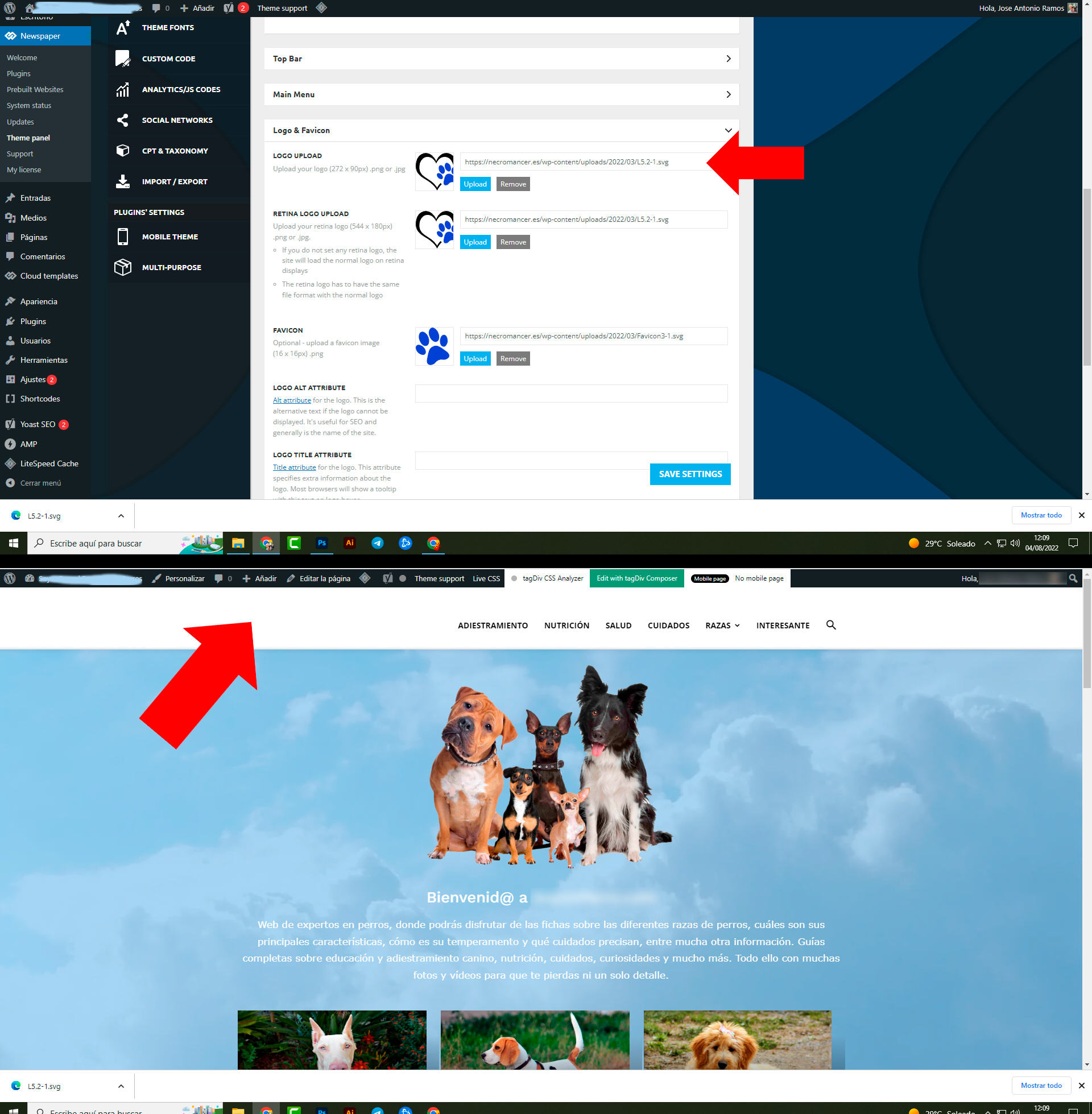
Calin Hello,
I understand what you mean.
What I can recommend is to use the tagDiv Composer and edit the homepage -> https://i.imgur.com/bqzqOMJ.jpg, then select on the flex block the thumb that you want to use -> https://i.imgur.com/4O4YBur.png
Also, for the featured image inside the article there are 2 elements that can be used. The background and normal featured image -> https://i.imgur.com/fxRxN3Q.png -> https://i.imgur.com/6re2KEg.png then choose the thumb size -> https://i.imgur.com/IZ3FDDu.png
After this the next step is to check the selected thumbs to be enabled in the theme panel> in thumbs section -> https://forum.tagdiv.com/theme-thumbs/ once that you sure that those are enabled you need to regenerate the existent images in the file media -> https://forum.tagdiv.com/thumbnails-fix-strange-looking-images-on-blocks/
I hope this will help you!
Thank you!
 Mp3gaga
 None of this guides are working for me.. My entire homepage just disappeared and this error is coming up, so I can’t add any element on it again.
Calin Hi,
If you are using the responsive version, then you need to edit the homepage and select the mobile view port, select the logo and change it -> https://i.imgur.com/N8Wgo9e.png -> https://forum.tagdiv.com/header-manager/
I hope this will help you!
 Bettina
 Hello!
I recommend you to set a homepage and do not let the blog page created by WordPress: https://i.imgur.com/mwjp18K.png
Any other page seems to be displayed well.
We have 3 options for mobile versions that you can use:
1. Responsive version: A responsive version of your website looks similar to the desktop version. Edit the page with TagDiv Composer. Click on the mobile viewport: https://www.screencast.com/t/XDQJedlggSB; there you can see your mobile version and edit or adjust the elements to look better.
2. Mobile pages: https://tagdiv.com/newspaper-10-3-7-update-brings-customizable-and-fast-mobile-pages
3. Mobile theme plugin: The Mobile Theme is a performance-optimized theme included in the main Newspaper theme that only loads on mobile devices. It comes with its own templates and design for pages, posts, categories, etc., so your current templates from the desktop theme will get converted to the mobile theme layout. Please see https://forum.tagdiv.com/the-mobile-theme/ and https://forum.tagdiv.com/mobile-theme-introduction/ for more information.
A full explanation you can find here: https://www.youtube.com/watch?v=SpGkOnJeNZY
You can choose to use whichever one is more affordable and useful for you.
For the option 1 and 2, you need to deactivate the Mobile Theme plugin.
Thank you!
 ilmetu
Hi there,
in the homepage i put a revolution slider, that opens a modal with a youtube video.
when i look at it in a mobile version there is some spaces at left and right
mobile : https://ibb.co/590PzpF
mobile settings : https://ibb.co/sy5nndJ
desktop : https://ibb.co/26db0n7
Thanks for your help.
 canopi_life
 Hello Anamaria,
Other pages are correct, but the homepage looks very wrong.
Please click on the site logo to enter the homepage.
Thank you.
Best,
Yen
 Anamaria
 Hello,
Please check this topic with the same problem -> https://forum.tagdiv.com/topic/tagdiv-composer-does-not-save-only-content-of-homepage/
Also, please purge the cache.
Thank you!
canopi_lifeHello tagDiv team,
Site url: canopi.tw
As the title, the homepage looks very different in different search engines.
Safari (the correct layout): https://imgur.com/cDXFbq2
Chrome (very wrong layout): https://imgur.com/dvFa8Ms
Please help me to fix it. Thank you!
Best,
Yen
Bettina Hello!
Yes, you need to build, customize or import some templates.
We recommend to use cloud/PRO templates in order to have the possibility to edit them with the TagDiv Composer which contains a lot of functions and features, please check our tutorial here: https://forum.tagdiv.com/tagdiv-composer-tutorial/
Documentation here:
– https://forum.tagdiv.com/cloud-library-templates/
– https://forum.tagdiv.com/design-post-pages-using-cloud-library-templates/
– https://forum.tagdiv.com/cloud-library-category-templates/
– https://forum.tagdiv.com/homepage-how-to-build-and-set-it/
Check also our video tutorials here: https://www.youtube.com/c/tagdivThemes/videos
Thank you!
Calin Hello,
This problem maybe because when you created the homepage you maybe set the content in the wrong place and instead to set it in the content area it has been set in the header/footer (or footer) area -> https://i.imgur.com/9GmVEMH.png -> https://i.imgur.com/BSEZ2yG.jpg -> https://i.imgur.com/k7l4fXt.png you need to drag and drop the content from header (or footer) area with tagDiv Composer in the main content area.
I hope this will help you!
ilmetuhi, i made a beautiful revolution slider for my homepage, and i want when the users clicks to open a video modal popup, the one same i open already with the normal option in tagdiv.
how it is possible?
thanks
 tenacemente
Ciao, perché non riesco a cambiare nulla nella pagina di errore 404? Esempio pagina: https://tenacemente.com/news/oggi/page/3/
Se clicco su “Go to the homepage” non rimanda alla mia home ma alla home della demo.
Ho provato a cambiare URL tramite tagDiv composer ma anche dopo aver salvato le modifiche resta tutto uguale.
Inoltre non riesco a cambiare la scritta ‘Go to the homepage’ sia da tagDiv composer che dalla sezione traduzioni di theme panel. Grazie
 theinvestedmind
Hi, I need to use the category template on an actual page. However, when I go to load the cloud templates, it is now showing me the category templates, only blocks and homepage templates.
How can I use the category template from the cloud database on a standard page?
 SujanRoy
Hi, my site fitbabu.com had 3 H1 tags on homepage. But I just disabled H1 on logo both on header and footer and also on mobile template.
Now it shows 1 H1 tag on home page “FITBABU.com”. But for SEO, I need to edit or change this tag. I tried edit on header.php on cpanel but it didn’t work. Can you please help me change the H1 tag?
Anamaria Hello,
I just checked and seems the site looks like this -> https://i.imgur.com/CyfWLXX.png
Firstly, the default WordPress homepage in the root directory is typical “index.php” not “index.html”. The problem is probably that you accidentally deleted the wrong file. It is, however, very difficult for us to help you because hosting environments vary -> https://forum.howtoforge.com/threads/problems-with-client-websites.39671/
Also, please ask your host if can help you.
Thank you!
 iptwins
Hello,
I contact you because I updated my site with Newspapper 11.5.1 and I had a problem on my homepage, there is a problem : http://plongee-infos.com
I tried to downgrade Newspaper in different versions, I still had the same problem, I still put the 11.5.1 version.
can you help me ?
I can give you the admin access if you need to switch.
thank you in advance for your help.
 didtav
 the error notification when I tried to edit the homepage with Td Composer:
Error at zones: 6(models) : 5(dom). The model does not match the content Current state has involved an issue. You could try an UNDO operation (CTRL+Z / CTRL+SHIFT+Z)
the homepage was automatically generated by prebuilt website, I didn’t change anything
didtav hello, it already set to static page and assigned to the homepage created using prebuilt website, please help
Anamaria Hello,
Please make sure you have set the page on A Static page, and assign a homepage (you need to have a homepage/page that you have created before) from Settings -> Reading => https://i.imgur.com/mwjp18K.png
Thank you!
didtavwebsite: https://home.navia.id
hello,
I tried to install the prebuilt website on a fresh wordpress instalation but the homepage is not loading, other page, post, category is fine. only the homepage. I also tried to import the homepage template from cloud template, but that also doesn’t work
please help, thanks
 chehabb
Hi there, im trying to remove the big flex grid from the post page, everytime i press on a post the grid is there, how can i remove it to only show on homepage and when i press a post i dont see the grid before the post
my site is
beirutlab.com
Thanks for your help
 joesmuid
 Hey,
Thanks for getting back to me, I had worked out how to do it and installed the London pro one, but didn’t like it, so I went to work making pulses pro perfect for my needs.
I have a problem though, I have installed the big grid flex 10 at the top of my page, it does not fill the page, i have tried adding an inner column to it to get it full page, but I cannot.
Have a look at my homepage at https://thehighlandtimes.com/
Ideally I would like the top section of the page to be filled as it looks wrong with the smaller box at the head of the page, my question is: how do I get the box to fill the full page?
Or can I add another item to fill the space so it takes up the full page?
Thanks,
Joe
Bettina Hello!
Unfortunately, in our theme we do not have dark mode and light mode features.
You have to do it manually. Change the background color into white from Newspaper -> Theme panel -> Theme colors -> General theme colors. And also the global colors which are used in the demo, you can find and change them if you edit the homepage for example with the TagDiv Composer, access Website Manager : https://prnt.sc/LJVqfzmJ72wi.
Thank you!



