
No search results were found in Documentation!
 chicky365
Hi
I am using the Most Commented option for a block on my homepage to show the most popular articles by comment. Is there a way to set a date restriction, otherwise the most popular commented articles of all-time will forever appear at the top.
I would like to restrict it to a number of weeks or months, so that other more recent articles will eventually appear in the list.
I would prefer not to have to exclude articles by ID, as this will end up taking more time and manual intervention to maintain.
 futureform
I’ve created a homepage layout with pagebuilder. Almost okay, but now I have the homepage duplicated (cloned?) in every article. Also, if I try and create a post template, the homepage layout is still there. Is there something wrong with the theme? With Yoast?
Screenshot here: https://imgur.com/a/NZeljnM
Website here: https://futureform.ro/
 emmalabbe
Hi, I have 4 questions about the author box :
1- I’d like to show an author box at the end of only some chosen posts, is it possible?
2- I understand that the image in the standard author box is necessarily the gravatar from the WordPress account of the author. If I want to show who is the author of a post written by an external writer, and I don’t want him to be a contributor on my wordpress website, I think that I need to create myself his author profile. How should I do to import his portrait (I’ve got the image as a jpg file) without editing his wordpress account/gravatar ?
3- When I click on the name of an author just below the post title, it goes to my homepage (exemple here: https://devenirbilingue.com/apprendre/anglais/cours-formation/certifications-danglais-laquelle-choisir/). I’d like to choose the URL where it goes, or to create an author page with all the posts from this author.
4- In some cases I’d like to replace the author name below the post title, by something like “Guest post”. For that I need to delete the word “By” in front of the author name. In the translations tab I can’t leave it blank. Is it possible to show only the author name with no “introductory word” ?
Thank you !
 Calin
Calin Hi,
I think that you are using a PRO demo or cloud templates, that is why the theme panel settings are not apply. Using cloud template from tagDiv Cloud Library, you’ll need to edit the cloud template using tagDiv Composer and set on the elements the color and style you want
For example in order to change the share style, please edit the single post template wit tagDiv Composer, like this -> https://i.imgur.com/ZpxtjbP.jpg click on the share buttons and choose a style https://i.imgur.com/jyYrNlL.png after that do not forget to save the changes.
If you want to remove the view counter and comments use the right click on these elements and remove them -> https://i.imgur.com/9TJgyv4.png
For the problem with the author links, yaybe the author archives are disabled in the Yoast plugin, if they are author links will be redirected to the homepage. Check if that is the case – http://prntscr.com/mbwwuk
Let me know the results!
Thank you!
 Vlad S
 Hello !
The weather element can be inserted in the homepage using the tagDiv Composer as you can see it here: https://www.screencast.com/t/wrhA4umf8n
Thank you !
Calin Hi,
The pagination can be set only on latest articles this can be set from page template or using posts loop -> https://i.imgur.com/qokhcZY.png on pages with tagDiv Composer.
If you you need help with this, please provide me a link where I can check your homepage and I will guide you!
Thank you!
 slivertorp
Hi TagDiv team,
I’m using a Post Loop block to display my 6 latest articles on my homepage.
I have got the pagination at the bottom. So far so good.
But How can I link my pagination buttons (page 2, page 3, etc ) to my list of posts?
Example of what I need : page2 = shorturl.at/dM136
On your Influencer template : page2 is identical to the home page : https://demo.tagdiv.com/newspaper_influencer/page/2/
Thanks in advance for your precious help 🙂
 Aleksandra
Hi,
I have big problem.
My homepage has pagination pages. Example: https://homepage.com/page/2/, https://homepage.com/page/3/, https://homepage.com/page/13/ https://homepage.com/page/134/ etc. I can create tousends of those pages. They are in Google search results.
How to remove those pages?
 mayolafernandes
I’d like to categorize the different sections of my homepage into: Travel, Food, Culture etc
However on the TagDiv composer i’m not given the option to edit the headings of the blocks, the option isn’t available.
Can anyone help?
digital-reporter.com
 Hispanic L.A.
 Just to clarify, can the sticky menu be made clickable to go back to the homepage?
Hispanic L.A.In hispanicla.com I am using Newspaper 9.8. The site’s homepage appears a. with an older version b. no images. The posts appear without images, as well as the widgets in the sidebar.
This happens on every computer. Use of /?nocache renders the right view.
I deactivated all the plugins and the problem persists. I changed theme to Twenty Twenty and the problem disappeared. I cannot find what in the theme causes the problem. Please help.
Calin Hi,
Please check if you have set a static page on your homepage, only this can be edit with tagDiv Composer, the latest articles/posts (blog) is not editable with tagDiv Composer.
Also the blocks and flex blocks can be filter from this section -> https://i.imgur.com/pj7W6J5.png
Thank you!
 erescultura
Hi.
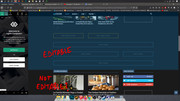
I´m trying to remove some blocks from the homepage in my site erescultura.com
I can edit the top area, but apparently not the bottom area. What am I doing wrong?
 bmagique
Hello,
i want a normal pagination on homepage, how can i do it ? In my blocks i have only ajax or infinite.
I want a normal pagination with pages numbers.
Thank you
Calin Hi,
If the tagDiv Composer will not display on your homepage is possible to have set on your website on homepage the latest posts -> https://i.imgur.com/CqfswFD.png
Homepage – How to build and set it -> https://forum.tagdiv.com/homepage-how-to-build-and-set-it/
Hope this will help you!
Thank you!
Calin Hi,
This option -> https://i.imgur.com/rMvNSYn.png from theme panel will disable the post date from inside the posts, the date will still show on blocks, if you want to disable the date from blocks too you’ll need to use this option -> https://i.imgur.com/kFvwQy7.png also in pages and cloud templates from tagDiv Cloud Library you can set the banners, or elements using tagDiv Composer, on standard templates you’ll need to make sidebars and add widgets in them -> https://i.imgur.com/H1zoVNv.png
Also in order top add elements in sidebar for “Latest articles” you’ll need to check the page at bottom in homepage latest articles, please check our documentation from here -> https://forum.tagdiv.com/page-templates-2/
Hope this will help!
Thank you!
 spezialcom
 I put a photo in the header. now i click on a page in the menu. I don’t want to see the header photo anymore. The same with contributions. I click on a post and don’t want to see the header photo anymore. the header photo should only be visible on the homepage. Do you understand what I mean. unfortunately my english is bad. sorry. is there a way to hide the header photo. is there a position at newspapper?
 Caspar
when im on my homepage i dont get the option to edit with tagdiv, i get the option on other pages but not on my post/homepage. now i understand that i can edit my homepage to be a static page and then i do get the option to edit the page but in that case i get a ugly /name/ on my homepage and i cant seemt to add a sidebar to this page.
 GusV
GusVHello,
I am quite new with using the NewsPaper Theme and I am learning as i go along, but can you tell be how to add banners to the homepage and all of the post pages preferable on the right side please refer to the attachment. Also I have disabled the show date tab but when I refresh page the date is still visible?

PLEASE CHECK WEBSITE: http://www.instromedia.com

Thanks.
Gus
http://www.instromedia.com
 molineux
 Hi,
I have updated the theme.
I am encountering an error when using the tagdiv composer on the homepage.
https://www.dropbox.com/s/grstu77o8796zvv/screen.jpg?dl=0
This is preventing me from updating the homepage. Can you advise how I should correct?
Also how do I change the font style/size of the related articles, and also below images in the sidebar.
https://www.dropbox.com/s/m3kxgx7zdlrpa5c/Screen1.jpg?dl=0
Thanks,
Jason.
 Equapio
Hi Support-Team,
i want to make my site super fast and am excited to update it to 10.2. now. However the homepage was built with the WPBakery Visual Composer (current installed version is 5.1.1). Will the update break the page?
As far as i understand the situation i need to use the cloud templates+TD Composer to rebuild the homepage. But what is the best way to do this reg. the update? Should i update the theme first with the standard pack installed and then rebuild the homepage or would it be better to do it prior of updating to the latest version of Newspaper in order to not break the page?
 ynaija
Hello,
Great theme by the way.
I have the “Animals Magazine PRO” demo installed and been unable to change the background images on the homepage to mine as it keeps giving me the error: Invalid data Current state has involved an issue. You could try an UNDO operation (CTRL+Z / CTRL+SHIFT+Z).
Please how do I go about this?
Thanks.
Vlad S Hello !
Unfortunately on Homepage you cannot add the comment element. This can be done only using a 3rd party plugin but we have not tested any so we cannot recommend one.
Thank you for your understanding !
 Hinditracks
 Thanks for your reply Calin.
At top of my homepage, there is a “Trending Song” widget. That widget is overflowing in the desktop view. Please suggest me how to restrict it not to stretch more than the width of the template.
Calin Hi,
First you need to make a page that you want to be your homepage after that go in Settings > Reading -> https://i.imgur.com/glnZj3L.png if there is still a problem, please provide some more details and some screenshots.
Thank you!



