
No search results were found in Documentation!
 regio-online
Hi there,
I’m struggling to find an answer to the following. I have created a banner ad for a client and placed it on the static homepage of our newssite. I used Tag Div Composer and the block Single Image to place the ad on the desired place on that page.
The problem I have is that my image is not responsive for all devices. If I want to place it as a code in the Ads section I found the code to use, but can’t find other sizes for that image in the upload folder. Besides that, how do I make sure that when someone clicks on the ad, it will link to the site of my advertiser? I don’t see an example for that in the code given on the forum in the non-Adsense ads section.
So to put it simple: I have a selfmade image/banner ad, I want to place it with tag div composer on any place I prefer on my (home)pages and I want the image to be responsive when showing on a tablet or mobile phone. Is this possible?
Thanks in advance for any help you can give!
 jralvarogonzalez
How can I change the color of the title of the post on the homepage? Actually some titles are blue and I’d need to change. You can see what I’m talking about in muy web http://www.viajesrockyfotos.com
Thanks for all.
 nhatkymua
I am using the Jetpack Photon for saving bill, and resize my image. All pages on the desktop are work fine. But its doesnt not work on the mobile homepage, category page.
Can you help me please? The link https://thich.com
 mortgageman
 Hi,
I tried the code (pasted on advance css on theme panel and tablet section, portrait and landscape, my results are below. I also tried editing the px to increase the height but it did not work.
Sidebar image works correct portrait, on homepage and pages (but not on posts)
Sidebar image is incorrect landscape, on homepage and pages (but shows correct on posts)
The header images on pages is also appearing incorrect on portrait, but shows correct landscape.
The custom code for the iframe did not work. Do you have any other ideas? The review box works perfectly landscape and portrait, however the ‘ask an expert’ section is cut off both landscape and portrait.
Please note: pages are in the main menu and posts are in the sidebar for pages
 pikirk
Hi,
yesterday I installed the Newspaper-theme in WordPress (4.9.1) and chose the demo “Travel Blog” and adapted it for my content today. I have some problems now, that I can not solve of myself.
1. I have switched all text colors to dark gray (#434242) under theme panel/theme color. However, some texts remain in black – for example on the homepage the headlines of the current posts.
2. Some headings of the default sidebar (for example in the widget adbox) are not left-aligned. Instead, the headings are in the middle. How can I adjust this uniformly?
3. In the footer the headlines of the widgets are slightly indented and do not start flush with the text. How can I correct this?
If necessary, I can provide screenshots. I am looking forward to a quick response.
Best regards, Alex
 fenomeno0chris
Hi and thank you very much for choosing my homepage for your showcase!
(By the way: the name of my page is PS4source with a small “s” letter)
Lastly I noticed, that it would be appropriate to change some font styles.
Especially on those elements, where the headline stays on top of an image (see images).
So my question is, how can I change fonts for one element and not the entire page?
I think it would be great to add contour or shadows to the headlines.
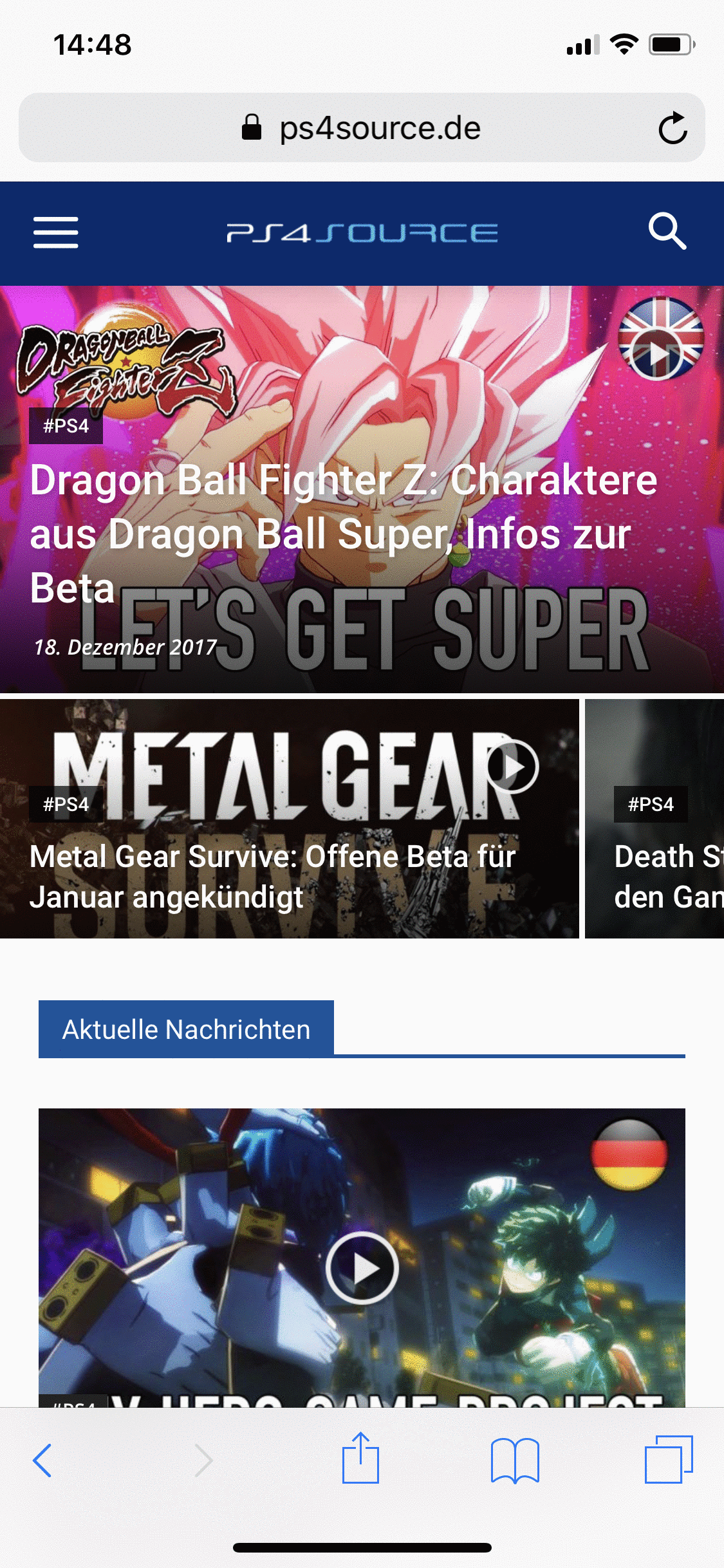
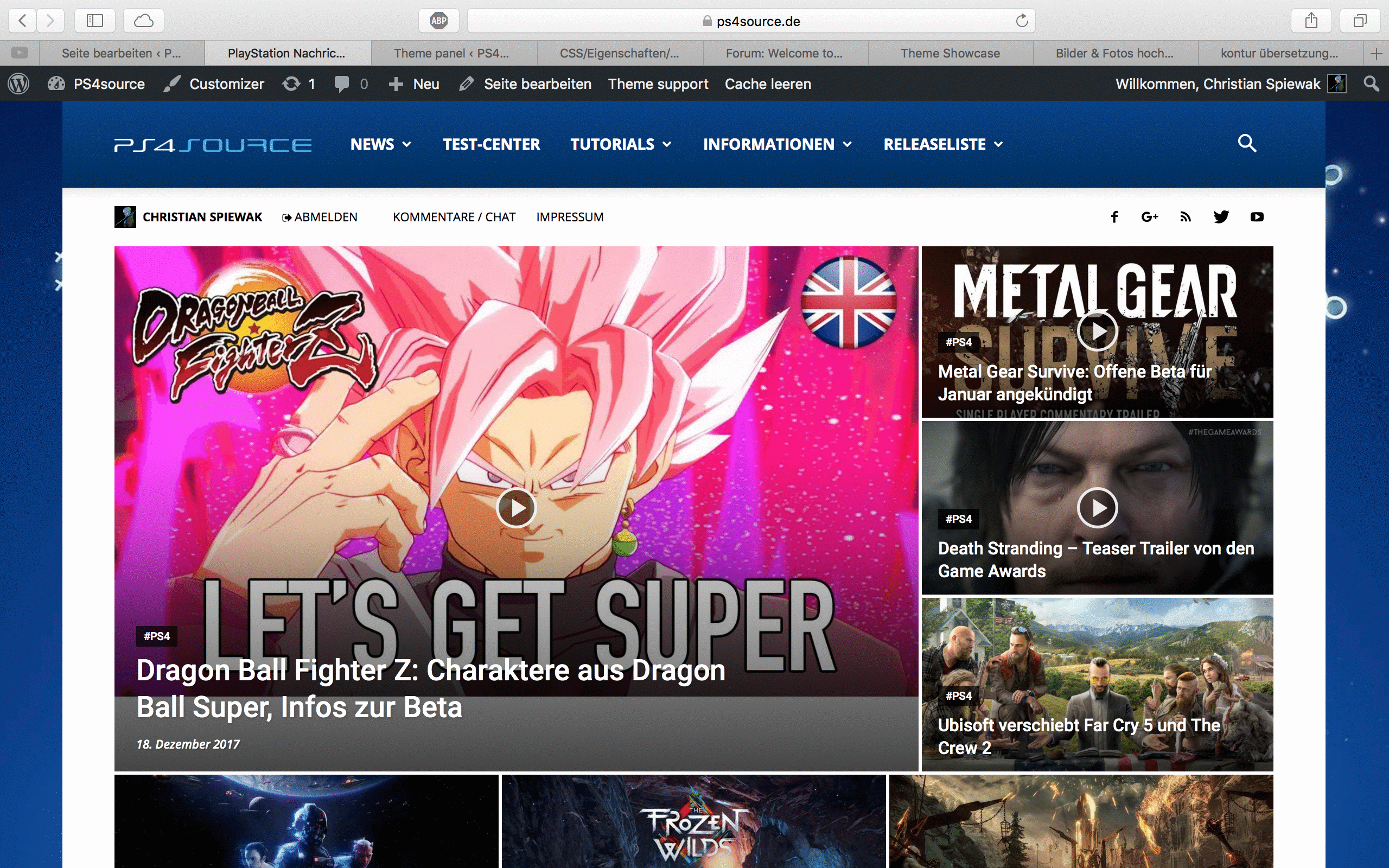
Would be great, if someone can help me!
 Alle79
Hello guys,
when I edit the homepage with tagdiv composer i look at the preview on the mobile device as i want it to be, when I publish the update on the mobile nothing has changed. I tried to make a lot of changes but it’s still the same on mobile. The homepage is set as static, I tried both with mobile plugin active and without. Can someone help me?
 k440092
 Hi,
Ok. Thank you.. my bad =)
Another question:
I would like to show all my posts excerpts on my homepage.
I know i can do it with Visual Composer.
But if i use example “Block 12” it will show post excerpts in computer, but in mobile it shows only title?
Is there anything to do, so it would show also the excerpts in mobile view?
 Marcus_S
Hello,
I have assigned two categories to an article. Economy as a primary category, politics as a secondary. However, Politics is displayed as a category on the blog’s homepage.
If you click on the article, you end up in the category economy.
Affected is this article: https://salzsau-panorama.de/2017/12/17/pols-und-dorendorf-sprechen-ueber-fackraeftemangel/
 generah
 I have gone through the documentation and have done as instructed but the sidebar isn’t working yet.
Here is the screenshot of the homepage i which to have

or check the link to the image
generahGood day, you’ve got an amazing theme but i seem not to get two things working fine for me.
1. No single post has a sidebar. Sidebar is not working at all in all single post but works in pages and homepage. I have tried almost all setting s but yet to get it right.
2. I want to change something in the homepage block. Instead of it to display number of comment, I want it to display the number of times the post have been shared. see this attachment 
This is my Website url
 brenbrinkman
 But is there a way to fix this? and yeah you’re right, it only happens at the homepage.
Thank you!
 Rhonda
 On the homepage of nashvillechristianvoice.com, underneath the category, “WORLD” is the background word “RETRO”. I would like to change the word Retro and I do not see how to change that.
 mentosdrive
 Hi!
I’m trying to achieve a homepage header like the Law, Spa and Smart App demos. I disabled tagDiv composer because crashed my website 3 times.
Can I achieve that using visual composer?
Thanks!
 Catalin
 Hello ayoub00113,
Most likely, you are using VC Composer or Td Composer to create your About Us page. Unfortunately, the mobile theme does not recognize any page builder shortcodes and does not exist any such an option that allows you to create your own homepage which displayed only for mobile. The mobile homepage has a default layout, according to our documentation here -> https://forum.tagdiv.com/the-mobile-theme/
Hope this helps!
Thanks for your understanding!
 upyoggyan
sir/madam
this theme is awesome.but when i visit my site in mobile device my websites http://www.upyoggyan.com homepage
not fully showing in the mobile device. widgate is not showing in sidebar and footer. google also say your page is not mobile friendly. please see screenshot

Catalin Hello zeeodesk,
You should provide your website URL so I can take a closer look at it. First of all, you should refer to the following topic here -> https://forum.tagdiv.com/topic/featured-images-not-showing-on-homepage/
Thanks.
 Simion C.
 Hi,
That would be possible with a code like this, it will make the category tags of your chosen color on the homepage
– https://www.screencast.com/t/38bwoqJYwC0u
.home .td-post-category {

background-color: red;

}
Enter it in Theme panel->Mobile theme->Custom CSS code.
Thanks
 Fenix
FenixHi,
I’m having a problem with td composer plugin: when i try to edit an element of my homepage the plugin doesn’t load and save anymore. On the browser’s console appear this:
 tdcJobManager.addJob

js_files_for_wp_admin.min.js:26:33

tdcJobManager.addJob - Error callback - textStatus: error errorThrown: Not Found

js_files_for_wp_admin.min.js:24:109

{…}

columns: 3

jobId: 0

postId: "54674"

replyHtml: ""

shortcode: "[td_block_big_grid_6 category_id=\"8\"]"

__proto__: Object { … }

js_files_for_wp_admin.min.js:24:109

tdcJobManager.addJob - ERROR: 404 not found
I dont’t know what is going on. I already tried to remove and re-install the composer plugin and the template (version 8.5.1), i also repaired the database with the wordpress’s official function. Can you please help me?
P.S: the website works fine, it stops to work only when i try to edit a page.
Website: https://gamesquare.it/
Thank you in advance.
 Flowingfree
 Maybe you can’t access the links because it is a staging site.
Since you can access the homepage you can see that certain modules have blurry thumbnails and other modules display very crisp and clear thumbnails. You don’t necessarily have to go to the post page, you can take my word that they are showing great quality on the post pages.
This is a problem with your thumbs on certain modules – I’m not sure if it’s the ratio you use or what…but it is a problem with the theme since I am clearly not the only one with this issue, and I have contacted other forum users asking if they have resolved it and they can’t. Some say that that the blurry thumbs are only an issue on some browsers or some devices – so perhaps you at Envato can check out where the problem is and correct it.
A theme with this many users should look good across the board.
 mmaandag
 Thanks a lot Simion, works well!
Final question on the “Homepage post”, can I remove the author, date etc?
I could not find this in the theme settings. Managed to remove it for the posts inside a grid.
Kind regards,
Michiel
Simion C. Hi,
Not all elements display a post excerpt. Some modules will show an excerpt, others will not. The excerpts cannot be enabled for modules that don’t feature it, unless maybe through code modifications in the theme files.
However you could display a post subtitle in the homepage post elements
– https://www.screencast.com/t/js72YjPhkq
– https://www.screencast.com/t/9V2peCbxC0
The posts that appear in the homepage post can be filtered and sorted, as all blocks. This is a guide
– https://forum.tagdiv.com/block-settings-guide/
There is also an offset feature for blocks
– https://forum.tagdiv.com/offset-feature/
So for example if the homepage post and the following block share the same filtering and sorting, you could set an offset of 1 in the block.
Please let us know if you have further questions.
Thanks
 nomoretechno
Hi is there anyway to do this? The mobile plugin has the category tag background colour set to black on the homepage. I would like it to be my brand colour.
mmaandagHello,
I really like the Homepage post extension, but like to add the excerpt.
How does it work?
Is it also possible to prevent a repetition of the post in the grid below the homepage post?
Many thanks and kind regards, Michiel
Catalin Hello LaJornada,
You should simply add your custom link in your top bar menu from WordPress, Menus section and then, using the Inspector browser you should find the class for your custom link item to hide it for the entire theme and block it only for your homepage. For more information about Inspector browser, please check the useful documentation here -> https://forum.tagdiv.com/create-custom-code-using-the-browsers-inspector/ Unfortunately, I cannot do this for you, sorry! I will only provide you an example and a hint from where you should do it yourself based my explain. So, if you are not aware of the steps which are needed to take in this case, please consider hiring a freelancer/developer to help you because we cannot provide custom work at the moment, sorry!
Thanks for your understanding!
