
- TutorialsFrom WPBakery to tagDiv Composer
 raccontareancora
 I have now restored it
but the screenshot would be the homepage background.
sometimes it happens that the site breaks and you can no longer see anything except the background.
Is it a problem related to updates?
 fizig3
PAGE SPEED TOO LOW FOR BOTH VERSIONS. I have use wp rocket but same results . Homepage images are less than 50kb but still large paint 4000ms and script blocking . such a lazzy theme i think
 Anamaria
 Hi,
sing our theme, you can choose from 3 mobile versions
-> mobile responsive => https://www.screencast.com/t/oJ2ShOp47
-> mobile theme plugin => https://forum.tagdiv.com/the-mobile-theme/
-> mobile page => https://tagdiv.com/newspaper-10-3-7-update-brings-customizable-and-fast-mobile-pages/ The option that you need to use.
Suppose you created the mobile pages with tagDiv Composer. In that case, when you install the Mobile Theme plugin, your pages will be overwritten by the plugin (the mobile theme comes with its templates for page, post, category, etc, so your current templates from the desktop theme will get converted to the mobile theme layout, the page content is made without builders in mobile editor => https://www.screencast.com/t/xbgZG8kH also, the options that are provided to edit the mobile theme version are limited (this keeps the things simple)).
This is a video about Responsive Newspaper Theme, AMP & Mobile Theme, Mobile Pages & Templates -> https://www.youtube.com/watch?v=SpGkOnJeNZY.
So, the mobile responsive is what you see when that you select the viewport on phone => https://www.screencast.com/t/matV17hH, so some settings may apply for each viewport(where is the border blue), and others are not(where the border is black).
The mobile page has the mobile templates from Cloud Library => https://www.screencast.com/t/YCcZ8rL8
The Mobile responsive version of the theme and the mobile page editor can be edit with tagDiv Composer, the mobile theme plugin cannot.
For example, you can have the mobile theme plugin activated and use the mobile page/mobile responsive version for the homepage/pages, but for the categories pages/404 page, you can’t use the mobile page/mobile responsive version if you have the mobile theme plugin activated.
So, if you want to design the pages with tagDiv Composer, you can use the mobile page or mobile responsive version.
Also, please check this topic https://forum.tagdiv.com/topic/amp-pages-not-working-well-with-this-theme/
If the cache plugin does not have mobile support, then the mobile theme version can be delivered instead on the desktop and vice versa.
The solution would be to use the recommended WP Super Cache plugin instead and activate these settings (especially the mobile device support): https://forum.tagdiv.com/cache-plugin-install-and-configure/
Thank you!
 Calin
Calin Hello,
Do you refer that tagDiv Composer is no longer working on the homepage, can you provide some screenshots with the error?
Or maybe you are referring to the wp editor from composer, if is this one and is keep loading please check the restriction settings and code – https://i.imgur.com/6NDIKnb.png – https://forum.tagdiv.com/general-options-may-interfere-newspaper-theme/
Thank you!
 Bettina
 Hello!
If you install the demo with content, then, of course, it will replace all your content and design as well. If you install the demo with no content, then it will replace the previous design. You can import only some sections or templates of your current-designed pages from those demos. The template’s manager is in Cloud Templates.
Do you have custom CSS code for your homepage?
Thank you!
Anamaria Hi,
No, you do not need to have the amp plugin activated for mobile page.
Using our theme, you can choose from 3 mobile versions
-> mobile responsive => https://www.screencast.com/t/oJ2ShOp47
-> mobile theme plugin => https://forum.tagdiv.com/the-mobile-theme/
-> mobile page => https://tagdiv.com/newspaper-10-3-7-update-brings-customizable-and-fast-mobile-pages/ The option that you need to use.
Suppose you created the mobile pages with tagDiv Composer. In that case, when you install the Mobile Theme plugin, your pages will be overwritten by the plugin (the mobile theme comes with its templates for page, post, category, etc, so your current templates from the desktop theme will get converted to the mobile theme layout, the page content is made without builders in mobile editor => https://www.screencast.com/t/xbgZG8kH also, the options that are provided to edit the mobile theme version are limited (this keeps the things simple)).
This is a video about Responsive Newspaper Theme, AMP & Mobile Theme, Mobile Pages & Templates -> https://www.youtube.com/watch?v=SpGkOnJeNZY.
So, the mobile responsive is what you see when that you select the viewport on phone => https://www.screencast.com/t/matV17hH, so some settings may apply for each viewport(where is the border blue), and others are not(where the border is black).
The mobile page has the mobile templates from Cloud Library => https://www.screencast.com/t/YCcZ8rL8
The Mobile responsive version of the theme and the mobile page editor can be edit with tagDiv Composer, the mobile theme plugin cannot.
For example, you can have the mobile theme plugin activated and use the mobile page/mobile responsive version for the homepage/pages, but for the categories pages/404 page, you can’t use the mobile page/mobile responsive version if you have the mobile theme plugin activated.
So, if you want to design the pages with tagDiv Composer, you can use the mobile page or mobile responsive version.
Thank you!
Calin Hi Raj Kumari, I think you you confused the tagDiv Composer plugin with tagDiv Standard Pack plugin (this one do not appear in your screenshot, only the tagDiv composer) – https://i.imgur.com/A9Ra37s.png and on homepage you have a block 4 named popular posts that is a block from the standard pack plugin – https://i.imgur.com/1DhEW2Q.png that wasn’t enabled when the shortcode was displayed on your website.
Thank you!
 awilbanks
currently when looking at pages with pagination, clicking on the arrows does not bring up additional posts. If I hover over the arrow to look at the link it takes me to a https://domain.com/#. On my homepage, hitting the arrow just throws me back to the top of the page. On tag pages, it does absolutely nothing. Any advice?
 rodgilmour1
Hi
I uploaded a new template without realising it would go live immediately. I had to revert back to newspaper theme but I have since lost the original website homepage and settings. Is there a way of finding and replacing please?
thanks
squashmad.com
Calin Hi,
That section is part from page template “Page builder + latest articles + pagination” and it can be edited from backend at the end of page using the provided options from “Homepage Latest Articles” – https://i.imgur.com/daDBiGZ.png
I hope this will help you!
Anamaria Hello,
Please provide some screenshots
Also, on the homepage there’s an option Customize icon => https://www.screencast.com/t/I2uVvP4b -> Site identity -> Site icon -> Change image -> publish => https://www.screencast.com/t/lY9WEOZEj
Thank you!
Calin Hi,
It seems that the problem is usually on homepage, when I checked a post and category the icons are there. The strange thing is that there are no error sin console, but it appears that the td-multipurpose icons are not loading on homepage only – https://i.imgur.com/PO1fu6m.png on the rest of the website – https://i.imgur.com/Jp6Ag8K.png
Can you please make a full backup and contact us via email at contact@tagdiv.com to further investigate the problem and fix it??
Thank you!
Calin Hi Yaron,
I think that now I understand what you mean, you are referring that the drop menu should be aligned like this – https://i.imgur.com/GwuJn8s.png right? If so then it can be done using the tagDiv Composer, edit the homepage and select the header main menu element and in general tab scroll to the sub menu options, there set first level left position – https://i.imgur.com/zfBhERN.jpg the number set there can be positive and negative to move the submenu to the left and right.
I thin that in your case it is possible that the number set to be around to -150.
I hope this will help you!
 richmcpharlin
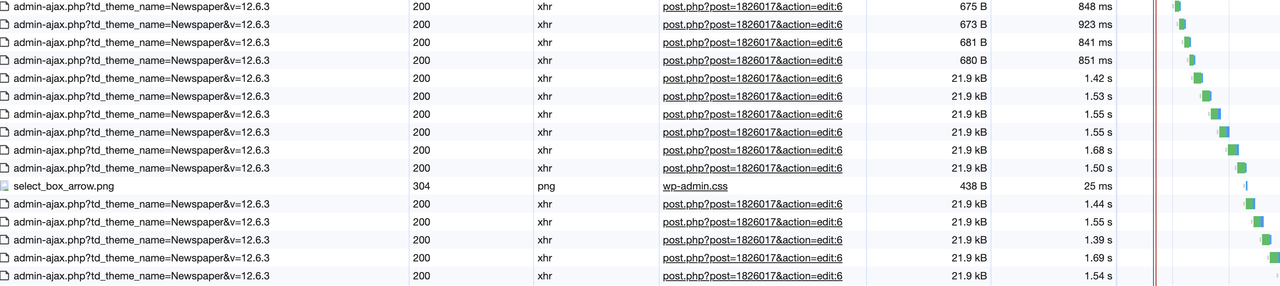
For some reason when editing the ‘page’ for our homepage Newspaper hammers admin-ajax.php until the server grinds to a halt. This only happens when editing the home page (ie not other pages) and only in a live environment (not on localhost).
 epicured
I recently created a new homepage using your TAGDIV Composer and the desktop version works great. Unfortunately, something is off with the mobile version and I’m hoping this is a simple fix that has alluded me up to this point.
I’m using your Big Grid Flex 3 at the top of the homepage and have set the appropriate category filter for content that should be included in the grid. It works perfectly on Desktop and even the mobile preview shows it’s working, but when I save it, the live mobile version is running our latest posts instead.
I’ve tinkered with the settings for both desktop and mobile but haven’t been able to fix it.
Is there something I’m missing or any general advice you could provide?
 disegnoweb
Hi there!
I have created the AMP version for the website smarknews.com, but ?’ve got some problems. I tried to take a look to the issues of other people in this forum, but it was unsuccessful.
First of All, I’ve created the home mobile version as you wrote in your documentation:
https://tagdiv.com/newspaper-10-3-7-update-brings-customizable-and-fast-mobile-pages/
I’ve used one of the mobile templates (newspaper mobile).
But if I try to load the page from mobile, it doesn’t work, even id I try to clear the site cache with the suggested plugin wp super cache.
The page is available here
https://www.smarknews.it/home-mobile/
But the stranger thing is that if I try to load the homepage from my desktop device without reloading the browser’s cache, it loads as mobile default version (with all the stream of the news without categories division)…
I’m not understanding where I’m doing wrong…
Thank you for your attention!
Andrea
Anamaria Hello,
I think that you are referring to this option: https://i.imgur.com/QKaQA1k.png. This is an option from the theme and not the name of the page. You can find all the pages here https://i.imgur.com/qqPzWqa.pngor here -> https://i.imgur.com/bTtxoVL.png
If you have edited the pages with another page editor, then yes, the composer will not recognize them, as if you created a page. Have you checked the documentation about the mobile options that the theme offers?
Also, there are different elements for pages, so you can not assign them globally; for example, if you have a homepage where you display all the posts, you can use the same template for a contact page where it is normal to have only a form for contact.
Thank you!
 ruben@grupointeres.com
Hello!
I’m working on this website https://viajarvivirysaborear.com/ and several things are not working.
– First of all, the home page is not being displayed. You can see all the other pages but not the main home page.
– When trying to update the theme to see if that’s the problem this message appears: https://cutt.ly/ywNQ5BVm
– Also, it doesn’t recognize that i have a licence key here either. https://cutt.ly/uwNQ6cmZ
 happypeoplepickleball
I recently activated the Newspaper Default theme version 12.0 on my WordPress website.
I am trying to get my website back up. On the home page, none of the Feature Images are displaying.
Also, I don’t know how to reduce the number of posts on the home page there are many, many and the page is taking a long time to load. Help!
 Ishola
I have watched multiple videos and read multiple articles in the past two months. They don’t seem to be helping. I joined this forum yesterday to see if someone can let me know what I’m doing wrong.
When I build a page using Tagdiv composer, customising a downloaded template, why does it say “MOBILE PAGE” at the top, when I want it to be a default, global page for something else (homepage, masthead, author, etc.)? Even when I customise something from the Cloud, it still says Mobile Page. Why? What does “Mobile Page” mean in this context?
All previous PAGES from previous themes (I have a few with content), are you saying Newspaper cannot recognise them and they have to be rebuilt?
Can someone please post a CLEAR GUIDE on HOW TO BUILD AND PUBLISH PAGES FROM SCRATCH? Don’t send me a link to those videos you have on YouTube. They’re confusing and incomplete with the steps. Just bullet points. Write like I’m an idiot (I may be, sorry).
I know I’m just missing something, and once I get it, everything will fall into place. Thanks.
 ninjaray
Hi – We’re working on a site currently in staging and have started to notice a few issues, hoping you can help:
– When editing a page with tagDiv Composer, none of the right-click features are working when selecting blocks or other elements. We’re unable to save elements as templates to move to other pages.
– Some pages will not open with tagDiv Composer (spinning circle), only with Classic Editor or Block Editor. It seems as though once a cloud template is imported, edited and saved, it’s no longer able to be edited.The PHP errors in console seem to point to td-cloud-library and td-composer but I don’t know what they mean. These pages include:
https://swankyretreats.dreamhosters.com/swankyretreats/
https://swankyretreats.dreamhosters.com/homepage/
https://swankyretreats.dreamhosters.com/demo-flex/
PHP Errors:
Warning
Undefined array key “tdbTemplateType”
+
1. wp-content/plugins/td-cloud-library/includes/tdb_functions.php:1346
1
Plugin: td-cloud-library
Warning
Undefined array key “td_action”
+
1. wp-content/plugins/td-composer/css-live/css-live.php:30
1
Plugin: td-composer
– It looks like certain External Shortcodes are missing from the list, including Posts Loop. Wondering how to add them so we can use?
– Are we able to save elements/blocks with settings on this site, then export and import to production site?
– It doesn’t look like we have access to all of the available Cloud Templates when we select Cloud Templates > All Templates > Add New, we get varying numbers below the “All” tab. We’re currently seeing 1220 but when we select one to preview and we end up at https://cloud.tagdiv.com/ we can see that there are 2418 available, but they don’t all show up for us. Wondering why that might be? Is it filtering out those which may not be compatible with the demo we have loaded?
– When editing a Cloud Template footer, we’re seeing these messages: “Error at rows: 2(models) : 1(dom). The model does not match the content Current state has involved an issue. You could try an UNDO operation (CTRL+Z / CTRL+SHIFT+Z)” We installed jQuery Migrate Helper as suggested in one of the forum posts, which didn’t fix anything but provided these messages:
Logged Deprecations:
Time
Notice
Plugin or theme
File location
Triggered on page
2024-02-23 07:31:13
jQuery.fn.load() is deprecated
Plugin: tagDiv Composer
https://swankyretreats.dreamhosters.com/wp-content/plugins/td-composer/legacy/Newspaper/js/tagdiv_theme.min.js
https://swankyretreats.dreamhosters.com/swankyretreats/
2024-02-23 07:31:20
jQuery.fn.load() is deprecated
Plugin: tagDiv Cloud Library
https://swankyretreats.dreamhosters.com/wp-content/plugins/td-cloud-library/assets/js/js_files_for_front.min.js
https://swankyretreats.dreamhosters.com/swankyretreats/
Lastly, I’m wondering why many of the forum posts are titled “Newspaper” and are not visible to us, even when logged in?When searching for answers to some of the above, it seemed like others may have had the same trouble and had them resolved but we couldn’t access the replies.
These may all be related but we’ve been struggling to fix. Any feedback, suggestions or assistance with any of this would be appreciated! – Ray
 Racesport
Hi guys,
We are building a newer version of our website racesport.nl at https://racesport127.e.wpstage.net/ but we have 1 problem with using a template on the category page and we want to know how we can copy templates from that development environment to live.
Problem 1
At category https://racesport127.e.wpstage.net/category/motogp/ I’ve imported the template https://demo.tagdiv.com/newspaper_week_pro/category/celebrity/ but the template does not work properly. It does in the TagDiv Editor, but when I save and watch the actual page, it looks messy.
The first row with images work perfect. Then below that, I’ve a 2 column with posts and the standard sidebar you also have.
But on the site, there is no sidebar, the items are to big. When you scroll, the sidebar does show very shortly and goes away, the page shifts. With a tiny bit of smaller screen size, I do see the sidebar, but not on the spot where it should be.
Problem 2
On the staging site https://racesport127.e.wpstage.net/ I’ve made multiple new templates, edited them and create new header, footer, homepage, category page and single post page. But how can I copy and paste them as I’ve made them in the test environment to live? If this is not possible then it will cost me allot of time to get the same layout, fonts, sizes etc in all the things and elements I’ve changed from the standard ‘Week Pro’ templates.
Let me know if there is a way to export and import theses templates. I couldn’t find it.
Let me know if you need access to de dev environment. I will provide you secure details?
Anamaria Using our theme, you can choose from 3 mobile versions
-> mobile responsive => https://www.screencast.com/t/oJ2ShOp47
-> mobile theme plugin => https://forum.tagdiv.com/the-mobile-theme/
-> mobile page => https://tagdiv.com/newspaper-10-3-7-update-brings-customizable-and-fast-mobile-pages/ The option that you need to use.
Suppose you created the mobile pages with tagDiv Composer. In that case, when you install the Mobile Theme plugin, your pages will be overwritten by the plugin (the mobile theme comes with its templates for page, post, category, etc, so your current templates from the desktop theme will get converted to the mobile theme layout, the page content is made without builders in mobile editor => https://www.screencast.com/t/xbgZG8kH also, the options that are provided to edit the mobile theme version are limited (this keeps the things simple)).
This is a video about Responsive Newspaper Theme, AMP & Mobile Theme, Mobile Pages & Templates -> https://www.youtube.com/watch?v=SpGkOnJeNZY.
So, the mobile responsive is what you see when that you select the viewport on phone => https://www.screencast.com/t/matV17hH, so some settings may apply for each viewport(where is the border blue), and others are not(where the border is black).
The mobile page has the mobile templates from Cloud Library => https://www.screencast.com/t/YCcZ8rL8
The Mobile responsive version of the theme and the mobile page editor can be edit with tagDiv Composer, the mobile theme plugin cannot.
For example, you can have the mobile theme plugin activated and use the mobile page/mobile responsive version for the homepage/pages, but for the categories pages/404 page, you can’t use the mobile page/mobile responsive version if you have the mobile theme plugin activated.
So, if you want to design the pages with tagDiv Composer, you can use the mobile page or mobile responsive version.
Also, please check this topic https://forum.tagdiv.com/topic/amp-pages-not-working-well-with-this-theme/
Thank you!
Anamaria Hi,
Please provide the link to your website.
Using our theme, you can choose from 3 mobile versions
-> mobile responsive => https://www.screencast.com/t/oJ2ShOp47
-> mobile theme plugin => https://forum.tagdiv.com/the-mobile-theme/
-> mobile page => https://tagdiv.com/newspaper-10-3-7-update-brings-customizable-and-fast-mobile-pages/ The option that you need to use.
Suppose you created the mobile pages with tagDiv Composer. In that case, when you install the Mobile Theme plugin, your pages will be overwritten by the plugin (the mobile theme comes with its templates for page, post, category, etc, so your current templates from the desktop theme will get converted to the mobile theme layout, the page content is made without builders in mobile editor => https://www.screencast.com/t/xbgZG8kH also, the options that are provided to edit the mobile theme version are limited (this keeps the things simple)).
This is a video about Responsive Newspaper Theme, AMP & Mobile Theme, Mobile Pages & Templates -> https://www.youtube.com/watch?v=SpGkOnJeNZY.
So, the mobile responsive is what you see when that you select the viewport on phone => https://www.screencast.com/t/matV17hH, so some settings may apply for each viewport(where is the border blue), and others are not(where the border is black).
The mobile page has the mobile templates from Cloud Library => https://www.screencast.com/t/YCcZ8rL8
The Mobile responsive version of the theme and the mobile page editor can be edit with tagDiv Composer, the mobile theme plugin cannot.
For example, you can have the mobile theme plugin activated and use the mobile page/mobile responsive version for the homepage/pages, but for the categories pages/404 page, you can’t use the mobile page/mobile responsive version if you have the mobile theme plugin activated.
So, if you want to design the pages with tagDiv Composer, you can use the mobile page or mobile responsive version.
Also, please check this topic https://forum.tagdiv.com/topic/amp-pages-not-working-well-with-this-theme/
Thank you!
 stringbenderb5
Tag Div Composure is being non-responsive when trying to edit or build pages. Can you please watch this short video here for demonstration?
Website
https://harrisonhomepage.com



