lugonet
In last weeks we have detected millions of bad requests to our WordPress installations that use the Newspaper template with Tagdiv Composer.
Our firewall is detecting this attacks however the server is experiencing excessively high traffic that is affecting its performance. There are millions of petitions like this one:
2024-02-02 12:31:20 Access 67.213.221.13 301 POST /wp-json/tdw/save_css HTTP/1.1
We would like to know when this security hole can be fixed.
Thank you.
lugonetIn last weeks we have detected millions of bad requests to our WordPress installations that use the Newspaper template with Tagdiv Composer.
Our firewall is detecting this attacks however the server is experiencing excessively high traffic that is affecting its performance. There are millions of petitions like this one:
2024-02-02 12:31:20 Access 67.213.221.13 301 POST /wp-json/tdw/save_css HTTP/1.1
We would like to know when this security hole can be fixed.
Thank you.
 Bettina
 Hello!
You need to have that plugin installed and active: https://forum.tagdiv.com/add-cryptocurrency-price-ticker-widget/
Thank you!
 AngelSky
I’ve installed the TOWN TALK prebuild. The articles have the Featured image to illustrate the article. I don’t want to use the Feature image but the image inside the article for the article browsing (or from the homepage). I’ve seen in your documentation: https://forum.tagdiv.com/featured-image/ that we could achieve this with 8.x but I can’t find this menu on 12.x. How to proceed?
Thanks!
 Gino Pinna
Hi, I’ve had the newspaper theme for some time, and I installed the mobile theme plugin. I followed all your instructions on the forum tutorial to the letter, but the amp pages only look good on desktop. normal pages on mobile can be seen well, but AMP ones can’t. A message like this comes out: sorry you have javascript disabled to see this page as it meant to appear, please enable your javascript. So when I went to my mobile browser I activated JavaScript, an option that was already active. Despite this, the problem persists. I’ve looked online for a way to resolve this, but everyone says to do it from settings etc. Do you have any idea why AMP pages on mobile, with the necessary plugins activated, give that error? Try it yourself, for example, from this link https://www.lottogazzetta.it/numeri-spia-per-il-lotto-del-30-01-2024-2/amp/ awaiting your response, best regards friendliness
 arkeonline
On website A I’ve loaded an existing cloud template from the Cloud library (also added a mobile template), after that i removed all elements in that loaded template and went ahead to create my own customized content / layout within that template.
Now I want to copy that ‘custom made’ cloud template from Website A to Website B, because I like the way it works. Website B already also has Newspaper installed, but is not using a cloud template yet.
I want to override the current template on Website B. How can I copy or load the templates (post template + mobile version of that template) from website A to website B?
Bettina Hello @ashwanibhasin!
Check here the theme requirements: https://forum.tagdiv.com/requirements-for-newspaper/
Deactivate all plugins except tagDiv ones. Also, if you are using a cache plugin, deactivate it, clear all cache, and try again.
Try to install it via FTP: https://forum.tagdiv.com/install-via-ftp/
Thank you!
Bettina Hello @Naseem786!
Did you build the pages with the TagDiv Composer?
We have 3 options for mobile versions that you can use:
1. Responsive version: A responsive version of your website looks similar to the desktop version. TagDiv Composer is used to edit the page.Click on the mobile viewport: https://www.screencast.com/t/XDQJedlggSB. There, you can see your mobile version and edit or adjust the elements to look better.
2. Mobile pages: https://tagdiv.com/newspaper-10-3-7-update-brings-customizable-and-fast-mobile-pages
3. Mobile theme plugin: The Mobile Theme is a performance-optimized theme included in the main Newspaper theme that only loads on mobile devices. It comes with its own templates and designs for pages, posts, categories, etc., so your current templates from the desktop theme will get converted to the mobile theme layout. Please see https://forum.tagdiv.com/the-mobile-theme/ and https://forum.tagdiv.com/mobile-theme-introduction/ for more information.
A full explanation is here: https://www.youtube.com/watch?v=SpGkOnJeNZY
If you need to use mobile version 1 or 2, then you need to uninstall the Mobile Theme plugin and AMP.
Thank you!
 Simion C.
 Hi,
That is the theme version. Newsmag 3.2 was released about 8 years ago. Maybe it would be worth considering to update the theme if possible.
I would not advise making modifications directly in the theme stylesheet. These will be lost when updating the theme or reinstalling it. Instead it would be better to load the CSS you want in other ways. You can override CSS from the theme or add new code by using other methods.
I’m not sure, but I believe that the theme used to have a custom CSS section back then as well https://prnt.sc/8o8D1tSccpH1 Could you please check? Or you could add CSS in the wordpress customizer panel https://prnt.sc/8E0yUhbSt5Tm -> https://prnt.sc/JBxjRTC_OlMe or with a plugin. Or through a child theme.
But if you want to modify the stylesheet directly, that should be possible.
Let us know if we can help or if you have questions. Assuming the code is valid, maybe all it needs to see the changes is to clear the cache, and purge the CDN files if you use one. But I would still suggest not doing it that way, and instead add the code you want in a different way. Could you please mention what modifications you want to make, or what code you want to add?
Thank you!
 ashwanibhasin
i am not able to install the newspaper theme. Whenver I install the tagdiv composer, it stops in middle and gives ajax error. Then the site goes blank.
 andrea.turco
Hello,
I’ve purchased your theme from Envato. I’ve installed it on a development server and now I’d like to show a prebuilt website, but I must enter a valid license key. If I enter it on my development server, will I also be able to use the code on my final server with a different url? Or is it a one-time key?
Bettina Hello @Demetri!
Unfortunately, I could not see your website.
Which demo have you installed?
If you disable PageLayer, your website is looking as it should, right?
Thank you!
Bettina Hello @liboriobutera!
We have already discussed this issue here: https://forum.tagdiv.com/topic/front-page-gone-after-theme-update/
We have 3 options for mobile versions that you can use:
1. Responsive version: A responsive version of your website looks similar to the desktop version. TagDiv Composer is used to edit the page.Click on the mobile viewport: https://www.screencast.com/t/XDQJedlggSB. There, you can see your mobile version and edit or adjust the elements to look better.
2. Mobile pages: https://tagdiv.com/newspaper-10-3-7-update-brings-customizable-and-fast-mobile-pages
3. Mobile theme plugin: The Mobile Theme is a performance-optimized theme included in the main Newspaper theme that only loads on mobile devices. It comes with its own templates and designs for pages, posts, categories, etc., so your current templates from the desktop theme will get converted to the mobile theme layout. Please see https://forum.tagdiv.com/the-mobile-theme/ and https://forum.tagdiv.com/mobile-theme-introduction/ for more information.
A full explanation is here: https://www.youtube.com/watch?v=SpGkOnJeNZY
If you need to use mobile version 1 or 2, then you need to uninstall the Mobile Theme plugin and AMP.
After every modification, you need to reindex your website on Google. It may take some more time.
Thank you !
 newspulpaper
Dear TagDiv Support Team,
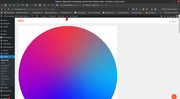
Initially, upon installing the Newspaper theme and plugin, we noticed that a TagDiv advertisement consistently appears across all pages of our WordPress administration area as illustrated in the attached Image A. While this was somewhat inconvenient, it did not majorly impact our workflow until recently.
The problem escalated after we installed a new plugin, “MailPoet. We have observed that when accessing the MailPoet pages within our WordPress administration, the TagDiv advertisement disrupts the interface significantly. The ad consumes a large portion of the screen space, severely hampering the usability and accessibility of the admin area. This issue is clearly illustrated in the attached Image B.
This interference is impacting our productivity and the efficient management of our site. We are seeking your assistance to resolve this matter. Could you please provide guidance on how to either reduce the size of the TagDiv advertisement or remove it entirely from the admin pages, especially where it conflicts with other plugins like MailPoet?
Thank you for your time and assistance.
Image A

Image B
 revistamineracao
Hello, the css on the page is broken, I’ve already uninstalled plugins, changed the version of WordPress, updated the theme and nothing. There are spaces on the website that are blank, icons are misaligned, etc. Can you help me?
 msproductions
Hello, I’m using the Living Pro template installed on my website and when I made some adjustments to the footer, I noticed the Menu Icons were misaligned and made smaller.
I tried to find a way to undo this, even by undoing the change to the footer but nothing.
Even attempted to create a new menu but that also contained the misaligned icons.
As I could not find a way to fix this, I uninstalled and reinstalled the Living Pro theme which did give me the menu displaying properly, but after updating the header the icons shifted once again. Please see screen shot:
https://drive.google.com/file/d/1XaJ2t413X3FX-Ta73k91r_OHBmqfNlCM/view?usp=sharing
Please let me know what can be done to prevent this from happening and fixing it as well.
Thank you.
 smga
smgaHello
I installed the ECHOVERSE demo – there is a great popup (and the template itself is great)
Now in the settings of the pop-up window I observe that the content is determined by modal id
The modal id is not described either in the documentation or on the forum.
Where to find the content settings for this modal id? In this case its name is “ev-modal-menu”

Thanks
 10v3eternal
The Composer tool is experiencing significant lag and crashes, repeatedly getting caught in a ‘saving’ loop when I attempt to save changes. This problem persists even after a fresh WordPress installation, with no additional plugins installed apart from the mandatory ones for the Newspaper Theme. The front end operates smoothly; the issue is isolated to Composer. I’ve provided a screen recording to illustrate the issue
https://u.pcloud.link/publink/show?code=XZpQN00ZNwkF0Pe7rLJJwSFsmLaWFLFa1C0V
 Regiane100
after the update of the theme it is overloading the use of RAM memory and the message displayed is the persistent object cache is not working appears all the time with the suggestion to install some Redis plugin. However WP super cache and optmize are installed and following the configuration of the theme document. What should I do?
url: investidoresbrasil.com.br
Bettina Hello @bduhamel!
This issue is because of the cache plugins that you use. Make a test, uninstall them, and check if the issue persists.
Thank you!
Bettina Hello @techwar!
You can install any demo without content: https://app.screencast.com/mGnVHedaVT1R1
Thank you!
Bettina Hello!
1. If you install the demo with content, then, of course, it will replace all your content and design as well. If you install the demo with no content, then it will replace the previous design. You can import only some sections or templates of your current-designed pages from those demos. The template’s manager is in Cloud Templates.
2. The demo’s content will appear on your website. You can preview the demos here: https://demo.tagdiv.com/select_demo/newspaper-prebuilt-websites/.
3. Yes. It will be overwritten. Better install without content (only design), or if you want to use your previous design, better import only the templates you want from any demo. Check out this guide: https://forum.tagdiv.com/how-use-tagdiv-cloud-library-templates/.
Thank you!
 pppppppp
 yes, I follow your suggestions, I hada uninstalled the Mobile theme and AMP plugin.
But it is still like this, please help.
 bduhamel
I have an issue where the site won’t display properly for anyone not logged in either for the desktop or mobile unless I go and clear the cache and used CSS. I never know when the formatting is going to go out of whack, so this is highly annoying and probably driving away a lot of traffic. I have WP Rocket installed and I never had this issue before but it seems the latest versions of the theme have a problem.
There is also an issue with the Instagram and X widgets where Instagram just shows I have 0 followers all the time and X is frozen at 1710 followers.
My site is located here: https://www.theaterbyte.com
 Joseph Owusu
Hi, just installed Amp on my themes and I keep getting “AMP page is invalid. Custom JavaScript is not allowed” from my Google search console.
Can you please help? Site: guidestofixit.com