
- TutorialsHow to install Revolution Slider
- TutorialsHow to Install bbPress forum
- TutorialsFrom WPBakery to tagDiv Composer
- TutorialsDefault Block Settings Guide
- TutorialsImport Revolution Sliders
- TutorialsSystem status parameters guide
- TutorialsHow to Update the WPBakery Page Builder plugin
- TutorialsExisting content
 boos11
hi.
i have problem with visit counter (eye on image) on posts.

in post is 210 visits after cleaning the cache website (WP Super Cache plugin)
my google analytics shows 6798 visits at the same time

Perhaps this is the wrong setting WP Super Cache. Do I have to set this plugin you show exactly as pictured on the Cache plugin – install and configure
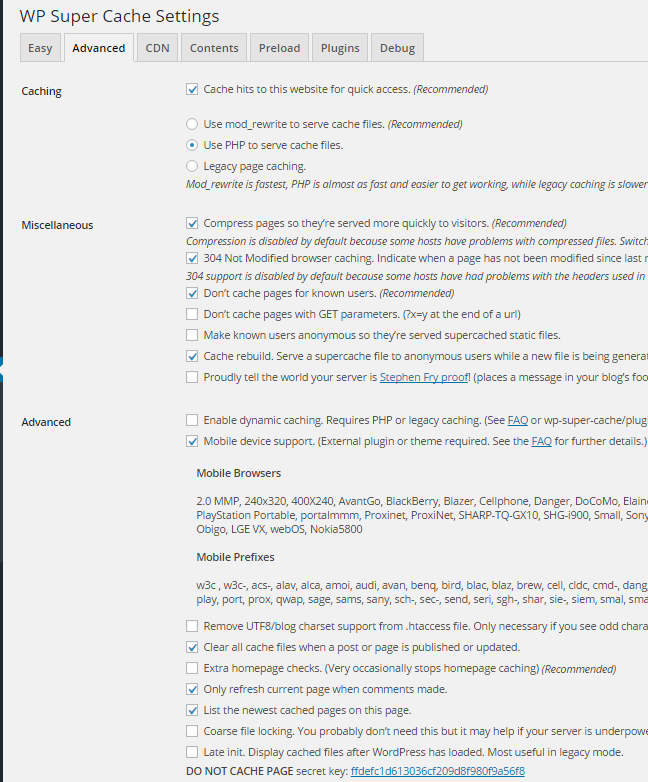
Thank you for your answer
 Catalin
 Hello orlando,
Please keep in mind that our speed booster plugin does not remove anything from the theme, sorry! For more information about how you should use our speed booster plugin, please consult here -> https://forum.tagdiv.com/how-to-make-the-site-faster/ Also, if the problem is still there, you should create a new clean install from scratch via FTP way because this is the surest method in this regard. For more information about this, please consult here -> https://forum.tagdiv.com/newsmag-install-via-ftp/
Thanks for your understanding!
 Bogdan B.
 Hello,
Creating aback-up is highly recommended. Please use this guide and create regular back-us to your install:
https://codex.wordpress.org/WordPress_Backups
Thank you!
Bogdan B. Please disable all plugins except visual composer, clear cache and reset cdn files. Then delete your current social counter and install the one provided in the main theme package you can download from envato.
Thank you!
Catalin Hello mRelby,
As you can see, if you will test our demo on iPad, you will notice that the sidebar will be sticky and work as properly. I suspect your issue happens due to your theme settings. Try to disable all the active plugins, leave use Visual Composer to active, clear all your caches and install only the plugins that come bundled with the theme packet and rule out any conflicting plugins. Also, if the problem is still there, you should make a new fresh install via FTP only with required plugins and check the results. Notice that if it goes on our demo, it should work on your side.
Thanks for your understanding!
 ahmedyakub
Hi Team,
I have installed the mobile plugin and activated it.for a while, it is shown as I have set for mobile and again changes to the desktop version. then I am going to the mobile section in the panel and save. Please help in this regards
Thanks
Yakub.
Catalin Hello pacoesni,
I have tested on my side, with the default state of theme and the paragraphs seem to work as properly as you mention here -> https://www.screencast.com/t/3otuRxflk I suspect this problem happens due to your website configuration, sorry! Please try to disable all the untested plugins, if you are using something like this, leave just Visual Composer to active, clear all your caches and install only the plugins that come bundled with the theme packet and rule out any conflicting plugins. Also, if you have some additional customization through the code you should remove all of them and the theme should work in the default state.
Also, if the problem is still there, you should make a new clean install from scratch via FTP, only with required plugins and check the results.
Hope this helps and let us know how it goes!
Thanks of r your understanding!
 Nano
Nano While reading few other threads on similar topics, I noticed that some of you have confusion about what “Free templates” are ( https://forum.tagdiv.com/topic/revolution-slider-templates/ )
Free templates are those templates that can be used freely if you have revolution slider installed on your WordPress dashboard. It doesn’t need any other premium addons or licenses to work. Here is how it looks:

I don’t know if TagDiv have asked to ThemePunch to provide access to these free templates or not but they must try to bundle it ( Just saying )
The problem is- when we see the pitch of the theme which says these are bundled with premium plugins, we never think it’s in any way different than purchasing that plugin directly ( except expecting support from them) but when we start using it, we see lot many things coming into the picture 🙁
#JustSaying
 commdiginews
I’m upgrading to the latest version of the Newspaper app, and when I go and install and then activate the revslider plugin, the site will consistently throw a bad gateway. If I don’t activate the plugin, the site loads just fine. Has anyone else had this issue? Its hosted with wpengine if that helps.
 Videnciastral
 Good afternoon,
I answer him:
I have not installed any plugin that comes by default in the template configuration.
I do not have any cache component in wordpress.
Please can you help me?
Also I try to activate Visual Composer and I could not. Attachment Screen Capture
https://drive.google.com/file/d/0ByMa6xO4xXEMTEMxZG5oVEZrVUE/view?usp=sharing
Thanks!!
-
This reply was modified 9 years by
Videnciastral.
 mtraps
Hello, I just installed this theme and I have WP specific hosting, I used one of the demo’s you guys build and the loading time is almost triple your demo? I am wondering why and what can be done to speed it up. Here is a link to the site. If you refresh the page you will se it takes a while to load and if you refresh your demo its almost instant. I haven’t really added any other pages and have only a few essentially plugins.
 Kundurnews
Dear Sir,
I have upgrade the v7.6.1 = i love it
but, i’am sorry, the mobile theme does not work properly for my web
1). mobile menu and mobile header does not appear.
2). some of page in google search, signing
“page not mobile-friendly”.
i have tried non active all the plugins
= no result.
and than
i have tried remove all the plugins, and reinstall theme together
= same
Pls give me any solution Sir.
http://www.kundurnews.co.id
Thank’s for your kind
Catalin Hello marcusvilson,
Please keep in mind that the plugin come bundled with the theme packet and it should work as properly, without any activation. You should install the theme via FTP way because this is the surest method in this regard. Also, for more information about Visual Composer, consult the documentation here -> https://forum.tagdiv.com/update-the-visual-composer-plugin-wpbakery/
Thanks for your understanding!
 paologalli
 OK thanks… I saw in the plugin description that the version is the same I already have installed
 zminer1
 Also a couple more questions:
I have not installed the seperate mobile theme since it is already responsive but when the site shrinks for mobile, it shows social Icons even though I have them disabled on the main pages, how do you edit this?
And lastly, I will not be allowing comments on posts, how do you remove the comment counters that show up on the front page? I have already disabled the counters on the posts but they still show in the front page.
Nano While searching on various other threads on the same topic, I noticed that there are ways to hide ads from the specific page using following code:
.postid-147 .td-a-rec, .postid-147 .td-g-rec{
display:none;
}
The result is here -> http://screencast.com/t/tz610oCpC
Notice : the .td-g-rec class is only for a Google Adsense AD and .td-a-rec for other ads.
Though, it is also discussed that to hide Adsense ads might go against Google’s policy. So, its better not to hide the ad but to stop ad placeholder from loading.
Bogdan was discussing something similar on how to remove ad placeholder from 404 pages on this thread: https://forum.tagdiv.com/topic/how-to-not-have-header-ads-on-certain-posts/#post-123574
Isn’t their any way to simply remove all ad placeholder from loading on any specific post? Please give a try to a solution for this.
You can very well notice that this issue is being faced by all of us, no matter whether they are aware of it or not.
I also noticed that many times, in other threads, it was advised to install any other plugins like Adrotate or QUAD.
I have a simple response on this. When we already have such a robust ad management system in-built in our theme, why should I use a new plugin for it? Shouldn’t we always try to keep numbers of plugins as low possible?
The ad-slots under TagDiv theme Ad manager is ( by default) built by taking Adsense into the consideration. Even Adsense examples are mentioned there, then why shouldn’t we try to improve its functionality rather than telling to use a new plugin?
I know that not everything can be integrated into a theme but if you do have such function. Please try to perfect it in future updates.
Just to give an example. There is a very popular theme on Themeforest called “BIMBER,” the developer didn’t want to work on ad section of the theme so, they collaborated with QUAD team and added the seamless ad-management system with this plugin.
But, since here we already have a very robust ad management option, we must try to make it fully worth of having it.
Hope you guys understand.
Love for TagDiv.
-
This reply was modified 9 years by
Nano.
Catalin Hello mike6209,
I guess that you are using some untested plugins with the theme and it is possible that all of these to interact with the theme core files and cause a lot of unknown issues, like these, sorry! First of all, you should make a full backup to your database and then, switch the theme to a default one, remove the old version of the theme and install via FTP the latest version of it because this is the surest method in this regard.
Hope this helps and let us know how it goes!
Thanks for the message!
Bogdan B. Hello,
Please disable all plugins except visual composer, clear cache and reset cdn files if you use it. Then install the mobile theme before any other plugins and check to see if it works properly.
Thank you!
Catalin Hello luxechicago,
Always, we recommend doing your theme update via FTP because this is the surest method in this regard. For more information about this way, please consult the documentation here -> https://forum.tagdiv.com/install-via-ftp/
Hope this helps!
Thanks for the message!
Catalin Hello Videnciastral,
I have checked your website and I saw that you are using a lot of untested plugins which can interact with the theme core files and cause a lot of unknown issues. Try to disable all of these, leave just Visual composer to active, clear all your caches and install only the plugins that come bundled with the theme packet and rule out any conflicting plugins.
If you do not have any access to load media in your media library, please make sure that you have set them all the permissions for upload folder in your Cpanel/FTP. Also, check your system status parameters to be higher increased according to our documentation here -> https://forum.tagdiv.com/system-status-parameters-guide/
Also, if the problem is still there, please try to make a new clean install from scratch via FTP and check the results.
Thanks for the message!
NanoHey, On our news site, we sometimes need to cover sensitive articles on terrorism, nudity, rape, etc. According to AdSense policy, they some time flag these contents as not appropriate to show AdSense ads on it. Link: https://support.google.com/adsense/answer/4410771?hl=en-GB
Being the best news site available, does newspaper theme have any shortcode to disable AdSense ads on any specific page? You must be aware that Newspaper theme already have great ad management section to place ads on all appropriate places on the website and hence there is no need to install any ad plugins like Quick Adsense Plugin etc.
But these plugins do have a shortcode like <!–NoAds–> which will hide all AdSense ( or any placed ads) on that specific post. How can I do the same here? There might be no single code or shortcode for it but there must be some ways to do this for sure.
What solution do we have here on this? If not, I request TagDiv to find some easy solution for it.
Thank you very much.
zminer1Hello, I installed Newspaper7 at zcashcommunity.com and it looks great, but when I try to link on twitter, the Twitter card is to a different website, (salesforce.com) who I have no association with. how do I change this in the theme settings?
 chrisporter31
Installing Plugin: tagDiv Social Counter
The plugin does not have a valid header.
Downloading install package from http://www.yourdancer.co.uk/wp-content/themes/Newspaper/includes/plugins/td-social-counter.zip…
Download failed. cURL error 7: couldn’t connect to host
Catalin Hello all,
Always, we recommend doing your theme update via FTP way because this is the surest method in this regard. For more references in this regard, please consult here -> https://forum.tagdiv.com/install-via-ftp/
Thanks for your understanding!
Catalin Hello Kraljsin,
It is strange…sorry! Please notice that our theme update does not influence your databases and you should not have to happen to you so. If you are using some untested plugins, you should try to disable all of them, leave just Visual Composer to active, clear all your caches and install only the plugins that come bundled with the theme packet and rule out any conflicting plugins. It is possible that your untested plugins used by you to interact with the theme core files and cause these unknown issues.
Thanks for your understanding!
