- TutorialsHow to install Revolution Slider
- TutorialsHow to Install bbPress forum
- TutorialsFrom WPBakery to tagDiv Composer
- TutorialsDefault Block Settings Guide
- TutorialsImport Revolution Sliders
- TutorialsSystem status parameters guide
- TutorialsHow to Update the WPBakery Page Builder plugin
- TutorialsExisting content
 skycr
skycrI have purchased a pack of news12paper themes but when i try to install on wordpress it failed, sending to me this error message: The theme does not have the style.css stylesheet.
What can i do? This problem does not let me to install the themes.
Can someone help me or make me a refund of my money?
Thanks
 esalinas506@gmail.com
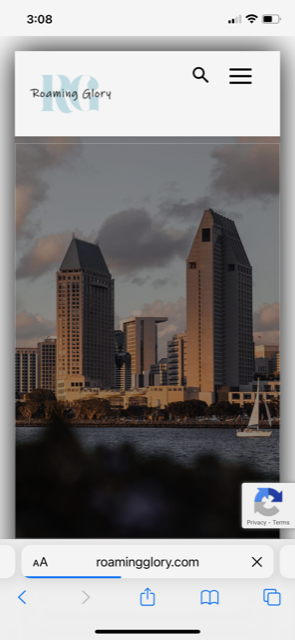
Today I noticed that the menu icon isn’t working from the home page when using a mobile phone. I noticed that after I click on the menu icon the URL adds a # at the end of the link.
Any idea why this is happening all of a sudden?
I attached some samples of what is happening.
This image shows what happens when I press on the menu from the home page.
https://i.postimg.cc/VLzTKQZ5/IMG-3155.png
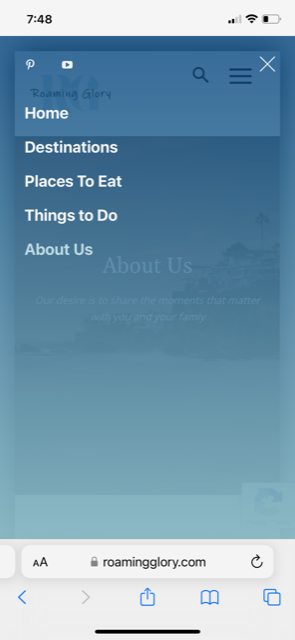
If I use the menu on the footer and go to another page (ex: About Us) I am able to access the mobile menu as shown below.
https://i.postimg.cc/yYnG5Q2j/IMG-3156.png
I have not installed any new plugins. This just happened on its own.
 shoaibarif6468
Hi,
I have just bought a newspaper theme and installed it on my website, but I’m unable to do any settings/changes to the website design. Anything I do change from the themes panel and save settings, the setting not getting applied to the website. Can anyone help me, please?
 Bettina
 Hello @ibexy!
This demo has a plugin for the style, so you need to install it. Download the theme package again from your themeforest account.
Thank you!
 xteaun
I updated my Newspaper theme today to version 12.1.1. Now it does not work anymore because I cannot install the tagdiv composer. Neither the installation via the Theme Panel nor the manual installation by uploading the plugin via the wordpress dashboard works. Please fix this since my website is now not operational.
Here is the error message:
Herunterladen des Installationspakets von https://cloud.tagdiv.com/td_plugins/td-composer/e815948e5c9ec5801de67b92a1d5a59fxx/td-composer.zip …
Entpacken des Pakets …
Die Datei konnte nicht kopiert werden. td-composer/legacy/Newspaper/includes/demos/the_rimont/td_media_8.php
 kbelimpassakis
hi there i made a fresh install about 2-3 weeks ago.
i installed a child theme from the first place.
a few days ago i saw that a new update was available.
i changed theme from child to newspaper theme and after i switched back the page layout stored in cloud library was set back to the original template used (i lost all the css and content hanges made).
i want to ask that it is a bit confusing for me the artcile relatively the child theme use if it is compulsory since using a child theme to copy the files (single templates etc) there in order not to loose changes made with editor to cloud library templates???
i m not sure after reading it in case somenones using child theme after an update the changes and the templates stored in cloud library will remain as they are, or they will change unless they are copied on achild theme files?
Can u please help me with that cause i do not want to loose all the work done in a future update or in case i revert to main.
finally, i am showing some deprecated api to the contact form i added, i do not know if it is noticed and u plan to fix it in future.
 yagiz
yagiz Hi again,
Thanks for the answer, so which plugin should I install to translate the Text or Button Text? Could you help me with this ?
Thank you
 ibexy
ibexy Thanks for your response.
I went to the example you gave but cannot find the location/ folder on my installation of the Doctors demo.
As per the example:
These modules are available in the Newspaper-tf\plugins\td-demo-plugins theme package.
What is the equivalent location in Doctors demo where I need to apply this?
 asisrodriguez
 Sorry Calin but I can’t belive that.
Then, why I can install in 9 websites in 2017? and now, since the last update, I can’t.
I don’t understand. All our webs appear as “REGISTERED” in green.
Thanks,
 Anamaria
 Hello,
The firewall is installed on the server, so please ask the host to help you! https://serverspace.io/support/help/firewall-configuring-the-server-firewall/
Thank you!
Bettina Hello @vivreausmic !
Every new demo with CPTs has a plugin with the style of flex blocks, so you need to have it installed in order to have the custom style of flex blocks with CPTs and custom fields included. https://forum.tagdiv.com/edit-modules-flex-block-x/
This is the code: https://prnt.sc/GNFFs9BIkC24 from tds_doctors_pro_module1.php file.
Thank you!
 First Friend
 Facing problems adding analytics code & Adsense code in newspaper themes also. I also faced problems after installing the newspaper theme page speed slow and errors like (Median server response time was 997 milliseconds. It should be less than the recommended 600 milliseconds threshold.) this.
Anamaria Hello,
Usually, this happens with cache plugins. If the cache plugin does not have mobile support then the mobile theme version can be delivered instead.
The solution would be to use the recommended WP Super Cache plugin instead and activate these settings (especially the mobile device support): https://forum.tagdiv.com/cache-plugin-install-and-configure/
Also, please make sure you have enabled the mobile cache if the plugin has this option
Please check this topic where I explained each mobile version -> https://forum.tagdiv.com/topic/mobile-version-not-working-properly-2/
I hope this helps.
Thank you!
 soynadie
Again the Newspaper update fails again and leaves an error in the update with the RRSS logos
(Attachment screenshot)
I also want to comment that it is very inconvenient to have to reactivate the plugins after the update processes
Why are they doing things wrong?
When I bought the template, you installed, registered, activated the plugins and everything flowed
Now everything is cumbersome and uncomfortable
What happen?
 Ljunganbladet
 kodro
kodroI’ve just uploaded the last version of the theme, and a big problem appears with the tagDiv Composer.
I can’t upload, a message appears on the screen after the installation:
tagDiv Composer
Failed
An error occurred and we could not finish the process.
Please manually update the plugins.
I’ve checked the plugin on the Plugins lists and doesn’t appear. I’ve entered inside the FTP and yes, exist. So weird problem. Can you help me please?
SOLUTION: I’ve erased the plugin, and I reinstalled.
 yguide
 Hello,
The Default RTL PRO demo is not working well! I’m trying to use the weather widget. but once i enable it, the logo position, top header change to the left instead of the right and the menu disappeared! Even other category pages are affected. So I had to reinstall the theme again to restore the changes. but problem still remains!
Can you please assist me with adding the weather widget without affecting the top header, menu and other pages to be switched to left as i’m using only the RTL demo. I have contacted your support via email two days ago but no answer.
Thanks,
 Kentaro Darkdox
 I tried, even downloading it from Themeforest, But still getting the same error.
I also tried to install the new version 12.1.1, but it keeps failing me.
 fm
fm Hello,
we had not installed the mobile plug in before, but had done it because the navigation mobile with all the resorts did not appear, as it is now the case. Does it need the plugin for this navigation, see attachment?
Furthermore: If the plugin is installed, won’t the previous settings (layout, content, footer) for mobile be automatically applied?
If not, what do you recommend so that the content appears there as before? There are the Mobile Settings and there is the item Mobile Page etc. in the header.
Regards, Frank
-
This reply was modified 3 years by
fm.
yagizHi,
I added a element called AD BOX to my page using the tagdiv composer.
I have 2 languages installed, so when I added the a text to this ADBOX element for a specific language needed to be added to another language as well. So how can I add a value to all different languages when I used this tag composer?
Thanks
 thanhtan09
When I install tagDiv Composer. My website redirect to a straight website.
My website is https://danangleisure.com/
Please help. Thanks
 osiortcp
Hello,
I have installed the “Blockchain” demo and I have an empty column when I’m in the tagdiv editor. How can I delete this empty column as no delete option appears in the bottom right corner?
This things appears sometime in other situations.
 rowe64
Hello,
First please excuse my writing because I go through Google translate.
I haven’t been able to update my settings for a while now. Indeed, the loading loops.
At the status system level everything is in the green.
NEWSPAPER Version: 12.1.1
PHP Version7 .4.33
WP Memory Limit 256 Mo
PHP Execution Time 60
PHP Max Input Vars 2000
Installed plugins:
tagDiv Composer
tagDiv Cloud Library
tagDiv Social Counter
Thanks in advance for your help
 daimpa
Hello, I’ve installed Newspaper with a child theme. Child theme is now active. Is it possible to perform the autoupdate from the Theme Panel, with the Install button under the udpates menu? Or should we take some extra steps?
Cheers,
Daniele.
 be2name
Hello,
the Newspaper theme is not compatible with the Yoast Video SEO plugin. When installed and enabled, the RSS feed shows wrong media enhancements with a doubled domain, so services like Deezer do not update the feeds, due to 404 errors caused by that links. They look like:
<media:thumbnail url="https://www.literaturcafe.de/www.literaturcafe.de/wp-content/uploads/rebecca_gable-1-1190x448.jpg" />
<media:content url="https://www.literaturcafe.de/www.literaturcafe.de/wp-content/uploads/rebecca_gable-1-1190x448.jpg" medium="image">
Here are the results of different settings:
– Standard theme Twentytwo with Yoast SEO: Video
=> Only post with videos have the media:thumbnail tag in rss-feed (desired behavior)
– Newspaper theme with Yoast SEO: Video
=> ALL posts have the media:thumbnail tag in rss-feed with wrong double-domain
– Newspaper theme with Yoast SEO: Video DISABLED
=> NO posts have the media:thumbnail tag in rss-feed
– Newspaper theme with Yoast SEO: Video enabled and ‘disable media RSS enhancement’ option in plugin settings ticked
=> NO posts have the media:thumbnail tag in rss-feed
I reported this issue to the Yoast support, and this is their reply:
Thank you for troubleshooting this. We endeavor to be compatible with the main page builders in WordPress, like Elementor, and other important themes in the WordPress environment, but in this case, would you mind escalating this to the theme developer so they can look into this further? If they need anything from us, they can email us with the details and we’d be happy to help them troubleshoot.
Could you please fix this or get in contact with Yoast to fix this.