
- TutorialsHow to install Revolution Slider
- TutorialsHow to Install bbPress forum
- TutorialsFrom WPBakery to tagDiv Composer
- TutorialsDefault Block Settings Guide
- TutorialsImport Revolution Sliders
- TutorialsSystem status parameters guide
- TutorialsHow to Update the WPBakery Page Builder plugin
- TutorialsExisting content
 Calin
Calin Hi iwebuserstudio,
The background from the Magazine PRO will apply only if you install the demo.
Please check in the theme panel > background -> https://i.imgur.com/IobdwzD.png if there is still assigned the background image, is is not, please set it, this should make the website boxed again.
Thank you!
 Mediaguy2021
 I have looked an check:
1.Do you have a site map of the page where are all the blocks and sections. I have not found any on you support Site.
DIVTAG EDITOR does not work. It will not bring up the page. Like how your videos show.. I have full control of the backend of the site. None of these solutions work. I have tried them all. I need to change some other things also.. This is not the not only issue I have. I am trying to get this page ready so we can launch it. I have screen shots but can’t upload them here.. If possible it need to have someone reach out to me..
2.There is an error in Theme Panel the Footer has no Drop downs.
3. I have to change the headings of some of the blocks.
4.These are all installed Plugins
tagDiv Composer
tagDiv Cloud Library
tagDiv Social Counter
tagDiv Newsletter
tagDiv Shop
tagDiv Mobile Theme
Official AMP for WP
tagDiv Standard Pack
Revolution Slider
-
This reply was modified 4 years by
Mediaguy2021.
-
This reply was modified 4 years by
-
This reply was modified 4 years by
 xmirz0
 1.This problem happen after updates the Newspaper 11.4. I’m not install tagDiv Mobile Theme.. The saiz logo is only minimized on the main page, but if i open blog page the size to fit the display .. web reference – https://nrchanneltv.com.my
 andreabarbieri
I installed Version 11.4 on one of my websites, and now the post wisth more than 6000/7000 words have a terrible lag when edited.
The front end looks fine, I am speaking about the editing post. (Both Gutemberg and classic mode).
I am pretty sure that it’s the update, because I have other 10 websites with Newspaper version 11.3 and have not the problem. Same plugins, same hosting.
Be aware of that, maybe try with your web develpers.
Thank you
 ikaris
Hi,
I am facing issues importing templates from the Cloud Library. I am trying to import Cloud Templates. I pressed the ‘add new’ button and chose my template.
The issue is, that I am seeing the page in which it says the template is “Installing” and the bar is not moving at all. It essence, the import is not taking at all. I’ve been waiting for a long time. What’s the issue and how to solve?
 Adrian568
Hello, I ran into another template issues. Apart from the error that appears during the installation of revolution slider (the problem is not solved, I wrote another post about it – support does not respond to the message), there are errors when installing the plugins. I wanted to install Yoast seo, I get a fatal error after installing and enabling the plugin. I can’t do anything else. Then I have to go to the server and remove the plugin, then the website is back to normal. I tried to install other plugins: All in one seo pack, Wp forms, but with every other plugin I get bugs and won’t turn on. The problem also appears when trying to uninstall. It is impossible to remove plugins from the WP panel, I have to remove them manually from the plugins folder on the server.
How do I fix these problems? Why can’t I install plugins?
What I see after installing other plugins:
All in OneSeo Pack:
Fatal error: Uncaught mysqli_sql_exception: Table ‘srv41318_wp1.wp_actionscheduler_actions’ doesn’t exist in /home/srv41318/domains/doradnik.pl/public_html/wp-includes/wp-db.php:2056 Stack trace: #0 /home/srv41318/domains/doradnik.pl/public_html/wp-includes/wp-db.php(2056): mysqli_query(Object(mysqli), ‘DESCRIBE wp_act…’) #1 /home/srv41318/domains/doradnik.pl/public_html/wp-includes/wp-db.php(1945): wpdb->_do_query(‘DESCRIBE wp_act…’) #2 /home/srv41318/domains/doradnik.pl/public_html/wp-includes/wp-db.php(2695): wpdb->query(‘DESCRIBE wp_act…’) #3 /home/srv41318/domains/doradnik.pl/public_html/wp-admin/includes/upgrade.php(2749): wpdb->get_results(‘DESCRIBE wp_act…’) #4 /home/srv41318/domains/doradnik.pl/public_html/wp-content/plugins/all-in-one-seo-pack/vendor/woocommerce/action-scheduler/classes/abstracts/ActionScheduler_Abstract_Schema.php(117): dbDelta(Array) #5 /home/srv41318/domains/doradnik.pl/public_html/wp-content/plugins/all-in-one-seo-pack/vendor/woocommerce/action-scheduler/classes/abstracts/ActionScheduler_Abstract_Schema.php(45): ActionScheduler_Abstract_Schema->update_table(‘actionscheduler…’) #6 /home/srv41318/domains/doradnik.pl/public_html/wp-content/plugins/all-in-one-seo-pack/vendor/woocommerce/action-scheduler/classes/data-stores/ActionScheduler_DBStore.php(25): ActionScheduler_Abstract_Schema->register_tables() #7 /home/srv41318/domains/doradnik.pl/public_html/wp-content/plugins/all-in-one-seo-pack/vendor/woocommerce/action-scheduler/classes/data-stores/ActionScheduler_HybridStore.php(57): ActionScheduler_DBStore->init() #8 /home/srv41318/domains/doradnik.pl/public_html/wp-content/plugins/all-in-one-seo-pack/vendor/woocommerce/action-scheduler/classes/abstracts/ActionScheduler.php(158): ActionScheduler_HybridStore->init() #9 /home/srv41318/domains/doradnik.pl/public_html/wp-content/plugins/all-in-one-seo-pack/vendor/woocommerce/action-scheduler/action-scheduler.php(44): ActionScheduler::init(‘/home/srv41318/…’) #10 /home/srv41318/domains/doradnik.pl/public_html/wp-content/plugins/all-in-one-seo-pack/vendor/woocommerce/action-scheduler/action-scheduler.php(49): action_scheduler_initialize_3_dot_1_dot_6() #11 /home/srv41318/domains/doradnik.pl/public_html/wp-content/plugins/all-in-one-seo-pack/app/AIOSEO.php(230): require(‘/home/srv41318/…’) #12 /home/srv41318/domains/doradnik.pl/public_html/wp-content/plugins/all-in-one-seo-pack/app/AIOSEO.php(171): AIOSEO\Plugin\AIOSEO->includes() #13 /home/srv41318/domains/doradnik.pl/public_html/wp-content/plugins/all-in-one-seo-pack/app/AIOSEO.php(155): AIOSEO\Plugin\AIOSEO->init() #14 /home/srv41318/domains/doradnik.pl/public_html/wp-content/plugins/all-in-one-seo-pack/app/AIOSEO.php(395): AIOSEO\Plugin\AIOSEO::instance() #15 /home/srv41318/domains/doradnik.pl/public_html/wp-content/plugins/all-in-one-seo-pack/all_in_one_seo_pack.php(94): aioseo() #16 /home/srv41318/domains/doradnik.pl/public_html/wp-admin/includes/plugin.php(2286): include_once(‘/home/srv41318/…’) #17 /home/srv41318/domains/doradnik.pl/public_html/wp-admin/plugins.php(191): plugin_sandbox_scrape(‘all-in-one-seo-…’) #18 {main} thrown in /home/srv41318/domains/doradnik.pl/public_html/wp-includes/wp-db.php on line 2056
Wp forms:
Fatal error: Uncaught mysqli_sql_exception: Table ‘srv41318_wp1.wp_actionscheduler_actions’ doesn’t exist in /home/srv41318/domains/doradnik.pl/public_html/wp-includes/wp-db.php:2056 Stack trace: #0 /home/srv41318/domains/doradnik.pl/public_html/wp-includes/wp-db.php(2056): mysqli_query(Object(mysqli), ‘DESCRIBE wp_act…’) #1 /home/srv41318/domains/doradnik.pl/public_html/wp-includes/wp-db.php(1945): wpdb->_do_query(‘DESCRIBE wp_act…’) #2 /home/srv41318/domains/doradnik.pl/public_html/wp-includes/wp-db.php(2695): wpdb->query(‘DESCRIBE wp_act…’) #3 /home/srv41318/domains/doradnik.pl/public_html/wp-admin/includes/upgrade.php(2749): wpdb->get_results(‘DESCRIBE wp_act…’) #4 /home/srv41318/domains/doradnik.pl/public_html/wp-content/plugins/wpforms-lite/vendor/woocommerce/action-scheduler/classes/abstracts/ActionScheduler_Abstract_Schema.php(117): dbDelta(Array) #5 /home/srv41318/domains/doradnik.pl/public_html/wp-content/plugins/wpforms-lite/vendor/woocommerce/action-scheduler/classes/abstracts/ActionScheduler_Abstract_Schema.php(45): ActionScheduler_Abstract_Schema->update_table(‘actionscheduler…’) #6 /home/srv41318/domains/doradnik.pl/public_html/wp-content/plugins/wpforms-lite/vendor/woocommerce/action-scheduler/classes/data-stores/ActionScheduler_DBStore.php(35): ActionScheduler_Abstract_Schema->register_tables() #7 /home/srv41318/domains/doradnik.pl/public_html/wp-content/plugins/wpforms-lite/vendor/woocommerce/action-scheduler/classes/data-stores/ActionScheduler_HybridStore.php(57): ActionScheduler_DBStore->init() #8 /home/srv41318/domains/doradnik.pl/public_html/wp-content/plugins/wpforms-lite/vendor/woocommerce/action-scheduler/classes/abstracts/ActionScheduler.php(158): ActionScheduler_HybridStore->init() #9 /home/srv41318/domains/doradnik.pl/public_html/wp-content/plugins/wpforms-lite/vendor/woocommerce/action-scheduler/action-scheduler.php(48): ActionScheduler::init(‘/home/srv41318/…’) #10 /home/srv41318/domains/doradnik.pl/public_html/wp-content/plugins/wpforms-lite/vendor/woocommerce/action-scheduler/action-scheduler.php(54): action_scheduler_initialize_3_dot_2_dot_1() #11 /home/srv41318/domains/doradnik.pl/public_html/wp-content/plugins/wpforms-lite/src/WPForms.php(221): require_once(‘/home/srv41318/…’) #12 /home/srv41318/domains/doradnik.pl/public_html/wp-content/plugins/wpforms-lite/src/WPForms.php(177): WPForms\WPForms->includes_magic() #13 /home/srv41318/domains/doradnik.pl/public_html/wp-content/plugins/wpforms-lite/src/WPForms.php(114): WPForms\WPForms->includes() #14 /home/srv41318/domains/doradnik.pl/public_html/wp-content/plugins/wpforms-lite/src/WPForms.php(402): WPForms\WPForms::instance() #15 /home/srv41318/domains/doradnik.pl/public_html/wp-content/plugins/wpforms-lite/wpforms.php(230): wpforms() #16 /home/srv41318/domains/doradnik.pl/public_html/wp-admin/includes/plugin.php(2286): include_once(‘/home/srv41318/…’) #17 /home/srv41318/domains/doradnik.pl/public_html/wp-admin/plugins.php(191): plugin_sandbox_scrape(‘wpforms-lite/wp…’) #18 {main} thrown in /home/srv41318/domains/doradnik.pl/public_html/wp-includes/wp-db.php on line 2056
 knthdgd
Hi!
I just installed Yoast SEO plugin.
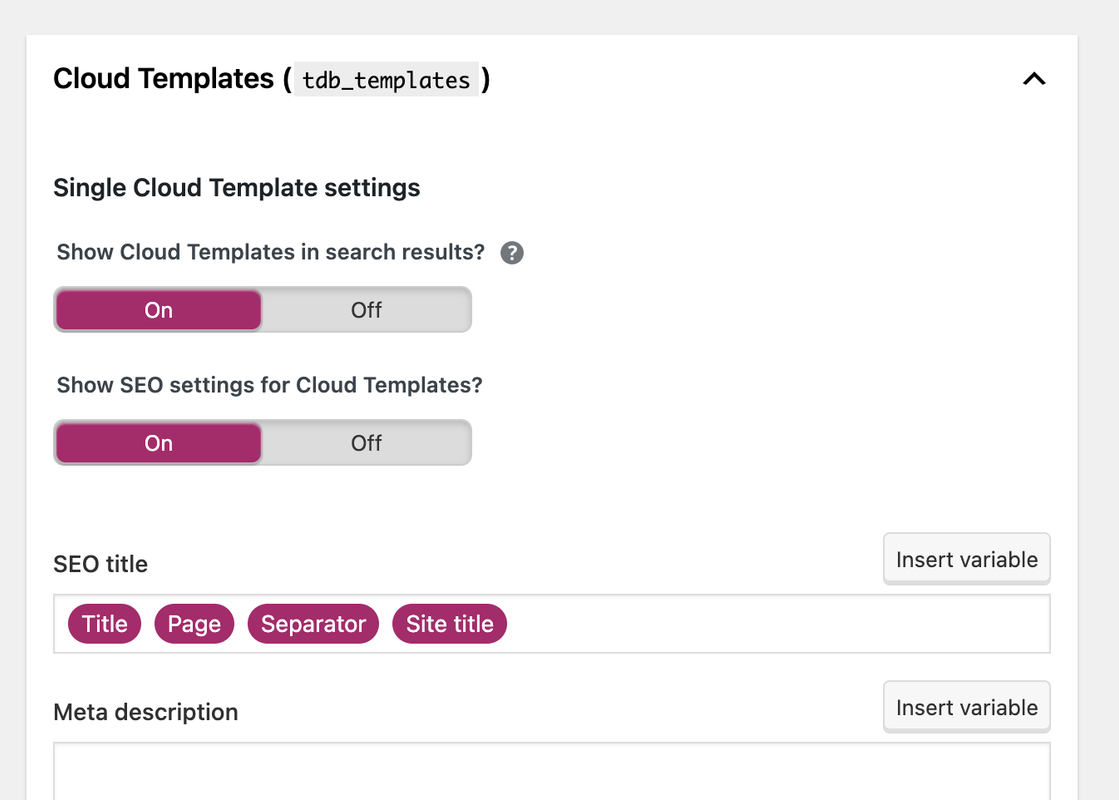
Do we agree that I should set “Show Cloud Templates in search results” to “Off”?
Because I do not want Google to index templates? This should not interfere with my real posts, pages and archives using the templates, correct?
 andreaskas
Hi,
I purchased and installed newspaper theme but i am facing an issue with the CSS.
On the first load of the page, without any cache for example in icognito mode, i see a white page with just the text and after a while the css is being loaded. See attached image for reference.


Also, when trying to generate the critical CSS, i am seeing the following console errors and the generate button does nothing.
Error: <svg> attribute viewBox: Expected number, "\\\"0".
xe @ jquery.min.js?ver=3.6.0:2
He @ jquery.min.js?ver=3.6.0:2
append @ jquery.min.js?ver=3.6.0:2
u @ js_files_for_plugin_analyze_css.min.js?ver=381db5cebf26144e1b1ab5f0477be694:3
u @ js_files_for_plugin_analyze_css.min.js?ver=381db5cebf26144e1b1ab5f0477be694:6
(anonymous) @ js_files_for_plugin_analyze_css.min.js?ver=381db5cebf26144e1b1ab5f0477be694:24
z @ js_files_for_plugin_analyze_css.min.js?ver=381db5cebf26144e1b1ab5f0477be694:21
(anonymous) @ js_files_for_plugin_analyze_css.min.js?ver=381db5cebf26144e1b1ab5f0477be694:34
dispatch @ jquery.min.js?ver=3.6.0:2
v.handle @ jquery.min.js?ver=3.6.0:2
c @ rocket-loader.min.js:1
load (async)
t.addEventListener @ rocket-loader.min.js:1
add @ jquery.min.js?ver=3.6.0:2
s.event.add @ jquery-migrate.min.js?ver=3.3.2:2
(anonymous) @ jquery.min.js?ver=3.6.0:2
each @ jquery.min.js?ver=3.6.0:2
each @ jquery.min.js?ver=3.6.0:2
Ee @ jquery.min.js?ver=3.6.0:2
on @ jquery.min.js?ver=3.6.0:2
success @ js_files_for_plugin_analyze_css.min.js?ver=381db5cebf26144e1b1ab5f0477be694:34
c @ jquery.min.js?ver=3.6.0:2
fireWith @ jquery.min.js?ver=3.6.0:2
l @ jquery.min.js?ver=3.6.0:2
(anonymous) @ jquery.min.js?ver=3.6.0:2
load (async)
send @ jquery.min.js?ver=3.6.0:2
ajax @ jquery.min.js?ver=3.6.0:2
s.ajax.s.ajax @ jquery-migrate.min.js?ver=3.3.2:2
(anonymous) @ js_files_for_plugin_analyze_css.min.js?ver=381db5cebf26144e1b1ab5f0477be694:32
dispatch @ jquery.min.js?ver=3.6.0:2
v.handle @ jquery.min.js?ver=3.6.0:2
c @ rocket-loader.min.js:1
jquery.min.js?ver=3.6.0:2 Error: <circle> attribute cx: Expected length, "\\\"50\\\"".
xe @ jquery.min.js?ver=3.6.0:2
He @ jquery.min.js?ver=3.6.0:2
append @ jquery.min.js?ver=3.6.0:2
u @ js_files_for_plugin_analyze_css.min.js?ver=381db5cebf26144e1b1ab5f0477be694:3
u @ js_files_for_plugin_analyze_css.min.js?ver=381db5cebf26144e1b1ab5f0477be694:6
(anonymous) @ js_files_for_plugin_analyze_css.min.js?ver=381db5cebf26144e1b1ab5f0477be694:24
z @ js_files_for_plugin_analyze_css.min.js?ver=381db5cebf26144e1b1ab5f0477be694:21
(anonymous) @ js_files_for_plugin_analyze_css.min.js?ver=381db5cebf26144e1b1ab5f0477be694:34
dispatch @ jquery.min.js?ver=3.6.0:2
v.handle @ jquery.min.js?ver=3.6.0:2
c @ rocket-loader.min.js:1
load (async)
t.addEventListener @ rocket-loader.min.js:1
add @ jquery.min.js?ver=3.6.0:2
s.event.add @ jquery-migrate.min.js?ver=3.3.2:2
(anonymous) @ jquery.min.js?ver=3.6.0:2
each @ jquery.min.js?ver=3.6.0:2
each @ jquery.min.js?ver=3.6.0:2
Ee @ jquery.min.js?ver=3.6.0:2
on @ jquery.min.js?ver=3.6.0:2
success @ js_files_for_plugin_analyze_css.min.js?ver=381db5cebf26144e1b1ab5f0477be694:34
c @ jquery.min.js?ver=3.6.0:2
fireWith @ jquery.min.js?ver=3.6.0:2
l @ jquery.min.js?ver=3.6.0:2
(anonymous) @ jquery.min.js?ver=3.6.0:2
load (async)
send @ jquery.min.js?ver=3.6.0:2
ajax @ jquery.min.js?ver=3.6.0:2
s.ajax.s.ajax @ jquery-migrate.min.js?ver=3.3.2:2
(anonymous) @ js_files_for_plugin_analyze_css.min.js?ver=381db5cebf26144e1b1ab5f0477be694:32
dispatch @ jquery.min.js?ver=3.6.0:2
v.handle @ jquery.min.js?ver=3.6.0:2
c @ rocket-loader.min.js:1
jquery.min.js?ver=3.6.0:2 Error: <circle> attribute cy: Expected length, "\\\"50\\\"".
xe @ jquery.min.js?ver=3.6.0:2
He @ jquery.min.js?ver=3.6.0:2
append @ jquery.min.js?ver=3.6.0:2
u @ js_files_for_plugin_analyze_css.min.js?ver=381db5cebf26144e1b1ab5f0477be694:3
u @ js_files_for_plugin_analyze_css.min.js?ver=381db5cebf26144e1b1ab5f0477be694:6
(anonymous) @ js_files_for_plugin_analyze_css.min.js?ver=381db5cebf26144e1b1ab5f0477be694:24
z @ js_files_for_plugin_analyze_css.min.js?ver=381db5cebf26144e1b1ab5f0477be694:21
(anonymous) @ js_files_for_plugin_analyze_css.min.js?ver=381db5cebf26144e1b1ab5f0477be694:34
dispatch @ jquery.min.js?ver=3.6.0:2
v.handle @ jquery.min.js?ver=3.6.0:2
c @ rocket-loader.min.js:1
load (async)
t.addEventListener @ rocket-loader.min.js:1
add @ jquery.min.js?ver=3.6.0:2
s.event.add @ jquery-migrate.min.js?ver=3.3.2:2
(anonymous) @ jquery.min.js?ver=3.6.0:2
each @ jquery.min.js?ver=3.6.0:2
each @ jquery.min.js?ver=3.6.0:2
Ee @ jquery.min.js?ver=3.6.0:2
on @ jquery.min.js?ver=3.6.0:2
success @ js_files_for_plugin_analyze_css.min.js?ver=381db5cebf26144e1b1ab5f0477be694:34
c @ jquery.min.js?ver=3.6.0:2
fireWith @ jquery.min.js?ver=3.6.0:2
l @ jquery.min.js?ver=3.6.0:2
(anonymous) @ jquery.min.js?ver=3.6.0:2
load (async)
send @ jquery.min.js?ver=3.6.0:2
ajax @ jquery.min.js?ver=3.6.0:2
s.ajax.s.ajax @ jquery-migrate.min.js?ver=3.3.2:2
(anonymous) @ js_files_for_plugin_analyze_css.min.js?ver=381db5cebf26144e1b1ab5f0477be694:32
dispatch @ jquery.min.js?ver=3.6.0:2
v.handle @ jquery.min.js?ver=3.6.0:2
c @ rocket-loader.min.js:1
jquery.min.js?ver=3.6.0:2 Error: <circle> attribute r: Expected length, "\\\"50\\\"/". pedro2
Hello guys,
I am using another theme and now I want to install and use your newspaper theme. I already have quite lots of content there articles and comments. Am I going to lose all my existing content by using your theme or is it going to be same like before?
 iwebuserstudio
Hello,
I installed single post page template(Single Post Template – Magazine PRO) from cloud template
However the background disappear when it installed in my WP.
demo :
https://tinyurl.com/y2ybzgca
after install in my WP
https://tinyurl.com/y6djdno4
Would you tell me how to set it back >
Calin Hi,
This situation depends on the cache plugin/tool that is used, please check the settings from it is possible to have some specific options and clear the cache when a page/post is published or updated.
For the moment we have only one cache plugin guide https://forum.tagdiv.com/cache-plugin-install-and-configure/
Thank you!
Calin Hi Stanford Nix, this situation can be solved by checking the cache options, most of cache plugin have options to clear the cache when a post is publish/update, for example we made a guide for WP Super Cache https://forum.tagdiv.com/cache-plugin-install-and-configure/
Thank you!
Calin Hi yeahthatskosher,
1. This situation appears because the cloud header that you are using is set as an overlay on content. Please edit the homepage using tagDiv Composer, select an element from header and click on the header -> https://i.imgur.com/vfLelhI.png then change the display option on default -> https://i.imgur.com/7dOQpHA.png
2. In page’s template is the wordpress editor, is only “default” when tagDiv Standard pack is not installed (because is no need for other settings, now those can be done with tagDiv Composer).
A page to be editable with tagDiv Composer this must be made from the start with the theme builder.
If when you edit the page and you can not edit the content, then most probably that content was set is the wordpress editor, That text should be set in tagDiv Composer in a column text or a text with title.
I hope this will help you!
Happy New Year!
Calin Hi,
“It’s only impossible with the free registration by email?”
I think that you are referring to use the free subscription, only submitting your address email and to have access to it. If is so, then this is possible, all you need to do is to use the default looker on those pots. Id you did this and the subscribe button is not working, please disable and delete tagDiv Composer and tagDiv Opt-in Builder, then re-install them from Newspaper >plugins.
“It’s possible for registration with subscription since the customer has a customer account?”
I think that you are referring that the user that a user already have access to wp-admin, if is so, then yes, this need to use the subscription to see the locked posts.
“If so, how does the unsubscribe go? Does the customer lose access immediately upon unsubscribing?”
Since for the moment this option is not in the opt-in builder we do not know how this should work, but is on our list to be add in the coming update of plugin.
Thank you for your understanding!
 Anamaria
 Hello,
Usually, this happens with cache plugins. If the cache plugin does not have mobile support then the mobile theme version can be delivered instead. The solution would be to use the recommended WP Super Cache plugin instead and activate these settings (especially the mobile device support): https://forum.tagdiv.com/cache-plugin-install-and-configure/
I hope this helps.
Thank you!
 rrtoday
 Have you tried replicating when using Standard Pack?
My other install on same system works ok when not using Standard Pack.
Will continue to try your suggestions.
 remsta
 Thank you, I will try that today.
I am also having problems with woo commerce, is there anyway to just get a basic set woocommerce pages automatically created? When I previously installed woocommerce it automatically created a ‘account’, ‘checkout’, ‘store’ page etc. with your theme it creates no pages at all…..
In addition how do actually use the pages, cloud pages do not appear as pages and when I create a store page and say cloud templates not all of them show….
Thank you
Anamaria Hello,
Yes, you can deactivate, delete and reinstall tagDiv Composer from Newspaper plugins => https://www.screencast.com/t/OrzLvR2j and try again.
Let me know the results!
Thank you!
 mauta
mauta hy, I try first in staging ambient
it is impossible to save the changes
appear this
Something went wrong. Your changes may not have been saved. Try again. There is a possibility that you need to manually fix the problem and upload the file via FTP.
Only the codes appear throughout the site
https://staging.nazioneindiana.com/
It’s possible eliminate the attual Tag div composer plugin an download a new to reinstall it?
The social icons now appear in theme panel.
Thanks
mauta hy, I try first in staging ambient
it is impossible to save the changes
appear this
Something went wrong. Your changes may not have been saved. Try again. There is a possibility that you need to manually fix the problem and upload the file via FTP.
Only the codes appear throughout the site
https://staging.nazioneindiana.com/
It’s possible eliminate the attual Tag div composer plugin an download a new to reinstall it?
The social icons now appear in theme panel.
Thanks
-
This reply was modified 4 years by
mauta.
Anamaria Hello,
Usually, this happens with cache plugins. If the cache plugin does not have mobile support then the mobile theme version can be delivered instead. The solution would be to use the recommended WP Super Cache plugin instead and activate these settings (especially the mobile device support): https://forum.tagdiv.com/cache-plugin-install-and-configure/
If the issue is still present you can try deactivating all non-theme plugins and check again in order to rule out a plugin conflict.
I hope this helps.
Thank you!
xmirz01.how to setting mobile logo size. i upload same size logo, sometimes it becomes small..sometimes it is normal size but sometime it is normal saiz.This problem happen after updates the Newspaper 11.4. I’m not install tagDiv Mobile Theme
2.How can I change the background color for a mobile display view ( now is black color, want to change to white color) .
 LPH
LPH Hi
Thank you for the link to another discussion. I found that there is a problem with installing the Standard Pack then Deactivating it. It deactivated ALL of my sidebars.
Your developers probably did not intend for that behavior to happen.
 Stanford Nix
I am working on getting the newspaper theme installed. I have everything setup correctly to my best knowledge. But it seems to not work when I actually view the theme live. When I go to edit a page in tagdiv it looks really good. And when I ‘view site’ it looks how it should. But if I take that link to an incognito window or mobile, it doesn’t look the same. Literally the same link. I need help getting all the links to work, and the pages to show up how they should. Inside WordPress they look great. Outside of WordPress in the actual view, its terrible
xmirz0


