
 Bettina
 Hello!
Check if you have Standard Pack plugin installed and active.
Let me know about your results!
Thank you!
Bettina Hello!
First of all, try to do these steps as quickly as possible, so your visitors do not notice the process:
1. disable TagDiv Composer
2. uninstall(delete) TagDiv Composer
3. clear cache (if cache plugin exists)
4. install TagDiv Composer
5. activate TagDiv Composer
6. clear cache (if cache plugin exists)
Also, make sure your WordPress and plugins are up to date(specially Standard Pack installed and active if you use default templates).
Sometimes, the issue can be from a plugin conflict, that’s why, please deactivate ALL plugins except tagDiv ones, also if you are using a cache plugin, deactivate it, clear all cache(also from your browser) and try again.
We recommend using WP Super Cache plugin https://forum.tagdiv.com/cache-plugin-install-and-configure/
Thank you!
Bettina Hello!
For that demo, there is a SVG code for the logo. Check in the header logo element in SVG tab if it is set it like hide or delete that SVG code, then go to CSS tab and there you can see the color brown in “Background color” and change it.
Do these steps also:
1. disable TagDiv Composer
2. uninstall(delete) TagDiv Composer
3. clear cache (if cache plugin exists)
4. install TagDiv Composer
5. activate TagDiv Composer
6. clear cache (if cache plugin exists)
Make sure your WordPress and plugins are up to date.
Sometimes, the issue can be from a plugin conflict, that’s why, please deactivate ALL plugins except tagDiv ones, also if you are using a cache plugin, deactivate it, clear all cache(also from your browser) and try again.
We recommend using WP Super Cache plugin https://forum.tagdiv.com/cache-plugin-install-and-configure/
Hope that helps you!
Thank you!
Bettina Hello!
First of all, try to do these steps as quickly as possible, so your visitors do not notice the process:
1. disable TagDiv Composer
2. uninstall(delete) TagDiv Composer
3. clear cache (if cache plugin exists)
4. install TagDiv Composer
5. activate TagDiv Composer
6. clear cache (if cache plugin exists)
Also, make sure your WordPress and plugins are up to date(specially Standard Pack installed and active if you use default templates).
Sometimes, the issue can be from a plugin conflict, that’s why, please deactivate ALL plugins except tagDiv ones, also if you are using a cache plugin, deactivate it, clear all cache(also from your browser) and try again.
We recommend using WP Super Cache plugin https://forum.tagdiv.com/cache-plugin-install-and-configure/
For the second issue, please provide more information, screenshots and also your website link in order to help you.
Thank you!
Bettina Hello!
When I visit your website I can see your latest post there.
Please delete your cache and try again.
We recommend using WP Super Cache plugin https://forum.tagdiv.com/cache-plugin-install-and-configure/
Thank you!
 xxxLesy
 I tracked it down by disabling plugins 1 by 1. The cause is compatitability with WooCommerce.
Disabling WooCommerce fixes it, but downgrading to previous versions doesn’t. Tested with:
WC 4.9.2 – not working
WC 5.0.0 – not working
WC 5.1.0 – not working
WC 5.2.0 – not working
WC 5.2.1 – not working
WC 5.2.2 – not working
WC 5.3.0 RC1 – not working
On Newspaper side tested with:
10.4 – not working
10.3.9.1 – not working
10.3.9.0 – not working
10.3.8 – not working
10.3.7 – not working
If Newspaper rollback updater also rolls back TD composer plugin, which is probably the real problem, than that would mean it’s not a recent update thing, but a major compatitability issue (I only recently installed WC, so I wouldn’t know).
Can you take it from here Bettina?
 djliamcontact
 Same here, I just installed a demo and I can’t change the logo…
 Anamaria
 Hello,
If you have installed a demo with content it will be exactly like in the demo.
For your problem, I think you have set this option from WordPress -> Settings -> Reading => https://www.screencast.com/t/MxL2uDiDnj80, so please set the option to A static pages, and for Homepage, you need to assign a page => https://www.screencast.com/t/TaXfGsZU2X ->https://forum.tagdiv.com/homepage-how-to-build-and-set-it/
Hope this helps you!
Thank you!
 johnsnow
Installed demo “New school pro” with no content. There is brown logo. I tried to change it with tagDiv composer and in dashboard. But no results. It is uploaded and changes saved. But logo still the same. Brown color “news school pro” how to fix it?
https://blacklivesmatter1.org
Anamaria Hello, @thefeedski,
Seems you have the Mobile theme plugin activate, when you install and activate the Mobile Theme plugin, your pages will be overwritten by the plugin (the mobile theme comes with its own templates for page, post, category, etc so your current templates from the desktop theme will get converted to the mobile theme layout, the page content is made without builders in mobile editor => https://www.screencast.com/t/xbgZG8kH also, the options that are provided to edit the mobile theme version are limited (this keeps the things simple)).
This issue can be from the plugin cache you use, when the mobile responsive version is displaying on the desktop, then you have a cache conflict, the plugin for the cache that you are using do not recognize the mobile and desktop cache. We recommend using WP Super Cache plugin https://forum.tagdiv.com/cache-plugin-install-and-configure/
Also, if you use other plugins for cache, those can interfere with the theme and causes this problem.
Hope this helps you!
Thank you!
 Vlad S
 Hello !
Please provide a link to your website in order to take a look.
You will have to first start looking for a plugin conflict. please deactivate ALL plugins except tagDiv ones, also if you are using child theme or cache plugin, deactivate them, clear all cache and try again.
Also you can try and remove and re-install the tagDiv Composer plugin and please send us a link to your website in order to take a look.
Let us know the results.
Thank you !
 Johann
 Offcourse, these steps are most obvious and done allready.
Even uninstalled- reïnstalled, deleted – uploaded via FTP.
Theme change, etc.
please look at our e-mail we sent yesterday
and please look into your own code as well as we did our check.
kind regards.
Vlad S Hello !
You will have to first start looking for a plugin conflict. please deactivate ALL plugins except tagDiv ones, also if you are using child theme or cache plugin, deactivate them, clear all cache and try again.
Also you can try and remove and re-install the tagDiv Composer plugin and please send us a link to your website in order to take a look.
Let us know the results.
Thank you !
 nouransaid
Hello sir, why my home page did not appear like the shape in your demo please help me, I installed architecture demo
https://www.engineering-society.com/
 MJO84
MJO84Hi,
After a theme update (I think 3.9) the admin panel would switch to RTL in “All pages, All posts.” When I switch lang to “Farsi”, an RTL lang, in “all pages, all posts” the posts and pages look like what you see in the screenshots. When I scroll down, the side menu goes to the left but still looks as you see.
When switched to Eng or “All languages” everything is OK!
https://prnt.sc/127m7zn
https://prnt.sc/127m8y0
I contacted all plugins involved and after weeks of investigations, they all refer me to you as the problem seems to be from the theme. There is no problem when a WP default theme is installed.
Thank you.
 gaevega
hi all, i have a big problem with my site’s pop-up menu. When clicking the hamburger button the menu does not appear, and it takes a long time. I tried to install the tag div mobile menu plugin but I can’t do it as it appears right now. I also need a lot of help to speed up the blog. I attach link https://www.vadoanapoli.it
 byothe
Hello
I am trying to install templates for different pages on my site but it get stuck on “installing”
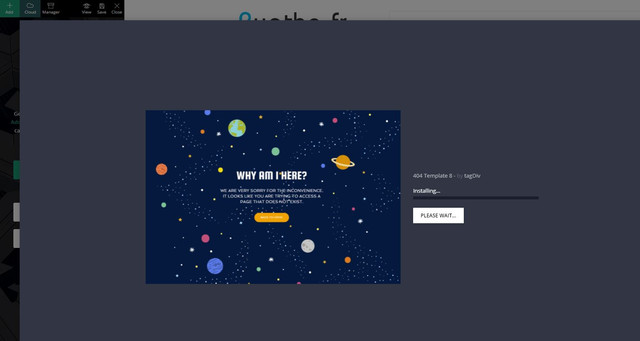
Just before doing that I had no problem to import a new footer template…
 forddyce
 Got the solution, I have a custom Gutenberg editor installed. I don’t understand how that messes up with the composer, turning it off solved the problem.
Bettina Hello!
First of all, try to do these steps as quickly as possible, so your visitors do not notice the process:
1. disable TagDiv Composer
2. uninstall(delete) TagDiv Composer
3. clear cache (if cache plugin exists)
4. install TagDiv Composer
5. activate TagDiv Composer
6. clear cache (if cache plugin exists)
Also, make sure your WordPress and plugins are up to date(specially Standard Pack installed and active if you use default templates).
Sometimes, the issue can be from a plugin conflict, that’s why, please deactivate ALL plugins except tagDiv ones, also if you are using a cache plugin, deactivate it, clear all cache(also from your browser) and try again.
We recommend using WP Super Cache plugin https://forum.tagdiv.com/cache-plugin-install-and-configure/
Let us know about your results!
Thank you!
Bettina Hello!
First of all, try to do these steps as quickly as possible, so your visitors do not notice the process:
1. disable TagDiv Composer
2. uninstall(delete) TagDiv Composer
3. clear cache (if cache plugin exists)
4. install TagDiv Composer
5. activate TagDiv Composer
6. clear cache (if cache plugin exists)
Also, make sure your WordPress and plugins are up to date(specially Standard Pack installed and active if you use default templates).
Sometimes, the issue can be from a plugin conflict, that’s why, please deactivate ALL plugins except tagDiv ones, also if you are using a cache plugin, deactivate it, clear all cache(also from your browser) and try again.
We recommend using WP Super Cache plugin https://forum.tagdiv.com/cache-plugin-install-and-configure/
Let us know about your results!
Thank you!
Bettina Hello!
First of all, try to do these steps as quickly as possible, so your visitors do not notice the process:
1. disable TagDiv Composer
2. uninstall(delete) TagDiv Composer
3. clear cache (if cache plugin exists)
4. install TagDiv Composer
5. activate TagDiv Composer
6. clear cache (if cache plugin exists)
Also, make sure your WordPress and plugins are up to date(specially Standard Pack installed and active if you use default templates).
Sometimes, the issue can be from a plugin conflict, that’s why, please deactivate ALL plugins except tagDiv ones, also if you are using a cache plugin, deactivate it, clear all cache(also from your browser) and try again.
We recommend using WP Super Cache plugin https://forum.tagdiv.com/cache-plugin-install-and-configure/
Let us know about your results!
Thank you!
Bettina Hello!
First of all, try to do these steps as quickly as possible, so your visitors do not notice the process:
1. disable TagDiv Composer
2. uninstall(delete) TagDiv Composer
3. clear cache (if cache plugin exists)
4. install TagDiv Composer
5. activate TagDiv Composer
6. clear cache (if cache plugin exists)
Also, make sure your WordPress and plugins are up to date(specially Standard Pack installed and active if you use default templates).
Sometimes, the issue can be from a plugin conflict, that’s why, please deactivate ALL plugins except tagDiv ones, also if you are using a cache plugin, deactivate it, clear all cache(also from your browser) and try again.
We recommend using WP Super Cache plugin https://forum.tagdiv.com/cache-plugin-install-and-configure/
Let us know about your results!
Thank you!
Bettina Hello!
First of all, try to do these steps as quickly as possible, so your visitors do not notice the process:
1. disable TagDiv Composer
2. uninstall(delete) TagDiv Composer
3. clear cache (if cache plugin exists)
4. install TagDiv Composer
5. activate TagDiv Composer
6. clear cache (if cache plugin exists)
We recommend using WP Super Cache plugin https://forum.tagdiv.com/cache-plugin-install-and-configure/
Let us know about your results!
Thank you!
Anamaria Hello,
In this topic, you can find information about mobile versions can use => https://forum.tagdiv.com/topic/mobile-pages-2/
So, I check your website and seems to be the mobile responsive version => https://www.screencast.com/t/ft23ysMafjs, I understand you have created a mobile page, please make sure you set it => https://www.screencast.com/t/bYroSq7x8T9, also, the header and footer are taken from the standard ones. All you have to do is edit the mobile page, and in Manager (Website Manager) you need to import or the easy way is to convert the existent header like this => https://www.screencast.com/t/z924EIRIMr1Y
The same must be done for the footer.
Also, asks the host if there is a cache plugin installed on the host.
If the problem persists after all this, we need to investigate what settings were made to cause that problem, please make a full backup to all files and the database and contact us via email at contact@tagdiv.com Provide
– wp-admin URL and credentials
– cPanel URL and credentials
– a link to this topic in order to identify you
Thank you!
Bettina Hello!
Please make sure your WordPress and plugins are up to date(specially Standard Pack installed and active if you use default templates).
Try to delete your cache(also from your browser).
We recommend using WP Super Cache plugin https://forum.tagdiv.com/cache-plugin-install-and-configure/
Let us know the results!
Thank you!
