
 minilittlethings
 I’ve tried to install the pluggin you told me (WP Super Cache) but I have some problems. I installed it but I can not configure it and it dosen’t appear in the bar settings. As you can see I have activated the pluggin https://we.tl/t-130qeQPJBB but the pluggin doesn’t appear in the settings box https://we.tl/t-bbV8TdrrO1 and when I try to press activate the pluggin this screen appears on my computer with the following text https://we.tl/t-vMXX4UoZX6 (Attention!
The /home/minilitt/minilittleparty.com/wp-content/advanced-cache.php file already exists. Delete it manually before using this plugin. If you still see this message after deleting it, please contact your accommodation support.)So, what can I do now? Do you have a private service that can fix all my problems because I’m wasting a lot of time and I don’t think I’m going to fix it.
 Calin
Calin Hello,
Please check our documentation for How to install and update plugins -> https://tagdiv.com/how-to-install-plugins-and-update-plugins/
Thank you!
 Vlad S
 Hello !
That aspect is the mobile theme being rendered on desktop.
Usually this issue comes from lack of a caching plugin. We do recommend using WP Super Cache as you can see here: https://tagdiv.com/wp-super-cache-plugin-install-and-configure/
Thank you !
Vlad S Hello !
This is a bit odd. Since you already installed the theme on one host you should be able to install it on a local host too. Do you use XAMPP localhost ? Try placing the Newspaper theme FOLDER not zip dirrectly into the wp-content folder of your localhost.
Thank you !
 akula001
how can i install/update plugins? I cannot allow a third party to ftp into my server. TY
 camilob1
hi i installed the theme and then i import the the Animals Magazine Pro i always use wp-bakery for this type of templates i already use this theme whit other and work just fine, but whit this o wp-bakery i got those codes i tried everthing i need to change a lot of things about the design but i can do nothing 
 andreasczech
 Hi,
thank you for you fast reply. Importing the demo settings only means to import the settings from theme panel, right? But I have to create pages like Home oder footer template or all of the cloud templates by myself and start from scratch, right?
Im wondering if its possible to import all of the demo content and replace / change stuff like posts, pages etc. Is there a “switch” to prevent me (or my cat) to click the uninstall demo button or install another demo (and loose the demo content)?
Calin Hello,
The best way to do that is to import only the demo settings, if you’ll overwrite the demo content on update or uninstall/change demo you’ll lose all the content, you can check more about how to install demos in our documentation from here -> https://forum.tagdiv.com/installing-demos/
Thank you!
 himanshu00123
Hi,
I have read the Tutorial of AMP implementation on https://forum.tagdiv.com/tagdiv-amp-plugin-tutorial and installed Mobile theme plugin and amp plugin from theme Plugin section and follow the steps as told in the tutorial but there is no AMP menu item in my left sidebar of admin panel below setting menu item

The single Post/Page is also not showing any AMP option like the image given below
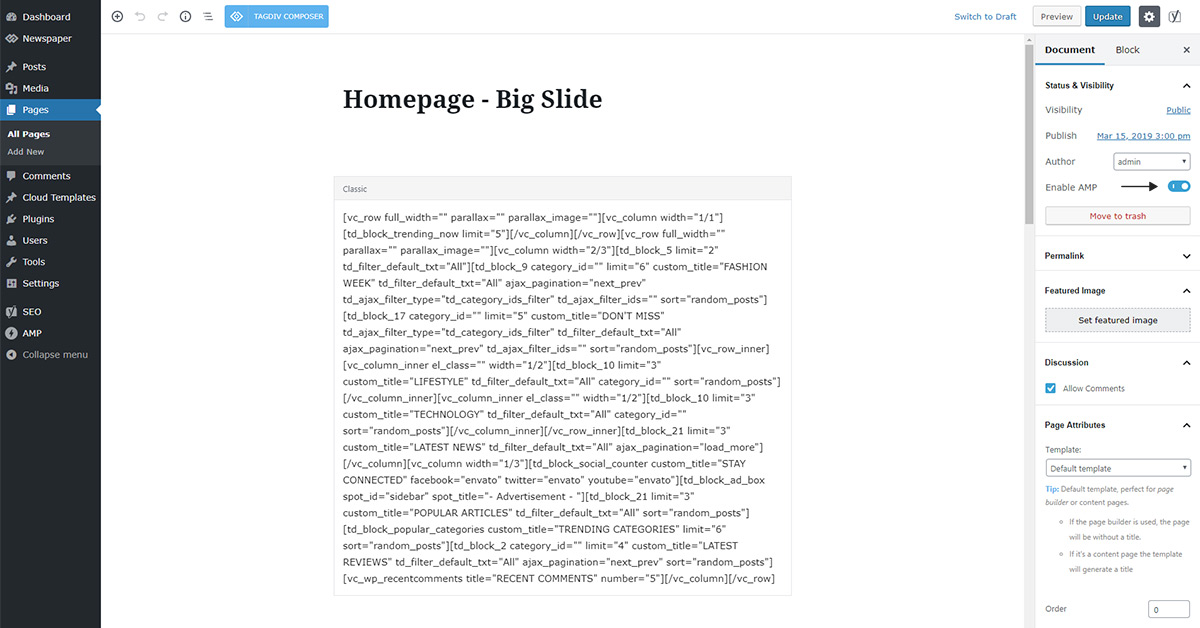
Please help
Website: hub4trendies.com
Vlad S Hello !
In order to install AMP you will need Mobile theme. Find out more about it here: https://forum.tagdiv.com/tagdiv-amp-plugin-tutorial/
Please note that this is a Custom Work request. We can offer custom work for a fee. Send us your inquiri here: https://tagdiv.com/premium-customization-services/ and you will receive a quotation.
Thank you !
 hbg
hbg I have no additional plugin or custom code or chiild theme installed. Also, it worked right before I changed the header, so it is kind of funny…
 TheVadmin
I go to theme panel -> footer -> instagram settings -> and enable SHOW THE FOOTER INSTAGRAM SECTION
I fill in my INSTAGRAM ID and I get the error | Instagram | Instagram data error: Instagram html data cannot be retrieved
I tried another public ID like “instagram” and nothing works either
https://goutisestate.com/store/
I have version 9.8 installed
 bjwyse
 I confirmed that I am trying to import the correct archive. I unzipped the files and copied them to my themes folder and the theme can now be activated.
Now, I see the same dialog box, asking for FTP connection details, when I try to install the required plugins. I do not get an option to enter my licence code.
Just a reminder that the theme is already up and running on my cloud based instance of WordPress and now I am setting up a local development instance.
andreasczechHi,
I just installed the Tech News PRO Demo and my plan is as follows.
Keep ALL of the settings and replace the content (post, categories etc.) step-by-step.
But how to prevent that I accidentally click the “Uninstall” button and everything goes away?
Do I have to copy the settings, pages, cloud templates etc. first?
Any hints are appreciated!
Kind regards
Andreas
Vlad S Hello !
Please make sure you are importing the correct archive as you can see here: https://forum.tagdiv.com/install-via-wordpress/
Thank you !
Vlad S Hello !
In order to install the newspaper theme please take a look at our documentation regarding the install as you can see here: https://forum.tagdiv.com/install-via-wordpress/
Also please make sure that your system requirements are up to date as you can see here: https://forum.tagdiv.com/requirements-for-newspaper/
I hope this is helpfull !
Thank you !
Calin Hello,
In order to have access to the demos, you’ll need to install and activate the plugins from Welcome section, in special TagDiv Composer, after that you’ll have access to the theme demos. -> https://forum.tagdiv.com/installing-demos/
Thank you!
bjwyseI am trying to install the theme using the ZIP file by uploading it in WordPress admin.
Instead of installing the theme from the ZIP file, it appears to be attempting to make an FTP connection.
The theme is already running on my website but I need to use a local development version also with the http://localhost URL.
 varesecity
Two days ago I bought the theme ”News9paper” that I installed on my site, I wanted todayI to install a copy to use as offline but it doesn’t allow me to upload plugins because it’s expired: does that mean I have to buy another copy?
Thank you
Best regards
Gianni
 WenTraveling
(1) I have followed the tutor of The Mobile Theme on NEWSPAPER website, but my page still can’t show the theme on my mobile. I have checked my website on the AMP-checking website, it says the link doesn’t have AMP.
(2) Furthermore, I have installed the AMP plugin, but the AMP setting icon disappear on my sitebar of WordPress (I have seen it just minutes before). Where can I get it back?
My website address: https://wentraveling.com
 pdpl
pdplI was not able to see Pro Demos; thus purchased the them again; but still the options are inactive.
I want to install “ROMANIA NEWS”; how can I do as the option is inactive in theme panel
 weedwiththat
Installed and activated theme but missing import demo data.
Soledad in wp admin only show three options: Welcome, Custom Fonts and White Label
No option to install demos
 webjump
Hi there,
we have a site in production that we have requested be moved to another domain.
However, the client did not tell me that they have also asked for the site to be duplicated (to a sub domain)
http://www.farewells.co.uk
http://www.farewells.co.uk/dev1
There seems an issue with both instances running on the same server space and we were informed it was consuming too many resources due to looping).
I immediately thought it may be a licence key issue and instructed the client to purchase an additional key (under their own Envato account). So all legal and fair.
I have also deleted the newspaper theme and installed a fresh one and now wish to activate the new key. I hope this will work. How do I do this?
This is a very urgent request and would really appreciate your assistance asap. We’ve worked really hard to buold the site.
Hope to hear from you soon.
Very best regards.
Ken
 shizane
So I migrated my site from namecheap to Flywheel using Migrate Guru…the site migrated fine but I cant update Composer, When I click the button to install the premium theme I get the error “Sorry, you are not allowed to access this page.”
I deactivated the theme, deleted it, uploaded a new version via FTP and now the site is broken and still cant update Composer.
I’m not sure if its a cache or permissions issue….
I emailed your support with admin access..hope you can help! Thank you.
 danishmic
Hi All
I purchased the theme and installed here http://infomyindia.com. It’s working fine but it’s resetting functions.php file permission to 00 (in both parent and child themes) https://www.screencast.com/t/aytWwjOhiN in 24 hours approx. I see, there is no malware in our server too. How can I fix this issue? Please help me to fix the issue.
Regards
Danish
