
- NewspaperHow to Add a Logo in Newspaper
- NewspaperShortcodes
- NewspaperHow to Set the Image Avatar
- NewspaperThe Mobile Theme
- NewspaperFavicon & iOS Bookmarklet
- NewspaperHeader styles
- NewspaperWhat’s Included in the Newspaper Theme Package
 storecorner
Hi,
In this website http://to10.gr/ the theme used is Newspaper.
The site has the main menu. Below it has logos from different teams that are repeated on all pages.
This is what supported from the theme or it is custom?
Thanx
 Bogdan B.
 Hello,
If you want to have the same responsive version, please disable the mobile theme plugin.
The footer logo can be changed from the footer section of the theme panel.
Thank you!
Bogdan B. Hello.
The footer logo can be changed to a different one from the footer section of the theme panel under the ‘footer info content’ section
Thank you!
 blithe
 In that thread, files are outdated. Also I am using multipurpose. I figured out. After this change; h1 on logo only show in homepage.
Change this file : wp-content/plugins/td-multi-purpose/header/tdm-header-menu-h1.php
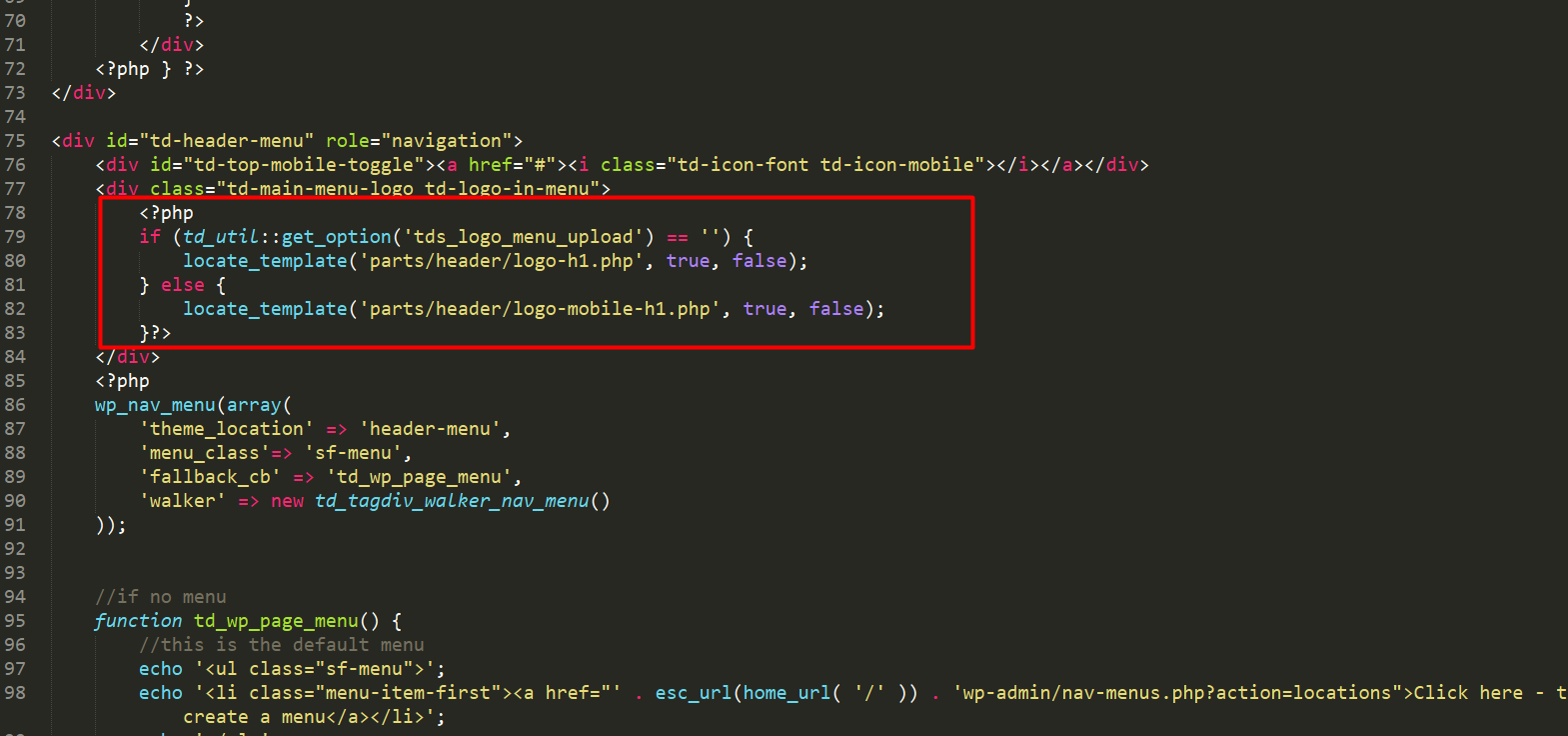
TO:
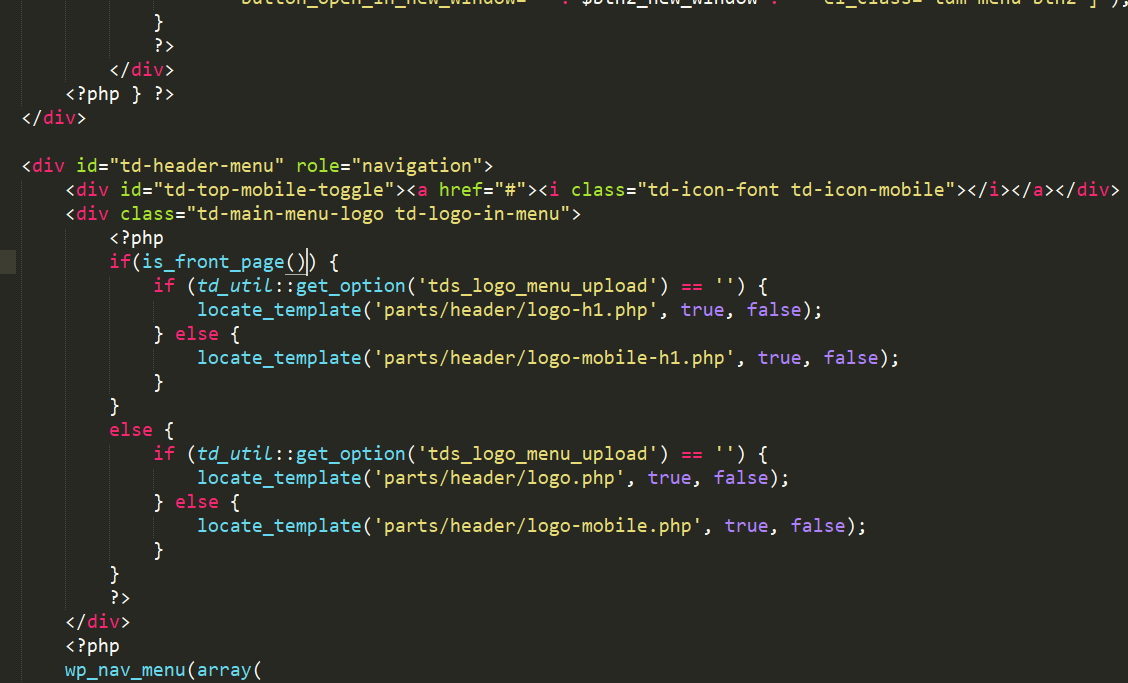
 db9
db9Hello,
The home page of my site is different in the mobile version, and I do not know how to edit to stay the same as the desktop version.
And … how do I remove the “News Magazine” logo and the “SOBRE NÓS” in the mobile version footer.
Site:
http://avada.hospedagemdesites.ws/teste2/
Can someone help me?
 gmkofficial
Hi,
I have a logo which is black but want to use a white version in the footer. How do I do this?
Thanks
 applesandarrows
 Awesome! That worked for the header, but I’m struggling to make that happen with the footer logo.
Thank you so much!
 modocmag
 Ah so I added the CSS and now it made the logo smaller, however now the logo is on the left of the website? :/ Any idea on how to center it?
 Simion C.
 Hi,
That would be the case if you have installed the Business demo
– https://demo.tagdiv.com/newspaper_business/
This demo has custom design that will position the logo on the right, when using header style 1. All the demos have custom design, based on modifications made to the default theme elements.
In this case you could either change the header style (the design is only for header style 1), or remove the code that is responsible for the modification, in the demo stylesheet directly
– https://www.screencast.com/t/oE3x6hLon
Thanks
 avielder
 I just answered my own question. The option is under “LOGO ON STICKY MENU”. Found it thank you!
avielderHello!
I have chosen Header Style 7 and I have it as a sticky menu when I scroll down. I noticed that when I scroll down the menu is sticky but the logo disappears. Is there a way to get the logo to shrink down proportionally and stay on the header?
 adminplay
 Deci, vad ca am o problema foarte mare. Fara sa fac niciun fel de modificare asupra setarilor din theme panel au disparut pur si simplu toate saterile si configurarile facute :(. Inclusiv codul de analytics, logo-ul etc.
Setarile au fost facute in data de 13.01.2018.
Va rog sa investigati problema cat mai urgent posibil pentru ca se pierd foarte foarte multe (optimizari seo etc.). Astept un raspuns cat de urgent posibil!
site-ul unde este instalata tema este ideipentrucasa .ro
 kredit
 my header logo (syle 1) is showing on the right and not on the left site. (adsense banner code is not submitted) yet.
How Can i Move my logo from the right to left please ?
http://prntscr.com/i0vlcb
 Catalin
 Hello blithe,
If you want to remove the H1 tag to your logo you should check the following topic here -> https://forum.tagdiv.com/topic/h1-in-logo/
Thanks.
 d85
d85Ajax dropdown – filter type: filter by categories, does not work!
On frontend I see the changes that need to be,when I’m surfing the site logout,
everything is mixed and nothing is right…
Bogdan B. Hi,
Or you can use a header style that does not show the full size logo./ Avoid header styles 9, 10 or 11 if you do not want a full width logo.
Thanks.
Simion C. Hi,
That could be made in these files, in each of the two locations
– https://www.screencast.com/t/fv7V2O0J
– https://www.screencast.com/t/5QtNF8NRYcaq
By default the header logo will direct to the homepage. A change like this for example, will change this functionality
– https://www.screencast.com/t/l5wFa3dCA3
– https://www.screencast.com/t/d6nJ49OVl
Thanks
Bogdan B. Hello,
The logo by default has a h1 tag added to it: https://www.screencast.com/t/b7nf1p7zKe8 so you always have a h1 tag present on your page. The text logo also has the h1 present
Thanks.
blitheI want to remove <h1> from logo. How can I do that?
 niederense
 you can try it with CSS
.td-header-style-10 .td-header-sp-logo img {
  display:block;
  position:relative;
  width:300px;
  z-index:1;
}-
This reply was modified 8 years by
niederense.
modocmagHi there,
I am currently trying to replace my PNG header logo to SVG, however, whenever I do it, the logo expands into full size on the browser. Is there a code I can keep it for example 300 by 300 pixels?
Website is http://www.ourculturemag.com – SVG is not currently the main logo
 mimmoarechi
Hi.
1. Lifestyle Magazine demo: how can I change the image of the AD next to the logo?
2. Lifestyle Magazine demo: how can I insert a customized banner instead of the AD?
3. Is it possible and How I can do to change the size of TD-composer elements (blocks, grids. etc) in the home page?
4. I resized my images to 1068×702 (to reduce crop effects), but now the loading of the home page is slow. Can you suggest me a way to minimize crop effects and to gain speed in home page loading?
Thanks.
applesandarrowsHello! We’ve setup a newsletter archive using Newspaper, and our client would like their logo to link back to the main website, rather than the archive. I’m not sure where to change this in the core files.
Archive Site: news.leadingagetexas.org
Main Site: leadingagetexas.org
Thanks!
 brian851
 Ok I see so if i have a logo I’ll not have any H1 referenced ? And it’s a real SEO problem !
I am right ?
Bogdan B. Hello,
Maybe you had a custom implementation added to the theme files. Our theme never featured a slogan section next to the logo. The only setting that comes close to what you mention is the text logo: https://www.screencast.com/t/HyITByUi The text logo will only show up when you do not have a logo uploaded and you use one of header styles 9, 10 or 11.
example: https://www.screencast.com/t/4KcwRTp0bx
Thank you!
