
- TutorialsSystem status parameters guide
 FrasL
FrasL Hi,
Same issue.
System Status
PHP Version: 7.4.3
WP Memory Limit: 256 MB
PHP Execution Time: 300
PHP Max Input Vars: 5000
Theme is registered. The templates have loaded on a couple of occasions but the page times out at 50 seconds 90% of the time.
Thx
 Anamaria
 Hello,
Please try to double the wp memory limit.
Also please check the permalinks and re-save them -> https://i.imgur.com/MQPtVzl.png
Let me know the results!
Thank you!
Anamaria Hello,
Unfortunately, I can’t see your screenshots https://i.imgur.com/26HI37e.png
A solution for sending a screenshot is this:
Download, capture, send: https://www.techsmith.com/jing-tool.html
Also, please make sure you have added the limit also in your wp-config.php file, in config is WP_MEMORY_LIMIT not PHP Memory Limit (there is a typo, sorry) – https://forum.tagdiv.com/requirements-for-newspaper/
and please increase all lower requirements, and follow all steps;
Please check the console when you try to edit is possible to be from the firewall or security module which blocks the admin-ajax.php request, which usually displays a 403 or 404 error
Thank you!
Anamaria Hello, Isaac
Please check what version of PHP you have, we recommend version 7.3
Please make sure that the theme install was done correctly
Install via WordPress -> https://forum.tagdiv.com/install-via-wordpress/
Install via FTP -> https://forum.tagdiv.com/install-via-ftp/
Also, please make sure you have added the limit also in your wp-config.php file, in config is WP_MEMORY_LIMIT not PHP Memory Limit (there is a typo, sorry) – https://forum.tagdiv.com/requirements-for-newspaper/
and please increase all lower requirements, and follow all steps; make sure that the theme is activated and you use an SSL plugin for HTTPS
Also, if you have other plugins activate, please disable them and see if the problem persists.
Thank you!
Anamaria Hello,
Please check what version of PHP you have, we recommend version 7.3
Please make sure that the theme install was done correctly
Install via WordPress -> https://forum.tagdiv.com/install-via-wordpress/
Install via FTP -> https://forum.tagdiv.com/install-via-ftp/
Also, please make sure you have added the limit also in your wp-config.php file, in config is WP_MEMORY_LIMIT not PHP Memory Limit (there is a typo, sorry) – https://forum.tagdiv.com/requirements-for-newspaper/
and please increase all lower requirements, and follow all steps; make sure that the theme is activated and you use an SSL plugin for HTTPS.
If you have shortcodes on the pages/posts please make you have tagDiv plugins activate (tagDiv Composer, tagDiv Cloud Library, tagDiv Standard Pack).
Thank you!
 fondiesicav
 Hi Anamaria,
PHP is 7.4.2
Wp memory limit is correctly set to 512 and already double-checked requirements.
On theme status, lights are already all green.

Anamaria Hello, @fondiesicav
Please check what version of PHP you have, we recommend version 7.3
Also, please make sure you have added the limit also in your wp-config.php file, in config is WP_MEMORY_LIMIT not PHP Memory Limit (there is a typo, sorry) – https://forum.tagdiv.com/requirements-for-newspaper/ and please increase all requirements that are lower, and follow all steps https://wordpress.org/support/topic/admin-ajax-php-500-internal-server-error-loading-scripts/
Thank you!
Anamaria Hello,
Please check what version of PHP you have, we recommend version 7.3
Please make sure that the theme install was done correctly
Install via WordPress -> https://forum.tagdiv.com/install-via-wordpress/
Install via FTP -> https://forum.tagdiv.com/install-via-ftp/
Also, please make sure you have added the limit also in your wp-config.php file, in config is WP_MEMORY_LIMIT not PHP Memory Limit (there is a typo, sorry) – https://forum.tagdiv.com/requirements-for-newspaper/
and please increase all lower requirements, and follow all steps; make sure that the theme is activated and you use an SSL plugin for HTTPS.
Also, if you have other plugins activate, please disable them and see if the problem persists.
Also, please send me a screenshot with a critical error when you try to upload the images.
Thank you!
Anamaria Hello,
Usually the “Invalid reply from server endpoint error” is caused by insufficient WP_Memory_limit, in config is WP_MEMORY_LIMIT not PHP Memory Limit (there is a typo, sorry) if you’ll set it to 256M, and is still not working, please check the rest of the settings from our guide -> https://forum.tagdiv.com/requirements-for-newspaper/ and please increase all requirements that are lower, and follow all steps. Also please make sure that you use an SSL to have https.
Also if the theme is not activated you’ll get the same message, make sure that you have the theme activate as in our guide from here -> https://tagdiv.com/how-to-activate-the-newspaper-theme/
Let us know about your results!
Thank you!
Anamaria Hello,
Please make sure you have added the limit also in your wp-config.php file, in config is WP_MEMORY_LIMIT not PHP Memory Limit (there is a typo, sorry) – https://forum.tagdiv.com/requirements-for-newspaper/
Sometimes, the issue can be from a plugin conflict, that’s why, please deactivate ALL plugins except tagDiv ones, also if you are using child theme or cache plugin, deactivate them, clear all cache and try again.
Thank you!
Anamaria Hello,
Please make sure you have added the limit also in your wp-config.php file, in config is WP_MEMORY_LIMIT not PHP Memory Limit (there is a typo, sorry) – https://forum.tagdiv.com/requirements-for-newspaper/
Thank you!
 sameehsn
Hello,
I have tried everything and setup memory to 256 MB. Checked with my hosting as well but still the system status in theme shows its 40MB.
Please help.
 officialmanish12
I m Successfully Install Newspaper 11, and all plugin successfully install, but when i edit a homepage with tagdiv composer this site can’t reach error showing
how to solve this error i will php verison, memory limit etc but this error is not solve
 Ms1203
 Currently I am using PHP 7.4
WP_memory_limit has also increased to 512Mb
Tried disabling all plugins, updating wordpress but still getting the same error
Anamaria Hello,
Please check what version of PHP you have, we recommend version 7.3
Also, please make sure you have added the limit also in your wp-config.php file, in config is WP_MEMORY_LIMIT not PHP Memory Limit (there is a typo, sorry) – https://forum.tagdiv.com/requirements-for-newspaper/
and please increase all requirements that are lower, and follow all steps;
Also, if you have other plugins activate, please disable them clear all cache and see if the problem persists.
Thank you!
Anamaria Hello,
Please check what version of PHP you have, we recommend version 7.3 and don’t share your credentials on the forum.
Please make sure that the theme install was done correctly
Install via WordPress -> https://forum.tagdiv.com/install-via-wordpress/
Install via FTP -> https://forum.tagdiv.com/install-via-ftp/
Also, please make sure you have added the limit also in your wp-config.php file, in config is WP_MEMORY_LIMIT not PHP Memory Limit (there is a typo, sorry) – https://forum.tagdiv.com/requirements-for-newspaper/
and please increase all requirements that are lower, and follow all steps; make sure that the theme is activated and you use an SSL plugin for HTTPS.
Also, if you have other plugins activate, please disable them and see if the problem persists.
Also, please send me a screenshot with a critical error when you try to activate tagDiv Composer.
Thank you!
 lyon
lyonHello, We are using Newspaper Theme version 10.4 on our multisite network, with WordPress 5.7.2. Ever since updating to 10.4, we’ve had an issue that affects just two of our sites on the network, one of which is the main site. All the other sites have no issue.
What happens is when we build a page with a sidebar in TD Composer, and leave the page template set to default, we are seeing a strange overlapping sidebar:
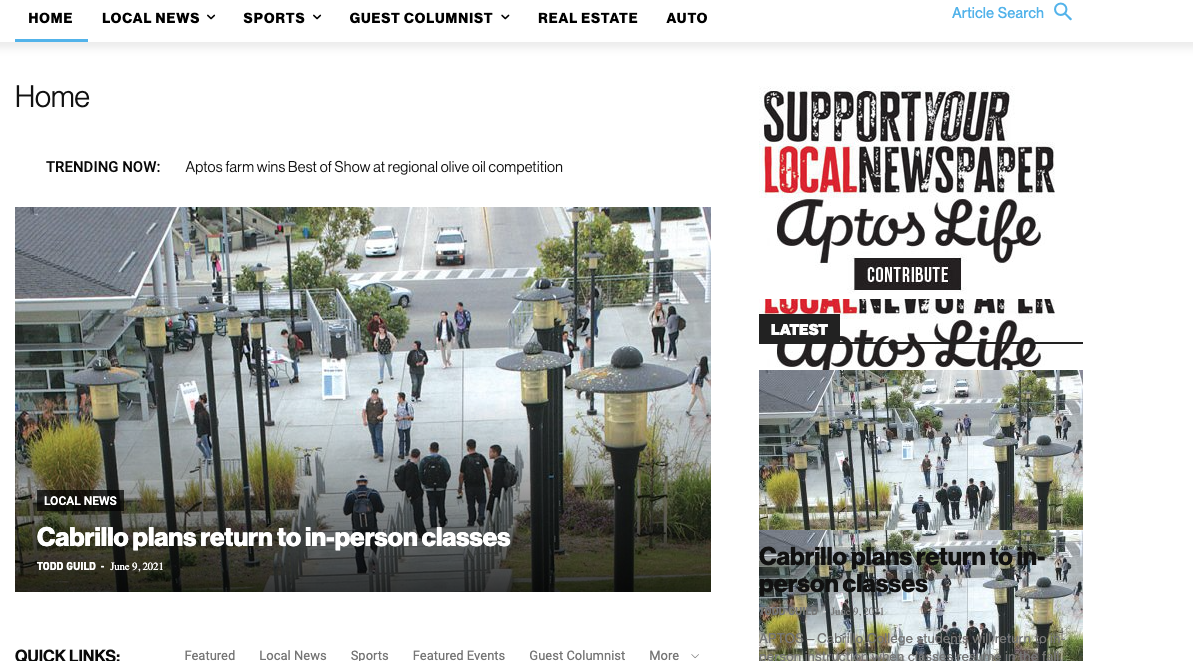
This is how we have the sidebar set in TD Composer:
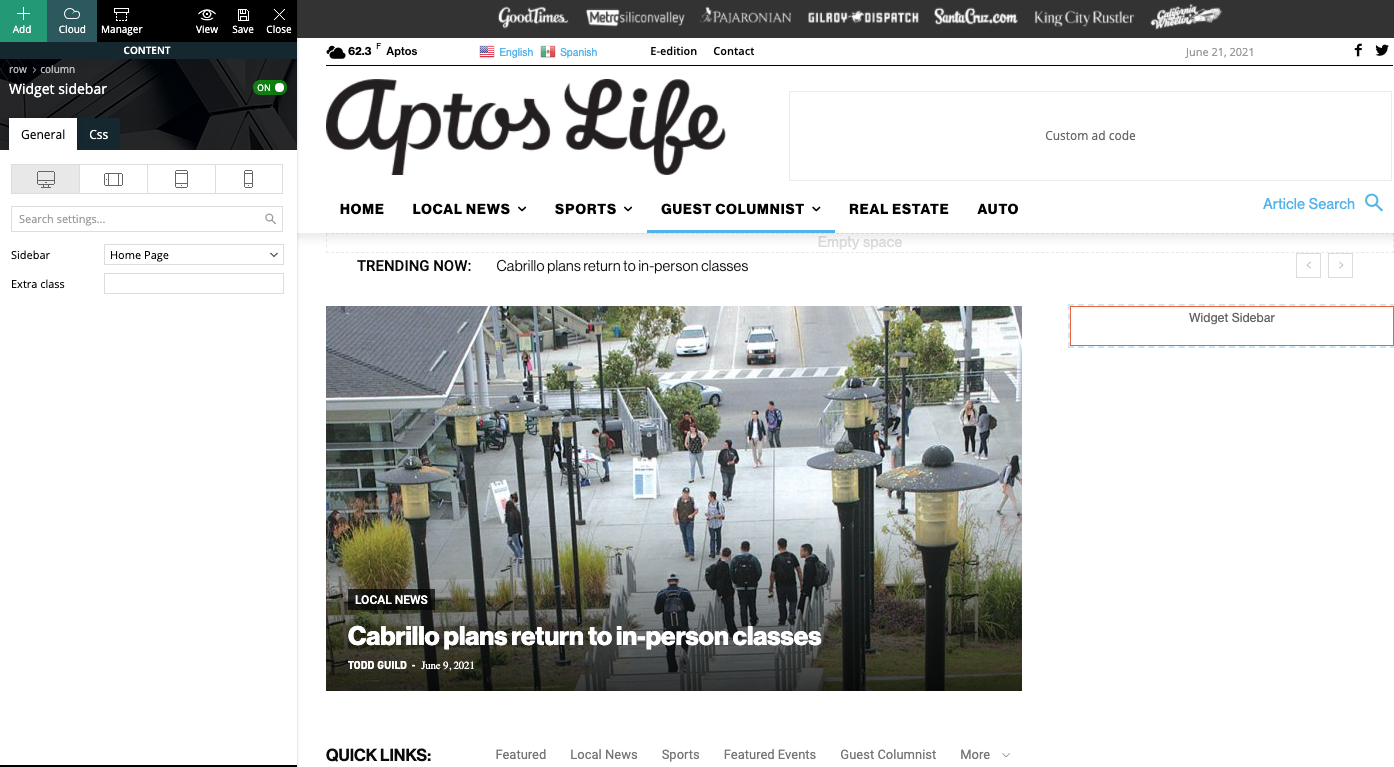
As a temporary workaround we can set the page template to Pagebuilder + latest articles + pagination, but this opens up a whole new set of problems. For example, if we try to change or hide the sidebar in the “Homepage latest articles” settings, no changes occur. Even something such as changing the title on the post loop won’t take affect.
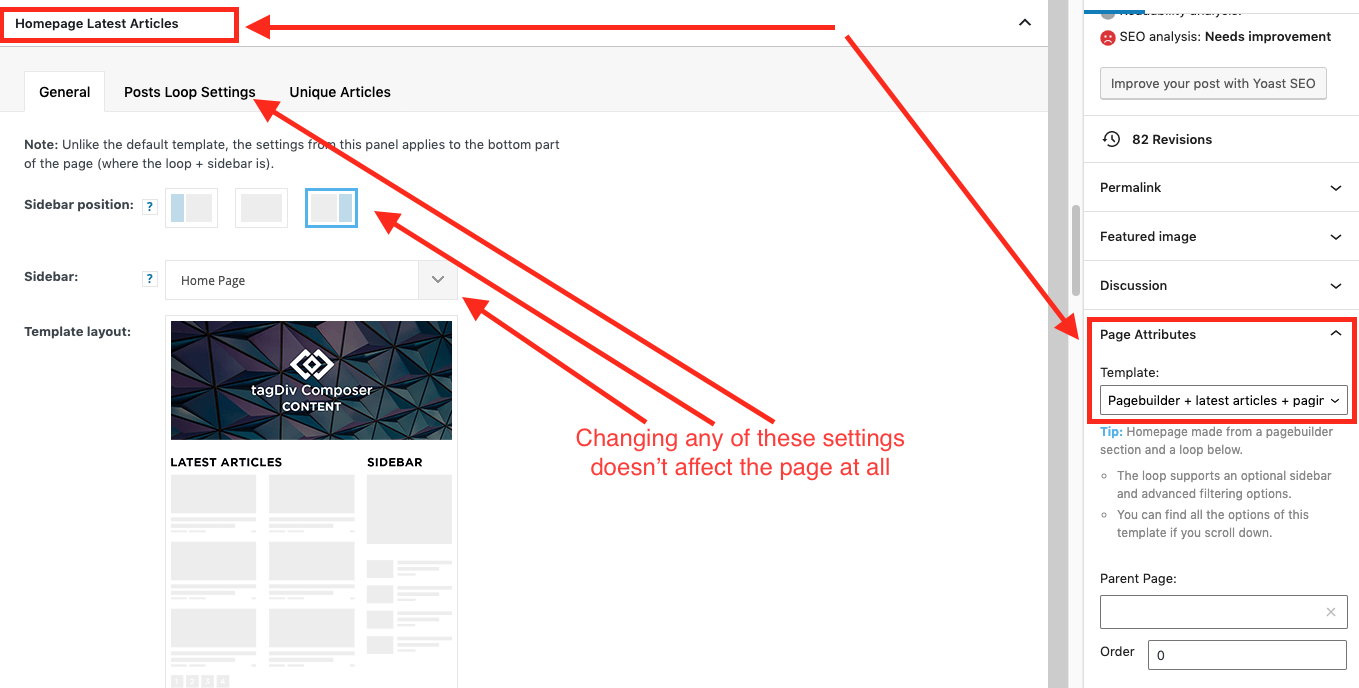
As a result, instead of two overlapping sidebars, we now have two duplicate sidebars stacked on top of each other:
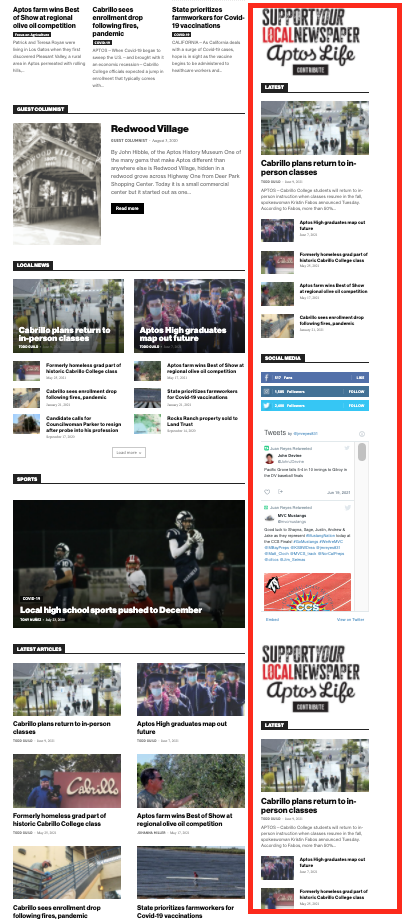
Is there any way to fix these issues? Ideally we would like to leave the page template set to default, with the overlapping sidebars eliminated.
We’ve already tried disabling all our plugins to check for conflicts. Here is some more info from the System Status panel:
Theme name Newspaper
Theme version 10.4
Theme database version 10.4
HTTP channel test wordpress
Installed demo Default – demo ID: default | install type: full
Theme Mobile Newspaper mobile version
php.ini configuration
Server software Apache/2.4.38 (Debian)
PHP Version 7.3.19-1~deb10u1
post_max_size 32M – You cannot upload images, themes and plugins that have a size bigger than this value. To see how you can change this please check our guide here.
max_execution_time 120
max_input_vars 3000
SUHOSIN installed false
PHP extensions
mbstring available
GD library available
WordPress and plugins
WP Home URL https://aptoslife.com
WP Site URL https://aptoslife.com
WP version 5.7.2
WP multisite enabled Yes
WP Language en_US
WP Memory Limit 1 GB/request
WP_DEBUG False
Caching plugin No caching plugin detected – for best performance we recommend using WP Super Cache
 kompic
 I understand, thanks. But how about if I don’t use the plugin to rename the plugin folder.
Renaming plugin folder is just another function supported by WordPress. One only needs to declare it in wp-config, that’s it. Just like changing the wp memory limit.
There should be a php line to change somewhere within the theme files/composer to make it compatible.
Please check. I would like to use this WordPress functionality.
Please have in mind that this is not working only when caching is turned on.
Thanks
Anamaria Hello,
I just checked your website and now the design looks fine => https://www.screencast.com/t/h39ku39W46o
Also, if you deactivate, delete, reinstall and activate the tagDiv Composer from Newspaper plugins => https://www.screencast.com/t/WLy01lbc, then will not affect the content/design of your website
Also, please make sure you have added the limit also in your wp-config.php file, in config is WP_MEMORY_LIMIT not PHP Memory Limit (there is a typo, sorry) – https://forum.tagdiv.com/requirements-for-newspaper/ in the documentation say exactly the steps.
Also, please do a test using only tagDiv plugins, and see if you can edit with tagDiv Composer, if errors occur, please send us screenshots.
Thank you!
 anirban268
 Hello,
Will removing and reinstalling the tagDiv composer affect content/design on my site?
Please guide me with the steps to follow for increasing the WP Memory Limit to 256MB/request.
Thanks and Regards.
Anamaria Hello,
Please make sure that the theme install was done correctly
Install via WordPress -> https://forum.tagdiv.com/install-via-wordpress/
Install via FTP -> https://forum.tagdiv.com/install-via-ftp/
Also, please make sure you have added the limit also in your wp-config.php file, in config is WP_MEMORY_LIMIT not PHP Memory Limit (there is a typo, sorry) – https://forum.tagdiv.com/requirements-for-newspaper/
and please increase all requirements that are lower, and follow all steps; make sure that the theme is activated and you use an SSL plugin for HTTPS.
Also, if you have other plugins activate, please disable them and see if the problem persists.
Thank you!
 danielr
 Hi Calin
Everything was according to the requirements you sent. Memory limit was 40M but I asked to increase it to max, 512M, and it seems to have had no affect. Still loading very slowly. Previously we also isolated each plugin to see which one it was having this effect and its definitely tagDiv composer.
Can you / do you want to login to my admin area to experience it? I can also put up a sandbox/dev area if you want.
 Redlemon
I would like to submit a bug report regarding the post loop inside of the tag div composer.
I have a page with a category’s posts and a dozen of ads. In order to better arrange everything, I attempted to split the content into three logical sections, and insert ads in between those. In the previous format I had a Category Grid 2 on top (entire row), then a full row banner, and then a 2/3 post loop on the left, and a 1/3 ads column on the right.
In the new format I had a 2/3 Category Grid 2 on the top, and a 1/3 column on the right, with one ad box on the top of the column, and a post loop with an offset of 5 posts, and a limit of 2 posts just below that. The remainder of the page remained as before, with the only difference being that the post loop under the full row banner, I set the offset to 7 this time, to compensate for the introduction of the previous post loop.
No matter what settings I configured the second post loop after that, the post limit would not change; it was being affected by the upper post loop, and was limiting the posts to 2 per page for the lower post loop as well. Obviously affected by the upper post loop, and I tried everything in my powers, including deleting the lower post loop, and saving, and reloading, and re-inserting a new post loop and configuring it anew, clearing the cache memory, clearing the cloudflare cache memory, firing up a private browser to test without browser memory, and what not. I even tried using a post loop 2 in place of the post loop, for both the upper and the lower positions alternatively, so as to make sure no rules of the type A affected the instance of the type B. Everything was useless. Every time the lower post loop would be affected by the upper post loop’s settings.
As soon as I deleted the upper post loop and introduced a couple of ads in its place, the problem with the lower post loop went away.
I thought somebody else could benefit from my experience, and perhaps bringing it to your attention you could come up with a fix in the meantime, hence my posting this here publicly. I don’t really need any further assistance with this in my case for the time being, as I have come up with a workaround that allows me to move on.
Thank you.
 IsaacGb
I just bought the theme after the installed I got the same issues.
System Status
PHP Version
7.4.19
WP Memory Limit
40 MB
⤏ We recommend memory to at least 256 MB. Read more
PHP Execution Time
30
⤏ We recommend to increase this value to 60 or more. Read more
PHP Max Input Vars
1000
⤏ We recommend to increase this value to 2000 or more. Read more
Im appreciate a help on how to fix this issues, I’m not a pro so well explained solution will be appreciated.
IsaacGb I just bought the theme after the installed I got the same issues.
System Status
PHP Version
7.4.19
WP Memory Limit
40 MB
⤏ We recommend memory to at least 256 MB. Read more
PHP Execution Time
30
⤏ We recommend to increase this value to 60 or more. Read more
PHP Max Input Vars
1000
⤏ We recommend to increase this value to 2000 or more. Read more
The documentation does not properly says how to fix each of this issues, I have checked the forum and there’s is not clear answer on how to fix this, I appreciate a clear tutorial on how to fix this step by step and no just redirect me to a link like the above.


