- NewsmagTheme colors introduction
- NewsmagSmart list ads
- NewsmagIntroduction
- NewsmagMain menu
- NewsmagLogo & Favicon
- NewsmagHeader ads
- NewsmagSmart sidebar
- NewsmagSharing buttons
- NewsmagCategory tag on modules/blocks
- NewsmagBackground introduction
 Anamaria
 Hello,
Please use a plugin for cache because now you have mobile theme on desktop -> https://imgur.com/W1KaV3U -> https://i.imgur.com/6z19Mek.png
Thank you!
 petar777
 Hey,
I am sharing you my WP Rocket settings and I think they might be useful for you:
ON THE FILE OPTIMISATION TAB
1. Activate Minify CSS Files
2. Optimise CSS Delivery > Remove unused CSS with these exclusions:
(.*).tagdiv-type(.*)
(.*).bhcrow-(.*)
3. Minify Javascript Files
4. Load Javascript Defered with these exclusions:
\/jquery(-migrate)?-?([0-9.]+)?(.min|.slim|.slim.min)?.js
5. Delay Javascript Execution with these exclusions:
\/jquery(-migrate)?-?([0-9.]+)?(.min|.slim|.slim.min)?.js(\?(.*))?( |’|”|>)
tagdiv_theme.min.js
tdTrendingNow.js
tdPopupModal.js
tdBlocksArray
hammer.min.js
tdbMenu.js
tdLoadingBox.js
tdb_p_autoload_vars
blockClass
tdAjaxCount.js
tdTabbedContent.js
tdStickyRow.js
tdSmartSidebar.js
OneSignalSDK
Important – delaying Javascript will make your ads load after any movement on the page so if you just reload the page they will not be loaded as soon as you move anything on the page it will load them immediately. For me this isn’t a problem.
ON THE MEDIA TAB
1. Activate Enable for images
2. Activate Enable CSS for background images
3. Exclude your logo
4. Activate Add missing file dimensions
5. Activate self host fonts
ON THE PRELOAD TAB:
1. Activate preload
2. Enable link preloading
3. Prefetch these:
//fonts.googleapis.com
//www.googletagmanager.com
//www.googletagservices.com
//tpc.googlesyndication.com
//use.typekit.net
//netdna.bootstrapcdn.com
//www.google-analytics.com
//ajax.googleapis.com
4. Preload fonts – /wp-content/themes/Newspaper/images/icons/newspaper.woff
ON THE DATABASE TAB
Enable everything without scheduling auto cleanup
ON THE HEARTBEAT TAB
Enable it and make everything reduced
Important – if you are self hosting your site on nginx you can enable this https://github.com/SatelliteWP/rocket-nginx – this enables Nginx to serve directly previously cached files without calling WordPress or any PHP
Important – if you are self hosting your site on nginx you can enable FastCGI and Redis (use redis cache plugin and nginx helper). When it comes to FastCGI MAKE SURE TO ENABLE SEPARATE CACHE FOR MOBILE AND DESKTOP OTHERWISE IT WILL WORK BADLY!
Important – if you have a large installation and you notice that your queries become slow (e.g. search page takes a lot of time to load or non-cached pages load for more than 1-2 seconds) you can buy Scalability Pro and Super Speedy Search from here https://www.superspeedyplugins.com/shop/ for me this plugins changed the way the theme worked immensely. My non-cached pages loading time dropped form 10 seconds down to 1-2 seconds.
Important – WPRocket offers a plugin that converts all your images to webp format and this is also crucial for your page speed. Their plugin works well for my site.
I hope this is useful for you!

 Davidpinto
Hi,
I deactivated the plugin AMP and the Mobile Theme, because I would like to create a template only for mobile.
I tried with this guide: https://tagdiv.com/newspaper-10-3-7-update-brings-customizable-and-fast-mobile-pages/
and i created a template HomePage Mobile.
https://i.postimg.cc/PxcpTMwW/Screenshot-2025-02-18-alle-16-56-50.png
But I’m confused, because when i see on iPhone I have the flex verison of desktop mode.
the site is http://www.davidpinto.it
thank you
Anamaria Hello,
You have the tagdiv mobile theme plugin installed. You can disable the plugin, or you can disable the plugin on the page https://i.imgur.com/fZGN0pf.png
If you want to continue with the tagDiv Mobile theme plugin, then you can edit the homepage using the theme panel settings > mobile theme – https://i.imgur.com/485PT9t.png also using the mobile theme plugin you need to add content for your page in mobile editor, this editor is at the bottom of pages – https://i.imgur.com/dsnoZKP.png the mobile content should be created using only the mobile editor, no builders.
Thank you!
 Bettina
 Hello!
Ensure the Mobile theme and AMP plugins are disabled, clear the cache, and try again. If the problem is still there, then make a test and deactivate ALL plugins except tagDiv ones. Also, if you are using a cache plugin, deactivate it, clear all cache, and try again.
Let me know the results!
Thank you!
 valerio88
 Hi Bettina,
I managed to solve the issue by deactiving the mobile theme plugin and AMP.
Now, even though comments are disabled only on my homepage appears the ‘leave a comment’ section. The area is not selectable on tagDiv Composer and I don’t understand how to remove it. Can you help? Thanks
My webiste is ulisse.blog
-
This reply was modified 1 year by
valerio88.
 giulian
Hi,
Using NewsPaper, with it’s latest version, we have a big issue with Google core web vital INP as none of our pages pases this rule. After investigating, I’ve seen that it is related with the offcanvas menu on mobile.
Since this is the theme’s native module, it probably happens on all of the inslations, happens on both of ours (prod & staging).
I don’t know if you are aware of the issue and if there is a solution for it. In case you don’t know it, to test it properly, you need to set up the environment settings to lower settings (slower network and CPU).
Didn’t find how to post images, and I preffer not to share the website publicly.
Let me know if you need any other info.
Bettina Hello!
Uninstall the Mobile theme and AMP if you have another layout on your mobile viewport.
Can you please provide your website link?
Thank you!
 jamiesharpe
Hello – on https://www.pinkluggageabroad.com/, I have set in my Theme panel: Header – Main Menu which is set up correctly in Appearance – Menus. However the menu is not displaying on my home page nor the mobile home page. Could you please investigate?
valerio88Dear Team,
After the Newspaper theme update, the mobile version of my website is completely misaligned from what I see on tagDiv Composer.
For instance, the comment section is back, registration of users is back too, lost the categories as a menu. Can you help?
Bettina Hello!
Uninstall the Mobile theme and AMP plugin.
Thank you!
Bettina Hello!
Please uninstall the Mobile theme plugin.
Thank you!
 Guelven
Hi, newspaper theme does not display some areas on mobile, logo, menu and other important areas, only displays most recent articles. any solution?
Link: https://planteloc.co.mz/
Anamaria Hello,
AMP is deprecated as of January 2023-> https://developer.bigcommerce.com/docs/storefront/wordpress/platform-integration/enabling-amp so we don’t longer recommend it.
You have the mobile theme version now, so you can disbale the plugins to check the responsive version.
Using our theme, you can choose from 3 mobile versions
-> mobile responsive => https://www.screencast.com/t/oJ2ShOp47
-> mobile theme plugin => https://forum.tagdiv.com/the-mobile-theme/
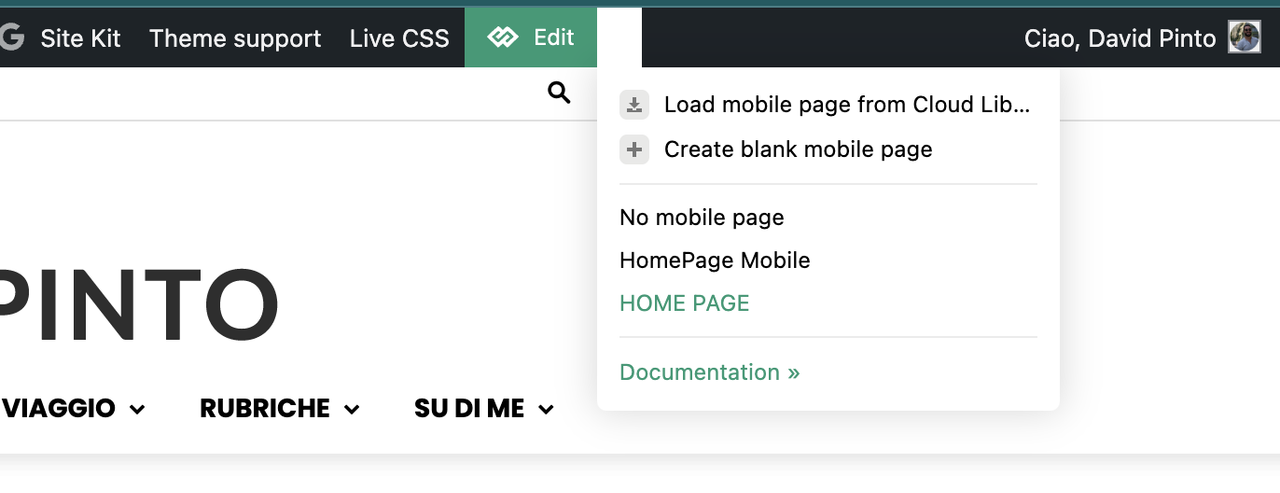
-> mobile page => https://tagdiv.com/newspaper-10-3-7-update-brings-customizable-and-fast-mobile-pages/ The option that you need to use.
Suppose you created the mobile pages with tagDiv Composer. In that case, when you install the Mobile Theme plugin, your pages will be overwritten by the plugin (the mobile theme comes with its templates for page, post, category, etc, so your current templates from the desktop theme will get converted to the mobile theme layout, the page content is made without builders in mobile editor => https://www.screencast.com/t/xbgZG8kH also, the options that are provided to edit the mobile theme version are limited (this keeps the things simple)).
This is a video about Responsive Newspaper Theme, AMP & Mobile Theme, Mobile Pages & Templates -> https://www.youtube.com/watch?v=SpGkOnJeNZY.
So, the mobile responsive is what you see when that you select the viewport on phone => https://www.screencast.com/t/matV17hH, so some settings may apply for each viewport(where is the border blue), and others are not(where the border is black).
The mobile page has the mobile templates from Cloud Library => https://www.screencast.com/t/YCcZ8rL8
The Mobile responsive version of the theme and the mobile page editor can be edit with tagDiv Composer, the mobile theme plugin cannot.
For example, you can have the mobile theme plugin activated and use the mobile page/mobile responsive version for the homepage/pages, but for the categories pages/404 page, you can’t use the mobile page/mobile responsive version if you have the mobile theme plugin activated.
So, if you want to design the pages with tagDiv Composer, you can use the mobile page or mobile responsive version.
Thank you!
 digitalbusiness
 Hello, I don’t know what the problem is. However, after activating the Mobile theme and AMP plugins, I cannot activate the Mobile + AMP option. It turns continuously in vain, as seen in the screenshot: https://prnt.sc/I4W9YWSKc5Ko. This is how the website is presented on the desktop version https://prnt.sc/7I_vMMQ73HUs. See how it is presented now on the mobile version: https://prnt.sc/aCXd9vCosQTy. It isn’t very good with the Newspaper theme logo. Please, help me to fix it.
-
This reply was modified 1 year by
digitalbusiness.
digitalbusinessHello, I don’t know what the problem is. However, after activating the Mobile theme and AMP plugins, I cannot activate the Mobile + AMP option. It turns continuously in vain, as seen in the screenshot: https://prnt.sc/I4W9YWSKc5Ko. This is how the website is presented on the desktop version: https://prnt.sc/7I_vMMQ73HUs. See how it is presented now on the mobile version: https://prnt.sc/aCXd9vCosQTy. It isn’t very good with the Newspaper theme logo. Please, help me to fix it.
Anamaria Hello,
To remove the sign in from mobile please go in Theme Panel -> Header -> Sign in/ Join and disable the option => https://www.screencast.com/t/bRsMhYYu7V8 after that you can remove the sign-in from the header with tagDiv Composer => https://www.screencast.com/t/Y5j6ArY8Ug , select the element and with right-click you can delete it => https://www.screencast.com/t/GshM3Q3nwDv
Thank you!
Anamaria Hello,
You have a header template from Cloud Library, then you need to edit with tagDiv Composer https://www.screencast.com/t/Y5j6ArY8Ug, select the logo and set there the image, make sure that is set to show and delete the logo text or SVG code-> https://imgur.com/ve11Fwt -> https://forum.tagdiv.com/add-logo-newspaper/ For mobile please edit with tagDiv Composer, select the viewport on phone, select the header logo and change it => https://i.imgur.com/cR7F0v4.png
You can to add the favicon, in Theme Panel -> Header -> Logo and Favicon => https://www.screencast.com/t/H4ucPC2wwz
Also, on the homepage there’s an option Customize icon => https://www.screencast.com/t/I2uVvP4b -> Site identity -> Site icon -> Change image -> publish => https://www.screencast.com/t/lY9WEOZEj also, here https://i.imgur.com/s3kT6q8.png
Thank you!
 stefanegirard
Hi
When you use tagDiv Mobile Theme you can remove sign in at the top of the mobile menu.
I DO NOT use this Mobile Theme, but I do not see where to go to remove the “Sign in” link.
Please help.
 mottoyou
 Hi Bettina,
Thank you for your reply!
Unfortunately this doesn’t help to solve the problem and it seems that you didn’t read my whole explanation carefully…
As I said, the problem doesn’t occur only with LiteSpeed, but also with WP Super Cache. So, as stated, this is not specifically related to LiteSpeed.
Of course I don’t use multiple caching tools, as I know that this is not a good technical approach and creates conflicts.
I tested WP Super Cache on a clone of the site (without LiteSpeed installed / activated), to see if the problem keeps coming up. I confirmed that it does!
I listed the entire troubleshooting process to show the conditions under which the issue occurs. Disabling all the other plugins doesn’t help either, as the problem persists. Only disabling the standard Cache eliminates the problem, in both situations: using either LiteSpeed or WP Super Cache.
I also don’t think it’s host-related. I tested with LiteSpeed on Hostinger and on the cloned site with WP Super Cache on Bluehost. Again, the problem persists!
The Object Cache is enabled in LiteSpeed, as it’s available with Hostinger, but the problem doesn’t appear when that’s enabled, nor does it disappear when that’s disabled. The error only goes away if the Page Caching is disabled.
I don’t have the Object Cache enabled with WP Super Cache, so another reason to understand that it has nothing to do with it.
I don’t use AMP or the Mobile Theme plugin. The entire design is just responsive.
The only thing I’m not sure about is the ESI section in LiteSpeed : https://prnt.sc/6O6fFh0PqBaU
I understand that this section gives you the chance to somehow exclude or set a different TTL for parts of the pages, to avoid serving outdated / wrong information.
However, enabling ESI causes the site to display incorrectly, so it doesn’t help in my case.
I was thinking of making use of ESI Nonces (https://prnt.sc/KDVCieNE_XTs | https://prnt.sc/J93A51NqhNPb), but again, I’d need to know what to exclude there. So again, it’s something related to the theme.
I know you have so many clients to respond to every day and I always really appreciate your whole team for all the work you’ve done and continue to do, but please pay more attention to the problem and its details. Otherwise, we’ll continue to ping-pong with the messages, taking each other’s time, risking not finding the right solution.
Maybe it’s a bug of this Header feature (“Don’t load on mobile / desktop”) and you could try testing at your end as well, using LiteSpeed, WP Super Cache or any other caching plugin.
Looking forward to your input!
Thank you!
Bettina Hello!
For this caching issue, please address the issue to the Litespeed support. So they can help you with the plugin settings.
Make sure you do not use many caching tools. Try to disable all and let only the Litespeed. Ask your host to verify if you do not have any other caching tools, object cache etc.
Do you use the Mobile theme plugin or AMP?
Thank you!
 568Winmk
Hi TagDiv Team,
I hope you’re doing well. I would like to inquire about the display of the Newspaper theme on mobile devices.
I have checked it using Safari and Chrome on my iPhone 13.
On the desktop version, everything appears perfectly, and when using developer mode to preview the mobile layout, there are no issues. However, when I check it on my actual phone, only the homepage inherits the template’s styles, while other pages do not.
Could you provide any suggestions on how to fix this issue? I would appreciate your guidance.
Thank you!
website– https://xingbow.com
iamge– https://imgur.com/a/erYUqsT
Best regards,
Sean
 Simion C.
 I suggest not using AMP anymore, especially if there are problems. Use just the mobile theme if you want the best performance. But if you do need to use it, use it together with the mobile theme. And maybe only use it for posts.
I see you enabled the mobile theme and disabled AMP for category pages. Posts are usually the only content served in AMP. Everything looks fine now from what I see. The posts look fine in AMP + mobile theme, and the category pages look fine with the mobile theme. That’s how it should be.
Let me know.
Thank you!
mottoyouHi there,
I’m encountering a caching issue when it comes to not loading the Desktop Header on Mobile and vice versa.
I’m using the LiteSpeed Cache plugin and the following situations occur:
- Once I enable “Don’t load on mobile” for the Desktop Header (or “Don’t load on desktop” for the Mobile one), with all my custom configurations enabled in LiteSpeed, it happens that either the Desktop Header is no longer visible on desktop as well, or the Mobile Header disappears altogether.
- Using the “View Site Before Optimization” button in the LiteSpeed Debug section, everything seems to work properly. The Header is visible on both Desktop and Mobile.
- Thus, I tried excluding any CSS / JS files of the theme or TD plugins, one by one, to identify where the problem could be coming from. However, that didn’t help.
- Then, I disabled all the settings under “Page Optimization” (Minify, Combine, etc.) one by one. Even with all the settings disabled, the problem persists, with the Header showing only on Desktop or only on Mobile.
- So, while using the “View Site Before Optimization” feature gives good results, on the other hand, disabling all optimization settings doesn’t help.
- I also tested “View Site Before Cache” and again the problem seems to go away.
- In this regard, I moved on to disabling the settings in the “Cache” section, starting with all the other features except the standard “Enable Cache”. Nothing helped though…!
- Furthermore, I disabled the last remaining setting, “Enable cache”, and that indeed solved the problem, with the Header displaying correctly, on Desktop and Mobile.
- I started re-enabling all the custom options in “Page optimization” (Minify, Combine, etc.), leaving only Cache disabled and it seems that the issue no longer occurs. So, this shows that this feature in the TagDiv Header (“Don’t load on mobile / desktop”) conflicts with LiteSpeed cache.
I’m wondering if there is a solution that would allow me to properly use this feature in the TagDiv Header together with caching inside LiteSpeed. For instance, would there be a way to exclude the header from being cached by LiteSpeed or something like that?
Thank you in advance for your support!
Kind regards,
 Hafif
HafifHello,
For now, my website mediago.id using prebuilt themes and only set up for the mobile version ” ” . How can I switch to the desktop version?
Thank you