
- TutorialsFrom WPBakery to tagDiv Composer
- TutorialsWhat is Ajax preloading?
 Bettina
 Hello @quochungbcvt!
I do not recommend you to use AMP anymore.
From my point of view, if you don’t use the Mobile Theme plugin, then there is no reason or benefit to AMP. Unfortunately, AMP is not working with the cloud templates because the AMP’s layout is not fully customized.
The AMP version works best with default templates and not cloud templates. That’s why we integrated it with the Mobile theme plugin.
The feedback from our clients about AMP was negative and it is not used anymore, that’s why we didn’t add more customization options.
Thank you for understanding!
 Demetri
Trying to change logo in mobile, thread shows to try > Theme Panel > Header and open the Logo & Favicon section but no such section exists in my Theme Panel. How do I change the mobile logo??? Have newest version ~ Version: 12.6.3
 Calin
Calin Hello,
This is a problem related to the cache plugin. When the tagDiv Mobile Theme is used the cache plugin should have the option for “mobile cache” support enable to can make a separate cache for mobile version and desktop, for example – https://i.imgur.com/Jcy670Z.png – https://forum.tagdiv.com/cache-plugin-install-and-configure/
Thank you!
 11khalylkhalid
Hi there,
I have a problem with the mobile theme plug-in. The problem is that when i go to the browser and try to inspect my website and then choose the mobile screen it works fine but when i quit the inspection and try to return back to my website in the browser it still keep the mobile theme even though i am using the whole browser screen and i try the incognito mode and i still get the mobile theme in the page where i did the inspection the first time so the only why i get this problem solved is when i clean my website’s cache which is not practical.
Any help would be great!
 RaiderReader
Our site has an issue that we’ve not had before. Our website name shows in our header on desktops and tablets but not on mobile phones. Instead, the template name is coming up in the header. Yes, we edited it in in the mobile editor and it actually appears correctly in the editor, but not when others are viewing our page on their phones. Please help! http://www.raiderreader.org –
 LeFrancophile Editors
https://lefrancophile.com
Hi my images are not displaying on mobile and tablet (on mobile or desktop) but are displaying on a pc.
The images on individual posts are blank but if clicked on will appear on a seperate page.The main image of each post remains black.
I have tried deactivating plugins in case there is a conflict but not too confident about deactivating all plug ins in case of crashing site.
Can anyone help please
 Eleonora
Hello,
This morning everything was ok, about 1 hour ago the mobile theme disappeared.
I did all the required updates and reactivated Tag Div but nothing.
The site can no longer be seen on a mobile phone, but on a computer it can.
It’s urgent how do I solve it?
Thank you
Eleonora
 quochungbcvt
My website is: Babybloomberg.com
When entering the article detail page on your phone, the AMP interface will work. Everything is good, the only thing is that my website has 2 languages. Even though the articles are in Vietnamese, the menu in the AMP interface is always in English.
I use the Polylang plugin to create a 2-language website.
I have selected the Vietnamese Main menu and the English Main menu in the correct positions but they still do not display correctly.
I have attached a picture below.
Main menu VI 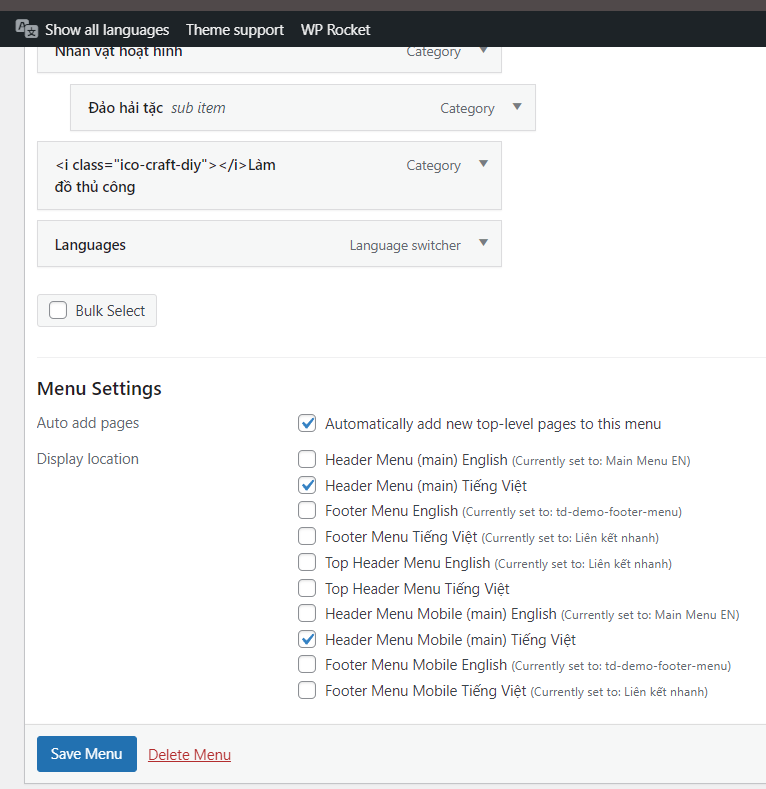
Main menu EN 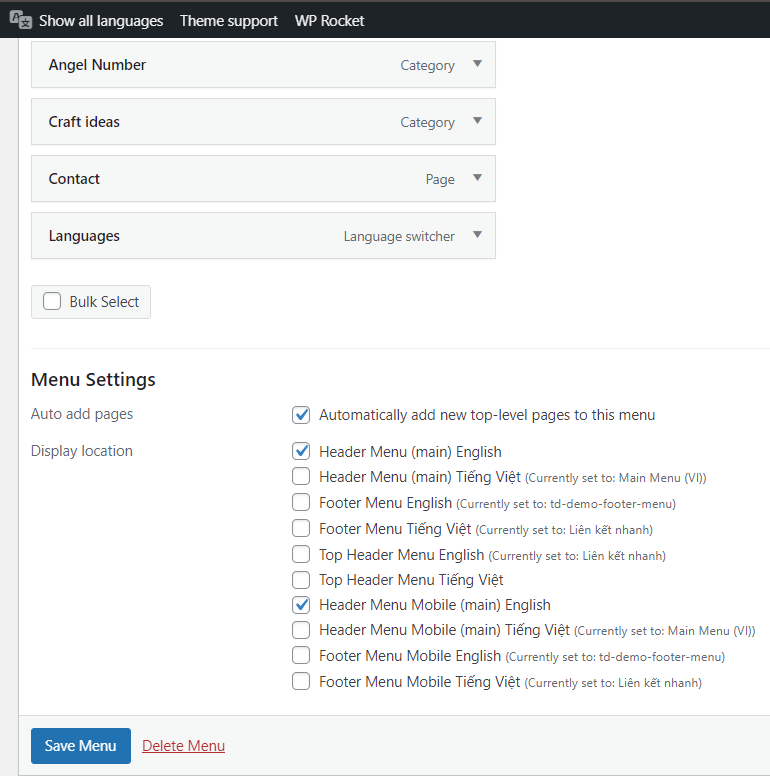
Menu in Vietnamese post in AMP interface 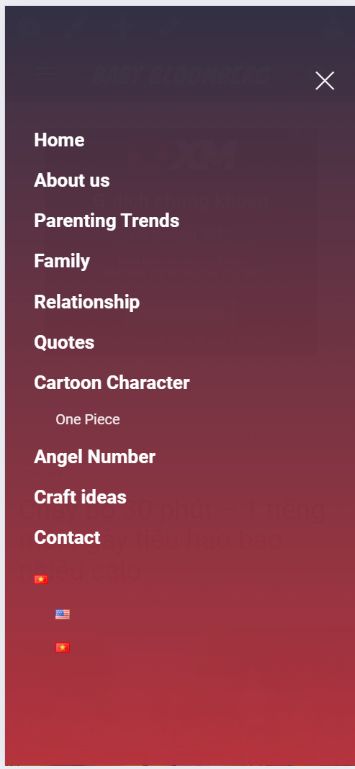
 eric-2
Hi, i can’t figure out how to fix an issue i am having. I am seeing text overlap on my mobile pages which makes the text unreadable.
This happened when i tried to update the theme for tagdiv on my site to the latest theme.
It is only happening on Mobile view. Anyone have an idea how to fix this???
 nhowarth
I have a small image – see https://www.news.cyprus-property-buyers.com/wp-content/uploads/2017/07/cmc1.png that I put at the foot of some on my articles.
I displays at the correct size (131 x 11px) when viewed on a desktop, but is stretched to fill the screen width when viewed on a mobile phone – see https://imgur.com/a/CVHBaV8
I have contacted Imagify, which I use to compress all my images about the problem and they replied:
“Please note that your theme is responsible to display the correct size needed on your website locations and according to the visitor’s screen.
“This type of issue is not related to Imagify; it should be addressed by the theme provider.”
The code used to display the image as follows:

You can view the post at https://www.news.cyprus-property-buyers.com/2024/01/30/limassol-dominated-the-cypriot-property-market-in-2023/id=00168437
Any thought on how I may correct this?
Thanks
Nigel
 libertylens
 I’m also noticing that the ad we have in the header is not appearing on the mobile layout.
 Suliman Razvan
 Ok, your action to my problem was to disable AIOSEO which is not a solution for me because it is a paid service for more than one site… After hours of tests I discovered that there is a real problem between AIOSEO 4.5.4 , 4.5.5 and tagDiv Mobile theme plugin.
My question is do u have any solution for my problem without disable AIOSEO ? Do you have a plan to solve these issues with AIOSEO in yours tagDiv Mobile theme future upgrades?
I need to know in order to have an idea how to proceed from now on in my business…Thank u.
 liboriobutera
 Thank you, but the screenshot I sent is from desktop, not from mobile. May you help me?
Bettina Hello @gorthi !
Try to add this CSS code in the theme panel settings -> Custom CSS:
.td-js-loaded .td-menu-background, .td-js-loaded #td-mobile-nav{

visibility: visible !important;

-webkit-transition: transform 0.5s cubic-bezier(0.79, 0.14, 0.15, 0.86);

transition: transform 0.5s cubic-bezier(0.79, 0.14, 0.15, 0.86);}

.td-menu-mob-open-menu .td-menu-background{ transform: translate3d(0, 0, 0);

    -webkit-transform: translate3d(0, 0, 0);}
I hope that helps you!
Thank you!
Bettina Hello!
Check this thread: https://wordpress.org/support/topic/sorry-you-have-javascript-disabled-2/
From my point of view, if you don’t use the Mobile Theme plugin, then there is no reason or benefit to AMP. Unfortunately, AMP is not working with the cloud templates because the AMP’s layout is not fully customized.
The AMP version works best with default templates and not cloud templates. That’s why we integrated it with the Mobile theme plugin.
The feedback from our clients about AMP was negative and it is not used anymore, that’s why we didn’t add more customization options.
Thank you for understanding!
 Yigi
YigiAfter updating the globalenergy.mx site and the globalindustries.mx site, they presented malware that redirected the site to sales pages, most of the time if accessed from a mobile…
I managed to clean the globalindustries.mx site and it appears safely in sucri but it keeps redirecting me on mobile devices https://sitecheck.sucuri.net/results/globalindustries.mx
However, I updated the one from globalenergy.mx yesterday and it automatically appears as a risky site https://sitecheck.sucuri.net/results/globalenergy.mx
please help, me
 Gino Pinna
Hi, I’ve had the newspaper theme for some time, and I installed the mobile theme plugin. I followed all your instructions on the forum tutorial to the letter, but the amp pages only look good on desktop. normal pages on mobile can be seen well, but AMP ones can’t. A message like this comes out: sorry you have javascript disabled to see this page as it meant to appear, please enable your javascript. So when I went to my mobile browser I activated JavaScript, an option that was already active. Despite this, the problem persists. I’ve looked online for a way to resolve this, but everyone says to do it from settings etc. Do you have any idea why AMP pages on mobile, with the necessary plugins activated, give that error? Try it yourself, for example, from this link https://www.lottogazzetta.it/numeri-spia-per-il-lotto-del-30-01-2024-2/amp/ awaiting your response, best regards friendliness
 arkeonline
On website A I’ve loaded an existing cloud template from the Cloud library (also added a mobile template), after that i removed all elements in that loaded template and went ahead to create my own customized content / layout within that template.
Now I want to copy that ‘custom made’ cloud template from Website A to Website B, because I like the way it works. Website B already also has Newspaper installed, but is not using a cloud template yet.
I want to override the current template on Website B. How can I copy or load the templates (post template + mobile version of that template) from website A to website B?
Bettina Hello @Naseem786!
Did you build the pages with the TagDiv Composer?
We have 3 options for mobile versions that you can use:
1. Responsive version: A responsive version of your website looks similar to the desktop version. TagDiv Composer is used to edit the page.Click on the mobile viewport: https://www.screencast.com/t/XDQJedlggSB. There, you can see your mobile version and edit or adjust the elements to look better.
2. Mobile pages: https://tagdiv.com/newspaper-10-3-7-update-brings-customizable-and-fast-mobile-pages
3. Mobile theme plugin: The Mobile Theme is a performance-optimized theme included in the main Newspaper theme that only loads on mobile devices. It comes with its own templates and designs for pages, posts, categories, etc., so your current templates from the desktop theme will get converted to the mobile theme layout. Please see https://forum.tagdiv.com/the-mobile-theme/ and https://forum.tagdiv.com/mobile-theme-introduction/ for more information.
A full explanation is here: https://www.youtube.com/watch?v=SpGkOnJeNZY
If you need to use mobile version 1 or 2, then you need to uninstall the Mobile Theme plugin and AMP.
Thank you!
 Naseem786
Newspaper Mobile Theme: About Us, Terms & Conditions, and Contact Us pages are not showing in my website.
Bettina Hello @ibadurrahman!
From my point of view, if you don’t use the Mobile Theme plugin, then there is no reason or benefit to AMP. Unfortunately, AMP is not working with the cloud templates because the AMP’s layout is not fully customized.
The AMP version works best with default templates and not cloud templates. That’s why we integrated it with the Mobile theme plugin.
The feedback from our clients about AMP was negative and it is not used anymore, that’s why we didn’t add more customization options.
Thank you for understanding!
Bettina Hello @liboriobutera!
We have already discussed this issue here: https://forum.tagdiv.com/topic/front-page-gone-after-theme-update/
We have 3 options for mobile versions that you can use:
1. Responsive version: A responsive version of your website looks similar to the desktop version. TagDiv Composer is used to edit the page.Click on the mobile viewport: https://www.screencast.com/t/XDQJedlggSB. There, you can see your mobile version and edit or adjust the elements to look better.
2. Mobile pages: https://tagdiv.com/newspaper-10-3-7-update-brings-customizable-and-fast-mobile-pages
3. Mobile theme plugin: The Mobile Theme is a performance-optimized theme included in the main Newspaper theme that only loads on mobile devices. It comes with its own templates and designs for pages, posts, categories, etc., so your current templates from the desktop theme will get converted to the mobile theme layout. Please see https://forum.tagdiv.com/the-mobile-theme/ and https://forum.tagdiv.com/mobile-theme-introduction/ for more information.
A full explanation is here: https://www.youtube.com/watch?v=SpGkOnJeNZY
If you need to use mobile version 1 or 2, then you need to uninstall the Mobile Theme plugin and AMP.
After every modification, you need to reindex your website on Google. It may take some more time.
Thank you !
 ibadurrahman
 this is not a plugin issue. i have on AMP option for mobile theme. When i load these pages, it don’t open in AMP but it open in Mobile behavior. When i click on “Exit Mobile Version” at bottom of page ten it load perfectly and it work good. its Your theme fault that it open Mobile Theme and not open AMP Theme for mobiles screens You can check it from the video i provide in below link. Also you can check image where i on AMP option for mobile.
https://drive.google.com/drive/folders/1Zrk3ju-eu0149P3BLQSPV-thfb2atXJT?usp=sharing
 gorthi
Hello
There is an error on mobile version via Safari browser, the thing is mobile menu isn’t opening when clicking on the humburger icon, it just unzoom the website but doesn’t open the menu model.
This is the screen after clicking the humburger icon : https://imgur.com/SgbkChc
PS: it doesn’t work on Safari ios only, other browsers works perfectly
Bettina Hello!
This issue has already been discussed here; please check:
https://forum.tagdiv.com/topic/mobile-menu-and-mobile-search-not-clickable/
Thank you!

