
- ApiPractical example – How to add a new Block and Module
- ApiAPI – Smart Lists – Introduction
- ApiAPI – Category top section style – Introduction
- ApiAPI – Category top section template – Introduction
- Apitd_api_module::update
- Apitd_api_module::add
- ApiAPI – Modules – Introduction
- ApiUsing the Theme API in plugins
 Bettina
 Hello Rahul!
AMP is faster and works better only with Mobile Theme. The white screen it could be a plugin conflict or a cache problem. Please make a test only with tagdiv plugins active without any cache plugin and see the results.
For more information about this plugin, please check our documentation here: https://forum.tagdiv.com/tagdiv-amp-plugin-tutorial/
Thank you!
Bettina Hello!
Let me explain you which options of mobile versions are:
1. Responsive version: A responsive version of your website is looking similar like on desktop, edit the page with TagDiv Composer, click on the mobile viewport: https://www.screencast.com/t/XDQJedlggSB ; there you can see your mobile version and you can edit the elements there.
2. Mobile pages: https://tagdiv.com/newspaper-10-3-7-update-brings-customizable-and-fast-mobile-pages/
3. Mobile theme plugin: The Mobile Theme is a performance optimized theme included in the Newspaper main theme and it loads only for mobile devices. It comes with its own templates for page, post, category, etc so your current templates from the desktop theme will get converted to the mobile theme layout. For more details, please take a look here: https://forum.tagdiv.com/the-mobile-theme/ https://forum.tagdiv.com/the-mobile-theme/
A full explanation you can find here: https://www.youtube.com/watch?v=SpGkOnJeNZY
Please provide more information about your issue, screenshots or a video with the settings you make in order to help you efficiently.
A solution for sending a screenshot/video is this:
Download, capture, send: https://www.techsmith.com/jing-tool.html
After making the screenshot, you will have a link, paste it here.
Thank you!
Bettina Hello!
You can not customize AMP at all because it comes with its own design: https://forum.tagdiv.com/tagdiv-amp-plugin-tutorial/
There are some settings in the Theme panel -> Mobile Theme.
Thank you!
Bettina Hello!
If you mean Mobile Theme, then you can not customize its own layout and edit the pages with TagDiv Composer.
You have only some settings for this layout, which you can find in Theme panel -> Mobile Theme.
Documentation here:
– https://forum.tagdiv.com/mobile-theme-introduction/
– https://forum.tagdiv.com/the-mobile-theme/
If you do not mean about the Mobile Theme plugin, then please provide more information about what you need to achieve, screenshots or an example and your website link in order to help you efficiently.
A solution for sending a screenshot/video is this:
Download, capture, send: https://www.techsmith.com/jing-tool.html
After making the screenshot, you will have a link, paste it here.
Thank you!
 Anamaria
 Hello,
You don’t have the same footer in the posts, because you have the mobile theme plugin (the mobile theme comes with its templates for page, post, category, etc so your current templates from the desktop theme will get converted to the mobile theme layout).
So you can disable it and see the results.
Also, please check the link provided above to that topic with information about each mobile version and how they work -> https://forum.tagdiv.com/topic/mobile-version-not-working-properly-2/
Thank you!
 Rahul chauhan
when i access my blog via mobile its open normally in amp theme mode but when click on 2nd or next page its suddenly becomes in default mobile view mode and only home page opens. Sometimes the screen also appears blank. How to solve it?
 Tughan
 Thanks a lot, everything is fine right now and working great!
May I request guidance in one thing too? Sorry if I missed it in any of these guides, I checked them twice but I’m not a native speaker.
When I type /?amp, it works great but homepage has a different design than the mobile page I created for homepage. Am I not allowed to customize the amp for now or am I missing something again?
Thank you for your patience and support! Amazing theme!
 tsc_site
I put an ad spot with adsense code right below the main menu: https://prnt.sc/1y2jgov
When I click to view it on mobile, nothing is shown: https://prnt.sc/1y2jixu
This is the page: http://tudosob.re/wrNA5b
Thank you
 menneskedyr
 Thank you for the quick response, but that’s not quite it. Yes, TD Composer has a lot of queries and we live with it, but this was caused by a single (double, actually) repeating query from TD Standard Pack apparently fetching the site logo, using what seems to be a highly inefficient function:
attachment_url_to_postid()
And it was doing it twice, once for the desktop and once for the mobile logo, on every single page load. This caused mysqld to spike to 200% and above.
I see now that I have posted the wrong screenshot above, sorry. Here’s the correct one:
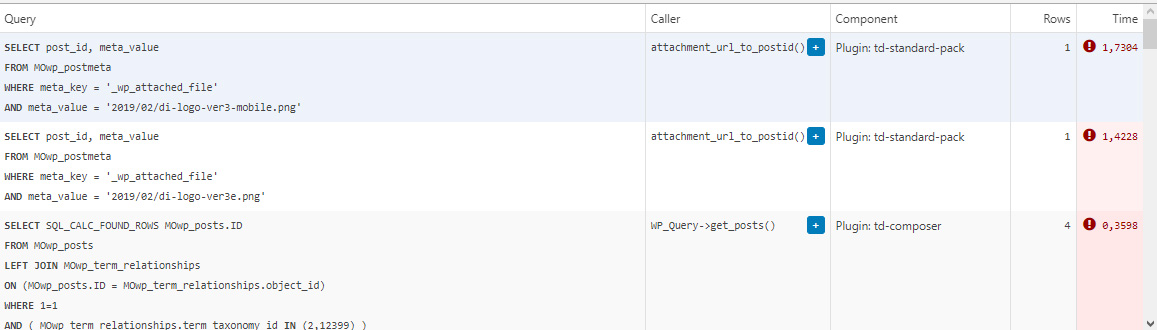
This morning I managed to patch up the problem, it’s a crude solution but may help someone. In header template I found that it was loading the logos from
plugins/td-standard-pack/Newspaper/parts/header/header-menu-h1.php
(yours may be different of course)
There I simply removed the PHP block fetching the logos and hardcoded the HTML for the logos in. As soon as I did that, the SQL spike went away. So I’d say it’s a bug, or inefficient code at least.
To be clear, we’re running the latest versions of WP, PHP, MySQL, the theme & plugins, all on a solid VPS. Yes there is quite a bit of SQL load, we’re working to optimize it with new blocks and Cloud Templates, but this was something else. Could be related to the latest Standard Pack update, don’t know, team didn’t report it before.
-
This reply was modified 4 years by
menneskedyr.
Bettina Hello!
I provide the same response, because someone required “how the ads of the mobile theme should be configured” and this is the only way you can apply the ads there.
Other ads should be configured with a plugin called Ad Inserter plugin. Also, there are auto ads, etc. That’s why we need more details in order to help you efficiently.
There are a lot of cases, that’s why I specified “case”.
We have 3 options for the mobile version, not only Mobile Theme plugin.
If a case required more investigation, then how can I describe this more clear? Sometimes a case is different then how you described in a topic.
Thank you for your understanding!
 iitob
iitob “I just checked your case, and it seems that my colleague replied to you and set it on the issue list for more investigation.”
You need to make this more clear then. If there is no current fix for this, people need to know. We’ve spent all the time switching over to Newspaper and using your mobile theme, but are now losing 60% of the revenue from anchor ads because they wont display with your mobile theme on most devices.
This issue has been brought up by multiple people, and each time one of you gives the same old “Please put the ad code in the mobile theme section” response, completely ignoring the detail people have provided you on this issue.
 srpskiposlovniimenik
Theme is broke again from no reason, homepage and category is ok and mobile too but article page showing me error with td composer a try to reinstall but still is error here 
Anamaria Hello,
I checked your menu on mobile and work => https://i.imgur.com/8lWU2vZ.png
Also, I saw you have the mobile theme plugin activated, and on the main page is disabled that’s why the menu is ok, but for posts/categories template, etc you need to set the menu in Theme Panel -> Mobile Theme -> Header -> Main menu => https://i.imgur.com/AjjhTfB.png
Thank you!
Anamaria Hello,
Now the website on mobile looks fine => https://i.imgur.com/xDE9nMS.png -> https://i.imgur.com/IMU41qd.png
Also, please check this topic where I explained each mobile version -> https://forum.tagdiv.com/topic/mobile-version-not-working-properly-2/ and choose what mobile version you want.
Thank you!
Bettina Hello!
Let me explain you which options of mobile versions are:
1. Responsive version: A responsive version of your website is looking similar like on desktop, edit the page with TagDiv Composer, click on the mobile viewport: https://www.screencast.com/t/XDQJedlggSB ; there you can see your mobile version and you can edit the elements there.
2. Mobile pages: https://tagdiv.com/newspaper-10-3-7-update-brings-customizable-and-fast-mobile-pages/
3. Mobile theme plugin: The Mobile Theme is a performance optimized theme included in the Newspaper main theme and it loads only for mobile devices. It comes with its own templates for page, post, category, etc so your current templates from the desktop theme will get converted to the mobile theme layout. For more details, please take a look here: https://forum.tagdiv.com/the-mobile-theme/ https://forum.tagdiv.com/the-mobile-theme/
A full explanation you can find here: https://www.youtube.com/watch?v=SpGkOnJeNZY
If you created the mobile pages with TagDiv Composer, then when you install Mobile Theme plugin, your pages will be overwritten (disappear) by the plugin layout.
If you use Mobile theme plugin, then you can not edit the pages with TagDiv Composer.
You have only some settings for this layout, which you can find in Theme panel -> Mobile Theme. Please note that if a page is made by Composer, than the content won’t be displayed on Mobile theme version. You should create the content with the Mobile Editor.
Unfortunately, AMP is faster and works better only with Mobile Theme, because it is not compatible with cloud templates.
From my point of view, if you don’t use the Mobile Theme plugin, then there is no reason or benefit from AMP.
Check our documentation about this plugin here:
https://forum.tagdiv.com/tagdiv-amp-plugin-tutorial/
Thank you for understanding!
Bettina Hello!
Please make sure you have the latest version of the PHP, WordPress, theme and plugins(11.3.1).
If that problem is still there, then please execute these steps:
1. disable TagDiv Composer
2. uninstall(delete) TagDiv Composer
3. clear cache (if cache plugin exists)
4. install TagDiv Composer
5. activate TagDiv Composer
6. clear cache (if cache plugin exists)
It seems that you use Mobile Theme plugin. Please note that if you need to use mobile pages or a responsive version, then you need to uninstall the Mobile Theme plugin.
Thank you!
Anamaria Hello,
Please go in Theme Panel -> Mobile Theme -> Grids and set the sort to other option => https://i.imgur.com/G4bf8WU.png
Thank you!
Anamaria Hello,
Please check this topic https://forum.tagdiv.com/topic/hiding-sidebar-on-mobile-2/
Thank you!
Anamaria Hello,
Please let me know what version you use for mobile.
Also, where you set the code for ads and some more details, a link to your website.
https://forum.tagdiv.com/ads-adsense-overview/
https://forum.tagdiv.com/using-other-ads-non-adsense-ads/
Thank you!
Bettina Hello!
If you need a mobile version different than desktop version, then I recommend to use option 2, mobile pages. Build and assign them to your desktop version.
Thank you!
 Calin
Calin Hi,
Yes, the mobile page link will be accessible only for admin and editor, those can edit the mobile page, for visitors will be display the link from desktop.
I asked a friend with iPhone 12, but he said that for him everything seems normal. If the problem is on iPhone 7 I will try to find someone with that iPhone version.
Thank you!
Calin Hi Faba,
If you are using the responsive version, to remove the login option you need to disable this option -> https://i.imgur.com/wpVOrPh.png now if you have installed and activate the mobile theme plugin, then you need to disable it from the mobile theme plugin, from this place -> https://i.imgur.com/xuhQo1O.png
I hope this will help you!
 bidhi
bidhihttps://www.connectbroadbandservices.com/dekkomag/
Menu Not showing in mobile can you please check this
bidhihttps://www.connectbroadbandservices.com/dekkomag/
in mobile device Politics, Art & Culture, Social Set and World all section not showing kindly guide me, Also Footer Section Also not showing in mobile
 tamsin_lechner
 Hi Bettina
Two things.
1. Please can you delete all the screencast page shares above in the post — Oct 28, 2021 at 4:43 am? It has attracted some unwanted attention!! I can’t find an edit function to do it myself.
2. In response to your question. (FYI I’ve decided not to use Mobile Theme).
In your Theme Documentation for Mobile Theme, it shows “Post Settings” should be displayed between Footer and Theme Colors headings. This heading did not show in my settings list and therefore I could not customise the post settings. I did not follow your suggestion to install Standard Pack as a fix, as I already had it installed. I was able to access and customise all other plugin settings.
https://forum.tagdiv.com/the-mobile-theme/
Thanks, Tamsin



