
- NewsmagSmart list ads
- NewsmagIntroduction
- NewsmagMain menu
- NewsmagLogo & Favicon
- NewsmagHeader ads
- NewsmagSmart sidebar
- NewsmagSharing buttons
- NewsmagCategory tag on modules/blocks
- NewsmagBackground introduction
- NewsmagTheme colors introduction
 Calin
Calin Hi techwikimedia,
If you are using mobile theme plugin, please make sure that these thumbs are enable in theme panel -> https://i.imgur.com/tJwYaS4.png
Thank you!
 13fcm
13fcmAs of my understanding only the frontpage can show standard last post and some else in mobile view.
Now I create different pages to list block post from different categories, But mobile view does not allow this.
How can I display a specific category on a page in mobile view.
Thank you
Calin Hi,
I checked the site and the posts appear on my mobile.
Also if you want to set an individual template on some posts you can do it from inside the post, single post template from cloud -> https://i.imgur.com/u3mZgfI.png or standard post templates -> https://i.imgur.com/JatLSJG.png
Thank you!
 Vlad S
 Hello !
Please make sure that you have installed the mobile theme properly as you can find in our guide here: https://forum.tagdiv.com/the-mobile-theme/
Thank you !
 FrankFlames
  techwikimedia
 I followed your instructions
All System Requirements are as per documentation.
1. Disabled all plugins except tagDiv ones.
2. Clear all cache.
Still, it’s not showing thumbnails on the mobile theme.
Vlad S Hello !
From what I can see your settings are correct but from our experience when the mobile theme is being displayed on desktop that is due cache. You can contact your host, maybe they have some kind of caching service and that should be removed.
Thank you !
 miil
miil Hi Vlad,
in the place “custom ad 1” I already have the desktop adv, but i want in the same place (custom ad1) the adv for mobile. Practically in the same custom ad 1 I would like to have 2 different adv one for desktop and one for mobile. Because i have two different generated code desktop e mobile.
How can I do it?
I hope I made myself clear
Calin Hi,
This is because you are using the mobile theme plugin, you’ll gain a better speed then responsive version of theme, but in order to achieve that speed you’ll need to create a new content for pages because in the most of cases those were made with builders or shortcodes ( tagDiv Composer, WPBakery ) and you need to use only the mobile editor ( you need to set the content for pages in mobile editor and this content will be display on mobile theme)
-> https://i.imgur.com/9d0UWLT.png
Unfortunately if you are using same plugin for shortcodes, this will not work on mobile theme, it will be interpreted as a html text, this will work only on responsive version. Also because amp plugin is use with mobile theme plugin the shortcode will not work on amp too, only if you do not use the mobile theme for amp.
Also you can show the responsive version on mobile theme -> https://i.imgur.com/m0bVB5T.png you can check more details about mobile theme in our documentation -> https://forum.tagdiv.com/the-mobile-theme/ or if you want to have the responsive version only, you can use the amp option from mobile theme -> https://i.imgur.com/oofST3D.png (to use the mobile theme template on amp) or you can disable the plugin.
Thank you for your understanding!
Vlad S Hello !
You can set your custom mobile theme here: https://www.screencast.com/t/WlD0DgsQWU
Please make sure that you write your ad code correctly.
Thank you !
 athenac
 Hi Calin,
Also the mobile theme is not showing on for some reason, not sure why since it was working fine.
Thank you
Vlad S Hello !
It looks like you are using Mobile theme.
The Mobile theme was specially designed for optimization on mobile devices. Unfortunately on mobile theme you cannot do much changes of design. If you want to have the same design as on desktop mode you can achieve that by simply disabling the mobile theme.
You will have to recreate your pages into the Mobile editor or completely disable the mobile theme. The mobile editor will not render shortcodes !
Also you can disable mobile theme on certain pages or posts by following this setting: 
Please take a look here: https://forum.tagdiv.com/the-mobile-theme/
Mobile theme plugin can be disabled from Newspaper Plugins as you can see here: https://www.screencast.com/t/LnkZCEVC
Thank you !
 softincome
 Hello Sir,
I am Already Try All Things. But Not Any Progress, Also Mobile Amp Themes Is Fine. But Computer Mode Not Working , Please Give Me Solutions Visit My Website = www.softincome.in
 roqya_France
 “for me in english font mean police”
I can change it on computer no problem with tagdiv font using theme panel , but on mobile phone it is not changing , except for larger screens, I have iphone 7.
can you help ?
 indochine
 Yes, I can but I only need the Ad on mobile view. Adding it to the template will make it global on all viewport.
techwikimedia I have installed tech news pro without content and it’s working fine but when i activated Mobile theme, Thumbnails are not showing.
So I deactivated cache plugin(wp super cache) but still thumbnails are not showing on mobile theme.
Website: http://www.techwikimedia.com
athenacHi,
Mobile theme was working fine and today when I checked the desktop version showed up on mobile. Please review. Thanks
Vlad S Hello !
It looks like you are using Mobile theme.
The Mobile theme was specially designed for optimization on mobile devices. Unfortunately on mobile theme you cannot do much changes of design. If you want to have the same design as on desktop mode you can achieve that by simply disabling the mobile theme.
You will have to recreate your pages into the Mobile editor or completely disable the mobile theme. The mobile editor will not render shortcodes !
Also you can disable mobile theme on certain pages or posts by following this setting:
Please take a look here: https://forum.tagdiv.com/the-mobile-theme/
Mobile theme plugin can be disabled from Newspaper Plugins as you can see here: https://www.screencast.com/t/LnkZCEVC
Thank you !
 varungulati411
Unable to use TD composer. The Mobile Header page is not loading on selecting. Header Banner fails to get updated. Still uses the old banner.
 otobaza
Dear support,
On tech version of newspaper theme I’m facing design issues on mobile-responsive version. Seems all contents, except index page are moved left. Can you please see below screenshot and advice what to do?
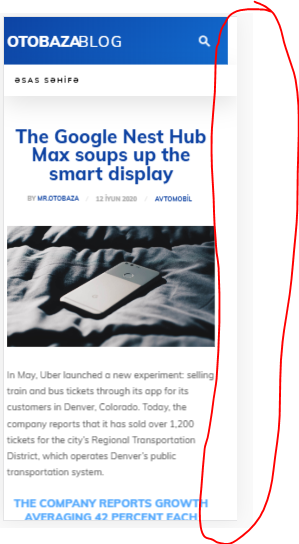
Link for view – https://blog.otobaza.com/2020/06/12/the-google-nest-hub-max-soups-up-the-smart-display/
 Revive the Netherlands
Is it possible to show multiple custom image ads on the mobile theme plugin. On the homepage and in posts. Also when you relaod the page it shows a differant imagas. Im now talking about Adsense but own Images.
Is this hard to do with the mobile theme?
Do we need for this to turn off the mobile theme plugin (website will become slower then)
We to have around 10 advertisers on our website.
There ads management plugins.
Also we can pay the Tagdiv.com programmers to customize the Mobile theme if this a good option.
Domain: revive.nl
 itgrcapitallink
I am visiting the https://capitallinkshipping.com/category/industry-news/ from my mobile and I can see the https://imgur.com/a/MZlPHoM
When I am visitng the https://www.responsinator.com the layout of https://capitallinkshipping.com/category/industry-news/ is different.
Why it is different?
What the people view when they visit the web site from their mobile.
Thank you.
Calin Hi,
If you are using the mobile theme plugin, then you need to set the background image in theme panel> mobile theme -> https://i.imgur.com/HdlWfst.png only if you use the responsive version it will apply the settings from here -> https://i.imgur.com/f8lTuEY.png
Let me know the results!
Thank you!
Calin Hi b_chris21,
If you set the code in theme panel, then it will be set between <head></head> tags, where exactly need to be set this code? normal the code set between <head></head> tags is displaying in mobile theme too, but maybe this code need to be set in a specific place.
Thank you!
miilHi, in my site I use google adv, and 3 custom ad spaces, is there the possibility to use in the same 3 spaces (custom ad1, 2 3) different versions of adv for desktop and mobile?
This is what I put in the custom ad
<div id=’div-gpt-ad-xxxxxxxxxxxxxxxx’ style=’width: 300px; height: 250px;’>
<script>
googletag.cmd.push(function() { googletag.display(‘div-gpt-ad-xxxxxxxxxxxx-0’); });
</script>
</div>
Thanks
Translated with http://www.DeepL.com/Translator (free version)



