
- NewsmagSmart list ads
- NewsmagIntroduction
- NewsmagMain menu
- NewsmagLogo & Favicon
- NewsmagHeader ads
- NewsmagSmart sidebar
- NewsmagSharing buttons
- NewsmagCategory tag on modules/blocks
- NewsmagBackground introduction
- NewsmagTheme colors introduction
 pedroreis
Hello,
Some terms are not translated in mobile theme, like “About Us”; “Follow US” inside footer.
“Search” word after click in search also not translated.
Where can i translate it?
 UsmanSwift
Sign option still appears on mobile version.
 Vlad S
 Hello !
That aspect is the mobile theme being rendered on desktop.
Usually this issue comes from lack of a caching plugin. We do recommend using WP Super Cache as you can see here: https://tagdiv.com/wp-super-cache-plugin-install-and-configure/
Thank you !
Vlad S Hello !
As you can see here: https://gtmetrix.com/reports/sportspoint.pk/cZUprDNS You can do some improvements. Test your website using gtMetrix and improve the results that you want.
Also for a greater page speed in the Mobile theme I would recommend using the Mobile Theme. https://forum.tagdiv.com/the-mobile-theme/
Thank you !
Vlad S Hello !
In order to have AMP working with Newspaper Theme you will have to use mobile theme. The Mobile theme was specially designed for optimization on mobile devices. Unfortunately on mobile theme you cannot do much changes of design. If you want to have the same design as on desktop mode you can achieve that by simply disabling the mobile theme.
You will have to recreate your pages into the Mobile editor.
Also you can disable mobile theme on certain pages or posts by following this setting: 
Please take a look here: https://forum.tagdiv.com/the-mobile-theme/
Thank you !
 minilittlethings
 I don’t want to delete a row, I want to delete an empty space in the header of my website. But it doesn’t matter, maybe this is not the real reason why I can not see my website properly. The layout of my website can not be viewed correctly either in web format or in phone format. On this screen https://we.tl/t-BjISQALK5r you can see how I can see my page in tagdiv format (the design I’ve created and built with tagdiv).
On this other screen you can see how people see my website on website format, on mobile format and tablet format https://we.tl/t-L7Luney61T. Why do you think my website can’t be seen properly in any of the formats and it just looks correctly in tagdiv format?. Mywebsite is: http://www.minilittleparty.com Thank you very much.
 fizig313
dear sir
new theme is too slow on mobile devices
take a view
https://sportspoint.pk
 WenTraveling
I have got the feedback of my former post (#post-314162), but I still have some question.
1. I have activate AMP plugin already, but I can’t find the AMP icon on my side bar for AMP settings. I saw it on my site before, but not it is missing. How should I get it back?
2. If I follow the steps to change the mobile theme from theme panel, “USE THE MOBILE THEME FOR : Mobile +AMP”, the set of my website seen on computer will go wrong.
Thank you so much again!
my website: https://wentraveling.com/
 himanshu00123
Hi,
I have read the Tutorial of AMP implementation on https://forum.tagdiv.com/tagdiv-amp-plugin-tutorial and installed Mobile theme plugin and amp plugin from theme Plugin section and follow the steps as told in the tutorial but there is no AMP menu item in my left sidebar of admin panel below setting menu item

The single Post/Page is also not showing any AMP option like the image given below
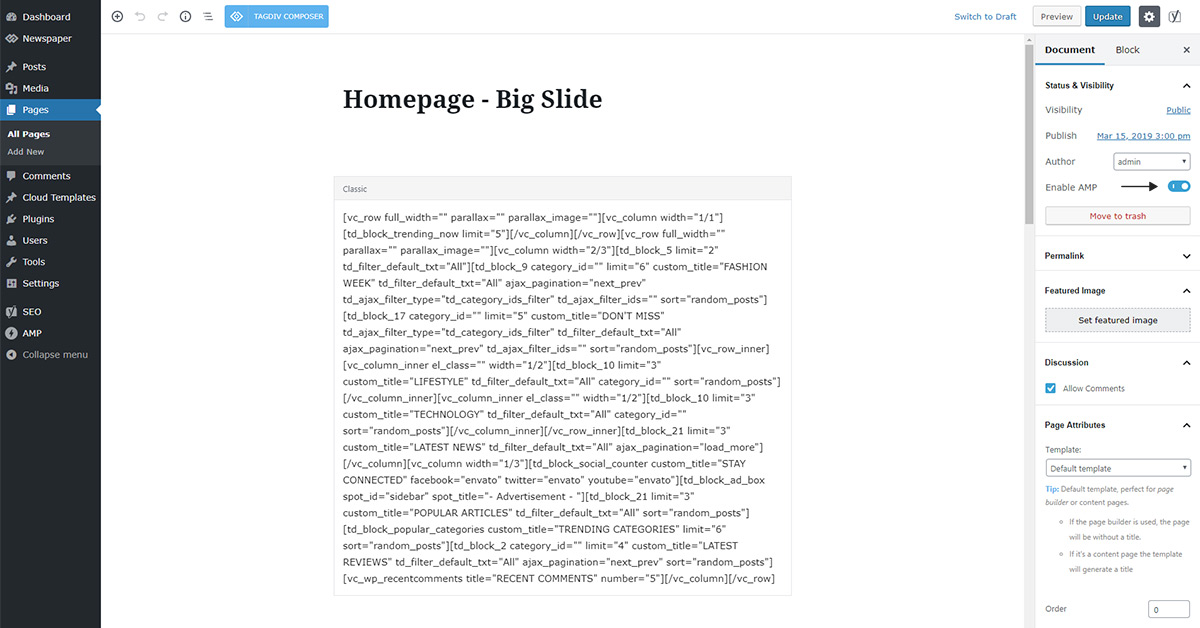
Please help
Website: hub4trendies.com
 ronitimn123
I have creat a new menu for mobile. But when I click after editing the page it’s showing the blank page with only header and footer.
Vlad S Hello !
In order to install AMP you will need Mobile theme. Find out more about it here: https://forum.tagdiv.com/tagdiv-amp-plugin-tutorial/
Please note that this is a Custom Work request. We can offer custom work for a fee. Send us your inquiri here: https://tagdiv.com/premium-customization-services/ and you will receive a quotation.
Thank you !
 Calin
Calin Hello,
I do not quite understand the problem, you activated the mobile theme and this is not apply? if is so then make sure that you clear all cache and you set the mobile theme plugin according to our documentation -> https://forum.tagdiv.com/the-mobile-theme/
If this is not what you mean, please provide some more details and screenshots.
Thank you!
Calin Hello,
I think that you are referring on the icons that appear on mobile version, http://prntscr.com/p5iia7 please check our documentation for how to add an icon in menu from here -> https://forum.tagdiv.com/how-to-add-icons-in-menu/
Also you can use the tagDiv Composer for responsive version -> http://prntscr.com/pctenr unfortunately you can not upload these icons as the images in media library, sorry!
Thank you!
Calin Hello,
1. The mobile version is look like that because you have the mobile theme plugin that provide you a better speed then responsive version of theme, but in order to achieve that speed you’ll need to create a new content for pages because in the most of cases those were made with builders ( tagDiv Composer, WPBakery ) and you need to use only the mobile editor ( you need to set the content for pages in mobile editor and this content will be display on mobile theme)
-> https://www.screencast.com/t/ebUIzt4se
Also since Newspaper v9.7.4 you can show the responsive version on mobile theme -> http://prntscr.com/oh6r2s you can check more details about mobile theme in our documentation -> https://forum.tagdiv.com/the-mobile-theme/
2. Please make sure that after you activate the mobile theme you select one of those options from them panel> mobile theme for AMP -> http://prntscr.com/pb4z2p save the settings and refresh the page, after that the amp settings will appear -> http://prntscr.com/pb4zpx
Thank you!
 howtomoney
It seems to be an application error!!
Below is my setup.
↓↓↓↓↓↓
*Use Mobile Theme For:
Mobile <=== Selected
Mobile + AMP
AMP
Vlad S Hello !
The designs do not match because you are using the mobile theme. The Mobile theme was specially designed for optimization on mobile devices. Unfortunately on mobile theme you cannot do much changes of design. If you want to have the same design as on desktop mode you can achieve that by simply disabling the mobile theme.
You will have to recreate your pages into the Mobile editor.
Also you can disable mobile theme on certain pages or posts by following this setting:
Please take a look here: https://forum.tagdiv.com/the-mobile-theme/
Thank you !
Calin Hello,
If you wan to use the responsive version of theme and you have mobile theme plugin activate, then make use that you enable this option http://prntscr.com/pcpud7
Thank you!
 Yahtzee_Wikilord
Hi
My Tagdiv Composer no longer recognizes any of my demo content posts.
It cannot edit them, nor create posts. All it can do is create and edit pages and even that’s a bit glitchy.
This is a problem because I can’t get this page to render well in the Mobile Theme:
https://www.medievilfaq.com/about-us/
It’s not a plugin conflict, I checked that on my staging site.
Please help!
WenTraveling(1) I have followed the tutor of The Mobile Theme on NEWSPAPER website, but my page still can’t show the theme on my mobile. I have checked my website on the AMP-checking website, it says the link doesn’t have AMP.
(2) Furthermore, I have installed the AMP plugin, but the AMP setting icon disappear on my sitebar of WordPress (I have seen it just minutes before). Where can I get it back?
My website address: https://wentraveling.com
 mukeshingh
why my website pages is not working in mobile?
Check this https://www.hindibro.com/privacy-policy/
mukeshingh Implemeted but its not working on Mobile
Check this – http://hindibro.com/sarkari-result
mukeshinghHow can i use same design for mobile version which i have created for desktop.
 Cuddlepill
 Mobile site was fixed, so we can skip that one!
For Instagram, I have photos popping up in the footer, but it’s not reflecting new images. You can see a screenshot here: https://drive.google.com/open?id=1JfJ_lmpzB8FuEj8Jwuj6etqN07babFbg.
For post preview, the post preview tool within WordPress is rendering the post incorrectly (it’s not reflecting correct formatting). See screenshot here: https://drive.google.com/open?id=1V4Oj4fcgxviY_N3Ucxh0MlwmSVDeo4FB
 ericnyandwi
im having a problem on my webite, everytime i instal ” The tagDiv Mobile Theme plugin requires the tagDiv Composer plugin! my website goes down and stop working
 urbandigital
Hey,
for some reason the titles of some posts are displayed incorrectly on mobile devices, screenshot: https://ibb.co/YyhJ9by
Link (open on mobile device in order to see the problem): https://urban-digital.de/stadtraum-digital-bewerten-jim-walker/
How can we solve this problem?
Thanks!
