
- TutorialsFrom WPBakery to tagDiv Composer
- TutorialsWhat is Ajax preloading?
 Mustafa Varol
 Hello Simion C.
Thank you for the information you provided. I figured out that the problem is the pixel plugin for facebook. After deactivating the problem is solved. Thank you so much.
INFO: Facebook pixel plugin and mobile theme are incompatible.
 Simion C.
 Hi,
I appologize for the delay. From what I can see AMP is not active on your website, or at least for the posts I checked
– http://prntscr.com/njvnsu – http://prntscr.com/njvo08 – http://prntscr.com/njvo4u
So there is no relation between the posts and an AMP version to be indexed by Google. The mobile theme is active but AMP is not, maybe you did not activate one of the options that use AMP – http://prntscr.com/njvpjz you could check that as a first step.
To test if AMP works use /?amp at the end of the URL or use an online validator or tester
– https://validator.ampproject.org/
Thanks
 Calin
Calin Hi,
Please notice that writing multiple times in the same topic only delays the answer. In order to get a fast response, please write once and wait for an answer. We answer from oldest to newest so if you keep posting, your post is moved to fresher ones thus receiving the answer later until we answer all posts before your last reply.
The mobile theme is a plugin that provide you a better speed then responsive version of theme, but in order to achieve that speed you’ll need to create a new content for pages because in the most of cases those were made with builders ( tagDiv Composer, WPBakery ) and you need to use only the mobile editor ( you need to set the content for pages in mobile editor and this content will be display on mobile theme)
-> https://www.screencast.com/t/ebUIzt4se
If you want the responsive version and amp you should use this opinion -> https://www.screencast.com/t/jZct5ueBqOrb but if you have amp activate on pages you’ll need to create in Mobile editor a content for AMP version of page.
Also please check our documentation for Mobile Theme: Automatic Optimization for Mobile with Newspaper Theme -> https://tagdiv.com/mobile-theme-automatic-optimization-for-mobile-newspaper-theme/
Also for the 3 blocks, for those you’ll need to have set seam feature posts (that have set feature category) -> https://forum.tagdiv.com/featured-posts-2/ -> https://www.screencast.com/t/QsJ6ppY4
You’ll need to add some posts in feature category -> https://forum.tagdiv.com/featured-posts-2/ if you do not have this category you can create it, just make sure that you set the category name to be
Featured
Let me know if you have more questions!
Calin Hi,
Using mobile+amp you’ll have the same layout for mobile posts/pages and amp, but you’ll need to make a new content in mobile editor for pages and amp.
Using Amp you’ll have the same layout on mobile like on desktop, but the speed will be lower, and you’ll still need to make content for pages in mobile editor, if you want to have amp on pages.
Please check our documentation for mobile theme -> https://tagdiv.com/mobile-theme-get-mobile-ready-with-newsmag-theme/ and How to Make an AMP Ready Website with Newspaper Theme -> https://tagdiv.com/amp-newspaper-theme/
Yes, you can set a logo for mobile, you need to go in Theme panel>Header > Logo for Mobile -> https://www.screencast.com/t/WLhKBBUENy
Logo & Favicon in Newspaper Theme ->https://forum.tagdiv.com/logo-favicon/
Thank you for your understanding!
 TheWrestlePost
 This is for the desktop version. I want to add the same to the mobile theme
Simion C. Hi,
The mobile editor is for simple text, images, and what is possible with it. Entering composer shortcodes in it will not work properly and may cause problems. The mobile version is separated from composer elements and the main theme, it has it’s own files, doesn’t have many settings that may slow it down etc. This is why it is faster.
If displaying composer elements on mobile is needed, the solution is to disable the mobile theme plugin.
What exactly would you like to edit regarding the mobile latest articles section? If you want to do code modifications to it, in the homepage, the file is here (since update 9.7)
– http://prntscr.com/nju3hb
Thanks
 keithohara
Hi folks,
My sites header on Safair mobile is appearing skewed (screenshot below).
It’s as it the browser isn’t recognising that it’s a mobile, as it’s not showing the mobile version of the site.
Any recommendations on how this can be remedied?
Thanks,
Keith
 Sanjay Kumar Monu
 Hi,
Updating via FTP also leads to the same error. I think you guys have updated the Theme but not the Mobile Theme Plugin appropriately or there is some kind of configuration mismatch.
When I install the mobile theme plugin (which is given in the same theme package) it disabled automatically and also prompting the error in my WP Dashboard like as I already shown you above in the screenshot.
That’s Why I am reporting you? I think it has some kind of Configuration Mismatch.
I have also purchased the Newsmag theme (Current version is 4.8) from you guys which is currently installed in one of my other site. There also the problem associated with Mobile theme. It doesn’t work with theme (amp pages not generates there).
I do not have any problem for now, because in both of my site I am using one of the earlier version of both the theme and it is working fine. However, At some point I have to update it and that’s why I’m reporting you.
Hope you understand and look forward to resolve these issues.
Regards,
Sanjay
-
This reply was modified 7 years by
Sanjay Kumar Monu.
Calin Hi,
Please try the steps indicate in this similar topic : -> https://forum.tagdiv.com/topic/mobile-friendly-test-fail/
Thank you!
Simion C. Hi,
The easiest way would be with some CSS, like this – http://prntscr.com/njtnh3
This code can be entered in the Theme panel->Mobile theme->Custom CSS code section
.category .td-category-description {

display: none;

}
Thanks
 Vlad S
 Hello !
Please insert the code in the mobile theme tab: https://www.screencast.com/t/y5iLsN3bLGil. Also we suggest using the WP-Super Cache in order to clear browser’s cache: https://tagdiv.com/wp-super-cache-plugin-install-and-configure/
Thank you !
 spu
spuHi,
We created a new single post cloud template and we are facing an issue.
1) When the article ends, there is a lot of white space. We tried reducing the margin too, but when we reduced margin/padding then the box below it which is the author’s box, goes into the article/overlaps it. How to resolve this? (example https://www.gadgetbridge.com/news/oneplus-7-pro-press-renders-leaked-shows-full-display-and-triple-rear-camera-setup/)
2) In infinite loading, when the next article appears the statement on Chrome tab shows undefined. This should not be the case. It should show the article name. https://prnt.sc/njsw9l
3) When someone is reading an old article, say from 2-3 days ago or older. When they scroll down and trigger infinite scroll/auto load, they see an article before that date only or the next article of that day. Is there a way to show them the latest articles from the current date.
4) When can we get infinite scroll/auto loading on mobile single post pages?
5) How can we show the time also when the article was posted. Right now, only date appears, but Google gives extra marks if time also appears.
Thanks
Website: gadgetbridge.com
Simion C. Hi,
Seems there are a few AMP errors, I checked one of your posts with the validator. In most cases these are due to plugins, custom code entered in the theme panel, theme files, ad spots, or even in the post content.
For example this error (and another one) seems to be caused by the Facebook pixel code
– http://prntscr.com/njsern
You could add that code here – http://prntscr.com/njsf2h hen test again.
All the errors have to be analyzed and get to the source of the issue, and there are quite a lot of issues that can happen due to various elements
– https://amp.dev/documentation/guides-and-tutorials/learn/validation-workflow/validation_errors
By default, using theme plugins, AMP and mobile theme, the AMP is valid. But usually various codes or plugins interfere with the validation. Only by removing/deactivating them and testing can lead to valid AMP.
Thanks
 WebGuyFL
 Hi, it’s http://www.amisun.com.
We have Robin image optimizer plugin, if that could be the culprit. It all started after the latest Newspaper update and affects android mobile and tablet only.
Thank you so much!!
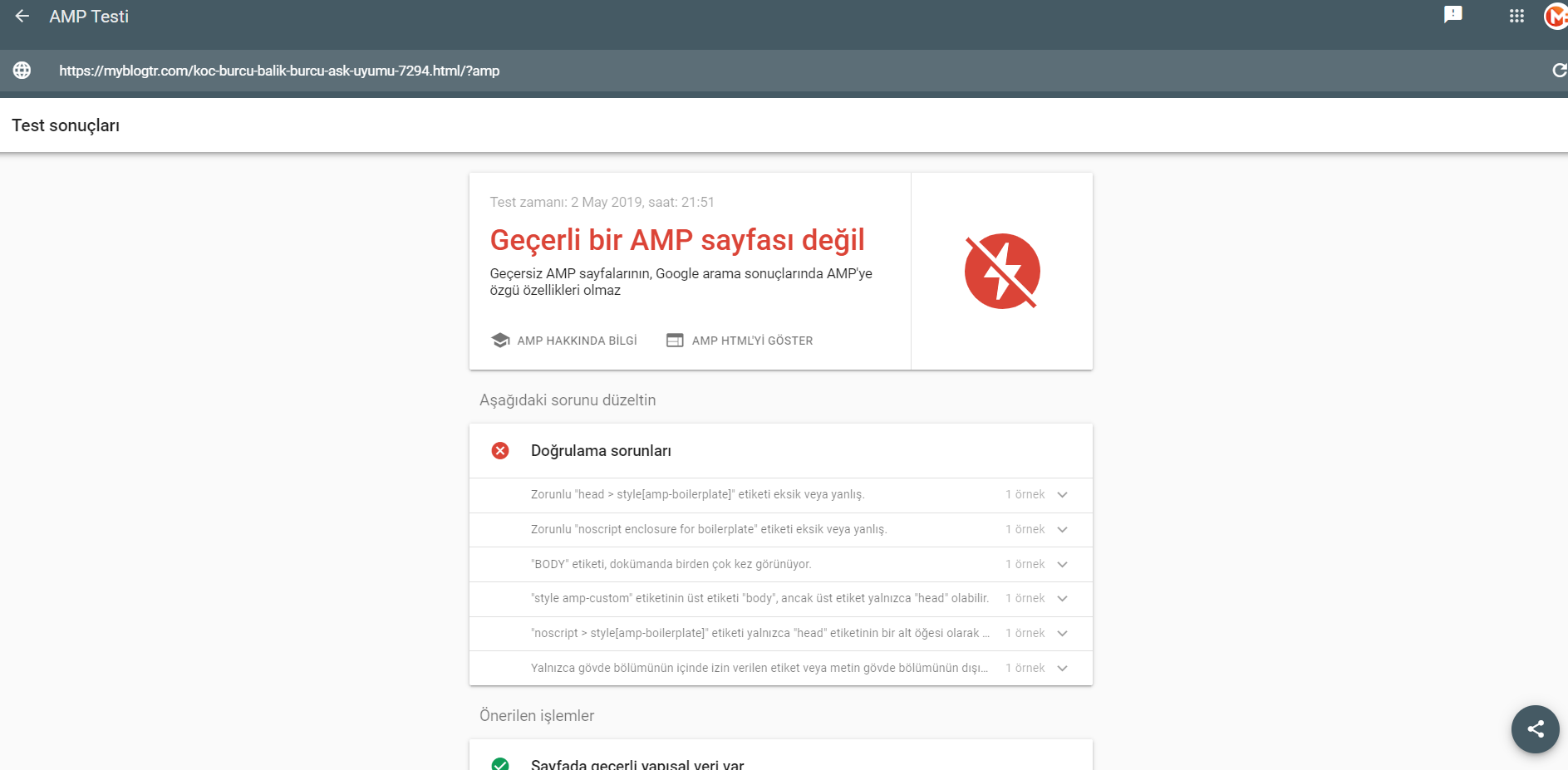
Mustafa Varol Hello;
td-mobile-plugin disable picture amp report
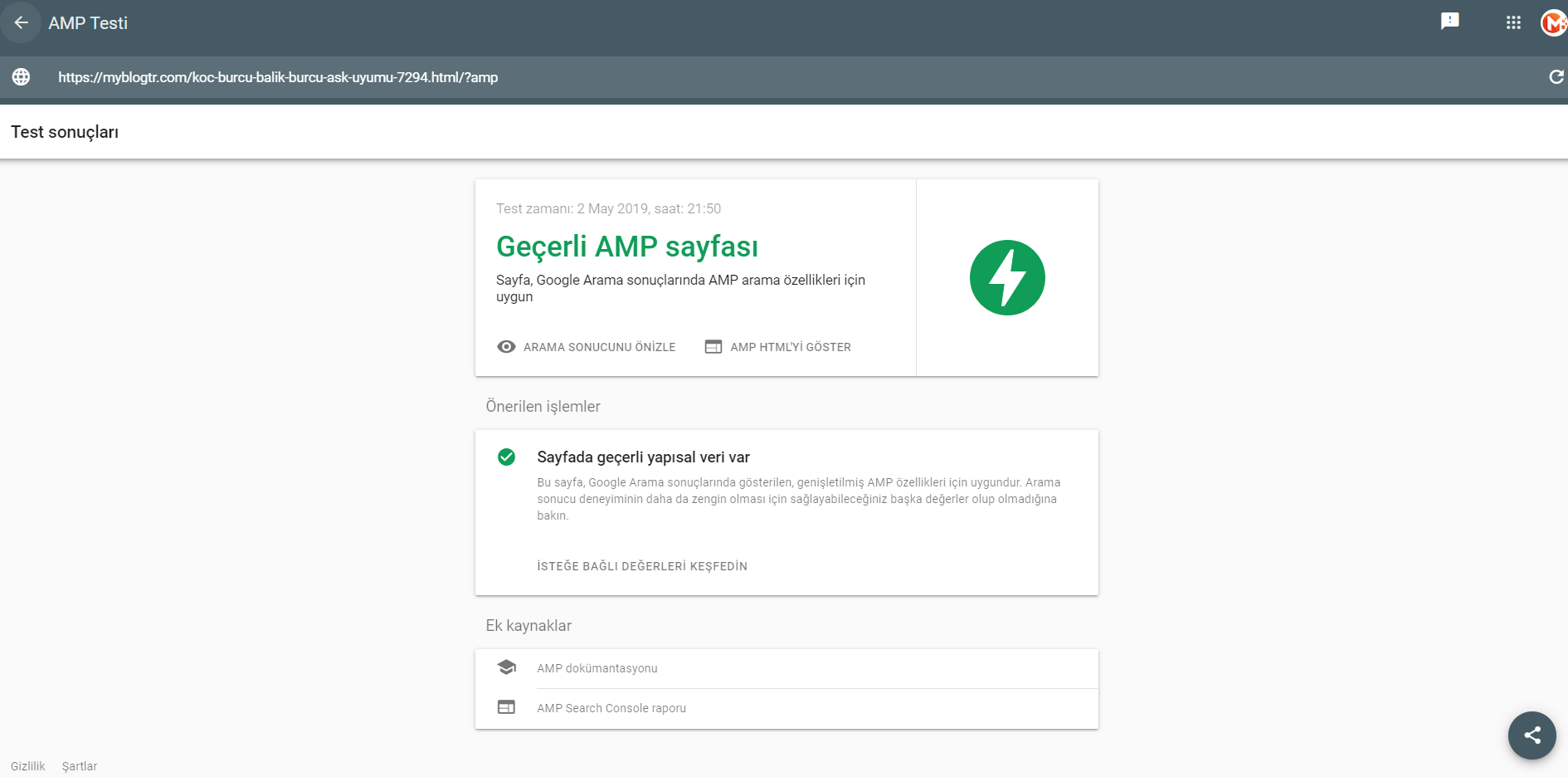
td-mobile-plugin active picture amp report
Simion C. Hi,
So the website is now showing when viewing with a mobile phone and Chrome? I could take a look, please post a link to the website so I can check.
Thanks
Sanjay Kumar MonuHi,
Tagdiv Team,
I have installed Newspaper 9.7.2 theme and activated all the plugins it ask me to do.
However, I got an error displaying Mobile Theme not supported by current Active Theme.
Let me tell you the Mobile theme version that is installed is 1.2.
I got this error back from Newspaper 9.7 update. Therefore, rolled back my site again to version 9.6.1.
And of course, I have updated the theme by following all the guidelines provided by you.
Do something, I have shared the screenshot below.
Screenshot: https://prnt.sc/nji7tw
Regards,
Sanjay
Calin Hi,
The logo that is set in Newspaper theme panel>Header > Logo for mobile will be show in footer section on mobile theme -> https://forum.tagdiv.com/logo-favicon/ -> https://www.screencast.com/t/GfJ74elj
Thank you!
Calin Hi,
You can use the header manager and make a menu for both versions ( desktop and mobile ), most of users that have this problem use the mobile menu for both versions.
Thank you!
 faeezchaus
I have selected amp only option for mobile theme and yet it is shown every time I access my site on mobile device (even non amp site)
Calin Hi,
From what I can see in your screenshots, you have the mobile version on desktop that is way you do not see the footer page, the mobile version this shouldn’t appear on desktop, usually this is a plugin conflict, please deactivate all non theme plugins, also if you are using child theme or cache plugin, please deactivate them, clear all cache and try again.
Also is look like you are using a plugin that was in trial version and now you need to buy it to can use it.
Thank you!
 Catalin
 Hi,
If you are using the mobile theme, that setting can be changed from here ->
https://www.screencast.com/t/HzNBLlZagw
Hope this helps!
Thank you!
Simion C. Hi,
Please don’t bump the topic, this will only delay the response from our part. It will refresh the topic date and move it to the back of the line, we reply from oldest to newest at all times.
I have tested the website with a mobile, for me it works in the homepage
– http://prntscr.com/njg0y8 – http://prntscr.com/njg11u
The menu modal opens when I click on the menu button. Should work the same for you. If I misunderstand please let me know and I will check again.
Thanks
 barnisayz
 Hi,
Thanks Simion, but the problem I’m having is that even after correcting it in the translation area of the Newspaper theme option, the ajax sign in/join popup box is not reflecting the change even when I’ve cleared browser cache. The change did not reflect both on mobile and desktop. I do not know what kind of cache the ajax sign in/join popup box is using for not responding to the changes. Its frustrating after trying several times! How can this be solved please?
url: https://www.thepalmagazine.com
-
This reply was modified 7 years by
barnisayz.
Catalin Hi,
Most likely, your logo is black and that’s why it is not visible on the mobile when the black banner is applied. I recommend you to change the logo on mobile with another one on white background for example, from the theme panel, from here -> https://www.screencast.com/t/HWF27uSl3yvc
Thank you!
