No search results were found in Documentation!
 gamingfront
 Yes, that’s working. Only one thing if you can see it because it’s so small to notice. When you put the code, you can notice actually 3 borders, first is for border-bottom, second is box-shadow and 3rd the brightest is probably of margin or padding between those pictures. Can you write me a code to remove that spacing and to have only border-bottom and box shadow? Thanks a lot for effort.
 rafael-l
Hi there, all my posts have a category for permalinks settings, and i need to exclude this specific category from the related articles, otherwise the related articles don’t work properly, i already tried everything that is on this forum like this: https://forum.tagdiv.com/topic/filtering-related-articles-at-bottom-of-post/
… and this: https://forum.tagdiv.com/topic/remove-category-from-related-articles-filter/
… and don’t work, i just need to the related articles don’t “get” a specific category, i was using this plugin: https://wordpress.org/plugins/wp-hide-category/ but it stoped working…
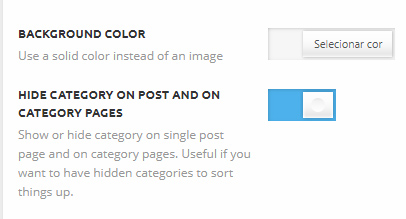
I’m using this option in the pannel : https://www.baixesoft.com/wp-content/uploads/2018/03/Hide-categories.jpg
… but the related articles “get” this category anyway…
I’m just wondering if i can try anithing different here
‘td_column_number’ => $td_column_number,
‘category_id’ => ‘-4’
If i use like this, all posts that have that category disappear from the block and the related articles don’t show nothing.
I appreciate any help, and please consider add more options in related articles in the theme pannel, users are asking for this since 2014. Thank you!
 Catalin
 Hello,
Here is talking about updated time which seems to be added at the bottom of each post. It’s strange because our theme does not add something like this, sorry! MayBE, this effect comes from such untested plugins used by you. To achieve best theme results, you should remove all of these, clear all the caches and check the results. As a quick solution, in this case, would be to use such a custom CSS code to hide this date from that section. Use the code below and place it in Theme panel -> Custom CSS area.
The code is ->
.td-post-content .updated{

display:none;

}
Thanks for your understanding!
 GregStewart
 I’ve now moved to live site and updated to 8.7.2. The problem still exists, all featured images uploaded prior to activating Newspaper show correctly. New images uploaded since Newspaper activated (the exact same dimensions as previous images) only show the bottom 50%. Please help it’s making my site look awful.
 Simion C.
 You could remove the margin top and bottom the social section is adding
– https://www.screencast.com/t/YxyL9R5Lvf
– https://www.screencast.com/t/SpC9GSPXa7
.nc_socialPanel {

margin-bottom: 0px!important;

margin-top: 0px!important;

}
Maybe even the remove the bottom padding of the post content if you want to
– https://www.screencast.com/t/15K4mAWGp1r
– https://www.screencast.com/t/c27ezWx8xe9o
.td-post-content {

padding-bottom: 0;

}
Simion C. The post pagination will be displayed below the post content by default
– https://www.screencast.com/t/dNdzRpzNZHn
The article bottom ad will push the pagination down, since it is part of the actual article content
– https://www.screencast.com/t/phQA45rJhL17
The pagination already is set to appear below the post content, it cannot be moved higher in the structure
– https://www.screencast.com/t/KUc3bxnI
If that plugin form is inserting itself in the post structure, there would be nothing to do from the theme perspective to control it’s position.
Thanks
 usacarry
Is there any way to move the pagination code to be directly below the content instead of inside the footer?
https://www.dropbox.com/s/ey83hx9mmrheq0l/Screenshot%202018-02-27%2009.41.34.png?dl=0
I’m using OptinMonster which adds the “Get more articles” newsletter signup section automatically. And then the bottom ad which is controlled by Newspaper shows up and then the pagination for the post.
I’d like to move the pagination so that it is directly under the content of the post, then OptinMonster and then the ad. Can I modify one of the theme files to move this? From looking at the code, it seems that if I were to move it to the bottom of the td-post-content div instead of the footer that comes after it that should do the trick. I’m just not sure where that is in the theme files.
Simion C. Hi,
It seems there is no margin bottom set for the ad boxes, there should be a default margin for them. Enter this code in Theme panel->Custom CSS section
.td-a-rec {

margin-bottom: 48px;

}
Remove then empty spaces you entered, the code should provide the same margin for all the ads.
Thanks
 WakeUpCallProject
I am using block 16 set to sort by site wide popular posts through jetpack setting.
I have entered (-4479, -3893, -5860, -7038, -3953,) in the “Post ID filter:” section to remove the top those posts from showing in the popular widget. However those posts still appear in the widget.
How can I run the popular posts widget but filter our certain posts?
As the method above is not working.
Widget is located bottom right hand sidebar here if that helps:
https://smallcaps.com.au/golden-mile-four-new-nickel-cobalt-anomalies-quicksilver/
I want the ‘Ultimate guides’ for the cannabis, cobalt, lithium and vanadium articles to be filtered our of the ‘Trending Posts’ list.
Here is the image showing what I want filtered out:
https://ibb.co/fMxStH
Thanks in advance.
WakeUpCallProject How do you then filter out posts after setting it to this?
I have entered (-4479, -3893, -5860, -7038, -3953,) in the “Post ID filter:” section to remove the top 4 posts on my site from the popular widget (on the jetpack setting). However the top four posts still appear in the widget.
How can I run the popular posts widget but filter our certain posts?
As the method above is not working.
Widget is located bottom right hand sidebar here if that helps:
https://smallcaps.com.au/golden-mile-four-new-nickel-cobalt-anomalies-quicksilver/
I want the ‘Ultimate guides’ for the cannabis, cobalt, lithium and vanadium articles to be filtered our of the list.
Thanks
Simion C. That would be the space reserved for the breadcrumbs. Since you do not use them you can remove that space, use a code like this
– https://www.screencast.com/t/JyCOuIcIoo
.td-crumb-container {

display: none;

}
For the borders use a code like this, change the border dimension, type and color as you wish
– https://www.screencast.com/t/BcHsS9YSvkCB
.td_module_5 {

border-bottom: 1px dashed #000;

}
Thanks
 Alin [tagDiv]
 Hi,
I have checked your site and from what I see your resources are not loaded in footer, so I guess Speed Booster is not active or it is not configured to move the resources to the bottom.
Also you did not applied please the other pagespeed suggestions – https://forum.tagdiv.com/how-to-make-the-site-faster/ and check the official documentation – https://developers.google.com/speed/docs/insights/rules
Unfortunately the time doesn’t allow us to provide custom or optimization services, sorry! If you don’t have the required knowledge I suggest to get someone to help you.
Thanks!
Simion C. I will try to help you, but I don’t quite understand what you are trying to do. I see you have removed the bottom sharing code and inserted a PHP code in the bottom sharing section on posts. The text contained in the code is now displayed accordingly from what I can see.
Any code you insert there will be displayed instead of the bottom sharing socials. Please correct me if I misunderstand.
 mlindia
 Hello,
If I move tagdiv ad widget from top to bottom the error also moves. Then it clearly shows it is coming from Theme files.
Kindly provide the solution ASAP.
 Bogdan B.
 Hello,
As you may already know, the speedbooster plugin will work with other plugins if they are added to that array or simply removed the compatibility code altogether, but it will not be able to move all of the css or js to the footer. It is only guaranteed to work properly with the plugins found originally in the compatibility list. You will have to try other methods to move the js and css for the ones that speedbooster cannot move.
http://www.wpbeginner.com/wp-tutorials/how-to-move-javascripts-to-the-bottom-or-footer-in-wordpress/
Thank you!
 BruceInLouisville
Question: For the Image Box element in TD Composer, what CSS would I add and where would it add it to move the title box to the bottom of the image? And also change the background color of the title box?
Or, is there a different element I could use that would have the title at the bottom (or top, I suppose)?
If there is not a way, I suppose I can edit each image individually and add the title myself at the bottom. But, thought I would ask first. Thanks!
BruceInLouisville Sorry to reply to this topic, but for the moment I cannot seem to find the location to start a new topic.
Question: For the Image Box element in TD Composer, what CSS would I add and where would it add it to move the title box to the bottom of the image?
Or, is there a different element I could use that would have the title at the bottom (or top, I suppose)?
If there is not a way, I suppose I can edit each image individually and add the title myself at the bottom. But, thought I would ask first. Thanks!
Simion C. Hi,
@Ladiesabroad you could remove the code you used now for the “Europa” menu item and use this one instead
– https://www.screencast.com/t/sZVSPg5w
It will increase the width of the sub-menu in order to display better, also it will now affect only the first sub-menu of the “Europa” menu item.
.menu-item-6530 > .sub-menu {

padding: 14px;

-moz-column-count: 2;

-webkit-column-count: 2;

column-count: 2;

width: 21em!important;

}
@Adcomm_Media Please provide a link to your website if possible, we will try to give you a more accurate solution. If you cannot provide a link, I could give you a more general code that might work. This may require modifications in your case
– https://www.screencast.com/t/74jdQgXbcd7G
You must use your own menu ID in the code
– https://www.screencast.com/t/oQBesGqCAm
A background hover color similar to what you have on your current website, can be set in the theme panel if needed
– https://www.screencast.com/t/544Eghu5TMt
.menu-item-9310 > .sub-menu{

-moz-column-count: 3;

-webkit-column-count: 3;

column-count: 3;

width: 40em!important;

}

.menu-item-9310 > .sub-menu li{

border-bottom: 1px solid #e5e5e5;

}
It will separate the menu items in 3 columns and increase the width (this can be changed if needed). It also ads a border bottom but you can remove that if you don’t want it.
Currently in the theme there is no option to create sub-menus with columns. There are simple drop-down menus, mega-menus and page menus.
Thanks
 emmak
emmakHi,
I am still having an issue with the blockquote styling.
I need the paragraphs to show, for the text not to be all caps in both the main and the mobile theme, and be left justified.
I have used the theme panel but I am not getting the results I want.
I am playing around with the css but I cannot make it anything but left justified.
blockquote {
font: 16px italic Georgia, serif;
width:500px;
padding-left: 70px;
padding-bottom: 18px;
padding-right: 10px;
margin: 5px;
text-indent: 23px;
text-align:justify;
}
Please help.
Page here.
http://bit.ly/2D2tIAR
Simion C. Hi,
1. That would be the padding top and bottom the theme ads for the page content
– https://www.screencast.com/t/TOWokeMYFOcI
You could remove that if needed, with a code like this
– https://www.screencast.com/t/Ivz6NFtO1jW
.td-main-page-wrap {

    padding-top: 0;

}

.td-main-content-wrap {

    padding-bottom: 0;

}
2. The social icons element will display the icons horizontally, one after the other
– https://www.screencast.com/t/hGiKcbN2
There are a few design styles available in the style tab, but not to align them differently.
5. The footer on this website is not a page, it is created custom. In the theme you can either use footer templates
– https://forum.tagdiv.com/footer-templates/
Or design and set a footer page containing any element you want, since this is possible now.
Thanks
Simion C. Hi,
Some smart lists have options to display an ad, the ones you mention. Others will not display any ads. Also when a smart list is used, the article ads (top, inline and bottom) will be removed. That would be the current functionality.
To display ads in the smart list styles that do not support them by default, would require code modifications to the smart list files
– https://www.screencast.com/t/BhMdqfhGoy
Or maybe with a plugin that could insert ads, I could not make any recommendations however in the matter.
Thanks
Simion C. Hi,
If you choose page builder + title, then the title will be displayed on top of the page. Use the default page template if you don’t want it to show.
The breadcrumbs can be removed in the theme panel if needed for all the website
– https://forum.tagdiv.com/breadcrumbs/
The breadcrumbs will not be displayed on the homepage, there is no need for that. They are generated here in each template
– https://www.screencast.com/t/PXqU9m23sk
Page builder with latest articles will always show the latest articles section in the bottom of the page. This can be removed by choosing a different page template.
The overlay menu page template will display the menu over the page content, like this
– https://www.screencast.com/t/Tiwv4a9NnH
The year could be displayed with this code
– https://www.accessc.com/articles/copyright-year-update.html
– https://www.screencast.com/t/xqlnRb0fM
– https://www.screencast.com/t/yNSvBKIhWdn
Try changing the colors in the theme panel
– https://www.screencast.com/t/s8Cj92MGRv
The demo has custom design, so if at the moment of creating it there was no theme panel option for that color, it was set with CSS
– https://www.screencast.com/t/38DQ0ZhPSEjG
Remove the design from the demo stylesheet and the theme panel option should apply.
Thanks
Simion C. Hi,
1. You could add an empty space element below the events grid
– https://www.screencast.com/t/ZOnyCeL4
This element can have a height set by you in it’s settings. Or even set a margin bottom to the grid, in the CSS tab
– https://www.screencast.com/t/gD4bI1qD6eV
2. That is happening because of a condition in the demo
– https://www.screencast.com/t/rrdvxGghPFO
If you were to remove that condition it would appear like this
– https://www.screencast.com/t/ZRZLXVQf9H
3. Check if the modal image is enabled in the theme panel
– https://forum.tagdiv.com/modal-window/
It should apply to all post content images once enabled in the theme panel, now it seems to be disabled.
Thanks
Bogdan B. Hello,
Yes, you can remove the margins of the header elements and have them stick together.
Add this code in your custom css box:
.td-header-style-4 .td-header-sp-recs{

margin-bottom:0!important;

}

.dj-desc{

margin-bottom:1px

}
Thank you!
 Equinoctium
 My website runs under a coming soon mode, so that won’t work.
let me write it more clear then
You make a post and select a featured image.
Now if someone opens that post to read it, that futured image is shown. If you move your mouse over that image the mouse changes in a hand so you can click on it and a link appears on the bottom linking you back to this article.
I want to remove this link, there is no use for it.
Other inserted images do not contain a link by default.
Hope that clears things up to better understand.
Thanks.