
No search results were found in Documentation!
 rajtekken5
Hello Tagdiv,
I am experiencing Bug in Infinite post scrolling. I am hosting my site on AWS and using Cloudfront for images delivery(not to worry about system resources.).
I have been facing problems with Infinite post scrolling, when you scroll down you see half of the content is cut-off before the next post.
This is a link to my site:- https://bit.ly/3JiPy1B
My newspapers system status Photo:- https://bit.ly/3mRK6Jx
Pictures(link) of the problems:- https://bit.ly/3EsvIwW and https://bit.ly/3qqiHz4
I use extra plugins like Autoptimize, Yoast and my Newspaper system status is also good.
I have tried to find a solution to this problem. But couldn’t get any results after trying out multiple tips from your forum articles. If you want, I will provide login, pass and you can rectify it.
I am using (Single Post Template 52 – Life News PRO) only for post articles.
 fatih-2
Hi there
Does this opt in builder can work with Mailchimp? We have categorized the subscribers via their interest and this can be done in mailchimp. We are currently using easy forms with mailchimp and works fine. However, we would like to optimize the site with using tagdiv plugins only. Does this plugins also compitable with WPML?
Thanks
 yonish3
 Sorry, a developer has forgotten to uncomment debug mode.
The problem with the image is not only on the menu.
https://prnt.sc/245kngh
I’m using https://wordpress.org/plugins/optimole-wp/ to optimize the image
 Anamaria
 Hello,
I just verified your website and for me, the modal to login doesn’t appear.
Please provide more details.
Also, did you use a plugin to optimize CSS / js?
Thank you!
Anamaria Hello,
Please edit with tagDiv Composer, select the menu and in the tab called “Mega Menu” you can change the image size https://i.imgur.com/nlvINiQ.png
Also, please let me know if you use a plugin to optimize the image or to set an effect.
Thank you!
 Bettina
 Hello!
We have 3 options of mobile versions:
1. Responsive version: A responsive version of your website is looking similar like on desktop, edit the page with TagDiv Composer, click on the mobile viewport: https://www.screencast.com/t/XDQJedlggSB ; there you can see your mobile version and you can edit the elements there.
2. Mobile pages: https://tagdiv.com/newspaper-10-3-7-update-brings-customizable-and-fast-mobile-pages/
3. Mobile theme plugin: The Mobile Theme is a performance optimized theme included in the Newspaper main theme and it loads only for mobile devices. It comes with its own templates/design for page, post, category, etc so your current templates from the desktop theme will get converted to the mobile theme layout. For more details, please take a look here: https://forum.tagdiv.com/the-mobile-theme/ and https://forum.tagdiv.com/mobile-theme-introduction/
A full explanation you can find here: https://www.youtube.com/watch?v=SpGkOnJeNZY
Please make sure you did the right settings for the mobile version you want to display.
Thank you!
Bettina Hello @Adrian!
You can use the plugin which suites you the best. For your case, I recommend you to optimize your website with or without that plugin.
For the page speed, I can recommend you some solutions in order to increase the score.
Our developers are working a lot to improve the page speed in every update.
Also, to increase the page speed you can check these similar topics for more solutions:
– https://www.infophilic.com/get-almost-100-pagespeed-newspaper-theme/
– https://forum.tagdiv.com/topic/score-100100-pagespeed-with-newspaper-wordpress-theme/
– https://developers.google.com/speed/docs/insights/v5/about
– https://www.youtube.com/watch?v=tnkVapqhIHc
Please check the tutorials from those platforms gt metrix and Google Pagespeed Insights and I’m sure you can increase the page speed.
Please note that page speed is not covered by the support team: https://forum.tagdiv.com/newspaper-theme-support/
Thank you for understanding!
@hena durovova Congrats!
Bettina Hello @daringnesia!
Please deactivate the Mobile theme plugin and see the results.
We have 3 options of mobile versions:
1. Responsive version: A responsive version of your website is looking similar like on desktop, edit the page with TagDiv Composer, click on the mobile viewport: https://www.screencast.com/t/XDQJedlggSB ; there you can see your mobile version and you can edit the elements there.
2. Mobile pages: https://tagdiv.com/newspaper-10-3-7-update-brings-customizable-and-fast-mobile-pages/
3. Mobile theme plugin: The Mobile Theme is a performance optimized theme included in the Newspaper main theme and it loads only for mobile devices. It comes with its own templates/design for page, post, category, etc so your current templates from the desktop theme will get converted to the mobile theme layout. For more details, please take a look here: https://forum.tagdiv.com/the-mobile-theme/ and https://forum.tagdiv.com/mobile-theme-introduction/
A full explanation you can find here: https://www.youtube.com/watch?v=SpGkOnJeNZY
Thank you!
 Beldar
 Hi, I’m sorry, but you didn’t take a good look at the fault I’m talking about… In the Home page, if you scroll down, the infinite scroll is activated, and all the news that load in it appear with the image with error (see the screenshot).
As for the speed of the website, we have followed your recommendations: Improved CSS, WP Super Cache, Cloudflare Pro and we tried Autoptimize, but the latter gives error.
Bettina Hello @Beldar!
I’ve checked your website and it seems that they are loading, but slowly, till the page is fully loaded. I recommend you to optimize your images and your website page speed.
Thank you!
 The Cyber Flame
 Hi,
Yes, I am using Auto Ads on my site.
And I generated a manual Ad code as a Banner Ad to place on the Header Ad area.
According to your advice, I added the AdSense code to Analytics too.
I deactivated Autoptimize plugin, but I can’t deactivate all the other plugins at the moment.
Still, the Header Ad not showing.
But I tried adding the Ad Code to that area via Cloud Templates Header Template. Then it worked, but the Ad size is too much larger (than 728×90 – recommended size). There was no option to adjust the Ad size.
Bettina Hello!
Please check some tips in order to pass Google’s Core Web Vitals:
https://forum.tagdiv.com/topic/score-100100-pagespeed-with-newspaper-wordpress-theme/
https://www.stanventures.com/blog/cumulative-layout-shift/
https://web.dev/cls/ -> https://web.dev/optimize-cls/
https://www.datadab.com/blog/fix-cumulative-layout-shift/
https://wp-rocket.me/google-core-web-vitals-wordpress/improve-cumulative-layout-shift/
https://forum.tagdiv.com/topic/to-high-cumulative-layout-shift-in-mobile-theme/
https://www.perrill.com/should-i-be-worried-about-core-web-vitals/
https://www.contentkingapp.com/academy/core-web-vitals/
Some factors which you need to take into account are:
External factors: server speed, if you are using CDN or not, the external resources loaded by your website like ads, fonts, tracking scripts like Facebook Pixel, Google Analytics, Twitter analytics, Hotjar and so on.
Internal factors: the number of elements on the page, image size, image formats, if you are using mobile optimized layouts, console errors, if you are using the Standard Pack plugin on not, if you are using PRO demo or a standard one. So, we recommend to use for mobile the responsive version: https://forum.tagdiv.com/topic/issue-with-lcp/
Hope that helps you!
Thank you!
Bettina Hello @lalit!
I recommend you to optimize your images before uploading in the Media Library.
Please make sure that you have activated the proper thumbs for the Mobile Theme. The mobile theme requires the “265×198” and the “741×486” thumbnail sizes in order to show the featured images properly.
This can be found in here: https://www.screencast.com/t/N18dR3qZrh
After activating the thumbnail sizes you need to regenerate your thumbnails using a plugin. Check this: https://forum.tagdiv.com/using-the-theme-with-existing-content/
Please note that page speed is not covered by the support team: https://forum.tagdiv.com/newspaper-theme-support/
Hope that helps you!
Thank you!
 Shubham Patel
I want optimize my website for core Web vitals without removing Google Adsense ads. I want to meet core Web vitals with Google ads. How can I achieved it with newspaper theme?
Bettina Hello @nwnuyhs!
Our developers are working a lot to improve the page speed in every update.
However, page loading speed can depend on many factors, and each website is unique from this point of view. Let me explain some of these factors and maybe they give you some starting points for optimizing your website.
External factors: server speed, if you are using CDN or not, the external resources loaded by your website like ads, fonts, tracking scripts like Facebook Pixel, Google Analytics, Twitter analytics, Hotjar and so on.
Internal factors: the number of elements on the page, image size, image formats, if you are using mobile optimized layouts, console errors, if you are using the Standard Pack plugin on not, if you are using PRO demo or a standard one.
But, we will take in consideration your query.
Thank you for your suggestion!
Bettina Hello!
1. I can not see any black line at the top on the homepage in your website. Did you mean the sticky header or the top bar menu?
2. This demo uses the responsive version for mobile. A responsive version of your website is looking similar like on desktop, edit the page with TagDiv Composer, click on the mobile viewport: https://www.screencast.com/t/XDQJedlggSB ; there you can see your mobile version and you can edit the elements there.
Yes, you can import other templates and use mobile pages which are fully customizable and could be so different than desktop version, so you should build and assign them to each desktop page you need. If you do not build for every page, then for the rest of the pages you’ll have the responsive version of your desktop automatically. For more information about mobile pages, please check our article here: https://tagdiv.com/newspaper-10-3-7-update-brings-customizable-and-fast-mobile-pages/
OR if you do not want to build every page style, but you need different style too, then you can install the Mobile theme plugin. The Mobile Theme is a performance optimized theme included in the Newspaper main theme and it loads only for mobile devices. It comes with its own templates/design for page, post, category, etc so your current templates from the desktop theme will get converted to the mobile theme layout. For more details, please take a look here: https://forum.tagdiv.com/the-mobile-theme/ and https://forum.tagdiv.com/mobile-theme-introduction/
You can use which one is suitable for your needs.
Thank you!
 nwnuyhs
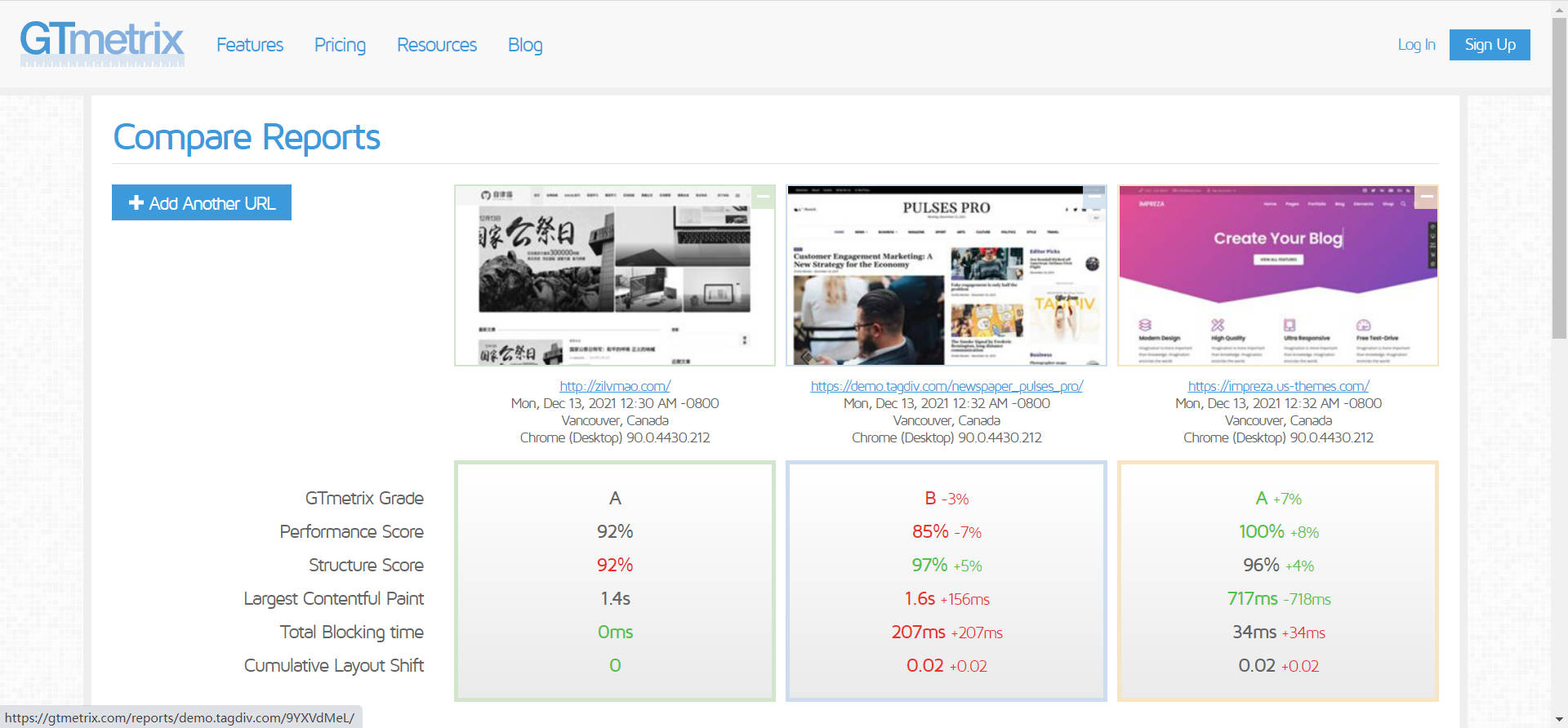
I compared several mainstream themes and found that the newspaper theme is really the slowest, second only to the avada theme, which is a disaster.
I hope tagdiv team can optimize the theme speed, you can learn from impreza theme and soledada theme, these two themes are much faster than newspaper theme without any optimization plugins.
The newspaper theme is already quite perfect in terms of functionality, optimization really needs to be improved!
Bettina Hello Ashish Kumar Mishra!
This issue about Web Stories has been discussed already in this topic, please check: https://forum.tagdiv.com/topic/web-stories-conflict-with-newspaper-in-web-stories-titles/
However, page loading speed can depend on many factors, and each website is unique from this point of view. Let me explain some of these factors and maybe they give you some starting points for optimizing your website.
External factors: server speed, if you are using CDN or not, the external resources loaded by your website like ads, fonts, tracking scripts like Facebook Pixel, Google Analytics, Twitter analytics, Hotjar and so on.
Internal factors: the number of elements on the page, image size, image formats, if you are using mobile optimized layouts, console errors, if you are using the Standard Pack plugin on not, if you are using PRO demo or a standard one.
For the page speed, I can recommend you some solutions in order to increase the score.
Our developers are working a lot to improve the page speed in every update.
Also, to increase the page speed you can check these similar topics for more solutions:
– https://www.infophilic.com/get-almost-100-pagespeed-newspaper-theme/
– https://forum.tagdiv.com/topic/score-100100-pagespeed-with-newspaper-wordpress-theme/
– https://developers.google.com/speed/docs/insights/v5/about
– https://www.youtube.com/watch?v=tnkVapqhIHc
Please check the tutorials from those platforms gt metrix and Google Pagespeed Insights and I’m sure you can increase the page speed.
Please note that page speed is not covered by the support team: https://forum.tagdiv.com/newspaper-theme-support/
We will take in consideration your query.
Thank you for understanding!
Bettina Hello @netclick!
Good grades. For the page speed I can only suggest you some guides. However, page loading speed can depend on many factors, and each website is unique from this point of view. Let me explain some of these factors and maybe they give you some starting points for optimizing your website.
External factors: server speed, if you are using CDN or not, the external resources loaded by your website like ads, fonts, tracking scripts like Facebook Pixel, Google Analytics, Twitter analytics, Hotjar and so on.
Internal factors: the number of elements on the page, image size, image formats, if you are using mobile optimized layouts, console errors, if you are using the Standard Pack plugin on not, if you are using PRO demo or a standard one. So, we recommend to use for mobile the responsive version: https://forum.tagdiv.com/topic/issue-with-lcp/
A responsive version of your website is looking similar like on desktop, edit the page with TagDiv Composer, click on the mobile viewport: https://www.screencast.com/t/XDQJedlggSB ; there you can see your mobile version and you can edit the elements there.
Our developers are working a lot to improve the page speed in every update.
Also, to increase the page speed you can check these similar topics for more solutions:
– https://www.infophilic.com/get-almost-100-pagespeed-newspaper-theme/
– https://forum.tagdiv.com/topic/score-100100-pagespeed-with-newspaper-wordpress-theme/
– https://developers.google.com/speed/docs/insights/v5/about
– https://www.youtube.com/watch?v=tnkVapqhIHc
Please check the tutorials from those platforms gt metrix and Google Pagespeed Insights and I’m sure you can increase the page speed.
Please note that page speed is not covered by the support team: https://forum.tagdiv.com/newspaper-theme-support/
The mobile pages are fully customizable and could be so different than desktop version, so you should build and assign them to each desktop page you need. If you do not build for every page, then for the rest of the pages you’ll have the responsive version of your desktop automatically.
Thank you!
Bettina Hello @newsng!
The issue can be from a plugin conflict or a cache issue, that’s why, please deactivate ALL plugins except tagDiv ones, also if you are using a cache plugin, deactivate it, clear all cache (also from your browser) and try again.
However, page loading speed can depend on many factors, and each website is unique from this point of view. Let me explain some of these factors and maybe they give you some starting points for optimizing your website.
External factors: server speed, if you are using CDN or not, the external resources loaded by your website like ads, fonts, tracking scripts like Facebook Pixel, Google Analytics, Twitter analytics, Hotjar and so on.
Internal factors: the number of elements on the page, image size, image formats, if you are using mobile optimized layouts, console errors, if you are using the Standard Pack plugin on not, if you are using PRO demo or a standard one.
For the page speed, I can recommend you some solutions in order to increase the score.
Our developers are working a lot to improve the page speed in every update.
Also, to increase the page speed you can check these similar topics for more solutions:
– https://www.infophilic.com/get-almost-100-pagespeed-newspaper-theme/
– https://forum.tagdiv.com/topic/score-100100-pagespeed-with-newspaper-wordpress-theme/
– https://developers.google.com/speed/docs/insights/v5/about
– https://www.youtube.com/watch?v=tnkVapqhIHc
Please check the tutorials from those platforms gt metrix and Google Pagespeed Insights and I’m sure you can increase the page speed.
Please note that page speed is not covered by the support team: https://forum.tagdiv.com/newspaper-theme-support/
Thank you!
 mariorados_
Hi,
I see on Google search console that that links are generated that have empty content or content that I did not ad with links from other sites on my page but without any pictures OR the possibility from me to edit this site. Google will squeeze my site like a cockroach if it detects that pictures are missing or similar and the site is not optimized for SEO. This one of these sites: https://ecommercebusinesstutorials.com/tag/mario-radosavljevic/
Please advise what to do as this is a site killer!
Thanks
Mario
Bettina Hello Kishore!
Please deactivate the Mobile theme plugin and see the results.
We have 3 options of mobile versions:
1. Responsive version: A responsive version of your website is looking similar like on desktop, edit the page with TagDiv Composer, click on the mobile viewport: https://www.screencast.com/t/XDQJedlggSB ; there you can see your mobile version and you can edit the elements there.
2. Mobile pages: https://tagdiv.com/newspaper-10-3-7-update-brings-customizable-and-fast-mobile-pages/
3. Mobile theme plugin: The Mobile Theme is a performance optimized theme included in the Newspaper main theme and it loads only for mobile devices. It comes with its own templates/design for page, post, category, etc so your current templates from the desktop theme will get converted to the mobile theme layout. For more details, please take a look here: https://forum.tagdiv.com/the-mobile-theme/ and https://forum.tagdiv.com/mobile-theme-introduction/
A full explanation you can find here: https://www.youtube.com/watch?v=SpGkOnJeNZY
Thank you!
Bettina Hello Carlos!
This issue is from a cache problem or a plugin conflict. Please make a test, deactivate all the cache plugins, clear the cache from your browser and see the results.
However, page loading speed can depend on many factors, and each website is unique from this point of view. Let me explain some of these factors and maybe they give you some starting points for optimizing your website.
External factors: server speed, if you are using CDN or not, the external resources loaded by your website like ads, fonts, tracking scripts like Facebook Pixel, Google Analytics, Twitter analytics, Hotjar and so on.
Internal factors: the number of elements on the page, image size, image formats, if you are using mobile optimized layouts, console errors, if you are using the Standard Pack plugin on not, if you are using PRO demo or a standard one.
For the page speed, I can recommend you some solutions in order to increase the score.
Our developers are working a lot to improve the page speed in every update.
Also, to increase the page speed you can check these similar topics for more solutions:
– https://www.infophilic.com/get-almost-100-pagespeed-newspaper-theme/
– https://forum.tagdiv.com/topic/score-100100-pagespeed-with-newspaper-wordpress-theme/
– https://developers.google.com/speed/docs/insights/v5/about
– https://www.youtube.com/watch?v=tnkVapqhIHc
Please check the tutorials from those platforms gt metrix and Google Pagespeed Insights and I’m sure you can increase the page speed.
Please note that page speed is not covered by the support team: https://forum.tagdiv.com/newspaper-theme-support/
Thank you for understanding!
Anamaria Hello,
If you referring to optimizing the images, you can use EWWW Image Optimizer Plugin and activate the lazyload option, and then you will have webp images -> https://www.youtube.com/watch?v=bR5ZY1fpeC4 you can use https://i.imgur.com/oiKd10u.png without Easy IO.
Thank you!
Bettina Hello @UdumuslivE!
I can see that you use the Mobile Theme plugin, but we have 3 options of mobile versions:
1. Responsive version: A responsive version of your website is looking similar like on desktop, edit the page with TagDiv Composer, click on the mobile viewport: https://www.screencast.com/t/XDQJedlggSB ; there you can see your mobile version and you can edit the elements there.
2. Mobile pages: https://tagdiv.com/newspaper-10-3-7-update-brings-customizable-and-fast-mobile-pages/
3. Mobile theme plugin: The Mobile Theme is a performance optimized theme included in the Newspaper main theme and it loads only for mobile devices. It comes with its own templates/design for page, post, category, etc so your current templates from the desktop theme will get converted to the mobile theme layout. For more details, please take a look here: https://forum.tagdiv.com/the-mobile-theme/ and https://forum.tagdiv.com/mobile-theme-introduction/
If you do not need Mobile Theme plugin layout, then please uninstall it from Newspaper -> Plugins. If you need mobile pages(2), then please make sure you’ve assigned the mobile page to the desktop one.
Please let me know how the mobile version is changing(how it should appear and it’s not appearing).
A solution for sending a screenshot/video is this:
Download, capture, send: https://www.techsmith.com/jing-tool.html
After making the screenshot, you will have a link, paste it here.
Thank you!


