
- Apitd_api_single_template::update_key
- Apitd_api_single_template::update
- Apitd_api_single_template::add
- ApiAPI – Single Template – Introduction
- ApiPractical example – How to add a new Block and Module
- ApiAPI – Category top section style – Introduction
- Apitd_api_module::update
- Apitd_api_module::add
- ApiAPI – Modules – Introduction
- Apitd_api_block::update
- Apitd_api_block::add
- ApiAPI – Blocks – Introduction
- ApiUsing the Theme API in plugins
 Bettina
 Hello!
Yes, that’s true. In order to edit a page with TagDiv Composer you need to use a PRO/cloud template and not a default one. For more information about TagDiv Composer, please check our documentation here: https://forum.tagdiv.com/tagdiv-composer-tutorial/
Thank you!
Bettina Hello!
In order to edit a page with TagDiv Composer you need to use a PRO/cloud template and not a default one. For more information about TagDiv Composer, please check our documentation here: https://forum.tagdiv.com/tagdiv-composer-tutorial/
By editing a page with TagDiv Composer you could delete elements but also the row called “Empty column”.
You could try to delete it like this: select the row, press the button delete from your keyboard, then with your mouse select “YES”.
Also you have another option too, check this: https://www.screencast.com/t/pxuOzYIIpcG
Thank you!
Bettina Hello!
If you have a cloud/PRO template, but you can’t edit the footer, then edit your homepage with TagDiv Composer, scroll till footer, click on footer zone and you can edit/delete the elements there.
Thank you!
Bettina Hello!
Please edit your post page and enable this option: https://www.screencast.com/t/z6zetugAHp ; please note also that this option is working only for cloud(pro) templates and not for the default ones.
Thank you!
 lyon
lyonHello, We are using Newspaper Theme version 10.4 on our multisite network, with WordPress 5.7.2. Ever since updating to 10.4, we’ve had an issue that affects just two of our sites on the network, one of which is the main site. All the other sites have no issue.
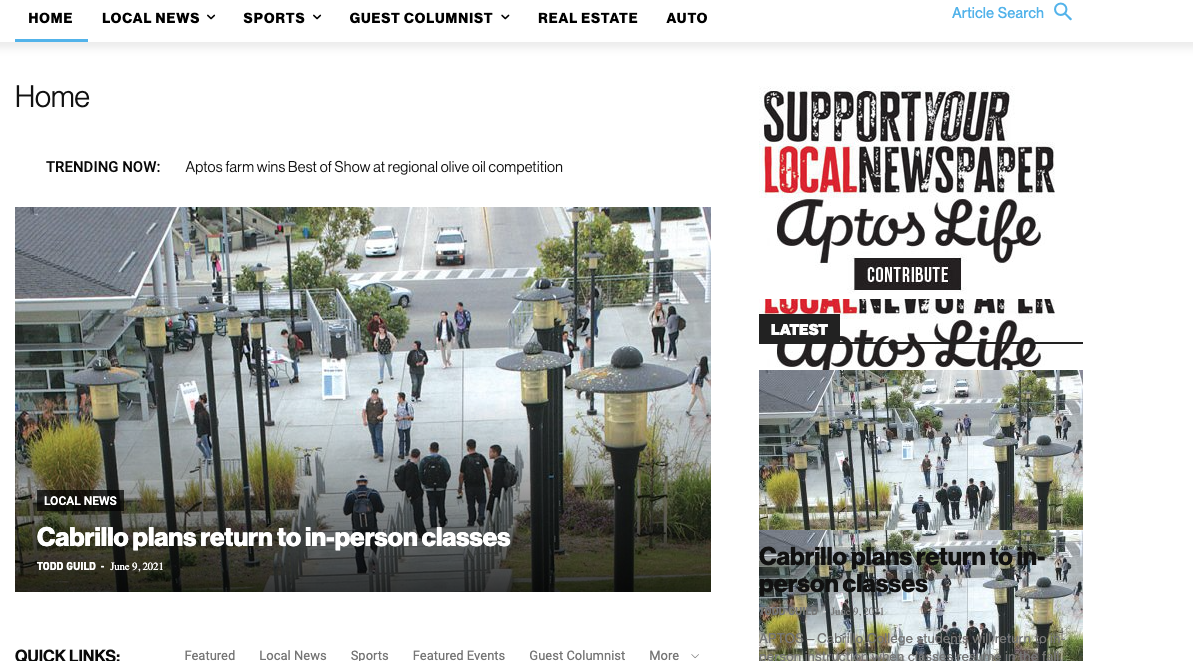
What happens is when we build a page with a sidebar in TD Composer, and leave the page template set to default, we are seeing a strange overlapping sidebar:
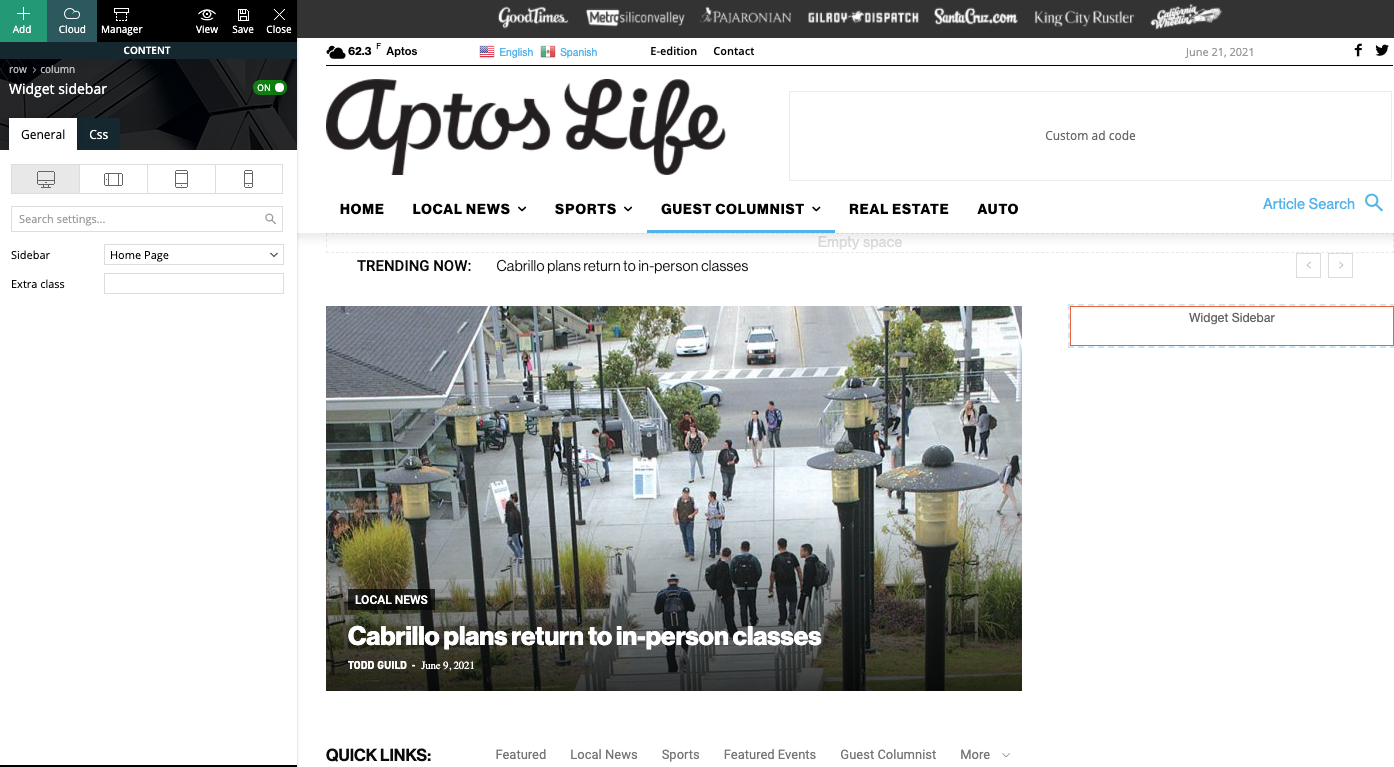
This is how we have the sidebar set in TD Composer:
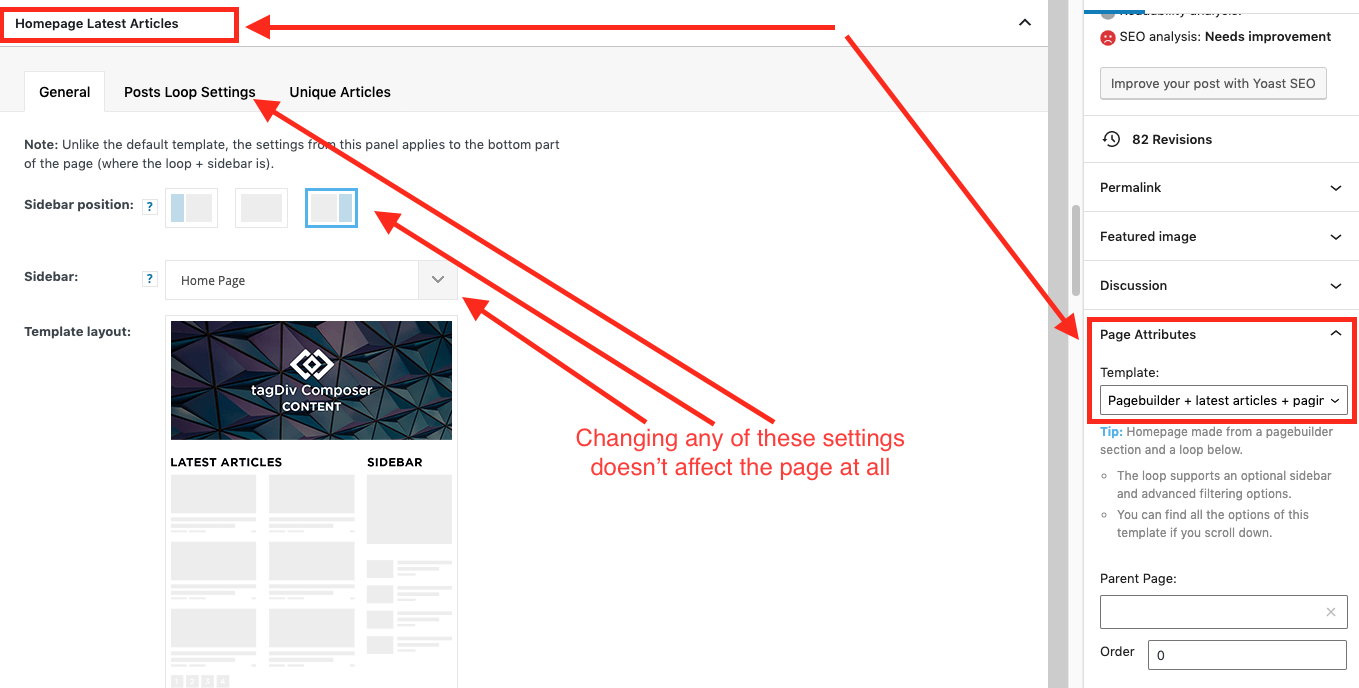
As a temporary workaround we can set the page template to Pagebuilder + latest articles + pagination, but this opens up a whole new set of problems. For example, if we try to change or hide the sidebar in the “Homepage latest articles” settings, no changes occur. Even something such as changing the title on the post loop won’t take affect.
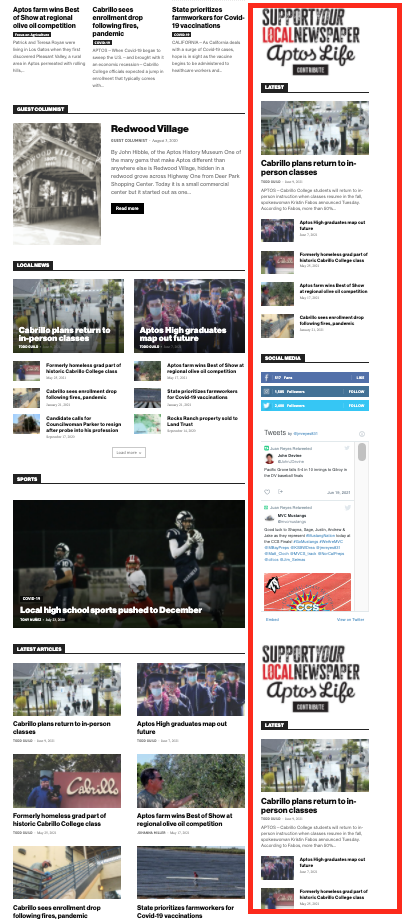
As a result, instead of two overlapping sidebars, we now have two duplicate sidebars stacked on top of each other:
Is there any way to fix these issues? Ideally we would like to leave the page template set to default, with the overlapping sidebars eliminated.
We’ve already tried disabling all our plugins to check for conflicts. Here is some more info from the System Status panel:
Theme name Newspaper
Theme version 10.4
Theme database version 10.4
HTTP channel test wordpress
Installed demo Default – demo ID: default | install type: full
Theme Mobile Newspaper mobile version
php.ini configuration
Server software Apache/2.4.38 (Debian)
PHP Version 7.3.19-1~deb10u1
post_max_size 32M – You cannot upload images, themes and plugins that have a size bigger than this value. To see how you can change this please check our guide here.
max_execution_time 120
max_input_vars 3000
SUHOSIN installed false
PHP extensions
mbstring available
GD library available
WordPress and plugins
WP Home URL https://aptoslife.com
WP Site URL https://aptoslife.com
WP version 5.7.2
WP multisite enabled Yes
WP Language en_US
WP Memory Limit 1 GB/request
WP_DEBUG False
Caching plugin No caching plugin detected – for best performance we recommend using WP Super Cache
 André Falcão
I generated a shortcut of a music player to insert at the top of the site and it doesn’t render. I’ve tried including the shortcut tag and the html code and nothing. The plugin I’m using is LBG AUDIO6 html5 .
In a page template it works.
https://costazul.fm/player/
Specifically on the gearer, no
https://costazul.fm/
Can you help me please?
 Bezukhof
Some posts using the same global template have very small fonts, even though when I edit it with the TagDiv Composer the font’s are showing larger.
Example page with small font:
Example page with appropriate font size:
https://nichefacts.com/wordpress-affiliate-program/
Demonstration of issues:
https://www.awesomescreenshot.com/video/4207926?key=e4a8ae82f33f13635f761d456b241d1d
 vikramsaiteja
Hey there ,
I have created two contact us pages one for desktop and other for mobile , Amp with same content , the page is correctly being displayed in desktop when it comes to mobile only the title tag is being displayed , I have used a premed template from cloud library to create this page . How could I resolve this to show the AMP page in mobile
 johnsnow
 Please tell me how to delete “tdb_templates/date-template/” pages? They indexed in google and absolutely not required
Bettina Hello!
Unfortunately, there you will find only homepage, header template and footer from that demo.
Thank you for understanding!
 papp0us
Hello,
in the last few days when somebody visits a link to my site through the Facebook app (the page loads in the Facebook Mobile Browser) the page seems empty.
If you open the same page normally, via google, the site works just fine.
The problem is there, only when the amp Plugin and the tagDiv Mobile Theme is enabled. When i disable them and use a custom Mobile template it works just fine.
Any ideas?
 kumarsundaram1964
Hi,
My site name is https://maritime-news.com
If you scroll down on the main page (all pages) we see Editor’s Pick before the footer. I’m not able to figure out where to show the posts from. I do not see any Cloud Template for that and the widgets show Newspaper Default but there is nothing under that.
Please help
 Faiq Ahmed
After the version 11 update. My header, footer, Author template, categories template, single post template, theme colors all are changed to default and are not same as I had customize them before. Only the Front page is which is a custom page.
How can I revert to my design settings back.
 denya
denyaMy correct mobile version. loads in 2 seconds.
After. An unconfigured template is displayed.
Correct version.
https://prnt.sc/15wdgu2
Wrong version.
https://prnt.sc/15wdx6z
Here’s a video.
My actions
Clearing the cache didn’t help.
No plugin conflict.
My site nevessta.ru
The problem is with this mobile version.
https://nevessta.ru/platya/
 technologyadvicecom
I’m adding a custom tagDiv composer block which will retrieve postmeta information for the post, then display that information on the page. This means I need to get access to the post ID of the post. But in testing I continuosly get the post ID of the cloud template instead. From within the context of a tagDiv composer block how can I reliably get the original post ID?
The oddest thing is that it appears to depend _where_ in the cloud template I place my block. If I place it in the content area it pulls the post information as expected. However if I place it above the title it tries to get template details. I’ve dumped out the following things in both cases.
var_dump($post->ID);
var_dump($wp_query->post->ID);
var_dump(get_the_ID());
var_dump(get_queried_object_id());
Am I doing something wrong?
 Socratease2640!
 Hey Harefamilia,
My understanding is that for the footer template only, you have to first assign it to a page (any page, I chose the homepage) . This can be done in the theme panel footer area or in the website manager. Strangely, setting it on one single page seems to make the footer appear globally on every page. Then you go back to THAT page to edit the footer. The “edit with TagDiv Composer” does NOT appear if you try to edit the footer template directly. Personally, I find it very inconsistent and confusing that they have done it this way. The footer template should be editable in the same way the header template is, that is, with the “edit with TagDiv composer”.
Hope this helps,
 David
David Hello Vlad,
Thanks for your reply. Unfortunately nothing is clear. How can I save the Ciritcal CSS?
What do you mean with “on template you have only the generate CSS”? How to save the generated CSS? What is the difference between CSS generated on pages and on templates?
Could you please exlplain all with screenshots?
Thank you!
 Vlad S
 Hello!
On the pages you have 2 buttons: Remove and Generate critical CSS
On template you have only the generate CSS. On pages you can directly generate CSS like on the templates. Or you can remove all the css and generate it.
I hope this was helfpul!
Thank you!
 Anamaria
 Hello,
In most cases when you get a similar message “ Error at zones: 6(models): 0(dom). The model does not match the content Current state has involved an issue. You could try an UNDO operation (CTRL+Z / CTRL+SHIFT+Z)” then indeed it is a problem, most of the time the problem is from a shortcode that is not compatible with our theme, therefore after you set it with tagDiv Composer and save the page/cloud template, the next time when you try to edit it, you’ll get that error.
For this error, you can check our guide from here at point 5 -> https://forum.tagdiv.com/tagdiv-composer-not-working/ also after trying the steps from our guide you do not get any good results, You can send us an email at contact@tagdiv.com and provide wp-admin login, as well as cPanel and credentials. We will take a look. Include a link to this topic in the email.
Let me know the results!
Thank you!
Anamaria Hello,
Seems you created a mobile page, the header and footer are taken from the standard ones.
So if you want to use a responsive version, please remove the mobile page, set it on “No mobile page” => https://www.screencast.com/t/E5FO7ZBH and then the responsive version will load.
Also, if you want to use the mobile page you need to edit the mobile page, and in Manager (Website Manager) you need to import or the easy way is to convert the existent footer like this => https://www.screencast.com/t/HrjOBNayd
This is a video about Responsive Newspaper Theme, AMP & Mobile Theme, Mobile Pages & Templates -> https://www.youtube.com/watch?v=SpGkOnJeNZY
Also, please clear your cache.
Thank you!
Vlad S Hello!
You could. Edit your template using tagDiv Composer and you will be able to replace this element with a Buy Now button element. That will redirect your users on the correct pages: https://www.screencast.com/t/brotBWHD9U
Thank you!
 Hoku Marketing
I am loading the Travel Pro Template sections and get errors on some, not all “One of the images failed to upload”
I cannot load homepage template and 1 or two others, however I have been able to load header, footer, and a couple others. I have taken screen shots of the error but cannot load here.
Any ideas why?
 mcostas.ac
Hi, how are you?
I add every template of category and It the same with all of them.
The page doesn’t render ok.
Do you have any suggestion for me?
Anamaria Hello,
tagDiv Composer is the main plugin on which the theme works, even the Theme Panel is included in this plugin.
In tagDiv composer are implemented several design options, functionalities, etc.
Also, normally if you use cloud templates you can have a better speed than with tagDiv Standard Pack, this does not mean that you do not have to make customizations.
Also, the tagDiv Standard Pack plugin from version 10.4, is no longer required because the new demos are using cloud templates.
Thank you!
Have a nice day!
Anamaria Hello,
You can use a header template from Cloud Library, and you can customize it with tagDiv Composer => https://www.youtube.com/watch?v=HXQQygkCCJo
Also, if you use the standard header from Theme Panel, for this you need to have the tagDiv Standard Pack plugin, from version 10.4, this plugin is no longer required because the new demos are using cloud templates.
Thank you!
