
- Apitd_api_single_template::update_key
- Apitd_api_single_template::update
- Apitd_api_single_template::add
- ApiAPI – Single Template – Introduction
- ApiPractical example – How to add a new Block and Module
- ApiAPI – Category top section style – Introduction
- Apitd_api_module::update
- Apitd_api_module::add
- ApiAPI – Modules – Introduction
- Apitd_api_block::update
- Apitd_api_block::add
- ApiAPI – Blocks – Introduction
- ApiUsing the Theme API in plugins
 vallejato
I configured the new template but the sidebar is not displayed in the whole site, only on the home page you can see it.
my site: http://www.vallejatonews.it
 rashigupta1024
Hi Team,
When I am opening my website on mobile. I am getting this error on the top of the page.
I am getting this error on 2 websites where I have installed a newspaper theme.
https://www.journalheadlines.com
https://www.digitalgadgetplatform.com
Please help
Warning
: count(): Parameter must be an array or an object that implements Countable in /home/nutrit02/public_html/digitalgadgetplatform.com/wp-includes/post-template.php on line 317
Warning
: count(): Parameter must be an array or an object that implements Countable in /home/nutrit02/public_html/journalheadlines.com/wp-includes/post-template.php on line 317
I need your support.
ASAP
 viktorgorgiev
Hello,
Can you help me where can I change this “page” in URL for my category template and also I successfully translated in translations in theme panel ( https://prnt.sc/s5fg3j – https://prnt.sc/s5fg06 )
Thanks
 9G
9GI’m using css in the template builder to reduce the height of the header menu at https://9gurus.com – it looks just the way i want which is great. But when I load or reload the page i can see the menu row loads at a bigger size and then jumps down.
how can i eliminate the jumpiness?
thanks!
eric
 automarketolog
In theory, when I click on the authors’ name I should be redirected to the author’s page (Author Template). But it doesn’t happen. I’ve set everything correct in the “Cloud Templates” section, put all the required authors in the “Used on” column — and still when I click the author’s name I just get redirected to the main page of the site. What can I do in order to fix it?
My site: https://automarketolog.ru
Screenshots: https://i.imgur.com/djqibxd.png https://i.imgur.com/Jbaj6BO.png
 sharppolo
Hi,
I have a problem with the cloud library category templates. I have totally created 27 templates but it always only displays 15 templates and no matter how many times I press, the newly added templates just won’t show up. I have already enabled to display 100 items on the same page under screen options.

 Calin
Calin Hi,
Unfortunately, the Page Links To plugin has not been tested with our theme and therefore, we cannot say for sure if it will work or not as expected with the theme, sorry! Also, we cannot provide support for untested plugins. We do not say that it can not work with our theme, but we do not know the right settings to make it work properly with our theme.
Maybe this problem appear only if you are using cloud templates, please try with standard templates.
Thank you!
Calin Hi,
Let’s try to do this together!
Open your homepage with tagDiv Composer -> https://i.imgur.com/LzlAtGZ.jpg over the elements until you see the row, after that click on it, in left side you’ll have a sidebar, from there you can stretch the row to the width you want -> https://i.imgur.com/Slhj7VD.jpg -> https://i.imgur.com/xDE7YzZ.jpg you need to do the same for all rows from the page.
Also you can edit the cloud templates with tagDiv Composer like this -> https://i.imgur.com/jxMiGwX.jpg and do the same thing -> https://i.imgur.com/jxMiGwX.jpg -> https://i.imgur.com/lnrF5Sz.jpg -> https://i.imgur.com/AcSN38b.jpg
Hope this will help you better!
Thank you!
 nycinsider
 So I tried to open a current page with TDC, but it says “Notice – not created with blah blah” I also can’t add anything above the content already there (text editor). I tried to drag an element, but it won’t work.
So then I tried to create a new page and use the TDC. I was able to add an image to the top of the page.
1) how do I then make that a page template?
2) How do I assign that template to multiple pages while leaving my content (what’s in the text editor) as the main page content.
when we work on pages, we need the usual WP interface – I need to see the SEO info and info from other plugins only available on the back end of WP. So TDC needs to be just to design templates but not for working with content, meta info, etc.
Calin Hi,
In order to be able to have comments in post, you need to make these settings -> https://i.imgur.com/83CnhKi.png -> https://forum.tagdiv.com/enabledisable-comments/
Also in your case you are using a pro demo and you need to edit the single post template from tagDiv Cloud Library using tagDiv Composer like this -> https://i.imgur.com/1kebAnv.png and add the single post comments where you want to have it -> https://i.imgur.com/i9pnmBJ.png
Hope this will help you!
Thank you!
Calin Hi,
The SEO plugins can count/read only the words, our theme use shortcodes to display the blocks and the rest of the elements, only if you set some text in pages then this will be count/read. For the example the single post templates from tagDiv Cloud Library that are set on post will not be read, only the post content will be.
The search engine crawlers will work normal as long you have for pages set a text this will be read.
Thank you!
Calin Hi,
So if I understand correctly you want to edit a page template, if eyes the files that can be edited are on this path wp-content/plugins/td-composer/legacy/Newspaper/page.php, page-pagebuilder-latest.php, page-pagebuilder-overlay.php and page-pagebuilder-title.php
If this is not what you mean, please provide some more details.
Thank you!
 Revive the Netherlands
 I tested the mobile theme plugin but the images where not loading and it was hard to change anything.
How can I change the mobile theme templates?
From the info page:
”It comes with it’s own templates for page, post, category, etc so your current templates from the desktop theme will get converted to the mobile theme layout”
I could not find the options to disable author, date, post views, social icons etc.
Calin Hi,
If you want to edit the footer cloud template, then you’ll need to edit it from a page, for example, you can edit the homepage, click on edit with tagDiv Composer -> https://i.imgur.com/uweNRrc.jpg after that go down to the footer end edit it how you want (now you can customize the the whole web-page from fronted).
Hope this will help you!
Thank you!
 pbagenzi
 Thank you. One other question , I want to add a page that queries table that is not WP. So My previous template , I create a logic to displace different pages based on categories . See the example below. Which file can I modify to achieve the same goal.
<?php
global $post;
$thepostId = $post->ID;
$thepostTitle =$post_title;
if ($thepostId ==”73251″) //videos
{
if ( wp_is_mobile() )
{
include TEMPLATEPATH. ‘/home_mobile_videos.php’;
}
else
{
include ‘home_videos.php’;
}
}
else if ($thepostId ==”90542″)
{
include TEMPLATEPATH. ‘/artist_news.php’;
}
?>
Calin Hi,
The simplest way to achieve a full width is to use a template from tagDiv Cloud Library. There is no one single button push. You have to import a post style and set it as the default post template in the theme panel post settings, then you need to import a category template that is full width and set that one as the default category template. The same for tags, author pages etc:
https://forum.tagdiv.com/tagdiv-cloud-library-plugin/ also for pages (stretch row and content ) https://www.screencast.com/t/i8SQ5eS4 .
Please read similar topics:
-> https://forum.tagdiv.com/topic/force-full-width-on-categories-post-grid/
-> https://forum.tagdiv.com/topic/homepage-full-width-content/
Thank you!
 SquallSFU
Hi guys,
how can I customize the styles of this text that appears on the search results page when there are no results to display?
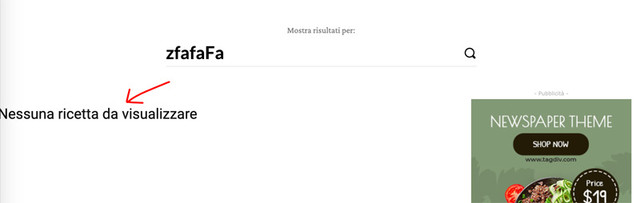
In tagDiv Composer I was unable to change the block without also changing the page with search results.
Calin Hi nycinsider,
The only page templates that our theme has are these from documentation > https://forum.tagdiv.com/page-templates-2/ what you can do is to make your own section and save the elements using the right clickafter that you can take that element from tagDiv Composer and reuse it, also you can import cloud sections from tagDiv Cloud Library -> https://i.imgur.com/vIXhGY8.jpg
Also tagDiv Composer is easy an is running normal -> https://www.screencast.com/t/9sIsUOgXXeO just make sure that the theme requirements are set correctly and you do not have a plugin conflict.
Thank you!
Calin Hi,
1-2. To fix this problem -> https://postimg.cc/B8YDDBvn you need to make sure that you set the mega menu correctly, please check carefully our documentation for mega menu this need to look like this -> http://prntscr.com/pyfl24 not like this with sub menus -> http://prntscr.com/pyfl9q
3. You can regenerate the thumbs using our documentation from here -> https://forum.tagdiv.com/thumbnails-fix-strange-looking-images-on-blocks/
Also you can use flex blocks elements, this type of blocks has more options for images -> https://i.imgur.com/YpFFI1Z.png
4. if you want to remove RECOMMENDED VIDEOS you need to edit the page using tagDiv Composer and use the right click on it.
5. If the breadcrumbs is set as element in a page or single post template it can be edited using tagDiv Composer -> https://i.imgur.com/oPbuBu1.png
If there is still a problem, please provide me a link to your website to inspect it.
Hope this will help you!
Thank you!
 Vlad S
 Hello !
Yes. You cand edit the pages / templates using the website manager: https://www.screencast.com/t/EDtzVrD5nL4 Create multiple headers / footers and you can set them on different templates.
Thank you !
Calin Hi,
1. In order to make the YouTube counter to work you need to set the api key in theme panel, also to make sure that there is no theme problems, you can disable and delete tagDiv Composer and install and activate it from here -> https://i.imgur.com/dPE3Azl.png -> https://forum.tagdiv.com/tagdiv-social-counter-tutorial-2/
2. If you set ads in theme panel and these are not displaying, most probably you are using a pro demo and you have single post template from tagDiv Cloud Library set on posts, if is so you need to edit it with tagDiv Composer -> https://i.imgur.com/lv0RUPC.png click on content and select the ads tab -> https://i.imgur.com/yID1fNz.png
Thank you!
 internath
 Hi
https://wpp.pharedere.com
can i modify the template so that i only choose image posts?
If you refresh home page you can see a random posts
Thanks
Calin Hi,
If you are using the mobile theme plugin, you’ll gain a better speed then responsive version of theme, but in order to achieve that speed you’ll need to create a new content for pages because in the most of cases those were made with builders ( tagDiv Composer, WPBakery ) and you need to use only the mobile editor ( you need to set the content for pages in mobile editor and this content will be display on mobile theme)
-> https://i.imgur.com/9d0UWLT.png
Also you can show the responsive version on mobile theme -> https://i.imgur.com/m0bVB5T.png you can check more details about mobile theme in our documentation -> https://forum.tagdiv.com/the-mobile-theme/ or if you want to have the responsive version only, you can use the amp option from mobile theme -> https://i.imgur.com/oofST3D.png (to use the mobile theme template on amp) or you can disable the plugin.
Hope this will help you!
Thank you!
 Jumich
 Thanks. But how to achieve the same look to my page without standard pack? When I was building my website, I choose one of predefined templates which is not available in cloud templates. I understood that classic block should be replaced by flex blocks, but they look totally diferent. I switched for moment my site to work without standard pack and it is not only about shortcodes, my header and footer were colapsed on every single url on my site
-
This reply was modified 6 years by
Jumich.
nycinsider So you’re saying there is no way to create a page template? To design a page and then re-use the design?
Tutorials are useless. Unless someone can look on my computer and tell me how to move something around – and explain a row or column and how they move around on MY COMPUTER IN MY TEMPLATE – they’re useless. I’ve wasted far too many hours trying to understand your TDC – I don’t have the words to say how impossible it is to use. I’ve publishing websites since 2003 and I’ve never been able to create one page on TDC without running into issues and having to trash the whole thing. You should be able to drag and drop sections on a page in 3 seconds, like any normal program. But you’re all tied into rows and columns that make absolutely no sense to humans and you can’t move anything around.



