
- NewsmagPage templates
- NewsmagCategory templates
- NewsmagFooter templates
- NewsmagDefault post templates
- NewsmagPost templates
- NewsmagHomepage – How to build and set it
- NewsmagtagDiv Composer Tutorial
- NewsmagCustom Post Type Support
- NewsmagNewsmag documentation
- NewsmagHow to use the Visual Composer plugin
- NewsmagHeader styles
- NewsmagSmart sidebar
- NewsmagCategory grid styles
- NewsmagCategory top post styles
- NewsmagHow category settings work
- NewsmagFeatured images
 Catalin
 Hello GlanceCompany,
Unfortunately, our theme does not have such an option for this for the posts, but only for the pages if you are using the Visual Composer. So, please notice that you can try to use the do_shortcode method, after you create the button from your Visual Composer, like this -> http://screencast.com/t/Neag3pRJ From there you can customize your button as you like and then, to see the shortcode for it, you will have to switch the Visual Composer to the classic mode, like this -> http://screencast.com/t/rCjQdy5P0RRA In this case, the snippet of the code which you will have to add to your core file, is that ->
<?php echo do_shortcode('[vc_row][vc_column][vc_btn title="Push the button" link="url:https%3A%2F%2Fwww.google.ro%2F|||"][/vc_column][/vc_row]'); ?>
So, please notice that this type of code should added in the coresponding loop single on what post template you are using. For my example, I just use the post template style 1 and the code will have to be added in loop-single-1.php, like this -> http://screencast.com/t/ePJyJxass4 and the result you should see here -> http://screencast.com/t/fc0uQsBVfW0
Hope this helps!
Thanks for your understanding!
 Bogdan B.
 Hi,
Sorry but we have not tested any other analytics excepot the classic code. I’m not sure if this tracking will work with our theme. Test it out and follow the implementation method provided by google. On the third screenshot you posted it says something about creating a new php file and adding a specific code to it and then adding the line of code in the page template files: http://screencast.com/t/m7rhJE4wDX But i cannot guarantee success as we have not tested this.
Thank you!
 Andrei L.
 Hi
@rida in order to have an image displayed on module you have to set a featured image for your posts in post editor: http://screencast.com/t/XjkIPaD3apt8 To disply recent posts on a page you can use theme’s blocks and choose in block’s filters latest post. For more details please check this link: https://forum.tagdiv.com/newsmag-block-settings-tutorial/ You can also use page builder+latest articles as page template: http://screencast.com/t/Cgwv9mQ2Go
Please refer to our documentation for more details about how to use Visual Composer and how to setup the homepage: https://forum.tagdiv.com/newsmag-homepage-how-to-build-and-set-it/ – https://forum.tagdiv.com/newsmag-page-templates/- https://forum.tagdiv.com/newsmag-how-to-use-visual-composer/ You can also check our youtube videos: https://www.youtube.com/watch?v=TUdVeZ1pbuc&list=PL6CsDkMaejhpWFcFNOIDfdp5nIT0NbUbj
Hope this helps!
Thanks!
Bogdan B. Hello,
Removing comments for specific pages works by simply disabling this option: http://screencast.com/t/lmYHj1iB It only works on the default page template though. Please make sure you clear cache after you check the setting to disable comments on specific pages.
Thank you!
 TheRiz
 Hi Andrei, thanks for the response. I meant hiding the Page Title in the breadcrumb.
Home > [page title]
Currently you can disable Post Title’s from appearing in the breadcrumbs but not page titles. You do this through Theme Panel > Template Settings > Breadcrumbs.
I will attempt to do this with CSS if there is no other way.
Thanks
 werbekracher
Hello,
I have activated the plugin “WP Subtitles” and insert it in archives pages and single posts template.
Now I want to integrate it in front page modules (Page Builder Elements), but it doesn’t work.
Can somebody help me to integrate it in front page modules?
<?php the_subtitle(); ?>
I think, it works not because the elements included via page builder?
Thanks for your help,
Pascal
 bvanrij
How do i change the standard WooCommerce template so that the list of products a displayed using Block 11 (for example). I want all search results, Categories, Brands and Vendor filters to use this template.
I already created a new page, and got the products to list and display correctly using Block 11, but i need it to work as the standard shop page and search etc.
Thanks.
 simchris
 HAd same question recently; there is option to disable on the modules page I think under “meta” … anyway, look for the ‘meta’ horizontal bar on the modules or templates page; forgot which. (Assuming you’re using 3.1).
Andrei L. Hi
By default the theme disable comments on pages but you can enable theme from theme panel > template settings: http://screencast.com/t/Q9ssidilqRlk
Thanks!
Andrei L. Hi
If you don’t want to display page’s title just change the post template used to default one: http://screencast.com/t/s7FmQBshMf
Let us know how it goes and if this is not what you mean please provide more details about what you’re trying to do and maybe we can help.
Thanks!
 WebK
WebKHi,
I have imported the “NotGeneric1” template from rev slider and have placed the embed code on the first row in visual composer on home page which is fine..
However i like to know how can i do it so it is behind the logo, main menu and top menu.. So that they all are transparent and on top of the slider..
Current site is http://www.ararat.org.au/ver2/
I am using the STYLE 10 for header Style in Newspaper Theme
Andrei L. Hi @rida
You can use blocks to sort posts from each page. For example in page 1 you add block 1 and choose in filters category1; http://screencast.com/t/BzaQQ74DhD9e For page 2 you can do the same, just change the category: http://screencast.com/t/8PwvC4KCIz2 You can also use page-builder+latest as a page template and choose the category from post loop settings: http://screencast.com/t/F2b8jkN9LXy
For more details about how to use visual Composer and how to built pages please check these links: https://forum.tagdiv.com/newsmag-how-to-use-visual-composer/ – https://forum.tagdiv.com/newsmag-block-settings-tutorial/ – https://forum.tagdiv.com/newsmag-homepage-how-to-build-and-set-it/ – https://forum.tagdiv.com/newsmag-page-templates/
Hope this helps.
Thanks!
Catalin Hello gistgalore,
I suppose that you want to remove this feature from the front page, right? So, please notice that our theme uses three-page templates as you can see here -> https://forum.tagdiv.com/page-templates-2/ and you will have to change the page template to another.
Thanks for your understanding!
 muppins
Ad code:
<script type="text/javascript">

  ( function() {

    if (window.CHITIKA === undefined) { window.CHITIKA = { 'units' : [] }; };

    var unit = {"calltype":"async[2]","publisher":"chaoticways","width":300,"height":250,"sid":"Chitika Default"};

    var placement_id = window.CHITIKA.units.length;

    window.CHITIKA.units.push(unit);

    document.write('<div id="chitikaAdBlock-' + placement_id + '"></div>');

}());

</script>

<script type="text/javascript" src="//cdn.chitika.net/getads.js" async></script>
Size: 300×250
put in template 11 post type.
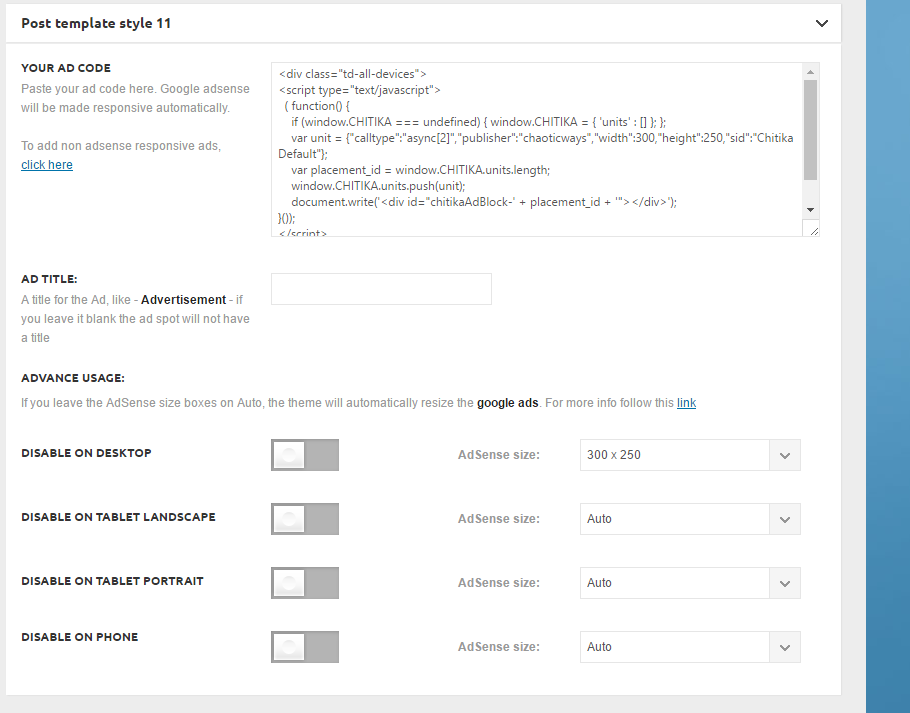
It’s not showing up on the top right next to the video:
http://ghesports.com/runescape-chaotic-ways-pk-video/
Nor is it showing on the homepage.
 ddlammers
Hi. When writing new posts, I love the post template options in the Post settings area that give me several different options to display the featured image. How do I get that same functionality for my pages? I have a featured image attached but can’t find any settings to display it.
Thanks,
Dirk
 starlogic
I am getting this error on my site http://www.nigerianbride.com:
Fatal error: Call to undefined function vc_map_get_attributes() in /home3/waakmm0aaf7m/public_html/wp-content/themes/Newsmag/vc_templates/vc_row.php on line 32
All the inner pages seem to be working but the home page is not working. I disabled “WPBakery Visual Composer” in the plugins section and the homepage did manage to pop up but not in the normal structure. I meed help please.
 Jessie
Hi,
I am using the latest version of the theme (7.2c) on the child theme.
I am using the Mobile theme plugin.
On my homepage the Logo is within the Menu.
I would like to display the Logo on my homepage above the Menu, like it is showing on a post.
(The post is using post style template 8)
(I am using header style 10 and want to keep it style 10).
Please see the image: https://postimg.org/image/c4ulj1br1/
 Gagandeep
 My site is too slow ! Here is the page speed test report

All Images are Optimized. ( Now I have optimized 2 Images displayed for optimization )
Suggest me 1 good plugin to minify the template codes.
Andrei L. HI
Theme layout relay on a fixed width by 1021px. All blocks, modules, rows and post templates are designed starting from this value. To increase container’s width on pages are required many customizations and tests. You will need to change the layout of all block’s and modules. Basically all theme’s layout must be re-designed.
We can’t offer customization services at the moment so if you really need this or you’re not aware of the steps you need to take in this regard please consider hiring a developer or a freelancer to do this for you.
Thanks for your understanding.
 Intraprendere
Hi,
i love smartlist templates but i have a little problem.
We use to write a preface on our smarlist article and the only way to not show this preface on all smartlist page s is the add an H3 empty tag (e Fake smartlist bullet point) at the beginning on the articles.
You can find an example here http://intraprendere.net/2066/cerchi-unidea-imprenditoriale-noi-te-ne-diamo-45/
How can i hide the first “fake smartlist bullet point” ?
Thank you, i really love your work!
G.
 DeannaIsaacs
 EVERY page is getting the same error code:
Fatal error: Call to undefined function vc_map_get_attributes() in /home/dlisaacs/theautoreporter.com/wp-content/themes/Newspaper/vc_templates/vc_row.php on line 32
THIS is why I had to restore a previous version of my site and go back down to a Newspaper theme that was working.
 iNBishkek Magazine
 Thanks Bogdan! Yes, we’re not familiar at all with your product. We’d lunched our 110 page website using a completely different set of products; tools & templates, having to re-educate ourselves on your platform has been a challenge and detailed info is very helpful. We’ll follow your instructions and hopefully will not have to ask for further clarifications.
One pesky problem, the weather widget that ships with the template is useless for our location – always off by 10-15c. I’ve contacted the provider over a month ago and they are aware of the problem but have not corrected it. I attempted to install a different widget that we use and has proved to be very accurate on our existing site but it does not show up as an available choice for the sidebar. Am I doing something wrong?
Catalin Hello jacob,
I have re-checked your website and I saw that you are using the Post Template Style 5 for your post design and please notice that for this type of template, the featured image will not be shown to the post page—this is the only one template with this setting. If you want the contrary, you will have to change it with another one.
Thanks for your message!
DeannaIsaacsI noticed I had no visual composer and, through looking into it on the forums, found that I’d need to update all my themes.
Updating through WP wasn’t working, so I FTPd into my site and renamed the old newspaper theme. Then returning to WP to upload the newer verison. That worked well until I go to my mainpage, which now states “Fatal error: Call to undefined function vc_map_get_attributes() in /home/dlisaacs/theautoreporter.com/wp-content/themes/Newspaper/vc_templates/vc_row.php on line 32”
IT IS VITAL I get my site back up and running!! Any help is greatly appreciated. Thank you!
 Arved007
 The thing is I want to show the featured image. Thats the whole point. :p
Video post format doesnt work for me cos’ is incompatible with video sitemaps, but I like the “play” icon it show on categores and the homepage.
So the idea is to use the video post format for the icon but keep the featured image showing at the top like templates 3 or 13.
Thanx for answering.
