- Apitd_api_single_template::update_key
- Apitd_api_single_template::update
- Apitd_api_single_template::add
- ApiAPI – Single Template – Introduction
- ApiPractical example – How to add a new Block and Module
- ApiAPI – Category top section style – Introduction
- Apitd_api_module::update
- Apitd_api_module::add
- ApiAPI – Modules – Introduction
- Apitd_api_block::update
- Apitd_api_block::add
- ApiAPI – Blocks – Introduction
- ApiUsing the Theme API in plugins
 Anamaria
 Hi,
Using our theme you can choose from 3 mobile versions
-> mobile responsive => https://www.screencast.com/t/oJ2ShOp47
-> mobile theme plugin => https://forum.tagdiv.com/the-mobile-theme/
-> mobile page => https://tagdiv.com/newspaper-10-3-7-update-brings-customizable-and-fast-mobile-pages/
If you created the mobile pages with tagDiv Composer, then when you install the Mobile Theme plugin, your pages will be overwritten by the plugin (the mobile theme comes with its templates for page, post, category, etc so your current templates from the desktop theme will get converted to the mobile theme layout, the page content is made without builders in mobile editor => https://www.screencast.com/t/xbgZG8kH also, the options that are provided to edit the mobile theme version are limited (this keeps the things simple)).
This is a video about Responsive Newspaper Theme, AMP & Mobile Theme, Mobile Pages & Templates -> https://www.youtube.com/watch?v=SpGkOnJeNZY
So, the mobile responsive is what you see when that you select the viewport on phone => https://www.screencast.com/t/matV17hH, so some settings may apply for each viewport(where is the border blue), and others are not(where the border is black).
The mobile page has the mobile templates from Cloud Library => https://www.screencast.com/t/YCcZ8rL8
The Mobile responsive version of the theme and the mobile page editor can be edit with tagDiv Composer, the mobile theme plugin cannot.
For example, you can have the mobile theme plugin activated and use the mobile page/mobile responsive version for the homepage/pages, but for the categories pages/404 page, you can’t use the mobile page/mobile responsive version if you have the mobile theme plugin activated.
So, if you want to design the pages with tagDiv Composer, you can use the mobile page or mobile responsive version.
No, you do not need a plugin to redirect to the homepage; this will automatically change, but please make sure that you have a cache plugin with the support alos mobile versions.
Thank you!
Anamaria Hi,
The tagDiv Composer is our page builder and it can be used for building pages and cloud templates, but not for creating posts. For this, you’ll need to use Gutenberg or a classic editor.
Using tagDiv Composer, you can build/edit the single post template (the layout of the posts).
Here is a video that will show you how to use the builder to create a website from scratch https://www.youtube.com/watch?v=SoGQ0d5kIBg to do this you’ll need to have the posts already.
Also, on our channel https://www.youtube.com/channel/UCOT1RiNysIPCTPSnVZskwtQ, you can find more videos that can help you and documentation https://forum.tagdiv.com/newspaper-theme-documentation/ and you can ask us here on the forum or email if you have any questions.
Thank you!
Anamaria Hi,
The tagDiv Composer is our page builder and it can be used for building pages and cloud templates, but not for creating posts. For this, you’ll need to use Gutenberg or a classic editor.
Using tagDiv Composer, you can build/edit the single post template (the layout of the posts).
Here is a video that will show you how to use the builder to create a website from scratch https://www.youtube.com/watch?v=SoGQ0d5kIBg to do this you’ll need to already have the posts.
Also, on our channel https://www.youtube.com/channel/UCOT1RiNysIPCTPSnVZskwtQ, you can find more videos that can help you and documentation https://forum.tagdiv.com/newspaper-theme-documentation/ and you can ask us here on the forum or email if you have any questions.
Thank you!
 Calin
Calin Hello,
1. Most of the time this is because the mobile content takes to long to loading and the page is to big and it needs to be smaller, what can be done is to use the mobile theme plugin, but the mobile version will no longer be the same as the desktop, or you can use the mobile page template, this is usually a copy of desktop version and it is edited to have small images and compress content so you can have a smaller mobile page.
2. I checked the screenshot and related to this you are using the mobile theme plugin, when this is used the mobile layout is simplified and is no longer longer related to the desktop version.
If you want to have the desktop version on mobile then you’ll need to disable the mobile theme plugin.
Also, for page speed what I can recommend is to make sure you have the last theme version and you are using those options – https://i.imgur.com/kR0SKAV.png – https://i.imgur.com/NwJkkqL.png – https://i.imgur.com/L7nijex.png (using tagDiv Composer check the header zone and disable it from mobile and desktop this will help wit the pagespped), also please use a CDN and a good cache plugin.
Thank you!
 joeyfatstat
bangor.today
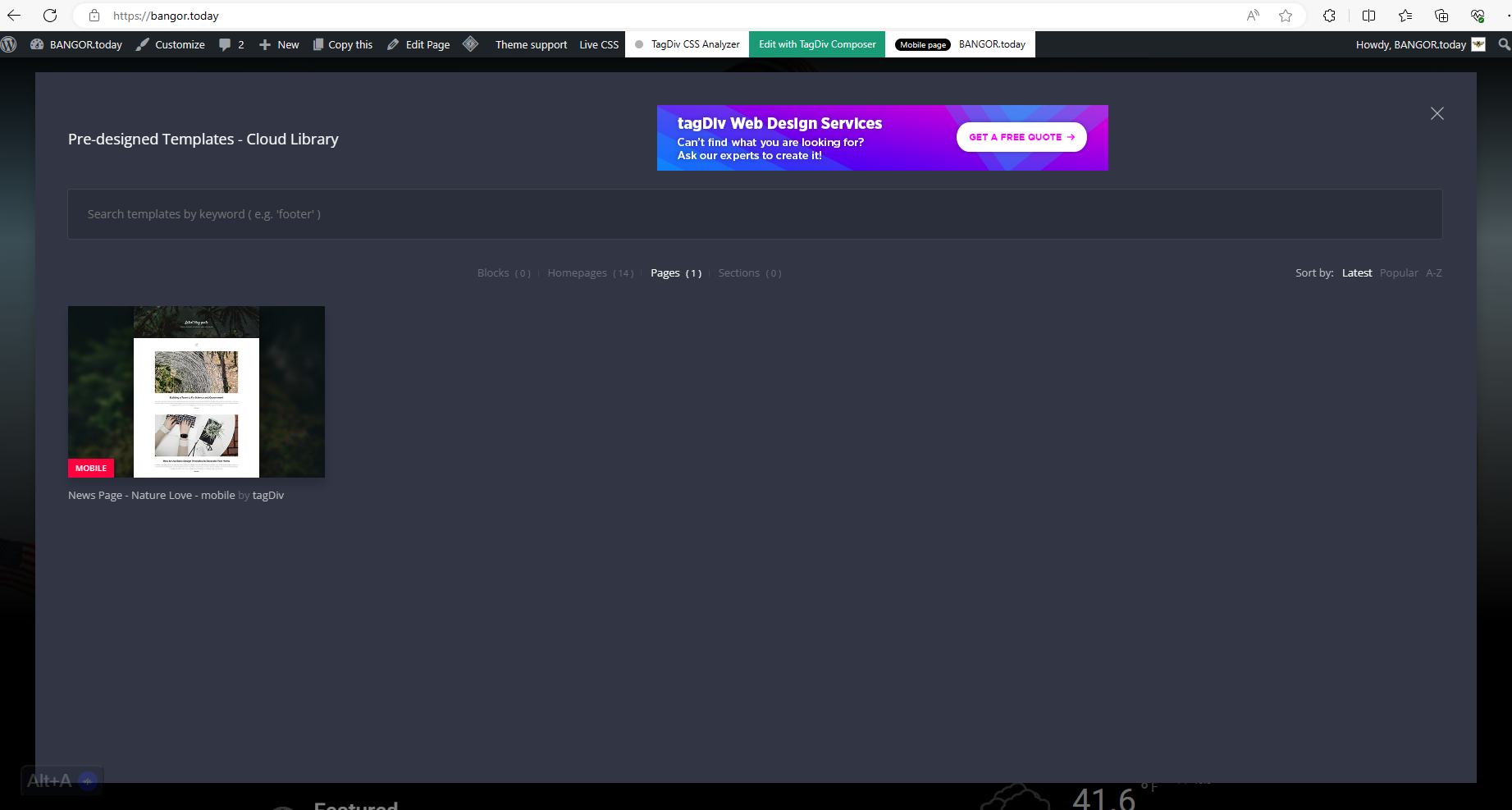
I have these cloud templates Blocks ( 0 )Homepages ( 14 )Pages ( 1 )Sections ( 0 ) I cannot find out where sections or blocks are because they are not showing up in my pop up. see here: https://bangor.today/wp-content/uploads/2023/12/aa33.png
I also cannot seem to get the Logo to display. It will display for a second and then disappear. as seen here https://bangor.today/wp-content/uploads/2023/12/Screenshot_20231226_124908_Chrome.jpg
And I have to initiate Amp in order to use TagDiv mobile?!?! As you see here 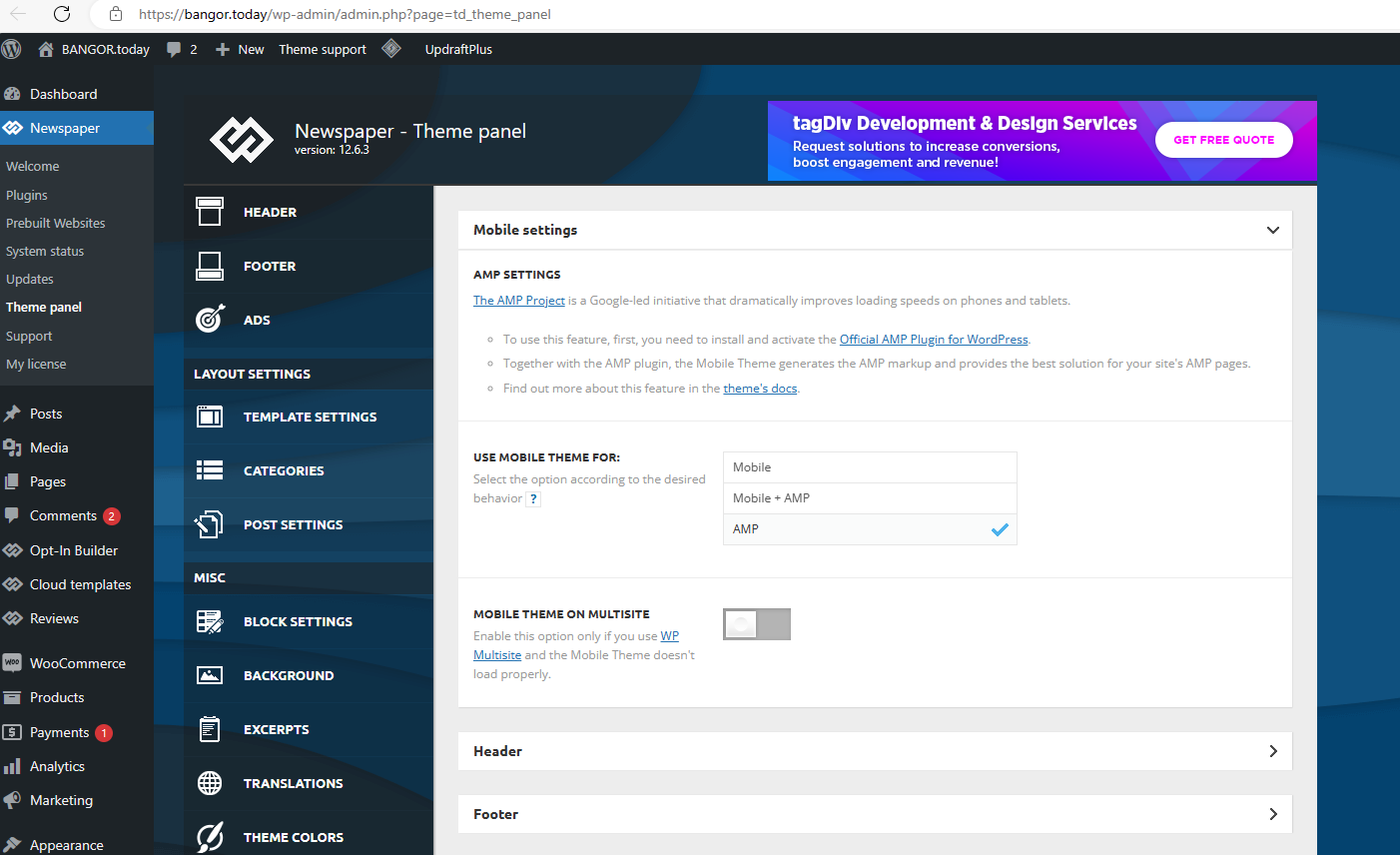
 khnalsaroj083
Fatal error: Uncaught TypeError: Unsupported operand types: int – string in /home3/jalbayukhabar/public_html/wp-content/plugins/td-cloud-library/state/single/tdb_state_single.php:1124 Stack trace: #0 /home3/jalbayukhabar/public_html/wp-content/plugins/td-cloud-library/shortcodes/single/tdb_single_date.php(189): tdb_state_single->{closure}() #1 /home3/jalbayukhabar/public_html/wp-content/plugins/td-cloud-library/shortcodes/single/tdb_single_date.php(189): Closure->__invoke() #2 /home3/jalbayukhabar/public_html/wp-content/plugins/td-composer/legacy/common/wp_booster/td_global_blocks.php(27): tdb_single_date->render() #3 /home3/jalbayukhabar/public_html/wp-includes/shortcodes.php(433): td_global_blocks::proxy_function() #4 [internal function]: do_shortcode_tag() #5 /home3/jalbayukhabar/public_html/wp-includes/shortcodes.php(273): preg_replace_callback() #6 /home3/jalbayukhabar/public_html/wp-content/plugins/td-composer/includes/tdc_composer_block.php(281): do_shortcode() #7 /home3/jalbayukhabar/public_html/wp-content/plugins/td-composer/includes/shortcodes/vc_column_inner.php(344): tdc_composer_block->do_shortcode() #8 /home3/jalbayukhabar/public_html/wp-content/plugins/td-composer/legacy/common/wp_booster/td_global_blocks.php(27): vc_column_inner->render() #9 /home3/jalbayukhabar/public_html/wp-includes/shortcodes.php(433): td_global_blocks::proxy_function() #10 [internal function]: do_shortcode_tag() #11 /home3/jalbayukhabar/public_html/wp-includes/shortcodes.php(273): preg_replace_callback() #12 /home3/jalbayukhabar/public_html/wp-content/plugins/td-composer/includes/tdc_composer_block.php(281): do_shortcode() #13 /home3/jalbayukhabar/public_html/wp-content/plugins/td-composer/includes/shortcodes/vc_row_inner.php(376): tdc_composer_block->do_shortcode() #14 /home3/jalbayukhabar/public_html/wp-content/plugins/td-composer/legacy/common/wp_booster/td_global_blocks.php(27): vc_row_inner->render() #15 /home3/jalbayukhabar/public_html/wp-includes/shortcodes.php(433): td_global_blocks::proxy_function() #16 [internal function]: do_shortcode_tag() #17 /home3/jalbayukhabar/public_html/wp-includes/shortcodes.php(273): preg_replace_callback() #18 /home3/jalbayukhabar/public_html/wp-content/plugins/td-composer/includes/tdc_composer_block.php(281): do_shortcode() #19 /home3/jalbayukhabar/public_html/wp-content/plugins/td-composer/includes/shortcodes/vc_column.php(349): tdc_composer_block->do_shortcode() #20 /home3/jalbayukhabar/public_html/wp-content/plugins/td-composer/legacy/common/wp_booster/td_global_blocks.php(27): vc_column->render() #21 /home3/jalbayukhabar/public_html/wp-includes/shortcodes.php(433): td_global_blocks::proxy_function() #22 [internal function]: do_shortcode_tag() #23 /home3/jalbayukhabar/public_html/wp-includes/shortcodes.php(273): preg_replace_callback() #24 /home3/jalbayukhabar/public_html/wp-content/plugins/td-composer/includes/tdc_composer_block.php(281): do_shortcode() #25 /home3/jalbayukhabar/public_html/wp-content/plugins/td-composer/includes/shortcodes/vc_row.php(1173): tdc_composer_block->do_shortcode() #26 /home3/jalbayukhabar/public_html/wp-content/plugins/td-composer/legacy/common/wp_booster/td_global_blocks.php(27): vc_row->render() #27 /home3/jalbayukhabar/public_html/wp-includes/shortcodes.php(433): td_global_blocks::proxy_function() #28 [internal function]: do_shortcode_tag() #29 /home3/jalbayukhabar/public_html/wp-includes/shortcodes.php(273): preg_replace_callback() #30 /home3/jalbayukhabar/public_html/wp-content/plugins/td-composer/includes/tdc_composer_block.php(281): do_shortcode() #31 /home3/jalbayukhabar/public_html/wp-content/plugins/td-composer/includes/shortcodes/tdc_zone.php(591): tdc_composer_block->do_shortcode() #32 /home3/jalbayukhabar/public_html/wp-content/plugins/td-composer/legacy/common/wp_booster/td_global_blocks.php(27): tdc_zone->render() #33 /home3/jalbayukhabar/public_html/wp-includes/shortcodes.php(433): td_global_blocks::proxy_function() #34 [internal function]: do_shortcode_tag() #35 /home3/jalbayukhabar/public_html/wp-includes/shortcodes.php(273): preg_replace_callback() #36 /home3/jalbayukhabar/public_html/wp-includes/class-wp-hook.php(324): do_shortcode() #37 /home3/jalbayukhabar/public_html/wp-includes/plugin.php(205): WP_Hook->apply_filters() #38 /home3/jalbayukhabar/public_html/wp-content/plugins/td-cloud-library/wp_templates/tdb_view_single.php(139): apply_filters() #39 /home3/jalbayukhabar/public_html/wp-includes/template-loader.php(106): include(‘/home3/jalbayuk…’) #40 /home3/jalbayukhabar/public_html/wp-blog-header.php(19): require_once(‘/home3/jalbayuk…’) #41 /home3/jalbayukhabar/public_html/index.php(17): require(‘/home3/jalbayuk…’) #42 {main} thrown in /home3/jalbayukhabar/public_html/wp-content/plugins/td-cloud-library/state/single/tdb_state_single.php on line 1124
There has been a critical error on this website.
Learn more about troubleshooting WordPress.
you can check link https://jalbayukhabar.com/?p=1
but defalt post-template is working
 santabazz
https://annapurnatimes.com/archives/73532 this is a single post from my website here, i have updated the date in Nepali BS date format using the date converter pluign. Previously when i was using the non cloud default single page template (old template any) the date was updating finely on the website single page. But when i have installed the cloud single templete the time shown converted is the time and date of publication of that cloud template not of the single post.
but i wanted is the date the post published. It is just not rendering the updated date but in the edit with tagdiv composer there is updated date shown which is not rendering on the frontend on the of the post date section correctly. in that link the date shown २०८० पुष ९, सोमबार is the published date of the tagdiv single template rather than post actual date. i have tried a lot to render the actual post date in loop but unable to do so. what will be the solution for that
 Phearak
Hi team,
I was wondering if you could help to fix the header for the mobile view as it showed: “This type of header is not editable with tagDiv Composer. Please use a cloud header template!”
so I could not find the place where to edit the logo and even the footer page as well
Thank you so much!
 SV_SOLUTIONS
Hello. This is my first time working with your template, so I have some questions. Unfortunately, I cannot find how to edit the text in articles in the template installed. As for the pages, there I can find a block in which I can edit the text. But in the articles I don’t see such an opportunity. I’m already slowly going crazy.
When I open an article via /Edit with TagDiv Composer/ I only see how you can edit the design as well as a plan for placing pictures of the article template, but I don’t see how you can edit the text itself. Could you tell me where I can see the instructions.
I read the instructions but for some reason I still don’t understand how to change the text in articles correctly. I really need your help.
Thank you for your help.
 Bettina
 Hello!
If you use cloud templates, then you should be able to edit the pages with the TagDiv Composer and choose the style and font from there for every element.
Check this guide: https://forum.tagdiv.com/font-customization/
Thank you!
Bettina Hello!
If you use cloud templates, then you should be able to edit the pages with the TagDiv Composer and choose the style and font from there for every element.
Check this guide: https://forum.tagdiv.com/font-customization/
Thank you!
Anamaria Hello,
You can create the pages as you want.
If you are referring to having posts without any ads, then you can duplicate the single post template, delete the code for ads, and assign it to the posts that you want without ads.
Check this topic: https://forum.tagdiv.com/topic/different-logo-in-categorypage/; The same steps are to duplicate any template.
Thank you!
 peterk119
I have a header customized for desktop and mobile, but a want diferent sections on mobile without using the mobile theme. When I create a mobile home page, even when i click yes to copy the content, the header and footer are not applied and says that a have to use a cloud template and I didn’t find any way to achieve this. At the cloud library thers’s only one header template applied globally
Bettina Hello @tghidotti !
If you use a cloud template, then you can edit the page with the TagDiv Composer, scroll to the footer, and delete the element you want.
Make sure it is not coming from an extra plugin.
Thank you!
Bettina Hello @dpp!
You can edit this page with the TagDiv Composer and customize the elements on the page.
1. The sidebars have been created in the tagdiv composer.
2. Yes, because you use cloud templates, which are fully customizable in the tagdiv composer. The settings from Composer overwrite the theme panel settings.
You can build a sidebar with the TagDiv Composer. Steps:
1. Insert one new row (or delete an existing one).
2. Divide into two columns (2/3 + 1/3).
3. You can add whatever element you want to the second column and consider it a sidebar.
More documentation about the cloud templates is here:
– https://forum.tagdiv.com/cloud-library-templates/
– https://forum.tagdiv.com/design-post-pages-using-cloud-library-templates/
– https://forum.tagdiv.com/cloud-library-category-templates/
Thank you!
Bettina Hello Betty!
You can only modify the footer with TagDiv Composer if you go to a page where it is assigned and edit that page with TagDiv Composer, and then you will have access to the footer also. For example, edit your homepage with TagDiv Composer, scroll till footer, click on footer zone and you can edit it.
We have 3 options for mobile versions that you can use:
1. Responsive version: A responsive version of your website looks similar to the desktop version. TagDiv Composer is used to edit the page.Click on the mobile viewport: https://www.screencast.com/t/XDQJedlggSB. There, you can see your mobile version and edit or adjust the elements to look better.
2. Mobile pages: https://tagdiv.com/newspaper-10-3-7-update-brings-customizable-and-fast-mobile-pages
3. Mobile theme plugin: The Mobile Theme is a performance-optimized theme included in the main Newspaper theme that only loads on mobile devices. It comes with its own templates and designs for pages, posts, categories, etc., so your current templates from the desktop theme will get converted to the mobile theme layout. Please see https://forum.tagdiv.com/the-mobile-theme/ and https://forum.tagdiv.com/mobile-theme-introduction/ for more information.
A full explanation is here: https://www.youtube.com/watch?v=SpGkOnJeNZY
If you need to use mobile version 1 or 2, then you need to uninstall the Mobile Theme plugin and AMP.
Thank you!
Bettina Hello @Roman!
We recommend using cloud/PRO templates in order to have the possibility to edit them with the TagDiv Composer, which contains a lot of functions and features. Please check out our tutorial here: https://forum.tagdiv.com/tagdiv-composer-tutorial/
More documentation about the cloud templates is here:
– https://forum.tagdiv.com/cloud-library-templates/
– https://forum.tagdiv.com/design-post-pages-using-cloud-library-templates/
– https://forum.tagdiv.com/cloud-library-category-templates/
If you use default templates, then the settings are in the theme panel; clear your cache and try again.
Thank you!
 dpp
dppHi there, i’m trying to change the sidebar for posts or category pages but I can’t find where this is done. https://test.dorpsplatform-prinsenbeek.nl/blog/2023/12/03/enthousiaste-bekenaren-gezocht/
I’ve tried:
1. Custom options from WordPress to edit the widgets, but it says: Your theme has 7 widget areas, but this particular page does not show them. You can navigate to other pages on your site while using the Customizer to customize and view the widgets on those pages.
2. In the Theme panel I can find sidebar options in the Blogs and Posts sections (in Template settings), but also any change I make there in the “CUSTOM SIDEBAR + POSITION” option is not loaded into the page.
So now my main question is, where do I need to be to make these default sidebars dissappear and load my own sidebar I want to configure.
 mundgefuehl
Dear Team,
I am trying to find the right place to edit the mobile footer on my page Mundgefuehl.
TagDiv composer tells me that I should use a cloud template, but I do not have a separate mobile footer template installed. In the Newspaper Theme panel I see only the reference to the Rimont footer template, but this gives me only the desktop version and not mobile.
Many thanks for your support
Betty
Anamaria Hi,
Did you make an update recently to the theme and plugins? Please follow the steps from this topic https://forum.tagdiv.com/topic/error-at-zones-6models-1dom-the-model-does-not-match-the-content-currene/ if you have a child theme; please use the main theme.
You can try to revert an old revision on a page/template -> https://www.wpbeginner.com/beginners-guide/complete-guide-to-wordpress-post-revisions/
Thank you!
 Abdessamad Azil
Hi,
I got this error, i’m not sure but I think after the last update. I got it in all pages and also in all templates.
Errors at columns: 1(models) : 2(dom). The model does not match the content Current state has involved an issue. You could try an UNDO operation (CTRL+Z / CTRL+SHIFT+Z)
Thanks,
Anamaria Hi,
Using our theme you can choose from 3 mobile versions
-> mobile responsive => https://www.screencast.com/t/oJ2ShOp47
-> mobile theme plugin => https://forum.tagdiv.com/the-mobile-theme/
-> mobile page => https://tagdiv.com/newspaper-10-3-7-update-brings-customizable-and-fast-mobile-pages/
If you created the mobile pages with tagDiv Composer, then when you install the Mobile Theme plugin, your pages will be overwritten by the plugin (the mobile theme comes with its templates for page, post, category, etc so your current templates from the desktop theme will get converted to the mobile theme layout, the page content is made without builders in mobile editor => https://www.screencast.com/t/xbgZG8kH also, the options that are provided to edit the mobile theme version are limited (this keeps the things simple)).
This is a video about Responsive Newspaper Theme, AMP & Mobile Theme, Mobile Pages & Templates -> https://www.youtube.com/watch?v=SpGkOnJeNZY
So, the mobile responsive is what you see when that you select the viewport on phone => https://www.screencast.com/t/matV17hH, so some settings may apply for each viewport(where is the border blue), and others are not(where the border is black).
The mobile page has the mobile templates from Cloud Library => https://www.screencast.com/t/YCcZ8rL8
The Mobile responsive version of the theme and the mobile page editor can be edit with tagDiv Composer, the mobile theme plugin cannot.
For example, you can have the mobile theme plugin activated and use the mobile page/mobile responsive version for the homepage/pages, but for the categories pages/404 page, you can’t use the mobile page/mobile responsive version if you have the mobile theme plugin activated.
So, if you want to design the pages with tagDiv Composer, you can use the mobile page or mobile responsive version.
Thank you!
 BatmanUnleashed
 i deleted my other page builder plugins, i deleted elementor and reinstalled it, and i am still getting the error:
“sorry the content area was not found in your page. you must call ‘the_content’ function in the current template, in order for elementor to work on this page”.
any ideas why this is being an issue?
 analia
Hello, I hope to find you very well!
I am trying to launch my site days ago, in conversation about some topics with Anamaria, but I have had little response and I’m a little lost with your template.
It is becoming very urgent for me to finish setting up the site, and I am wasting valuable time here, now I discover with horror that when a user wants to buy a monthly plan using stripe it tells him that the plan will expire in a month. I can’t find the option for recurring payments and I don’t want to start my site from scratch with another add-on.
I need to solve some urgent things:
1. Both annual and monthly plans should automatically renew , unless the user cancels . So I need to know how to configure recurring payments, because it does not appear in my plans interface.
2. When a person selects the plan it takes them to a login page when clearly they should go to a registration page.
3. People can register on my site and have an account and comment post, without having paid for a plan ! this is wrong for me, it should work like all subscriber sites like Netflix, if I don’t pay I can’t create an account.
4. I am having problems to block content, in some post it works but when I create a new post it does not work, all the extra plugins were disabled, I ask you not to answer me that may be the problem.
https://desarraigo.es/sin-categoria/lorem-ipsum-dolor-sit-amet/
I really appreciate your urgent help, I have been trying to launch my site for more than 15 days.
Have a great day.
 djalejo
 Yes I saw tha document. My single CPT template doesn’t show the Mobile Page option at the top as described in the article. I have some other normal pages and they do show the mobile option. I thought perhaps it doesn’t work with CPTs?