
No search results were found in Documentation!
 Calin
Calin Hi urishtaujjain, testing with https://pagespeed.web.dev/ and lighthouse have some small differences but shouldn’t be that big, now seems to be better and everything is on green – https://we.tl/t-Dlw8jD2OzA
Calin Hi,
I’m glad that there are improvements!
1) I don’t know how to solve this. How do I do it? – That one is related to some settings in wp rocket, here is a similar topic – https://forum.bricksbuilder.io/t/how-to-fix-pagespeed-issue-referenceerror/10792/2
4) I’ve changed the title from H3 to H2. I think this is what you were saying. – yes this was what I mean.
– Background and foreground colors do not have a sufficient contrast ratio. -> I see that now is only on footer there is should be better to change the email color to #ffffff if you want you can use this css that will set the hover on it:
.footer-email-wrap a{

  color: #ffffff;

}

.footer-email-wrap a:hover{

  color: #c8152b;

}
– Touch targets do not have sufficient size or spacing. -> please try this custom css, it should resolve a part of targets:
.meta-info,

.td-post-category {

    font-size: 12px;

}
I hoe this will help!
 urishtaujjain
 First of all thanks to Calin for guiding me, my pagespeed result score is great for desktop-96,mobile score is down and but lighthouse result is different, why is it so, I have attached lighthouse screenshots, please have a look at it and what issue we can solve in this? Please help
urishtaujjain First of all thanks to Calin for guiding me, my pagespeed result score is great for mobile-91 and desktop-96 but lighthouse result is different, why is it so, I have attached lighthouse screenshots, please have a look at it and what issue we can solve in this? Please help
Calin Ok, I checked the pagespeed results and now the score looks fantastic.
Now it seems that the above code is not fixing the problem on mobile only from desktop, were seems to be now a problem only with the first module.
Please add this extra code in the theme panel for phone -> https://i.imgur.com/o0yNNA8.png:
.td-big-grid-meta,

.td_module_mx1 .meta-info {

    padding-top: 16px;

    background: #111;

}
and for desktop please use this code – https://i.imgur.com/TOTynbt.png :
.td-big-thumb .td-big-grid-meta {

    background: #111;

}
Let me know the results!
Calin Hi,
“please send it other formet this imgur file is not opened in my system
– https://i.imgur.com/LjCV0di.png
– https://i.imgur.com/XLMWWup.png”
Those are related to the pagespeed results.
I will check for the emails, as far as I know we answered to those emails from that date, but it is possible to be in spam. I will check it right now and if I do not fine the email I will reply here, if I will find it I will reply via email.
Thank you!
 Anamaria
 Hi,
For issues with the NewsPaper theme and page indexation errors in Google Search Console, here are a few recommendations:
Check the robots.txt file: Ensure your robots.txt isn’t blocking critical pages from being indexed. Use the “URL Inspection” tool in Google Search Console to verify if pages are blocked.
Review Sitemaps: Ensure that your sitemap is submitted correctly and accessible by Google. It’s a good practice to manually submit it through Google Search Console after any significant site updates.
Fix Crawl Errors: Look for any specific crawl errors in Google Search Console. Pages with 404 errors, server errors (5xx), or soft 404s can prevent proper indexation.
Update the Theme: Ensure that your NewsPaper theme is up to date, as outdated themes might have bugs or compatibility issues that affect SEO. Also, check if any plugins or custom code interfere with indexation.
Structured Data Errors: If your pages have schema markup (rich snippets), ensure that it is implemented correctly. Incorrect schema data can lead to indexing issues or poor SEO performance.
Page Speed Optimization: Slow-loading pages can impact indexation. Use tools like Google PageSpeed Insights to check if slow page speeds are an issue and optimize your website for performance.
Check for Duplicate Content: Ensure your site isn’t producing duplicate content or thin content, as this can negatively impact Google’s ability to index your pages properly.
Mobile Usability: Google’s index is mobile-first, so ensure that your theme and website are fully optimized for mobile devices. Fix any mobile usability issues reported in Search Console.
Thank you!
 Youngman
Hi everyone,
I’d like to ask about the benefits of AMP in 2024 because I’m considering implementing it on my website as well. Is it still relevant or not for a blog or news website that aims to generate revenue through ads when using AMP?
I’ve heard some recent news saying AMP is no longer relevant since it’s no longer supported by Google, but from all the articles I’ve read, they emphasize, “If your site is a news site, using AMP is an important step.”
My mobile website, when tested on PageSpeed Insights for Core Web Vitals, passes the assessment. However, I’m still confused about whether I should use AMP or not. I’m uncertain because the Core Web Vitals results sometimes fail after a month or after significant Google updates.
What about you? Do you use AMP, and has it been beneficial for your site’s ranking or revenue? Is using AMP for a blog or news website a necessity?
I hope I or others who are as confused as I am about AMP can gain clarity from experienced webmasters and theme developers here.
 deekendown
 Thanks fort he answer and
1. I do
2. I do
3. Ido
4. I do
5. Ido
6. –
7. –
8. I use wp rocket and i think (not sure) i make it right
9. I do
10. –
 Bettina
 Hello!
LCP measures how quickly the largest content element (e.g., image, video, text block) becomes visible within the viewport. Improving LCP involves optimizing various aspects of your WordPress site. Here’s a step-by-step guide on how to enhance LCP:
1. Optimize Images
Images are often the largest elements on the page, and optimizing them can significantly improve LCP.
Compress Images: Use tools like Smush, Imagify, or EWWW Image Optimizer to compress images without sacrificing quality.
Use Correct Image Format: Convert images to modern formats like WebP for faster loading.
Lazy Load Images: Lazy loading delays the loading of images until they’re needed. WordPress 5.5 and later versions come with native lazy loading, or you can use plugins like Lazy Load by WP Rocket.
Serve Scaled Images: Ensure images are served in appropriate sizes based on the device.
2. Enable Caching
Caching improves LCP by reducing server response times and decreasing the amount of work needed to load a page.
Browser Caching: Ensure that static resources like CSS, JS, and images are cached in the browser to speed up repeated visits.
3. Minimize CSS and JavaScript
Reducing the size and loading time of CSS and JavaScript files can help improve LCP.
Minify CSS and JavaScript: Use a plugin like Autoptimize to minify CSS and JavaScript files.
Defer Non-Critical JavaScript: Delay the loading of non-critical JavaScript by deferring or async loading to avoid blocking rendering.
Remove Unused CSS: Eliminate unused CSS using WP Rocket’s CSS optimization feature or manual removal for unneeded stylesheets.
4. Use a Content Delivery Network (CDN)
A CDN helps improve LCP by serving your content from servers closest to the user, reducing latency.
Integrate a CDN: Use services like Cloudflare, StackPath, or KeyCDN to serve static resources, like images, CSS, and JavaScript, from a global network of servers.
5. Optimize Fonts
Custom fonts can significantly affect LCP if not optimized properly.
Preload Key Fonts: Use the preload directive in your HTML to load important fonts early.
Use System Fonts: Alternatively, switch to system fonts for faster font rendering.
Font Display Property: Use the font-display: swap; CSS property to ensure text is visible while web fonts load.
6. Reduce Server Response Times (TTFB)
A fast server response time (Time to First Byte, TTFB) is essential for a good LCP score.
Upgrade Hosting: Choose a high-performance hosting provider, especially one that specializes in WordPress, like Kinsta, WP Engine, or SiteGround.
Use Latest PHP Version: Ensure your WordPress site is running the latest version of PHP (8.x) for better performance.
Database Optimization: Regularly clean up and optimize your WordPress database using plugins like WP-Optimize or Advanced Database Cleaner.
7. Reduce Third-Party Scripts
External resources can slow down the page, affecting LCP.
Minimize Third-Party Embeds: Reduce or optimize third-party scripts, such as Google Analytics, social media embeds, and advertising.
Use Tag Manager: If you use multiple tracking scripts, implement them through Google Tag Manager to load them asynchronously and reduce load impact.
8. Prioritize Above-the-Fold Content
The content visible above the fold (i.e., before scrolling) should load quickly for a better LCP score.
Inline Critical CSS: Inline essential CSS directly into the HTML to prioritize above-the-fold content. Tools like Autoptimize or WP Rocket can help with this.
Avoid Heavy Above-the-Fold Elements: Avoid large images or videos that slow down the loading of the above-the-fold content.
9. Use Lazy Load for Iframes and Videos
Similar to image lazy loading, delay loading of iframes and videos until they are needed.
Lazy Load Iframes: Use plugins like Lazy Load for Videos or WP Rocket’s built-in lazy load feature to defer video loading.
10. Monitor with Performance Tools
Continuously track your site’s LCP performance to identify new bottlenecks or opportunities for improvement.
Google PageSpeed Insights: Run your site through Google PageSpeed Insights to get a detailed breakdown of LCP issues.
WebPageTest: Use WebPageTest for deeper insights into your page load times and specific areas affecting LCP.
GTmetrix: Another tool that provides useful performance data, including LCP metrics.
By implementing these optimizations, you should see a noticeable improvement in your WordPress site’s LCP, resulting in a faster, more user-friendly experience.
Thank you!
 giriraj
 Hello Bettina,
Thank you for your response.
I have achieved 100 score (mobile and also soon desktop) in PageSpeed Insights but I wanted to fine tune the errors.
I’m always trying to reduce the plugins because the plugins are creating issues so I don’t want to add another plugin to fix this issue.
Let me explore other options, whether I can fix it or not.
In the meantime if you found / got any info Pls share it.
Thank You
Giri
 Alex
Alex Hi Calin,
In 12.6.7 your devs fixed this issue with webp on loop blocks, which is good.
But this issue with Webp and Caching is not fixed.
– You previously said you were only able to replicate it once.
To easily replicate it – logout of your dev site and in a few minutes inspect the html with image that is meant to load webp. It will ignore webp and show jpg/png or whatever is used..
Also if you run it through https://pagespeed.web.dev/ the error “Serve images in next-gen formats” will be reported as the url of the shown image is not webp.
Thank you.
Calin Hi Amaro, please contact us via email at contact@tagdiv.com, there we can have a private conversation.
It is recommended to use a cache plugin and an optimize css, html and JavaScript code, most of cache plugins (like WP Rocket, Litespeed) have this option, others like WP Super cache need to be used with an extra plugin like autotomize – https://forum.tagdiv.com/how-to-make-the-site-faster/
Also you need to check your website with https://pagespeed.web.dev/ and try to resolve the situations mentioned there.
Thank you
Anamaria Hello,
To increase page speed, I recommend checking which thumbnails you are using on your blocks. You might want to avoid having all of them enabled and optimize and regenerate images. You can use the EWWW Image Optimizer for image optimisation, and the OMGF plugin for fonts. Additionally, you can use the WP Rocket plugin.
here are many optimization guides provided by our users here in the forum, some made by us; you could check some of them
– https://www.infophilic.com/get-almost-100-pagespeed-newspaper-theme/
– https://forum.tagdiv.com/cache-plugin-install-and-configure/
– https://forum.tagdiv.com/how-to-make-the-site-faster/
– https://forum.tagdiv.com/topic/high-number-of-ajax-request/
– https://forum.tagdiv.com/topic/score-100100-pagespeed-with-newspaper-wordpress-theme/
– https://www.andraware.com/wp-rocket-for-newspaper-theme/
– https://forum.tagdiv.com/topic/page-speed-guide-for-2023-beginners-and-advanced/
– https://forum.tagdiv.com/topic/newspaper-theme-speedify-your-website/
– https://forum.tagdiv.com/topic/tutorial-chriss-custom-optimizations-for-functions-php-etc/
– https://forum.tagdiv.com/cloudflare-cdn/
– https://forum.tagdiv.com/topic/theme-causing-high-cpu-usage-2/
– https://forum.tagdiv.com/topic/sql-querys-high-cpu/
– https://forum.tagdiv.com/topic/newspaper-theme-slow-to-respond/
– https://premium.wpmudev.org/blog/optimizing-your-wordpress-database-a-complete-guide/
– https://underconstructionpage.com/optimize-wordpress-database/
– https://crunchify.com/better-optimize-wordpress-database-all-in-one-guide/
Thank you!
girirajHello Team,
In the PageSpeed Insights I’m getting “Touch targets do not have sufficient size or spacing” error in the Accessibility for Desktop.
Can you tell me how to fix this?
Here is the error screenshot https://www.screencast.com/t/tG4Fyq6kH
My website address is https://www.giriblog.com
Thanks
Giri
Calin Hi,
I just checked the https://pagespeed.web.dev/analysis/https-thezugzwangblog-com-reglas-del-ajedrez/00ovo6sf4z?hl=en&form_factor=desktop and now on desktop the score is good – https://i.imgur.com/elRdftV.png now on mobile needs some improvements – https://i.imgur.com/hHbDPxZ.png
Please try the plugin for OMGF fonts. On WP Rocket make sure that you have the remove unused css option on, and use a plugin to optimize and convert images to webp.
Also, using CDN (Cloudflare), will improve the performances.
Thank you!
 TheZugzwangBlog
I’m trying to improve google core vitals metrics and would like some help. When analyzing one of our article URLs: https://thezugzwangblog.com/rules-of-chess/ PageSpeed recommends to minimize the work of the main thread (https://pagespeed.web.dev/analysis/https-thezugzwangblog-com-rules-of-chess/00ovo6sf4z?hl=en&form_factor=desktop) on mobile but I don’t know how I can do it. Also LCP and FCP metrics fail on both mobile and desktop. What can I do to solve this?
Thanks
Anamaria Hello,
For mobile, you can create mobile templates/pages, and you can use the WP Rocket plugin for page speed.
There are many optimization guides provided by our users here in the forum, some made by us; you could check some of them
– https://www.infophilic.com/get-almost-100-pagespeed-newspaper-theme/
– https://forum.tagdiv.com/cache-plugin-install-and-configure/
– https://forum.tagdiv.com/how-to-make-the-site-faster/
– https://forum.tagdiv.com/topic/high-number-of-ajax-request/
– https://forum.tagdiv.com/topic/score-100100-pagespeed-with-newspaper-wordpress-theme/
– https://www.andraware.com/wp-rocket-for-newspaper-theme/
– https://forum.tagdiv.com/topic/page-speed-guide-for-2023-beginners-and-advanced/
– https://forum.tagdiv.com/topic/newspaper-theme-speedify-your-website/
– https://forum.tagdiv.com/topic/tutorial-chriss-custom-optimizations-for-functions-php-etc/
– https://forum.tagdiv.com/cloudflare-cdn/
– https://forum.tagdiv.com/topic/theme-causing-high-cpu-usage-2/
– https://forum.tagdiv.com/topic/sql-querys-high-cpu/
– https://forum.tagdiv.com/topic/newspaper-theme-slow-to-respond/
– https://premium.wpmudev.org/blog/optimizing-your-wordpress-database-a-complete-guide/
– https://underconstructionpage.com/optimize-wordpress-database/
– https://crunchify.com/better-optimize-wordpress-database-all-in-one-guide/
Thank you!
 diegocoru
 I am not using the tagDiv Mobile Theme, just tried to activate it but immediately deactived it when I saw it look bad.
So I am happy with how the Mobile responsive looks like. The only thing is that i measured the speed rate of my web in the PageSpeed Insights and the performance of mobile is 59 (while the desktop one is 90).
So I really want to improve it and I am not able.
 Adi
Adi Hi,
Checkout this website when i right click on feature image it does not showing option for open image in new tab like an image check: https://share.zight.com/NQuAy6WB
When I open my blog post and right click on image its shows like an image check: https://share.zight.com/nOu7qjLb
Both websites are using same theme and template than whats the difference?
Also when I set feature image there is no option to set full size check: https://share.zight.com/8LuNv866
Also one more thing when I check my blog post speed on https://pagespeed.web.dev/ its show 89 on mobile if I remove feature image from the post. when I enable feature on top after heading (h1) its show only 40 in mobile. how can decrease that speed for just 1 image? and how can I resolve that speed issue without removing feature image after h1 in the post?
Anamaria Hi,
You have a good score now and lcp is on the cookie https://i.imgur.com/w6PBGJP.png https://pagespeed.web.dev/analysis/https-www-allerenitalie-com/m5wsrnxalp?form_factor=desktop
Thank you!
 anastasios
Hello, I have the following issue when using the video playlist plugin.
In google pagespeed tests appears the following problem regarding the videos and the SEO optimization:
Links are not crawlable: Search engines may use href attributes on links to crawl websites. Ensure that the href attribute of anchor elements links to an appropriate destination, so more pages of the site can be discovered.
I added manually the href attribute using JS (upon the loading of the page, after the creation of the element appended the href attribute and value from Youtube). But this led to a different problem – the links were redirecting to youtube, something that we do not want (we want the visitor to be able to see the videos remaining in our page).
The second thing I tried was in a similar way (using a simple JS script) appending just a value to the href attribute (e.g. href=”#v” so that it neither redirects nor move to the top of the page). But the error in the SEO section remained (I assume that maybe could be because it is appended after the creation of the element, the tests are ignoring it??).
So, summarizing what we would like is:
- To keep using the video playlist plugin, but with the addition of the href attribute so that the error I mentioned is resolved. In this case it is very important (in terms of UX) that upon clicking the user is not redirected to Youtube.
- Or as an alternative could be that the element for each video would be different from , so that the need for href doesn’t exist (but I am not sure if the plugin could work like this).
Finally, what is of importance to us is to find a way that the player works and the SEO issue is resolved (whether it would be an element or not, with a specific attribute or not etc, is ok).
I hope I explained it 🙂 , but I am at your disposal for any further info. Thanks!
Kind regards,
Bettina Hello!
I’m sorry for that.
You can have a great score, but it needs some adjustment and optimizations.
We know that page speed is very important, and we try to optimize the theme as much as we can, so you can have a great score with less optimization than before.
However, page loading speed can depend on many factors, and each website is unique from this point of view.
A great solution is to use the Google PageSpeed Insights tool, so you can see exactly what you should optimize on your website.
For customization and other services, you can contact our custom work team here: https://tagdiv.com/premium-customization-services/.
Thank you for understanding!
Bettina Hello!
We recommend the Wp Super Cache plugin.
There is all about the DOM. Which means you need to have less elements into that container or row, as such on that page. I can suggest you only to take care of how many elements you use on that page. You can try to use a cache plugin or a plugin which can minify the page or combine some elements in order to reduce its size.
To increase the page speed you can check these similar topics for more solutions:
– https://www.infophilic.com/get-almost-100-pagespeed-newspaper-theme/
– https://forum.tagdiv.com/topic/score-100100-pagespeed-with-newspaper-wordpress-theme/
– https://developers.google.com/speed/docs/insights/v5/about
– https://www.youtube.com/watch?v=tnkVapqhIHc
– https://www.xtechkr.com/optimize-newspaper-theme/
– Check those guides : https://web.dev/lcp/ – > https://www.sqlpac.com/en/documents/google-pagespeeds-lighthouse-6-new-features-lcp-cls.html -> > https://wp-rocket.me/google-core-web-vitals-wordpress/improve-cumulative-layout-shift
– https://forum.tagdiv.com/topic/to-high-cumulative-layout-shift-in-mobile-theme/
Please check the tutorials from those platforms gt metrix and Google Pagespeed Insights and I’m sure you can increase the page speed.
Please note that page speed is not covered by the support team: https://forum.tagdiv.com/newspaper-theme-support/
Thank you!
 random123
Hello,
I’m contacting you because I’m having two major problems that are preventing me from taking full advantage of my newspaper theme.
The first is that I have a caching problem and I don’t know if it’s linked to the theme or not. I’m using LiteSpeedCache and every day I have to clear my cache, otherwise my site doesn’t display and the images no longer display.
Regarding the PageSpeed test, I can’t solve the following problem:
Avoid excessive DOM size / A large DOM uses more memory, leading to longer style calculations and costly layout adjustments. Find out how to avoid excessive DOM size. Here is the screenshot:
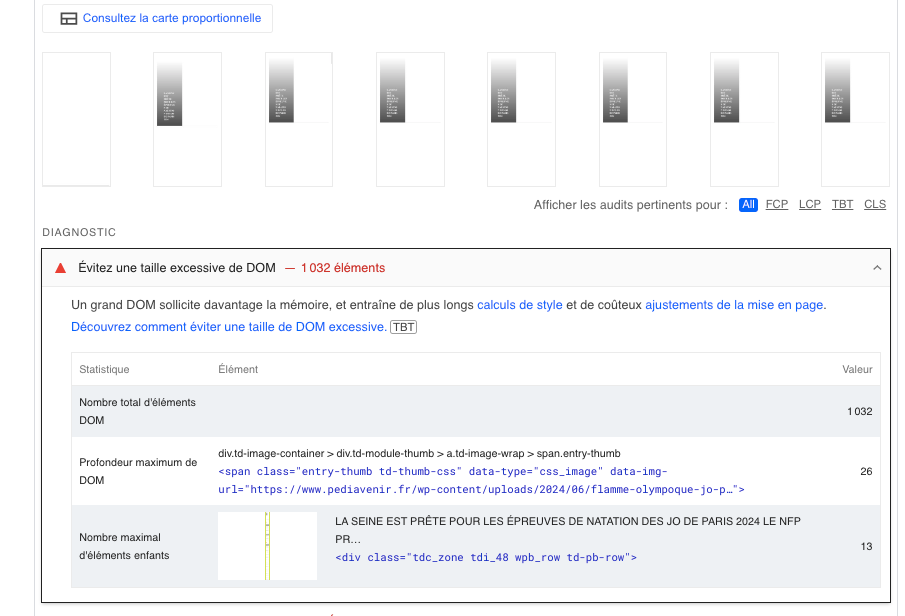
Thanks for your help!



