
 frankcf
 Thanks to both of you! Are there any examples of sites that achieve good scores? Even the demo has poor Google PageSpeed results:
https://demo.tagdiv.com/newspaper/the-most-anticipated-charter-flights-in-the-canary-islands/
Google PageSpeed Result:
– Mobile: 51/100
– Desktop: 60/100
If the demo is most highly optimized, that does not give me confidence that we will be able to optimize ours. Hoping to find other examples as well.
Thanks!
frankcfHi,
I really like the Newspaper theme, but whenever we test it on occasion, it always ranks slowest vs. other themes out of the box. Are there any examples of sites that are using a current version of the Newspaper theme that are fast and optimized? Would love to see some examples and understand how they achieved it.
Thanks!
 sortofrobot
https://developers.google.com/speed/pagespeed/insights/
Eliminate render-blocking JavaScript and CSS in above-the-fold content
Your page has 1 blocking CSS resources. This causes a delay in rendering your page.
None of the above-the-fold content on your page could be rendered without waiting for the following resources to load. Try to defer or asynchronously load blocking resources, or inline the critical portions of those resources directly in the HTML.
Optimize CSS Delivery of the following:
https://fonts.googleapis.com/…%2C500%2C500italic%2C700%2C900&ver=7.8.1
In the future update, is it possible to load the Google Fonts after the ATF section is loaded? It helps in SEO rankings.
Thank you
 BoraGursel
Hi,
In the analytics report, there was lots of issues about the speed. I will be glad if you can examine a bit and suggest me some clues to get over this. Thanks
As a sample page http://www.kilsanblog.com/yesil-cevreci-ekolojik/teraryum/
The report gives 63/100 for mobile and 81/100 values which are not good.
For Desktop: Your page has 3 blocking script resources and 9 blocking CSS resources. This causes a delay in rendering your page.
For Mobile: Your page has 10 blocking script resources and 9 blocking CSS resources. This causes a delay in rendering your page.
 alderion
Hi,
I have 2 problem,
1)I installed Wp Super Cache plugin due to your advise. When I make speed test I see that plugin does not work properly. Site seems has gzip, minify… problems.
For example the test result for my homepage from pagespeed insight; mobil: 31/100, desktop: 32/100
what should do to solve caching problem? it is about .httacces file or from my server side, what is the solutions?
2) In some of my post I use style 6 for featured image. After a while it seems the image has problem;
etc: https://gezipgordum.com/vizesiz-seyahat-edilebilen-10-guzel-ulke/
how can I solve it?
regards
Sami
 gntvls
 Hello, thanks for response. I did some testing and discovered that i had mod_pagespeed lazy_load filter applied.
Theme had the same functionality and since i removed mod_pagespeed filter, it started to work fine.
Thanks
 Bogdan B.
 Hello,
Please use a few online guides for leverage browser caching like for example:
http://stackoverflow.com/questions/26280271/pagespeed-suggestion-leverage-browser-caching-how-to
https://gtmetrix.com/leverage-browser-caching.html
Thanks.
gntvlsHello,
it seems i have issue with images loading on scroll, when i scroll down to the end of the page, i have last row with no images. Even worse when i resize browser window to tablet size, images are not loading at the middle of the page.
I’m using mod_pagespeed plugin.
Website: https://www.f1news.lt/
Thanks for your help!
 fenomeno0chris
 1) CHECK
2) CHECK
3) Too bad you can’t help me with that. It is just one line to edit -.-
4) CHECK
5) Since my team has written a lot of news before I changed the theme, can I somehow edit the default Quote-Style to “Quote box left”?
6,7,8) I have edit my functions.php file with the code from your pagespeed tutorial. Those are the css and js files, which appeared on the top of the page:
registered scripts

common | /wp-admin/js/common.min.js

farbtastic | /wp-admin/js/farbtastic.js

admin-bar | /wp-includes/js/admin-bar.min.js

jquery-ui-sortable | /wp-includes/js/jquery/ui/sortable.min.js

utils | /wp-includes/js/utils.min.js

svg-painter | /wp-admin/js/svg-painter.js

wp-auth-check | /wp-includes/js/wp-auth-check.min.js

td_social_counter | http://www.ps4source.de/wp-content/plugins/td-social-counter/js/td_social_counter.js

yoast-seo-admin-global-script | http://www.ps4source.de/wp-content/plugins/wordpress-seo/js/dist/wp-seo-admin-global-460.min.js

media-editor | /wp-includes/js/media-editor.min.js

media-audiovideo | /wp-includes/js/media-audiovideo.min.js

mce-view | /wp-includes/js/mce-view.min.js

image-edit | /wp-admin/js/image-edit.min.js

td_wp_admin | http://www.ps4source.de/wp-content/themes/Newspaper/includes/wp_booster/wp-admin/js/td_wp_admin.js

td_wp_admin_color_picker | http://www.ps4source.de/wp-content/themes/Newspaper/includes/wp_booster/wp-admin/js/td_wp_admin_color_picker.js

td_wp_admin_panel | http://www.ps4source.de/wp-content/themes/Newspaper/includes/wp_booster/wp-admin/js/td_wp_admin_panel.js

td_edit_page | http://www.ps4source.de/wp-content/themes/Newspaper/includes/wp_booster/wp-admin/js/td_edit_page.js

td_page_options | http://www.ps4source.de/wp-content/themes/Newspaper/includes/wp_booster/wp-admin/js/td_page_options.js

td_tooltip | http://www.ps4source.de/wp-content/themes/Newspaper/includes/wp_booster/wp-admin/js/tooltip.js

td_confirm | http://www.ps4source.de/wp-content/themes/Newspaper/includes/wp_booster/wp-admin/js/tdConfirm.js

thickbox | /wp-includes/js/thickbox/thickbox.js

gadwp-backend-ui | http://www.ps4source.de/wp-content/plugins/google-analytics-dashboard-for-wp/admin/js/ui.js
registered styles
farbtastic | /wp-admin/css/farbtastic.min.css
admin-bar | /wp-includes/css/admin-bar.min.css
zilla-popup | http://www.ps4source.de/wp-content/plugins/zilla-shortcodes-2.0/assets/css/admin.css
colors | 1
ie | /wp-admin/css/ie.min.css
wp-auth-check | /wp-includes/css/wp-auth-check.min.css
seedprod_plugin | http://www.ps4source.de/wp-content/plugins/ultimate-maintenance-mode/inc/css/admin-style.css
wysija-admin-css-widget | http://www.ps4source.de/wp-content/plugins/wysija-newsletters/css/admin-widget.css
yoast-seo-adminbar | http://www.ps4source.de/wp-content/plugins/wordpress-seo/css/adminbar-460.min.css
yoast-seo-admin-global | http://www.ps4source.de/wp-content/plugins/wordpress-seo/css/admin-global-460.min.css
yoast-seo-dismissible | http://www.ps4source.de/wp-content/plugins/wordpress-seo/css/wpseo-dismissible-460.min.css
google-font-ubuntu | http://fonts.googleapis.com/css?family=Ubuntu:300,400,500,700,300italic,400italic,500italic,700italic&subset=latin,cyrillic-ext,greek-ext,greek,latin-ext,cyrillic
td-wp-admin-td-panel-2 | http://www.ps4source.de/wp-content/themes/Newspaper/includes/wp_booster/wp-admin/css/wp-admin.css
wp-color-picker | /wp-admin/css/color-picker.min.css
media-views | /wp-includes/css/media-views.min.css
imgareaselect | /wp-includes/js/imgareaselect/imgareaselect.css
thickbox | /wp-includes/js/thickbox/thickbox.css
gadwp | http://www.ps4source.de/wp-content/plugins/google-analytics-dashboard-for-wp/admin/css/gadwp.css
woocommerce_admin_menu_styles | http://www.ps4source.de/wp-content/plugins/woocommerce/assets/css/menu.css
I tried every single jss and css ID in the td-speed-booster.php file, but none of them could fix the missing errors which google pagespeed displays. So how can I put those 9 JS and 5 CSS to the footer?
JSS Error:
http://ajax.googleapis.com/ajax/libs/jquery/1.11.1/jquery.min.js?ver=1.11.1

http://www.ps4source.de/wp-includes/js/jquery/ui/core.min.js?ver=1.11.4

http://www.ps4source.de/wp-includes/js/jquery/ui/widget.min.js?ver=1.11.4

http://www.ps4source.de/wp-includes/js/jquery/ui/accordion.min.js?ver=1.11.4

http://www.ps4source.de/wp-includes/js/jquery/ui/tabs.min.js?ver=1.11.4

http://www.ps4source.de/wp-content/plugins/zilla-shortcodes-2.0/assets/js/zilla-shortcodes-lib.js?ver=4.7.3

http://www.ps4source.de/wp-content/plugins/background-manager/resources/js/functions.js?ver=1.2.5.2

http://www.ps4source.de/wp-content/plugins/background-manager/resources/js/flux.js?ver=1.2.5.2

http://www.ps4source.de/wp-content/plugins/background-manager/resources/js/pub.js?ver=1.2.5.2
CSS Error:
http://www.ps4source.de/wp-content/plugins/wysija-newsletters/css/validationEngine.jquery.css?ver=2.7.8

http://www.ps4source.de/wp-content/plugins/zilla-shortcodes-2.0/assets/css/shortcodes.css?ver=4.7.3

http://www.ps4source.de/wp-content/tablepress-combined.min.css?ver=6

http://www.ps4source.de/wp-content/plugins/wp-jquery-lightbox/styles/lightbox.min.css?ver=1.4.6

http://www.ps4source.de/wp-content/plugins/background-manager/resources/css/pub.css?ver=1.2.5.2
9) Im patiently waiting for the fix!
10) CHECK
11) I have changed my PHP version to 7.0. Everything seems to work faster.
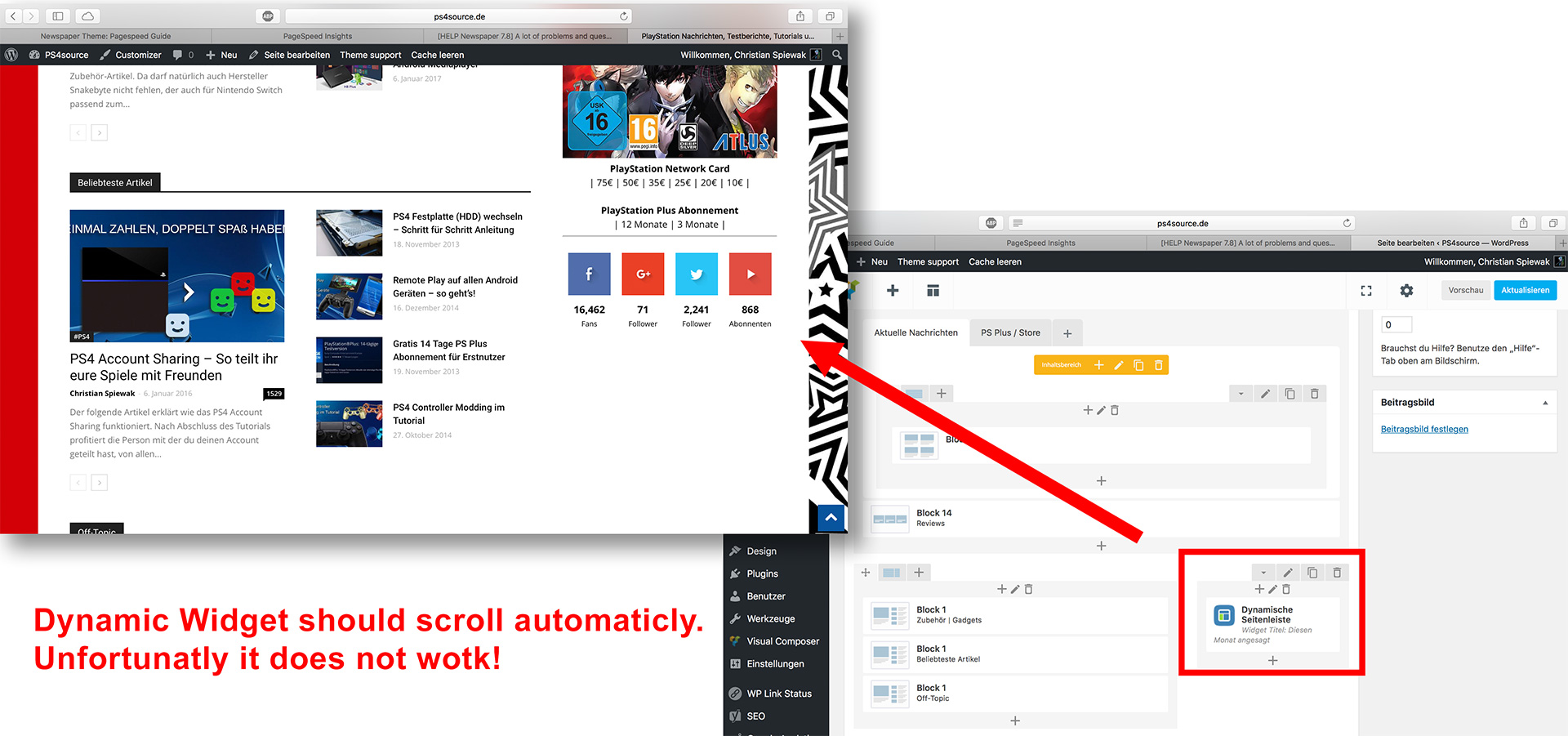
12) As you can see my dynamic widget on the homepage does not work:
 Amit
Amit This thread may help you 🙂
https://forum.tagdiv.com/topic/score-100100-pagespeed-with-newspaper-wordpress-theme/
 Alvino
Hello,
I have problems in mobile usability “Uses incompatible plugins”.
after I check here https://search.google.com/search-console/mobile-friendly
The problem comes from the featured video. These video only show
“Your browser does not currently Recognize any of the video formats available”
I also have checked tagdiv demo and displays the same
“Your browser does not currently Recognize any of the video formats available”
This is a screenshots that I try in demo tagdiv
https://s1.postimg.org/6dm8ek2ot/sc1.jpg >> Mobile-Friendly Test
https://s1.postimg.org/9xd81hbq5/sc2.jpg >> Pagespeed Mobile
https://s1.postimg.org/7u2sttbx9/sc3.jpg >> Pagespeed Desktop
Thank You
AmitIt’s a bit difficult to put Google matched content with a Newspaper theme.
One can use a text widget in the sidebar to put Google matched content this works well.
Also to put it after article you can add matched contents as related posts using following code:
<div class="wpb_raw_code wpb_content_element wpb_raw_html">

<div class="wpb_wrapper">
//YOUR MATCHED CONTENT CODE
</div>
</div>
Refer: http://prntscr.com/ej10ni
Result:
On desktop : http://prntscr.com/ej11rb
On Mobile: http://prntscr.com/ej128a
BUT
After activating td-speed-booster plugin the google matched contents get to mess with the design.
See results:
Below content – http://prntscr.com/esot2u
In sidebar – http://prntscr.com/esotu2
Disabling speed booster plugin fixes the issue.
But it compromises the pagespeed
Page speed with Speedbooster plugin – http://prntscr.com/esov91
Need a solution for this.
 Catalin
 Hello polys_a,
Please notice that the speed of your website depends on how well your site is optimized. Notice that is not a simple task and if you do not have any experience in this regard you will do not bring good results for the theme. Also, notice that we have a speed optimization tutorial but this is addressed only to advanced users. So, if you follow the steps which are presented in this tutorial here -> https://forum.tagdiv.com/how-to-make-the-site-faster/ you can increase the page speed loading and if you are not aware of the steps in this regard, please consider hiring a freelancer/developer to help you because the speed optimization services is not covered by our support policy, as you can read here -> https://forum.tagdiv.com/support-policy-2/ Check our documentation here -> https://forum.tagdiv.com/requirements-for-newspaper/ regarding on dedicated server to fit to our requirements.
Unfortunately, our theme does not have such an option to minify the style.css file and we cannot recommend any plugins with this functionality because is not tested with our theme. For minifying this file, we are using CloudFlare for our demo and works fine. If you want to read other views from our users, please check this topic -> https://forum.tagdiv.com/topic/tip-how-to-easily-minify-your-css-without-breaking-your-site/
One of our top members here on the forum wrote his own optimization tutorial here:
https://forum.tagdiv.com/topic/tutorial-chriss-custom-optimizations-for-functions-php-etc/ and here -> https://www.infophilic.com/get-almost-100-pagespeed-newspaper-theme/
Please keep in mind that at the moment, we cannot provide optimization services because this task involve time-consuming and we do not afford to do this, sorry! We only can provide support for basic theme settings.
If you are not aware of these steps which are needed to take in this regard, please consider hiring a freelancer/developer to help you because we cannot provide custom work at the moment, sorry!
Thanks for your understanding!
Catalin Hello all,
Please notice that the speed of your website depends on how well your site is optimized. Notice that is not a simple task and if you do not have any experience in this regard you will do not bring good results for the theme. Also, notice that we have a speed optimization tutorial but this is addressed only to advanced users. So, if you follow the steps which are presented in this tutorial here -> https://forum.tagdiv.com/how-to-make-the-site-faster/ you can increase the page speed loading and if you are not aware of the steps in this regard, please consider hiring a freelancer/developer to help you because the speed optimization services is not covered by our support policy, as you can read here -> https://forum.tagdiv.com/support-policy-2/ Check our documentation here -> https://forum.tagdiv.com/requirements-for-newspaper/ regarding on dedicated server to fit to our requirements.
Unfortunately, our theme does not have such an option to minify the style.css file and we cannot recommend any plugins with this functionality because is not tested with our theme. For minifying this file, we are using CloudFlare for our demo and works fine. If you want to read other views from our users, please check this topic -> https://forum.tagdiv.com/topic/tip-how-to-easily-minify-your-css-without-breaking-your-site/
One of our top members here on the forum wrote his own optimization tutorial here:
https://forum.tagdiv.com/topic/tutorial-chriss-custom-optimizations-for-functions-php-etc/ and here -> https://www.infophilic.com/get-almost-100-pagespeed-newspaper-theme/
Please keep in mind that at the moment, we cannot provide optimization services because this task involve time-consuming and we do not afford to do this, sorry! We only can provide support for basic theme settings.
If you are not aware of these steps which are needed to take in this regard, please consider hiring a freelancer/developer to help you because we cannot provide custom work at the moment, sorry!
Thanks for your understanding!
 harmario
Hi admins,
I have two important problems that I would like to solve.
1. The first one is when I look my website in the cache like googlebot (I use now http://www.seo-browser.com cause I don´t remember the comand to do in chrome) appears two menus. Thinking on the crawl buget, if he has to spend time two crawl two time that menu, is not really good, cause that time can be given to another URLs.
I tested another website that I know who have Newsmag as well and had two menu too.
How I can remove that double menu?
2. I did everyting to try to minify, defer, make them asynchronous and always crash the web. It is the same if try todo the same with jquery.js. Here all my pics of the website dont appears.
All of this affect to the speed to load the website and the pagespeed score.
Thanks a lot!
Have a nice day!
fenomeno0chris Thank you very much for your fast and extensive response!
1) The line appears after you visit some articles and scrolling up and down. I don’t know if its just my mac, but that would be weird, since all macs are using same safari browser.
Another weird thing I noticed: If im using Google Chrome browser, the big grid at the top of the site has this great animation (image gets zoomed in), if I move the mouse cursor over one article. On safari there is no animation at all. 🙁
2) I know that your theme has a custom login build in and Im already using it, as you can see (by the way it looks awesome). My problem is, that a user gets an email notification from WordPress after he registered on my site. In this email, he gets a link to set a new password. By clicking the link he gets redirected to this unpleasant site:
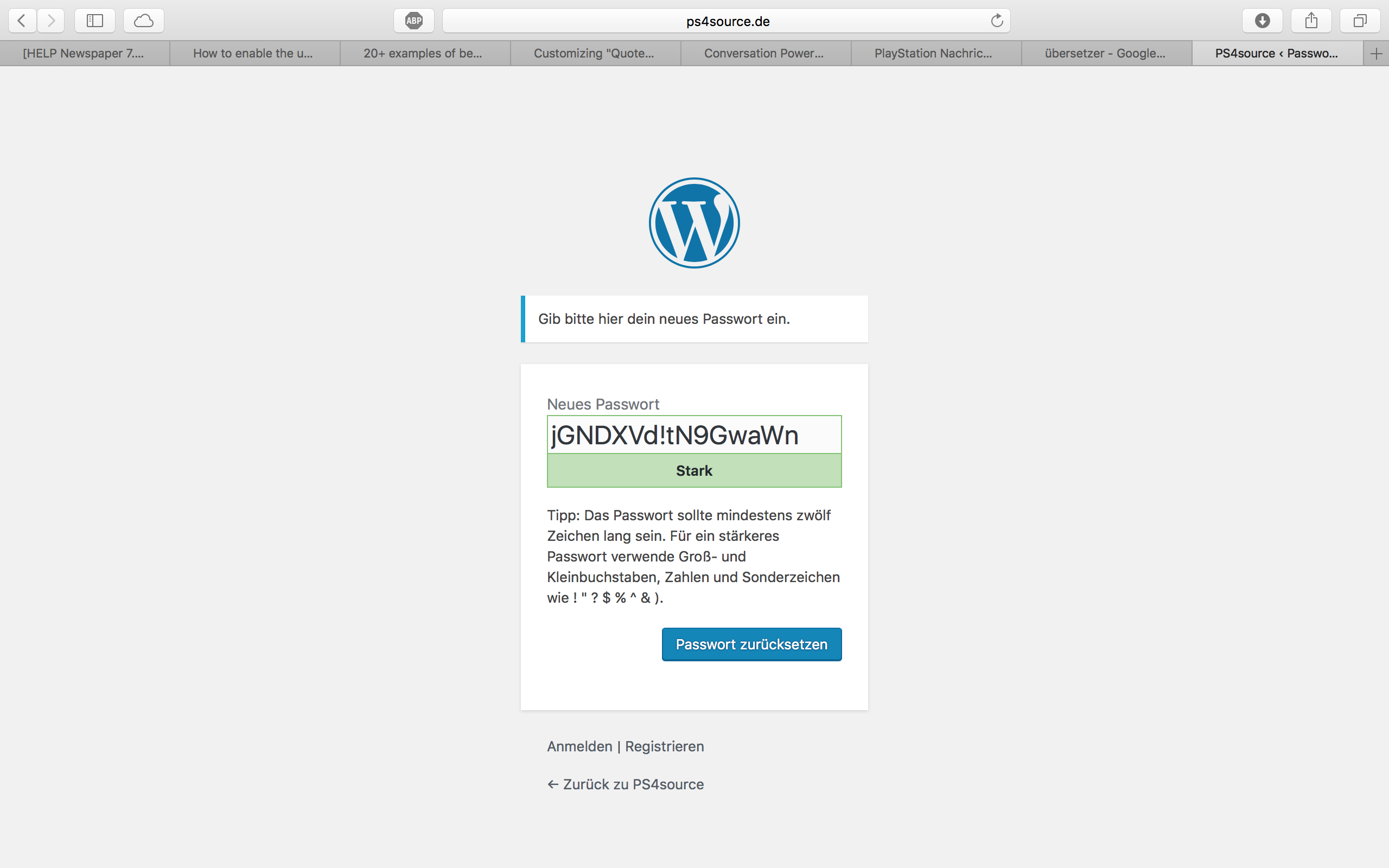
How can I change this registration process? Which plugin do you recommend?
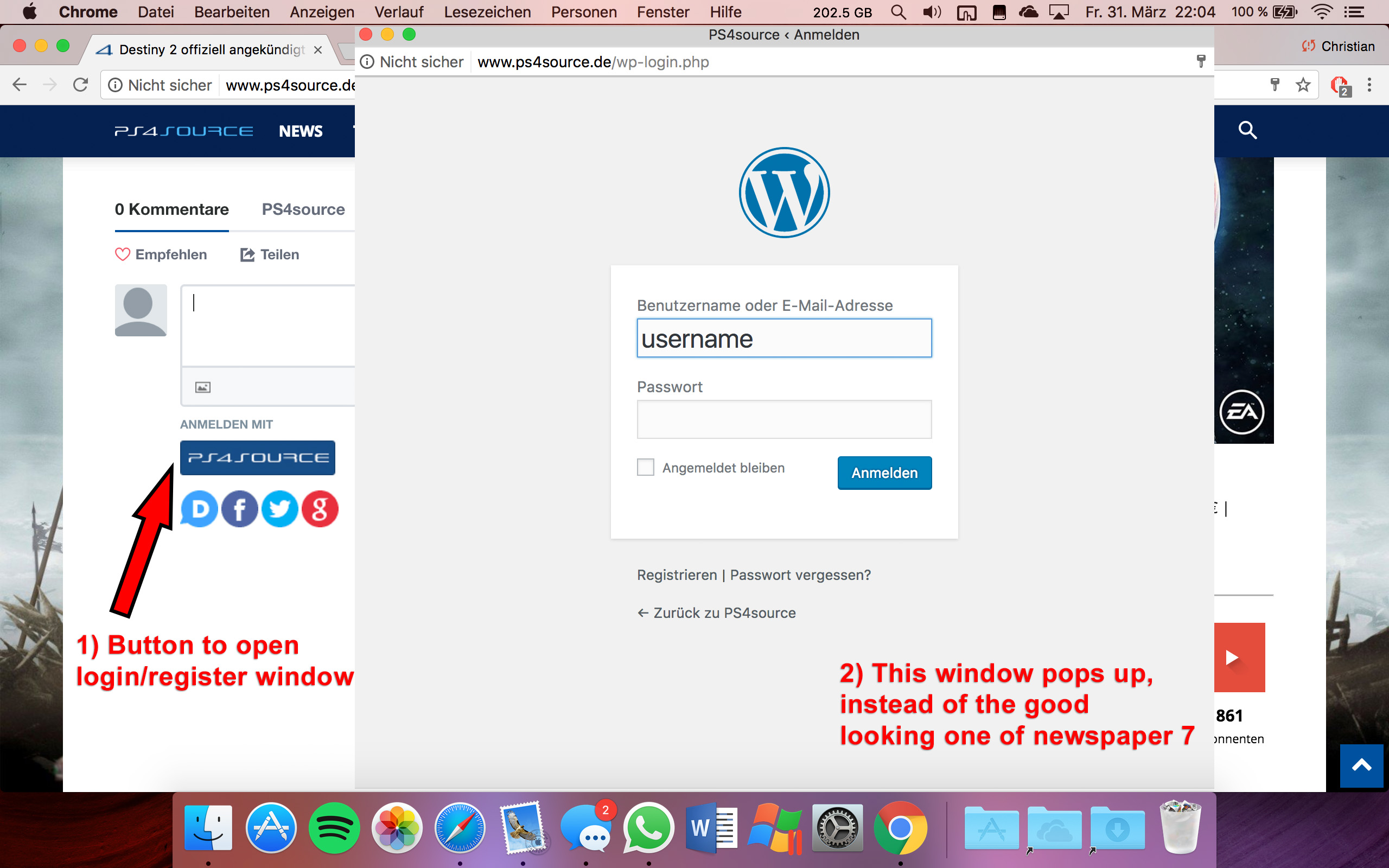
2.1) Also Im using Disqus Comment System, as I mentioned before. Ive used my own button to let the users register without having to use a social media account. Unfortunately I don’t know the link address to open the beautiful login/registration window of newspaper7.
Right now it looks like this, which is not very beautiful:
Disqus Button Code:
// Single Sign-on Integration

function dsq_sso_login() {
    global $current_site;
    $sitename = get_bloginfo('name');
    $siteurl = site_url();
    $button = get_option('disqus_sso_button');
    $sso_login_str = 'this.sso = {
          name: "' . esc_js( $sitename ) . '",
          button: "' . $button . '",
          url: "' . $siteurl . '/wp-login.php",
          logout: "' . $siteurl . '/wp-login.php?action=logout",
          width: "800",
          height: "700"
    };';
What should I enter at the url line, which is obviously responsible for the window?
3) CHECK
4) CHECK
5) Which Font do I have to use to get this vertical line on my quotes?
6,7,8) I do not know if I lost so many readers because the pagepeed has dropped or something else, but obviously I really want to get the numbers back to the state before I transferred to Newspaper7. Ive managed to increase the google pagespeed by reducing nearly all uploaded images. And I also read the Newspaper7 documentation to set the status parameters, the cache plugin and booster plugin as instructed. Unfortunately there are still some warnings, which should be solved as you can see here. Could you please help me, to get the best page speed as possible?
Should I change something on my .htaccess file?
# BEGIN WordPress
<IfModule mod_rewrite.c>
RewriteEngine On
RewriteBase /
RewriteRule ^index\.php$ - [L]
RewriteCond %{REQUEST_FILENAME} !-f
RewriteCond %{REQUEST_FILENAME} !-d
RewriteRule . /index.php [L]
</IfModule>

# END WordPress

# Deflate Compression by FileType
<IfModule mod_deflate.c>
 AddOutputFilterByType DEFLATE text/plain
 AddOutputFilterByType DEFLATE text/html
 AddOutputFilterByType DEFLATE text/xml
 AddOutputFilterByType DEFLATE text/css
 AddOutputFilterByType DEFLATE text/javascript
 AddOutputFilterByType DEFLATE application/xml
 AddOutputFilterByType DEFLATE application/xhtml+xml
 AddOutputFilterByType DEFLATE application/rss+xml
 AddOutputFilterByType DEFLATE application/atom_xml
 AddOutputFilterByType DEFLATE application/javascript
 AddOutputFilterByType DEFLATE application/x-javascript
 AddOutputFilterByType DEFLATE application/x-shockwave-flash
</IfModule>

# turns cache on for 1 month
<IfModule mod_expires.c>
ExpiresActive On
ExpiresDefault "access plus 1 week"
ExpiresByType image/jpg "access plus 1 week"
ExpiresByType image/jpeg "access plus 1 week"
ExpiresByType image/png "access plus 1 week"
ExpiresByType application/x-shockwave-flash "access plus 1 week"
</IfModule>

# gzip Compression if availiable
<IfModule mod_gzip.c>
 mod_gzip_on       Yes
 mod_gzip_dechunk  Yes
 mod_gzip_item_include file      \.(html?|txt|css|js|php|pl)$
 mod_gzip_item_include handler   ^cgi-script$
 mod_gzip_item_include mime      ^text/.*
 mod_gzip_item_include mime      ^application/x-javascript.*
 mod_gzip_item_exclude mime      ^image/.*
 mod_gzip_item_exclude rspheader ^Content-Encoding:.*gzip.*
</IfModule>

php_value memory_limit 256M
php_value max_input_vars 5000
php_value max_execution_time 300
php_value post_max_size 50M
php_value upload_max_filesize 50M
8) CHECK
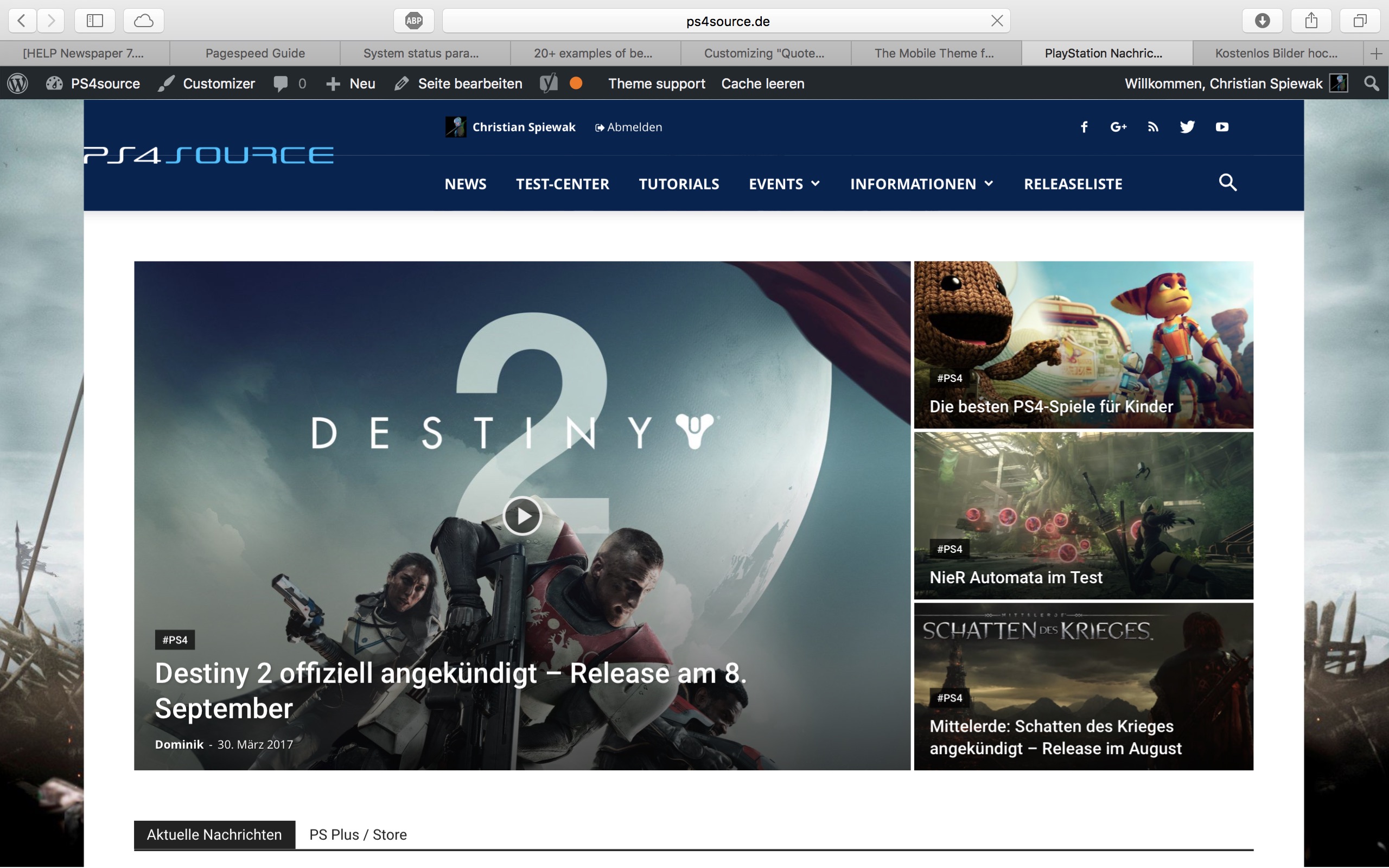
9) 
(link)
10) CHECK
11) [Newspaper->System status->php.ini configuration] I have this PHP Version 5.6.29-nmm1 (5.6 CGI). Is this ok?
-
This reply was modified 9 years by
fenomeno0chris.
fenomeno0chrisHello to the whole Newspaper/Newsmag team!
First I want to say, thank you very much for creating such great themes.
After 3 years I decided with my team to change the overall design of my homepage, by buying Newspaper7. The reaction of our readers and users are mostly positive. So thats a good sign.
Of course such a huge change is not that easy to handle and thats why I still have some problems and question, which should be solved.
All problems occur on the latest version of Newspaper 7.8
1) On my MacBook with the default Safari browser, I often get this annoying and bad looking line through the whole header section. How can I solve the problem?
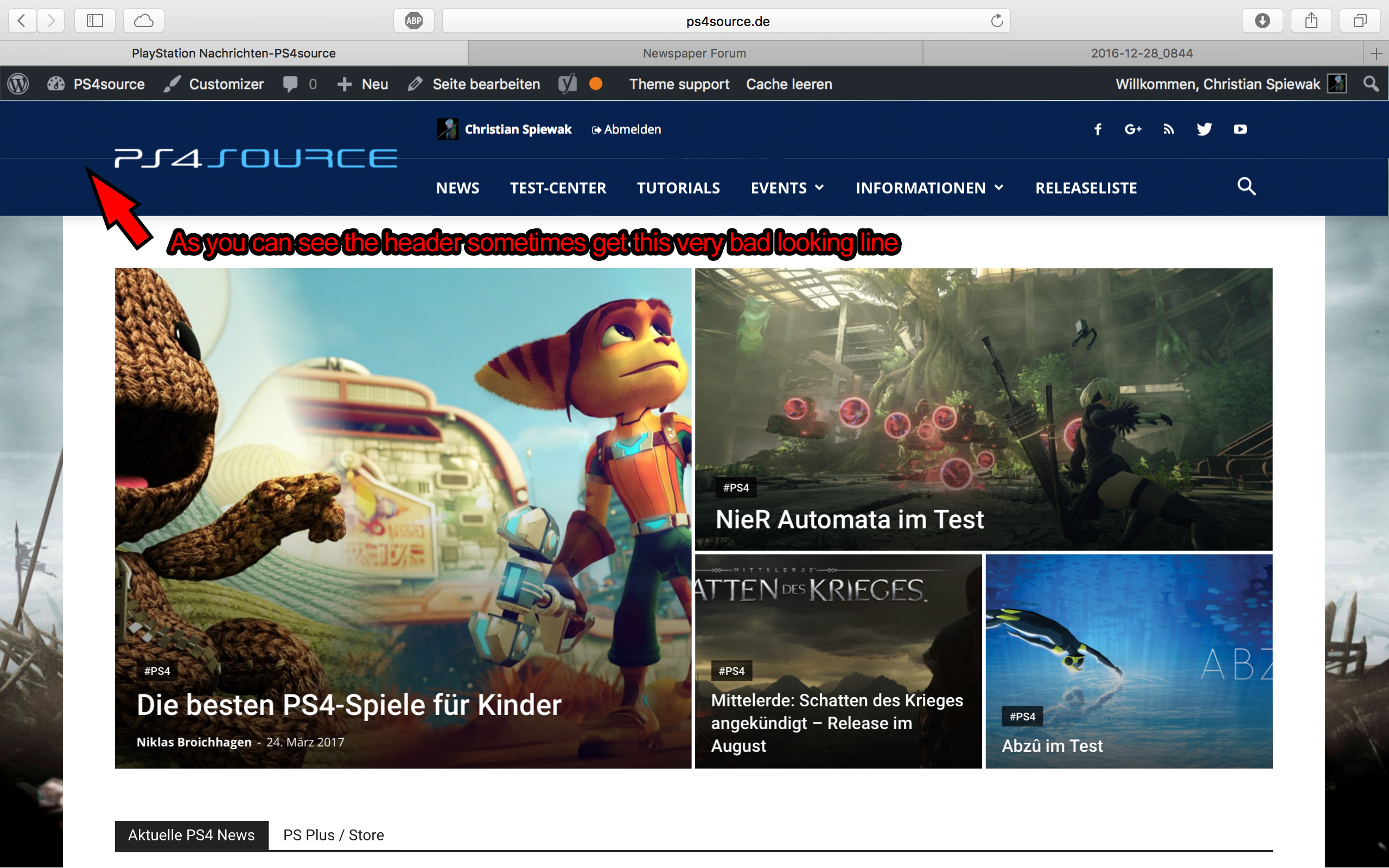
2) Which register plugin should I use? I don’t want to let new users to set a new password on the bad looking interface of WordPress. Im sure you guys know what I mean and have a good recommendation for that. Beside that, what should I use to prevent registrations from bots?
3) Is it possible to have a gradient header and footer, instead of just one color? It looks a bit boring.
4) How can I change the menu just for the mobile page, without using td-mobile-plugin?
5) How can I change the the font style and size of quotes? At default settings it looks way too big (see here)
6) Is it ok too use the responsive options, to create one site with different blocks and grids for mobile and desktop? Im asking cause I don’t know if my site will load much longer, if it has to load information even though there are not displayed. (see details here)
7) My current page speed is a disaster (see here). Why is it so bad, since Im using kraken.io image optimizer and WP Super Cache? How can I improve the score?
8) How can I use td-speed-booster, without uninstalling my plugins? (Disqus Comment System, TablePress, TotalPoll…) I really need those plugins, but I still want to have a fast homepage!
9) If I set [Template Setting->Force Full width->Header Menu] to “No Stretch”, the logo of my site is not at the correct position.

10) validator.w3.org shows, that my page has 33 errors (see here). How can I fix them?
Bogdan B. Hello,
You will have to optimize your site as you need to make a few adjustments:
https://developers.google.com/speed/pagespeed/insights/?url=http%3A%2F%2Fcolourfulathletes.com%2F&tab=desktop
Please use this guide: https://forum.tagdiv.com/how-to-make-the-site-faster/
Thank you!
 Syams
Syams All of these for newspaper. Probably work for newsmag?
https://forum.tagdiv.com/topic/tip-how-to-easily-minify-your-css-without-breaking-your-site/
https://www.infophilic.com/get-almost-100-pagespeed-newspaper-theme/
Catalin Hello OnlineThemes,
Unfortunately, our theme does not have such an option to minify the style.css file and we cannot recommend any plugins with this functionality because is not tested with our theme. For minifying this file, we are using CloudFlare for our demo and works fine. If you want to read other views from our users, please check this topic -> https://forum.tagdiv.com/topic/tip-how-to-easily-minify-your-css-without-breaking-your-site/
One of our top members here on the forum wrote his own optimization tutorial here:
https://forum.tagdiv.com/topic/tutorial-chriss-custom-optimizations-for-functions-php-etc/ and here -> https://www.infophilic.com/get-almost-100-pagespeed-newspaper-theme/
Hope this helps!
Thank you for the message!
 pruthvipanchani
 Site slowing down is not related with using Big Grid, you can use wp super cache plugin configuration with this link -> https://forum.tagdiv.com/cache-plugin-install-and-configure/
what you need to do is: enter your website URL here in google page speed insights -> https://developers.google.com/speed/pagespeed/insights/
that will explain you where is the problem
Bogdan B. Hello,
We are sorry to hear about your traffic drops but the theme is not to blame for that. The menu loads fast if you optimize your site properly. As you can imagine, we tested the theme thoroughly and our large user base can confirm there are no traffic drops in normal conditions and on a stable host. Please increase your loading speed and you will see the traffic rise up again. Page speed is the number 1 traffic loss issue and lots of people tend to ignore it. Themes are not the same. Our theme has complex elements that require a bit of optimization for optimal results. Please use this guide https://forum.tagdiv.com/how-to-make-the-site-faster/ and make the proper optimization to your site so users do not get bored waiting for it to load and you do not loose traffic.
Your site loads pretty slow: https://developers.google.com/speed/pagespeed/insights/?url=https%3A%2F%2Fdailytimes.ng%2F
Please consider google’s advice to increase the loading speed.
Also please increase your system status parameters like so: https://forum.tagdiv.com/system-status-parameters-guide/
Another issue you could be facing is opera mini. If a large number of your fans use opera mini then that alone is a big drop as our theme is not compatible with opera mini.
If for any reason you find our theme is not suitable for your project, you cna request a refund here: https://themeforest.net/refund_requests/new and we will provide your money back so you can choose a different theme.
Thank you!
Catalin Hello mkielas,
I have checked your website on Google PageSpeed Tools and I got this result -> https://www.screencast.com/t/QCvjkGIgb0 Your page speed is down because you do not make any optimization in this regard, sorry!
Please notice that the speed of your website depends on how well your site is optimized. Notice that is not a simple task and if you do not have any experience in this regard you will do not bring good results for the theme. Also, notice that we have a speed optimization tutorial but this is addressed only to advanced users. So, if you follow the steps which are presented in this tutorial here -> https://forum.tagdiv.com/how-to-make-the-site-faster/ you can increase the page speed loading and if you are not aware of the steps in this regard, please consider hiring a freelancer/developer to help you because the speed optimization services is not covered by our support policy, as you can read here -> https://forum.tagdiv.com/support-policy-2/ Check our documentation here -> https://forum.tagdiv.com/requirements-for-newspaper/ regarding on dedicated server to fit to our requirements.
Please keep in mind that at the moment, we cannot provide optimization services because this task involve time-consuming and we do not afford to do this, sorry! We only can provide support for basic theme settings.
If you are not aware of these steps which are needed to take in this regard, please consider hiring a freelancer/developer to help you because we cannot provide custom work at the moment, sorry!
Thanks for your understanding!
Catalin Hello etemekin,
I have inspected your website here -> https://developers.google.com/speed/pagespeed/insights/?url=https%3A%2F%2Fwww.reviewary.com%2F&tab=desktop and I noticed that your website is not well optimized, sorry!
Please notice that the speed of your website depends on how well your site is optimized. Notice that is not a simple task and if you do not have any experience in this regard you will do not bring good results for the theme. Also, notice that we have a speed optimization tutorial but this is addressed only to advanced users. So, if you follow the steps which are presented in this tutorial here -> https://forum.tagdiv.com/how-to-make-the-site-faster/ you can increase the page speed loading and if you are not aware of the steps in this regard, please consider hiring a freelancer/developer to help you because the speed optimization services is not covered by our support policy, as you can read here -> https://forum.tagdiv.com/support-policy-2/ Check our documentation here -> https://forum.tagdiv.com/requirements-for-newspaper/ regarding on dedicated server to fit to our requirements.
Please keep in mind that at the moment, we cannot provide optimization services because this task involve time-consuming and we do not afford to do this, sorry! We only can provide support for basic theme settings.
If you are not aware of these steps which are needed to take in this regard, please consider hiring a freelancer/developer to help you because we cannot provide custom work at the moment, sorry!
Thanks for your understanding!
 Mayapur Voice
 As Bogdon said, it’s not a file but a bunch of codes placed by VC plugin on the home page based on my design. You may not be using what I did. But if you suspect similar issue in your case then what you could do is create a copy of your home page, remove some elements (blocks) one after another and check the page speed of that newly created copy of the home page (Google pagespeed looks at page, not the whole website). If you find that removing a particular element increases the speed, you may want to remove it from your original home page and it might help. In our case I guess I can still fine tune more and get a better score but I am satisfied with 88/81 for Desktop/Mobile. https://gyazo.com/567702203d4cf47719c560e699c3d19c And this is without Cloud flare. Hope this helps.



