- NewsmagPage templates
 mundgefuehl
Dear tagDiv team,
today I am reaching out with a question on the post loop 2 element in the composer.
I wanted to use the option “exclude post IDs” under the general settings – however, when using this feature, it behaves like “include” instead of “exclude”.
Is there a bug, or am I doing something wrong?
This is how it looks like. My page is Mundgefuehl.com
Many thanks for your support
Betty
 Anamaria
 Hello,
A workaround will be to use posts loop, and use the option to filter it based on a custom field element -> https://i.imgur.com/sYC71OB.png
Thank you!
 michaeldef
 I’m having the same problem. Date won’t show even when appropriate box is checked. Date appears in one module because I typed it into the excerpt.
• Live page – https://bayarearegistry.com/category/photos/
• Composer – https://www.screencast.com/t/x0TBHzfaIITJ
Note: Big lead image is created w/ Posts Loop 2. Smaller thumbnails created with Flex Block 1.
 oqt
oqtHello,
In category template here https://img.onl/FGN43u the Posts Loop 2 element is used. we really like this one.
Right now both ad boxes get their banner code from a single Ad edit box, meaning its showing the same ad banner on the red circled positions. How we can keep this layout as it is but have a different banner on the second ad position?
One scenario we tried was to duplicate the Posts Loop 2 element, limit the posts to 6 on each (instead of 12) and then we can edit each ad respectively. but our issue with this scenario was that both Post Loop 2 elements are showing same posts, the second one doesnt display the next ones from latest.
Any ideas how to get 2 different banners in there? 🙂
Thank you very much
 Matt Tews
Where is the show_authors() function defined? I would like to review the code and write a mod.
I found where the function is called (td-standard-pack/Newspaper/loop-single.php) and I can successfully display multiple authors there using this PublishPress shortcode:
[publishpress_authors_data field=”display_name”]
I would like to have the above shortcode called from within show_authors() so I can use a filter/hook to modify the output from the functions.php file or with a code snippet. Anyone know where to find show_author()?
I am using the Newspaper theme.
Thanks!
Anamaria Hello,
This is a page https://www.aei.org/policy-areas/education/, not a template for the category.
You can customize the category template. For the category template, please use posts loop; if you have set a posts loop then will display all posts in this category or you can use Flex Block/Big Grid Flex and set the filter to “Category -Current category” => https://i.imgur.com/7P99qx0.png and this is why the block will display posts for each category. So, please check the settings.
Thank you!
 ninjaray
Hi – We’re working on a site currently in staging and have started to notice a few issues, hoping you can help:
– When editing a page with tagDiv Composer, none of the right-click features are working when selecting blocks or other elements. We’re unable to save elements as templates to move to other pages.
– Some pages will not open with tagDiv Composer (spinning circle), only with Classic Editor or Block Editor. It seems as though once a cloud template is imported, edited and saved, it’s no longer able to be edited.The PHP errors in console seem to point to td-cloud-library and td-composer but I don’t know what they mean. These pages include:
https://swankyretreats.dreamhosters.com/swankyretreats/
https://swankyretreats.dreamhosters.com/homepage/
https://swankyretreats.dreamhosters.com/demo-flex/
PHP Errors:
Warning
Undefined array key “tdbTemplateType”
+
1. wp-content/plugins/td-cloud-library/includes/tdb_functions.php:1346
1
Plugin: td-cloud-library
Warning
Undefined array key “td_action”
+
1. wp-content/plugins/td-composer/css-live/css-live.php:30
1
Plugin: td-composer
– It looks like certain External Shortcodes are missing from the list, including Posts Loop. Wondering how to add them so we can use?
– Are we able to save elements/blocks with settings on this site, then export and import to production site?
– It doesn’t look like we have access to all of the available Cloud Templates when we select Cloud Templates > All Templates > Add New, we get varying numbers below the “All” tab. We’re currently seeing 1220 but when we select one to preview and we end up at https://cloud.tagdiv.com/ we can see that there are 2418 available, but they don’t all show up for us. Wondering why that might be? Is it filtering out those which may not be compatible with the demo we have loaded?
– When editing a Cloud Template footer, we’re seeing these messages: “Error at rows: 2(models) : 1(dom). The model does not match the content Current state has involved an issue. You could try an UNDO operation (CTRL+Z / CTRL+SHIFT+Z)” We installed jQuery Migrate Helper as suggested in one of the forum posts, which didn’t fix anything but provided these messages:
Logged Deprecations:
Time
Notice
Plugin or theme
File location
Triggered on page
2024-02-23 07:31:13
jQuery.fn.load() is deprecated
Plugin: tagDiv Composer
https://swankyretreats.dreamhosters.com/wp-content/plugins/td-composer/legacy/Newspaper/js/tagdiv_theme.min.js
https://swankyretreats.dreamhosters.com/swankyretreats/
2024-02-23 07:31:20
jQuery.fn.load() is deprecated
Plugin: tagDiv Cloud Library
https://swankyretreats.dreamhosters.com/wp-content/plugins/td-cloud-library/assets/js/js_files_for_front.min.js
https://swankyretreats.dreamhosters.com/swankyretreats/
Lastly, I’m wondering why many of the forum posts are titled “Newspaper” and are not visible to us, even when logged in?When searching for answers to some of the above, it seemed like others may have had the same trouble and had them resolved but we couldn’t access the replies.
These may all be related but we’ve been struggling to fix. Any feedback, suggestions or assistance with any of this would be appreciated! – Ray
 itgrcapitallink
I would like to add some extra fields to posts loop?
which php file and in which location do i have to edit?
 Bettina
 Hello!
Oh, ok. Please edit the search page with the tagdiv Composer, click on the results(Posts Loop element) and delete the value of the offset posts. Let it empty with no space no value: https://app.screencast.com/Gh9jDf6t0XtLS
Save the changes and view the results.
Thank you!
Bettina Hello!
We’ve discussed about Flex Loop filter element. So, you should add taxonomies there.
Check these guides for more information:
– https://forum.tagdiv.com/filters-sorting-taxonomies/
– https://forum.tagdiv.com/introduction-cpt-acf-newspaper-theme/
– https://forum.tagdiv.com/custom-post-type-support/
Check this guide: https://forum.tagdiv.com/flex-block-settings-guide/ and the special filter I mentioned above. Also, you can read more about post loop element: https://forum.tagdiv.com/posts-loop/ This is the normal way to display the posts in your categories.
Thank you!
 ankasammerkez
 I am sorry about that comment i want to write “I can’t see the screenshoot”.
Thank you so much about flex loop filter it is working, but i want to show some category not all of them, is it possible that selecet specific category, and show the posts of that category
thank you so much
-
This reply was modified 2 years by
ankasammerkez.
Bettina Hello!
This could be possible if you have the CPTs with these taxonomies.
By default, you can filter the posts with the help of a flex block with the “Author Template: Author – Current author” filter; (you should place the shortcode in an author template). Or just add a post loop element in the author template.
Thank you!
Bettina Hello!
There is an option to show the number of posts: https://app.screencast.com/EpVqUDEGrT2ov
Set it like this: https://app.screencast.com/2sK4EwADMn7uw; add a flex loop element, so the posts will display there depending on the filter category you choose on your frontend.
Read all about it here: https://forum.tagdiv.com/filters-sorting-taxonomies/
Thank you!
Anamaria Hello,
You can set the global template for categories -> https://i.imgur.com/sBRmlQp.png
1. You can use this element for subcategories in the category template -> https://i.imgur.com/a6weUh7.png
2. You can use the posts loop to show the posts from the current category. https://forum.tagdiv.com/posts-loop/
Thank you!
Anamaria Hi,
In this template is used also, the posts loop that has pagination, if you have more posts then will be displayed in the posts loop, and you will have pagination -> https://demo.tagdiv.com/newspaper_city_pro/category/lifestyle/
Thank you!
Bettina Hello Seamus!
Set it like this: https://app.screencast.com/2sK4EwADMn7uw; add a flex loop element, so the posts will display there depending on the filter category you choose on your frontend.
Thank you!
Bettina Hello Seamus!
It will show all the categories, and when you click on a category, the flex loop element will display the posts from that category. Set it like this: https://app.screencast.com/2sK4EwADMn7uw; add a flex loop element, so the posts will display there depending on the filter category you choose on your frontend.
Please check out this demo: https://app.screencast.com/0pOxSFje6KYZH. https://demo.tagdiv.com/newspaper_app_find_pro/software-applications/
Thank you!
 Seamus
 Hi Bettina !
Yes! it is showing all the categories.
I don’t want it to show all the categories.
I thought that the idea of a Loop Filter was to be able to filter the categories that would show in the Loop.
I thought it would work something like the Category Filter in Flex Block 1, but above the Posts Loop.
Can you show me an example of a site where the Loop Filter is acually working ?
Thx,
Seamus
Anamaria Hi,
Does this problem appear on the categories templates?
You can customize the category template. For the category template, please use posts loop; if you have set a posts loop then will display all posts in this category or you can use Flex Block/Big Grid Flex and set the filter to “Category -Current category” => https://i.imgur.com/7P99qx0.png and this is why the block will display posts for each category. So, please check the settings.
Thank you!
Bettina Hello @satheeshraj!
A workaround there could be to use a cloud template with a block called posts loop, and there you can set an ad to repeat after however many posts you want. The ad should not appear when you have no results.
I hope that helps you!
Thank you!
Anamaria Hello,
You can apply the filter only on the Flex Block and Big Grid Flex -> https://imgur.com/Nnt3zGX
The Posts Loops settings are divided into 5 tabs: General, Layout, Style, ADS and CSS. The Posts loop is a special block and doesn’t have filtering options.
Also, one of the pagination options of the Posts Loop has the option for normal numbers, and the flex blocks do not have this option.
The Posts Loop automatically filters the posts depending on the cloud template you set (for example, on the category page, there will be posted posts from that category).
Thank you!
Anamaria Hello,
You can apply the filter only on the Flex Block and Big Grid Flex -> https://imgur.com/Nnt3zGX
The Posts Loops settings are divided into 5 tabs: General, Layout, Style, ADS and CSS. The Posts loop is a special block and doesn’t have filtering options.
Also, one of the pagination options of the Posts Loop has the option for normal numbers, and the flex blocks do not have this option.
The Posts Loop automatically filters the posts depending on the cloud template you set (for example, on the category page, there will be posted posts from that category).
Thank you!
 pppppppp
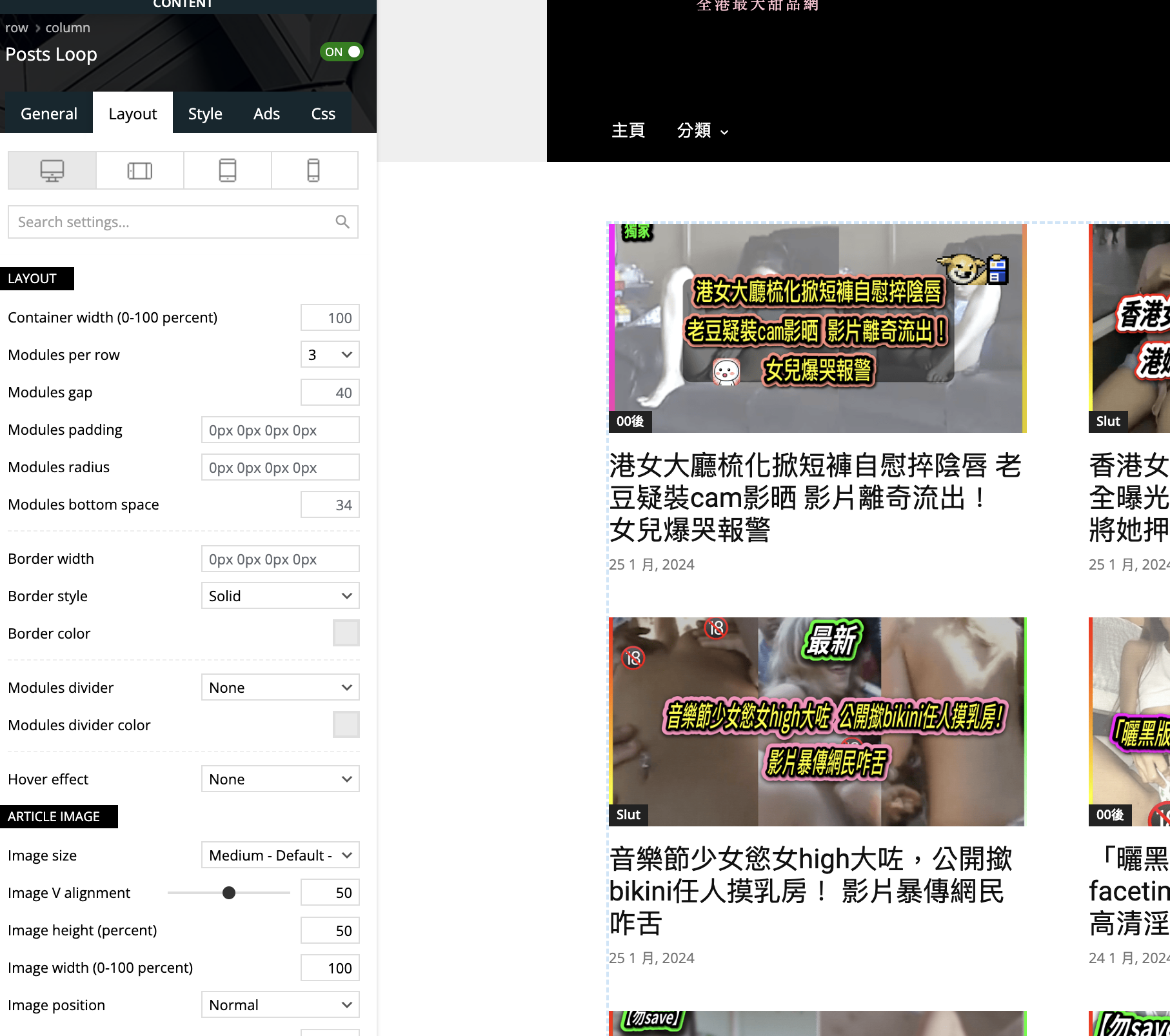
 OH yes, thanks. And then I use posts loop now, but how to do the setting in order to make the picture shows fully?
my picture pixel is 1920 x 1080
Thanks
Anamaria Hello,
You have Flex Block 1 here ->https://i.imgur.com/PI8QRip.png if you filter it to “Category -Current category” => https://i.imgur.com/7P99qx0.png, and then the block will display posts for each category. Also, if you want there to be random posts, then please delete the offset value from posts loop -> https://imgur.com/nB69YgU -> https://forum.tagdiv.com/offset-feature
Thank you!
Anamaria Hi,
The option is on the posts loop element; for posts loop 2 is not this option.
Thank you!