- NewspaperPosts Loop Element
- NewspaperFlex Block Builder and Flex Loop Builder
- NewspaperBookmark – Save For Later
- NewspaperModules Builder in Newspaper Theme
- NewspaperFilters and sorting for taxonomies
- NewspaperPage templates
- NewspaperSmart Sidebar
- NewspaperChild Theme Support
 Calin
Calin Hi,
This can be achieve using tagDiv Composer on the page where you have the latest articles section, first you’ll need to change the page template to Default Template, after that open the Td Composer and set a row at the end of page or where you want to have the latest articles -> http://prntscr.com/ojqqr3, you can change the row width -> http://prntscr.com/ojqr5x and set it a posts loop element -> http://prntscr.com/ojqrky click on it -> http://prntscr.com/ojqru0 and in layout section you can edit the number of post that will show inline http://prntscr.com/ojqsac.
Hope this will help you!
Thanks.
 Catalin
 Hi,
If you want to add some custom images at the top of your post title, you will need to edit the post template in order to achieve that. As an example, if you are using the post template style 1, you will need to edit the loop-single-1.php like this -> https://www.screencast.com/t/lLuxExQH If you made this change, please note that image will be the same for all of your posts which uses this post template.
Thank you for your understanding!
 Simion C.
 Hi,
Should work fine. I have tested this as well. Please note that there are 2 default post templates, the one that is used when the composer is inactive (can be considered a default post template), and one that is used when the composer is active and can be selected for posts.
I believe you have copied in the child theme, the loop single and single files from the theme – http://prntscr.com/ognr3o
Note that this template is used when the composer is inactive. When the composer is inactive a sidebar cannot be set for posts because there will be no post settings available, so the template is not supposed to display a sidebar since it cannot be set.
If you want to customize the default post template with the composer active, please copy it from the composer/legacy/Newspaper folder
– http://prntscr.com/ogo2la
And make a small modification in the single.php file after you copy in the child theme
– http://prntscr.com/ogo38l
Here is the modified code if needed – https://pastebin.com/uaZqtWjM
Please let me know if you have more questions.
Thanks
 huy
huy I use the Gossip Loop template to display the posts in the category that I want, but this function only shows the latest posts of all categories. And what I have to do to show only posts in a specific category?
Calin Hi,
If you want to have pagination only for one block, than you should set a posts loop with pagination https://www.screencast.com/t/y8I2IH8juUj and let the above blocks/modules without pagination, in this way you’ll have pagination, and the design will be the same.
Thank you!
Calin Hi,
You can set on the pagination the offset too, I think that you are using the Page Builder + Latest Articles + Pagination, if is so need you’ll need to open the page in backand and look for the “Latest Articles” > “Posts Loop Settings” -> https://www.screencast.com/t/7kZsLYEp
Thank you!
 David
DavidPlease add category filter for post loop elements. E.g. I don’t want to display all categories on the homepage. And I want to use post loop elements, not other block elements. Thanks! (Even hidden categories are visible, makes no sense to me)
 T2N
T2NHey,
1. After updating the theme to 9.7.3 version, all the changes which I make in single-loop.php file for single posts template don’t apply from some reasons, it doesn’t matter if I change the child theme or the parent. Can you explain me which template file should I edit?
2. How to change the text “Modified Date” to “Updated on” here for example: https://www.screencast.com/t/7yqSSx1bL
Calin Hi,
The Latest articles that you have in the homepage came from the page template -> https://forum.tagdiv.com/page-templates-2/ -> Page Builder + Latest Articles + Pagination, if you want to edit the Latest Articles using tagdiv Composer then you should change the page template to “Default Template” and edit the homepage using the TD Composer and set the posts loop element where you want in the page -> https://www.screencast.com/t/yPt3PzRm68 -> https://www.screencast.com/t/SA01tVWwZ
Block settings guide -> https://forum.tagdiv.com/block-settings-guide/
Thank you!
Calin Hello @Engager,
The “Posts loop” element will be filter automatic in function of the templates/pages, if you set it on homepage this will show all the categories and posts; if will be set in a category template and for example this will be set on a specific category, when you’ll check it only the the posts from that category will be display.
If you want to show a specific post/category you can use a flex block, or a block -> https://forum.tagdiv.com/block-settings-guide/
Thank you for your understanding!
Calin Hi,
If you are using the category template, you can sort the order of post from here -> https://www.screencast.com/t/rs7JsOot but you can not filter the posts loop, or category grid ; if you want to filter the post you’ll need to use some blocks or flex blocks, but those will not be filter the post from the current category, will be apply only the filters that you’ll set; also this option will not longer apply on cloud templates -> https://www.screencast.com/t/6SuiswCYzc5
Thank you!
Calin Hello,
Please notice that only the “posts loop” element/block will sort the posts according to the category/author/… template, also the posts loop element should have the same options for style/design, the only tag that posts loop do not have is the filter, but this block is automatically filter; there are only few sorts -> https://www.screencast.com/t/DJUd7kKKgO
Thank you for your understanding!
 Prateek
Hello, team tagDiv.
I am customizing author, archive, search, category and tag templates. I chose an archive template from cloud library, the posts are displayed using post loop. But I want to change the design of how these posts look for which I decided to use flex box 1. Now the problem, flex box or any shortcode other than post loop isn’t working the way it’s supposed to be. Flex box show all the post there are on the website, there is no filter. Only post loop filters the post.
So please help me. I don’t want to ruin my website’s design by bringing in any consistency in the way it looks.
This is happening with my website.
1) I went into the theme panel. From the section “LAYOUT SETTINGS”, I clicked “TEMPLATE SETTINGS”.
2) I clicked on the tag template from the on of the sections under “WordPress Templates”.
3) I clicked on the link “cloud library” and imported a template. Everything is fine. Only the post under the selected tags were being displayed which was great.
4) I tried to edit this template. The posts in this template were being displayed with the help of post loop.
5) I tried to replace the post loop with flex box because it gives more options for customization.
6) I selected the flex box and what I see is that all the posts started showing. The posts were not filtered by tag.
I have only one post for the tag name “Tour” but when I click on this tag, instead of showing that one post only, it shows all the posts. And this only happens when I don’t use post loop
Calin Hi,
If you are using a category template from tagDiv Cloud Library, then only the post loop element and category grids can get the category posts dynamically, the rest of theme, is need to be set manually -> https://forum.tagdiv.com/block-settings-guide/
Thank you!
 HighTechDad
I’m trying to have multiple loop post elements on Category and Author pages. Started with a blank template. Inserted in 2-3 “loop post” elements so that I could have different sections with different sized elements for the loop. I offset the additional posts as appropriate. The template looks fine. But when I implement on the site, the same posts appear in all sections, or sometimes it is the same single post repeated in each section. Pagination does show (as there are multiple posts), but each post repeats in all sections.
I saw a similar post here but wanted to start new thread since that one hadn’t been updated.
Essentially the loop is broken when multiple “post loop” elements are on the same page.
I was curious if a fix has been identified or if there is a workaround in place.
Thanks!
Simion C. Hi,
The default category templates don’t have many settings, all of them are in the theme panel, for each category
– https://forum.tagdiv.com/how-category-settings-work/
The content will appear automatically in the top grid and the post loop below. Posts that are part of the respective category will be displayed sorted by default as latest. If I misunderstand or you have more questions, let me know.
Thanks
 desiyatri
 Thanks but I will need to modify the code because I do not want to use a cloud post template as of now (no template is good for the image size of 670x446px). In the earlier version of the theme, I had made the change in the ‘loop-single.php’. Now, this file seems to have changed because I could not locate the code for the related posts. I am not using a child theme and I am willing to manually make this change every time the theme gets updated. I need to show related posts above the author box. Please tell me where to make the change.
Best Regards
 Insud-admin
Hi guys,
I need to know which might be the best way to add a shortcode/Raw Html/php function to Posts LOOP inside blocks added via tagDiv
It’s for the implementation of DW Reactions Pro – WordPress Plugin
It’s documentations says:
MANUALLY INSERT INTO YOUR THEME.
1. Open wp-content/themes/<Your theme folder>/.
2. You may place it in archive.php, single.php, post.php or page.php also.
3. Find <?php while (have_posts()) : the_post(); ?>.
4. Add anywhere below it (The place you want Reactions to show): <?php if (function_exists(‘dw_reactions’)) { dw_reactions(); } ?>.
INSERT USING SHORTCODE
If you DO NOT want the reactions to appear in every post/page, DO NOT use the code above. Just type in [reactions] into the selected post/page and it will embed reactions into that post/page only.
If you to use reactions button for specific post/page you can use this short code [reactions id=”1″], where 1 is the ID of the post/page.
If you want to show reactions button you can use [reactions count=false button=true].
If you want to show reactions count you can use [reactions count=true button=false].
If you to use reactions button for specific style you can use this short code [reactions style=1], where 1 is the ID of the style.
Calin Hi,
If you want to make your own category template you need to import the blank template -> https://www.screencast.com/t/WmAi8pDML3 set the category grid -> https://www.screencast.com/t/EYZffzAF also set a posts loop -> https://www.screencast.com/t/DOX37w8SB
Basics: Using the tagDiv Composer Front-End Page Builder -> https://tagdiv.com/tagdiv-composer-page-builder-basics/
Thank you!
 malakith
is there a way to add a filter to either posts loop elements like you can for blocks?
 johnllyman
 Thank you for the response. In my backend it simply displays the following code:
<?php $td_mod_single->show_author() ?>
So the difference in the loop-single.php I’m not given the code that says get_author
With posts, the co-author plugin does work as well as it displays more than one author in the list of posts.
Simion C. Hi,
If the post has both categories a and b it will appear in both category pages. When using cloud category templates and loops to display the posts, the loop element has a setting to exclude specific posts by ID – http://prntscr.com/nlzp4g
But other than this there would be no other ways to exclude posts that normally should appear in their category pages. Unless maybe you create a cloud category template and use filtered blocks and grids, but then that template can only be applied to a specific category. That would be a solution if you only want to do this for a few categories.
Thanks
Simion C. Hi,
You can enter code in the single and loop single template files
– http://prntscr.com/nkz54e
But this will affect only posts that use the default post template
– http://prntscr.com/nkz5i8
If you use other post templates, note that since update 9.7 the post template files (and many other theme files) were moved in the tagDiv composer plugin
– https://tagdiv.com/updating-the-core-of-tagdiv-themes/
So the post template files are now here – http://prntscr.com/nkz6ku they would have to be modified there directly, child theme modifications are not possible anymore for them. Please let me known if you nave more questions.
Thanks
 narinder912
Hi
I want Related Posts above the author box. In the responsive site, I have managed to do this by changing ‘loop-single.php’. But I cannot see how to do this in Mobile Theme? Can you please help?
Thanks.
 javid
javidHELLO
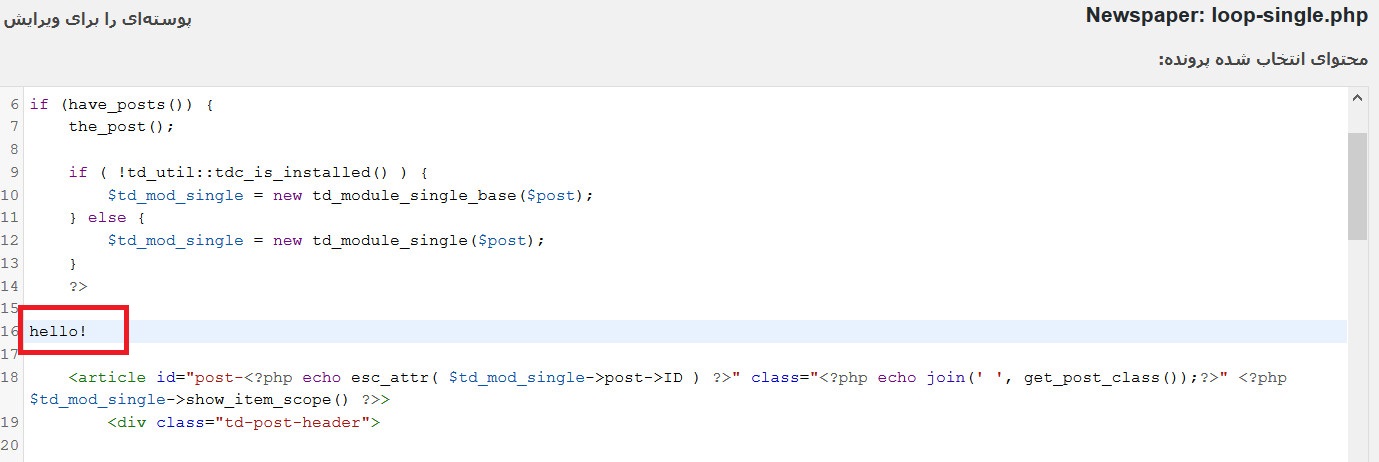
i wnat to change this file loop-single.php
but i can not see any change
i added “hello” here
http://www.coca.ir/wp-content/uploads/2019/04/1.jpg
hello!
<article id=”post-<?php echo esc_attr( $td_mod_single->post->ID ) ?>” class=”<?php echo join(‘ ‘, get_post_class());?>” <?php $td_mod_single->show_item_scope() ?>>
<div class=”td-post-header”>
but i can see them in my single posts
http://www.coca.ir/wp-content/uploads/2019/04/2019-04-27_132154.jpg