
 Alin [tagDiv]
 Hi,
Please also try this without any plugins active, leave just Visual Composer active to make sure that is not happening due to other plugins you use, then make sure that you regenerate your thumbnails: https://forum.tagdiv.com/how-to-fix-strange-thumbnails/
After doing this empty cache and check again.
Please let me know how it goes!
Thanks!
 brettworth
Hi guys, so I’ve got a strange problem. I’ve added the latest version of the Google Analytics code to the theme panel in Newspaper but for some reason whenever I load a page on my site the page doesn’t stop loading, iel the page loads fine but on Chrome I see the page loading icon in the tab keep spinning and at the bottom of the web page I see ‘waiting for googleanalytics.com…’
When I remove the code from the theme panel the page loads instantly and the loading icon in the tab stops. When I add the code back in the issue comes back.
Any ideas?
[update – I am now getting ‘waiting for fonts.gstatic.com]
 princepetropia
Hi again!
I was trying to do a little customization with the logo. I tried adding the full-width logo+menu and combine it with a separate logo for the mobile. Strangely, the mobile logo never appeared, so the full width desktop logo just shortens and appears in the mobile view. I found a solution of my own. instead of using a full width logo, I am now using the default logo+ad+menu and I have added a background image to the css element(.td-boxed-layout .td-logo-rec-wrap).
I was wondering if you could see to this yourself too? maybe make it possible for me to add a separate logo for the mobile? There probably might be something wrong with the mobile-logo.php, but I am really an html guy, not much big on php, you know. So, could you pleaze see?
 yakir105
 Hi,
I disable all plugins and default all the setting and the big slider start to work.
but i still get this strange sign instead of the button of the “next page”:
http://www.hayom.org.il/wp-content/uploads/2015/02/Slider-not-work.jpg
Thank you very much!
 Lucian
 Hi,
My guess is that somehow your update hasn’t been done well or you have made changes/modifications to the theme as the it seems that this css code is missing or it’s not applied: http://screencast.com/t/jPoIT65Hu
Please also test this after disabling the css minifier/html compressor and make sure you empty cache/purge files afterwards then test again without plugins.
Add this css in theme panel > custom css for the mega menu issue:
.td-mega-menu .td_block_mega_menu {

padding-top: 20px;

}
For the “Related posts” issue, after I inspected your site I noticed that the images are loaded at their original sizes which should not happen so I suggest you follow this guide and regenerate thumbnails: https://forum.tagdiv.com/how-to-fix-strange-thumbnails/
After that please make sure you empty cache and/or purge files.
The line height/ font/ size/ family/ weight.. can be changed from theme panel: http://screencast.com/t/DHO5IQnJrLqW
Thanks
Lucian Hi,
The thumbs for the images on blocks/modules are created by the theme and loaded at smaller sizes so when on phones or tablets depending on the screen view the thumbs need to get a bit stretched so that they fill their container. You could change this by adding a new thumb size or altering the one you use and have it to use a larger one which would look better on mobiles or tablets.
The size of the images can be changed from functions.php: http://screencast.com/t/FbsZ2g0g
And regenerate thumbnails: https://forum.tagdiv.com/how-to-fix-strange-thumbnails/
Please also note that if you alter it’s size it you might need some css modifications.
You could change it’s color via css but only if you’re using different blocks on your sidebar as if you’re using the same block/blocks you can’t target via css just one and change it’s color.
Let me know of your situation I’ll let you know if it can be done easily.
Thanks
 salocharly
hi guys and thanks in advance.
I noticed that when using “smart list 2” with long titles, the titles get cut at the end with “…”.
as for my sites I need longer titles most of the time I wonder, Is there a way to fix this? make it a two liner and make the counter a little bigger so it docent look strange?
any help welcome
Thanks!
 Emil G
 Hi,
You images are not compressed – http://screencast.com/t/3iC97TdUsA4 you can also set the Browser Leverage – follow this guide (sections 2 and 3) – https://forum.tagdiv.com/how-to-make-the-site-faster/
You also need to regenerate the thumbs, follow this guide – https://forum.tagdiv.com/how-to-fix-strange-thumbnails/
Thank you, Emil G.
Alin [tagDiv] Hi,
1&2 Please try to regenerate your thumbnails: https://forum.tagdiv.com/how-to-fix-strange-thumbnails/
After doing this empty cache and check again.
Also note that if you have featured images smaller you need to use a plugin like Thumbnail Upscale: https://wordpress.org/plugins/thumbnail-upscale/ as WordPress cannot enlarge thumbnails, only make them smaller. For upscale use a combination of plugins Thumbnail Upscale + Force Regenerate.
3. This should not happen, because the background should have negative z-index. Please try this custom css in Theme Panel > Custom Css: http://screencast.com/t/4Tyxyq5OJ
.td-big-slide-background .backstretch{

z-index: -999998!important;

}
Please provide your site url if this not helps.
Thanks!
Emil G Hi,
The theme doesn’t require code modifications, all solutions provided by me are either server optimizations (gzip compression, browser leverage), image optimization (when you deliver uncompressed/uncropped images and your page has 4-6Mb multiplied with a large number of visitors it will certainly lead to a blockage), cache. The Speed Booster is not that important, it will just move js and css at the page end giving the illusion that the page loads faster because the js/css executes after the other content elements are loaded. All those optimizations should be done regardless of the theme used and unfortunately we couldn’t include them in the theme as an automatic feature. I’ve made a guide here – https://forum.tagdiv.com/how-to-make-the-site-faster/ – the setting presented on the guide were taken from our demo server – also it requires to regenerate the thumbs – https://forum.tagdiv.com/how-to-fix-strange-thumbnails/
There are also discussions on the forum on this subject – https://forum.tagdiv.com/topic/pagespeed/ – https://forum.tagdiv.com/topic/tutorial-chriss-custom-optimizations-for-functions-php-etc/
Sorry for all the trouble you encountered with our theme, we can offer a full refund, just send us an email at contact@tagdiv.com and we’ll discuss the details.
PS – We’re testing the latest version of VC, on our tests it behave properly, we’re trying to identify why it uses so many resources on some of our clients servers. We advise anyone who has trouble with the latest version to switch to the previous one (4.3.5) which should work fine.
Thank you, Emil G.
 Breakwater
 wow, that is really strange.
Should I purge my cache and CDN? Maybe it there is a bug and it is being reproduced at that level.
I’m using WPENGINE which has an aggressive cache, I’m using the theme speed plugin, AND I’m using Cloudflare wich has it’s own CDN and cache.
Those three levels of cache could be messing with what I see when I look at the site from my geographic location.
Maybe when you look at it, it is being pulled as a fresh copy from your geographic location?
yakir105Hi,
I have moved all the JS bottom of the page, and the slider stopped working, Even if I click on the “next page” button.
How do I solve this?
In addition I have a strange sign instead of the button of the “next page”:
http://www.hayom.org.il/wp-content/uploads/2015/02/Slider-not-work.jpg
Thank you very much!
Emil G Hi,
First backup the database and the files.
If you don’t move on another host/domain, install and activate the Newspaper theme, then regenerate the thumbs – https://forum.tagdiv.com/how-to-fix-strange-thumbnails/ , set the menus (top, main, bottom), set the sidebar(s), create the main page and set it as a homepage from Settings -> Reading
You can find more details on how to configure each section in the documentation – https://forum.tagdiv.com/newspaper-documentation/
Thank you, Emil G.
Alin [tagDiv] Hi,
You can use this guide to regenerate thumbnails: https://forum.tagdiv.com/how-to-fix-strange-thumbnails/
If you have images smaller you need to use a plugin like Thumbnail Upscale like Christopher said: https://wordpress.org/plugins/thumbnail-upscale/ as WordPress cannot enlarge thumbnails, only make them smaller.
Thanks!
-
This reply was modified 11 years by Alin [tagDiv].
Alin [tagDiv] Hi,
Please try to regenerate your thumbnails: https://forum.tagdiv.com/how-to-fix-strange-thumbnails/
After doing this empty cache and check again.
Thanks!
 SveinDahlbergLucian
 Hi,
I have also tested this and haven’t found any issues when using the latest theme version. Not sure if this related to the theme as we haven’t made any modification to editor lists. This might be a WordPress error also so please try testing this when switching to a default WordPress theme and check if this behavior is still present.
Regarding to the issue you have with the image in the slider I suggest you make sure first that the image is actually larger than 700x452px width and if so use this guide an regenerate thumbnails: https://forum.tagdiv.com/how-to-fix-strange-thumbnails/
Hope this helps!
Thanks
 blogatrompa
Hello
Before I use the new NewsMag, I used your Magazin theme and I had exctly the same strange problem. The Main Menu in homepage have always 3 areas selected. It just happens in homepage!!!
Can you help me, please: http://a-trompa.net/
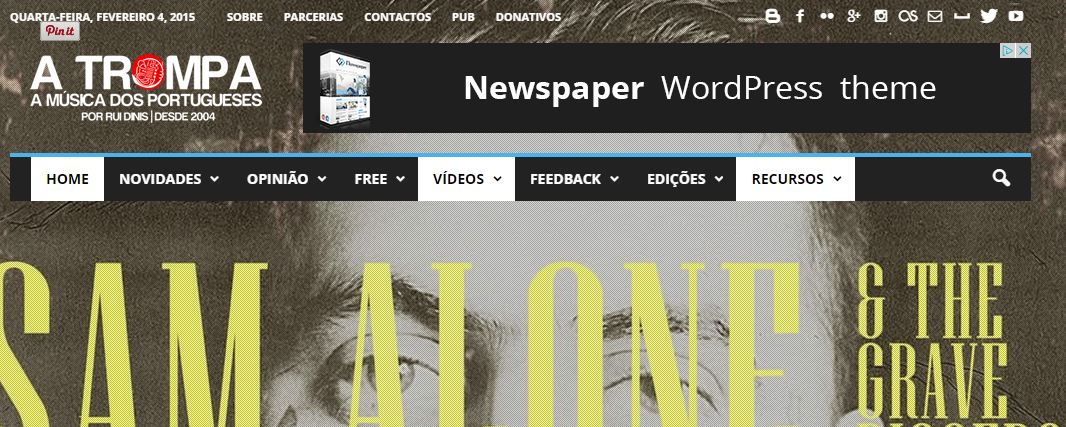
Thx
Rui
 ajaffarali
I’m having a strange issue with the slider. It works if “All Categories” are selected but if I select a specific category, it doesn’t show anything at all. I’ve tried ALL Categories with a “Featured” filtering but that doesn’t work either.
 Marius
 Hi,
@Breakwater is just a strange coincidence, nothing else, and about the theme is definitely a copy.
Thanks for the message!
Lucian Hi,
I’m not sure if the image thumb is added by default by WordPress or not so if you have added it yourself then you just need to remove that code which you used to add it if not then I suggest to use the thumbnail image size from media settings to set the size for your images: https://forum.tagdiv.com/how-to-fix-strange-thumbnails/ then regenerate thumbnail: https://forum.tagdiv.com/how-to-fix-strange-thumbnails/
After this without using the code in the function file the image size for feeds should be at the sizes you want.
Please let me know and also provide your site’s URL so I can check this.
Thanks
 dainde
Hello,
I have installed and set up my newspaper template. I made my pages the way i plan to, but on every page, there is some strange “LATEST ARTICLES””content that are added by default on the bottom of all the pages, before the footer.
I am struggling 4-th day with this problem
Please help me to remove it from the pages
this is how it looks like:
Just scroll down untill you see the Lastest articles in english , it takes mote content than my actual page!
 Carllauren
 The strange thing is that I only have the the field called post_views_count.
There are no field named post_views_count_7_day_total.
Something must be wrong with my theme?
Thank you
yakir105 Thank you very much,
Helped only after I added a little change:
.post ul.td-category {
float: right!important;
}
.post ul.td-category li {
float: right!important;
}
.post .entry-date.updated {
margin-right: 0px;
}
Little question:
What is strange mark appears next to the categories?
http://www.hayom.org.il/wp-content/uploads/2015/01/Tag.jpg
FireBug said: .td-category-page-sub-ind.
What is this?
(http://www.hayom.org.il/category/%D7%A0%D7%95%D7%A9%D7%90%D7%99%D7%9D/)
Tnx
-
This reply was modified 11 years by
yakir105.
Lucian Hi,
Please also try this without any plugins active, leave just Visual Composer active to make sure that is not happening due to other plugins you use, then make sure that you regenerate your thumbnails: https://forum.tagdiv.com/how-to-fix-strange-thumbnails/
After doing this empty cache and check again.
Please let me know how it goes!
Thanks


