No search results were found in Documentation!
 Les
Les Hi Further to my last email I have noticed strange characters on the other pages please see samples below
 Combines the benefits of elemental magnesium and rhubarb root to promote regular bowel movements.
 Achieving digestive balance is
 And that’s what Motions does best…Â
 detlev
hello support-team,
unfortunately I have a problem and hope you can help me. Clicking on the photo “Libella – Werbung …” should open a full page, but unfortunately it doesn’t. Strangely, however, all images from a “[folder gallery]” function are displayed enlarged when clicked. Do you have a solution for this?
Kind regards Detlev
 bilaalsadiq
Hi,
I am encountering an issue using the Flexbox 1 element on the homepage of our website (thefootballweek.org), under the “World Voices” section.
I have a category which I want Flex Box 1 to display the latest articles for, I am able to load the category, but I am unable to load the latest articles.
Strangely, I can see it working in the TagDiv editor, but when I click save, it stops working on the published page, meaning that there is an issue occurring between the editor and display of the page.
Please see the attached screenshots for further context: https://imgur.com/a/84FUWYw
I have updated the theme, and I have also ensured that there is 0 offset value so it shouldn’t skip any posts.
If you could please advise.
Many thanks
 thhjort
Hi, recently we are experiencing a strange issue, where other posts are added at the bottom of the page, above the footer. It seems to be added after our “related content” element as some kind of lazy load.
Where does this come from, and how can I turn it back off?
You can see it here, for instance: https://kongensoe.dk/vores-alkohol-behandling-er-helt-i-saerklasse/ – it is like the whole page is added below with header tag and everything. Right from the breadcumb.
I hope you can help me fix this.
Best, Thomas
 KP1989
 This doesn’t tell me much, especially the strange server code…

 ecolivable
Have this strange extra menu item that drops down with the sub-menu. Can’t seam to find a way to turn it off. Anyone have any ideas?
 industricom
Hello,
This topic is for a technical consultation on Newspaper theme.
We use the Newspaper theme from tagDiv on some of our websites, but we stayed at v8.7, the team who was in charge of maintaining these sites never updated it because of poor technical organization. Currently we want to upgrade the theme on all sites and move to the latest version 12.6.6
It is impossible to update it automatically because the theme management panel does not offer this option, so we followed the procedure described on the documentation to update it manually.
Unfortunately after installing and activating the theme, we noticed a behavior discrepancy on the site, in fact, the content of the site pages was no longer displayed correctly, and there were strange character strings which were embedded everywhere on the pages.
Is there a particular procedure that you can advise us to upgrade our version 8.7 to 12.6.6, or we have to do several upgrades going through the intermediate versions (9, 10, 11, then 12)? And if so, is there a repository where we can download these versions, because the merchant site only offers the latest version for download.
While awaiting a response, we thank you for the attention you would give to our request.
Kindly
 Youngman
It seems like it’s time to add “Bluesky social media” to the TagDiv Social Counter, TagDiv Composer, and article sharing features. Many people are starting to leave Twitter because of strange regulations and the many paid features.
I’d also like help adding LINE/&LINE Official Account to social media options. So far, adding LINE/&LINE Official Account has been a bit complicated.
 DavidCLM
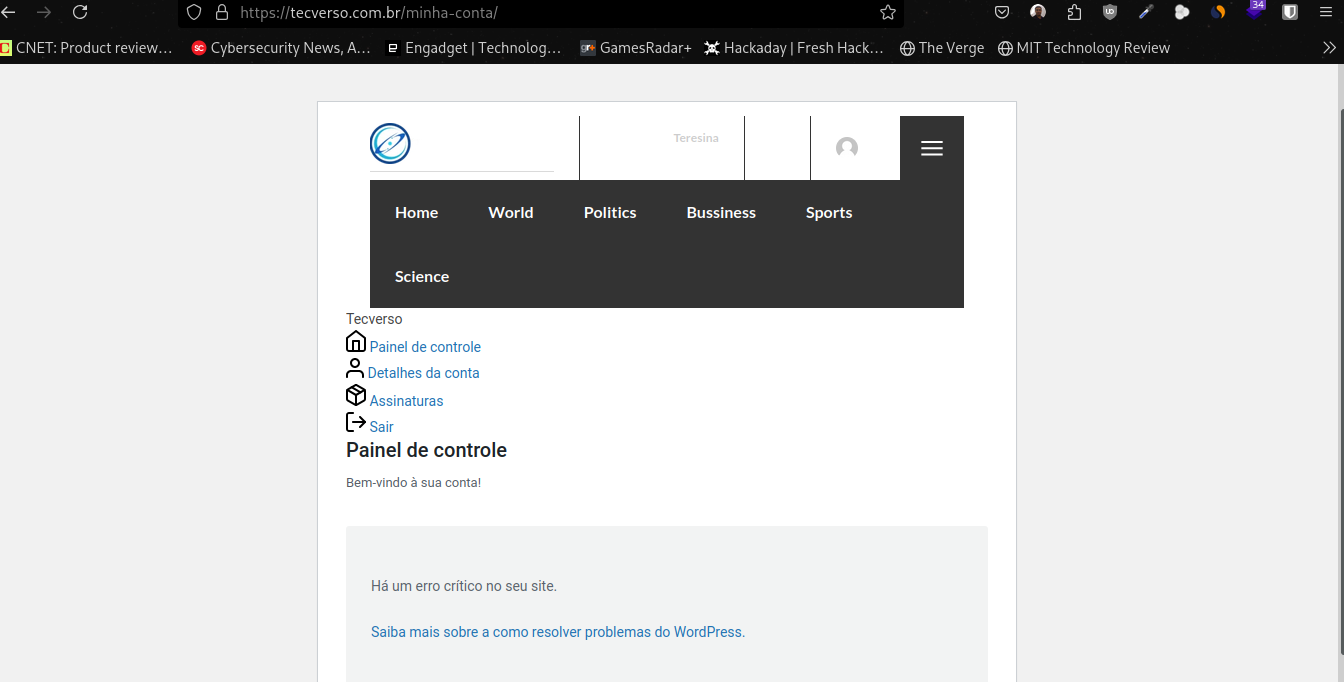
 Yes, every time I use the theme translation to Portuguese and connect the “my account” page to the Opt-In Builder plugin, the page bugs out, but it has to be both things. If I connect the page to the Opt-In Builder plugin and don’t use the theme translation, the page doesn’t bug out. If I use the theme translation and don’t connect it to the Opt-In Builder plugin, the page doesn’t bug out either. Very strange and confusing…
Print: https://tecverso.com.br/tela.png
-
This reply was modified 1 year by
DavidCLM.
 gmodonesi
 Hello,
it it possible that the problem is due to some special charatcers in the text or title of the post?
Because I tried with a simple post with few words an it didn’t happen.
I tried again with the original post and it happened again.
I know it may sound strange but who knows…
 Anamaria
 Hi,
Are the icons not displayed when you’re not in editing mode? This is strange. I would like to take a look. Can you please email us at contact@tagdiv.com with the wp-admin access and include the link to the topic in the email?
Thank you!
 Comitia
 Thank you for your reply.
But, there are no issues when viewing on a PC or tablet.
This behavior only occurs on smartphones,
so it doesn’t seem to be a problem with image optimization or similar factors.
Have you checked the reference video?
https://www.comitia.com/wordpress/wp-content/uploads/rendering.MP4
Alternatively, could you please access the site on your own smartphone to see for yourself?
site url https://pc.3448.jp/
It seems strange that the top part of the page, which should have already loaded, is being re-rendered.
What could be causing this?
 lorandd
Hello,
I have configured my site with newspaper theme and configured menus and everything was working ok. The other day I have enabled WPML plugin to have multilanguage support. Now I wanted to edit something in the header and I noticed that when editing the homepage with tagdiv composer the header looks strange and I can’t edit it anymore as I have this message:
Can you advise why this has change and what can I do to revert or see the same header in the editor as on the page. The footer is also gone in edit mode.
Thanks
 Bettina
 Hello Frank H!
Strange! We would like to investigate your issue.
Please contact us via email at contact@tagdiv.com and provide the following:
– admin URL and credentials
– cpanel URL and credentials
– a link to this topic to identify you
Thank you!
 christopherkevil8838
 Thank you for your help on this. I really appreciate it.
But when I click on the edit button, I go to the post editor page. I do not go to the Gutenberg block editor. Is it possible I don’t have it installed yet?
Also when I go to the list of posts, all my post titles are displayed vertically, like this:
S
A
M
P
L
E
T
I
T
L
E
O
C
T
O
B
E
R
2
0
2
4
E
D
I
T
It’s very strange!
-
This reply was modified 1 year by
christopherkevil8838.
Bettina Hello!
Strange! We would like to investigate your issue.
Please contact us via email at contact@tagdiv.com and provide the following:
– admin URL and credentials
– cpanel URL and credentials
– a link to this topic to identify you
Thank you!
 rock5
rock5 Ok thanks,
I still have to do what you suggested but in the meantime I noticed a very strange thing:
if I open the page as admin I see the homepage correctly: https://drive.google.com/file/d/102spUFtJGOu2K3G7Irbt2so7dqKvjf3E/view?usp=sharing
but if I open it anonymously I don’t:
https://drive.google.com/file/d/1gcq6vX9BUbUnISbdUmuiNFoZQlImG0kM/view?usp=sharing
could you check? thanks
 vanek48
Hello!
I have chosen the News Hub PRO theme, and something strange is happening with my site. After installation, everything is fine, and the design matches both the mobile and desktop versions of the site. However, after some time, the style seems to break either on the desktop or mobile version of the site, and I can’t figure out what causes it. An example of the broken style is shown in the screenshot from the phone. The same design issue can appear on the desktop version of the page as well. All third-party plugins have already been disabled, and the cache has been cleared, but it doesn’t help. Could you please advise me on what to look into?
Thank you.


Bettina Hello!
Strange! We would like to investigate your issue.
Please contact us via email at contact@tagdiv.com and provide the following:
– admin URL and credentials
– a link to this topic to identify you
Thank you!
 ethosmedia.eu
Hi, I have the same problem in two websites of a company ( https://banks.com.gr , https://insuranceworld.gr ). I’m using Search cloud template and flex block 1 (I tried posts loop also) to display search results. I set category filter to Search – Current search, sort order to latest and post type to post. The results aren’t in the right date order in both websites.
Then I had a look to a personal project without cloud templates ( https://zoumeoraia.okmarkets.gr ) and it does the same.
It’s very strange. I tried everything. Please help.
Bettina Hello!
Strange! We would like to investigate the issue you have.
Please contact us via email at contact@tagdiv.com and provide the following:
– admin url and credentials
– cpanel url and credentials
– a link to this topic in order to identify you
Thank you!
 Aragosta
Hello,
i try to used Fancy text with image element, but if I look at it from backoffice the image is next to the text while if I look at it online the image appears above and the text below.
I took a screenshot: https://imgur.com/a/0Ln3zqr
Why?
Anamaria Hello,
Unfortunately, our tagDiv team doesn’t have an employee named Carlos. From what I see there, that person has installed some malware plugins on your site, so you’ll need to manually clean the site. For example, you should delete plugins with strange or unknown names, remove any users you don’t recognize, and clean any suspicious code files, both in the theme and WordPress.
You could consider reinstalling the WordPress version, and checking for this plugin wp-zexit.php. It might be wise to inspect via FTP if it doesn’t appear in the WordPress -> Plugins. Additionally, using Wordfence to scan the website and remove unknown users would be prudent.
Change admin passwords and delete admin accounts you are not familiar with;
– Delete any weird/unknown plugins;
– Delete the weird/unknown themes;
– Clean unfamiliar Theme Panel injected code (example – https://i.imgur.com/4q70kCv.png);
– Clean WordPress files (example – https://i.imgur.com/stJCqiK.png)
Please block /wp-json/tdw/save_css
If an attacker wants to target this URL /wp-json/tdw/save_css they can do so. Even if the website uses a different theme, the attacker can still try that URL. We could add an option to be able to enable/disable the Live CSS, it will be considered. But for now in order to remove it this can only be done with a modification to the composer plugin. I think that all that removing it requires is to comment this line of code – https://prnt.sc/RtwvL5Nc4ikR -> https://prnt.sc/ymZmhdUfp57U But as I mentioned, the attacker can still try to access the URL.
Thank you!
 CapCityNews
Hi Carlos, did you do this on the admin side, when you made changes? (CapitalCityNews.online)
- 3 new users appeared (see 2a.png below), and I can’t delete (see error msg screen grab – 3a.png).
- 2 new plugins were added (see 1a.png below) that are not listed on WordPress plugin site.
- Plus, now I cannot do maintenance (delete users, etc) — I get same error message as above.
Thanks for your help,
Dave


 Calin
Calin Hi,
I just cheek the website and now I no longer see the images on blocks and grids – https://i.imgur.com/Zi3Irwt.png and sems that are not loading at all. Now checking the page speed this is wow – https://i.imgur.com/5Mz6Klk.png -https://i.imgur.com/1dUjQKR.png
Related to the list you provided after you checked the theme using the plugin for theme checker, this is not quite related.
Now for Background and foreground colors do not have a sufficient contrast ratio from mobile the color on mobile should be stranger then desktop. On desktop should be at least 4.5 but on mobile needs to be over 7.
Thank you!