
 Anamaria
 Hi,
This is very strange. But if it works for someone with the same account, I don’t know exactly what the issue is.
Thank you!
Anamaria Hi,
This is strange. Please check if you don’t have an object cache https://forum.tagdiv.com/general-options-may-interfere-newspaper-theme/
Thank you!
 Bettina
 Hello!
It’s so strange!
Deactivate all plugins except tagDiv ones. Also, if you are using a cache plugin, deactivate it, clear all cache, and see if the problem is still there.
Let me know the results!
Thank you!
Anamaria Hi,
This is strange. Can you please do a test using only tagdiv plugins? Maybe you have a plugin conflict.
Thank you!
 petar777
Is it possible to adjust the breakpoints at which the mobile header becomes active?
The reason I want this is that when I use the option “drop items in more” which would solve my problem, whenever I reload the page the whole header reloads in a strange way causing a bad feel to the website.
 anastasios
Hello, after updating to the latest version (12.6.6) we have a strange problem – in the homepage the images of our posts do not correspond with the ones assigned – once you open the article is ok, but when shown in homepage each post is shown with the image of the previous one (appears that each image is moved to the next post). It happens only when viewed in mobile for now.
Bettina Hello!
Strange! It should work well.
We would like to investigate the issues you have.
Please contact us via email at contact@tagdiv.com and provide the following:
– admin url and credentials
– a link to this topic in order to identify you
Thank you!
 newsneural
 I had to turn of MegaMenu. Remove it. It made the page load 3-4 seconds. Also lazy loading of images must be turned of. Its something strange with that template.
 leagcooks
 How strange, All it is, is a link to your page… There is already a link at the top of our websites. (below)
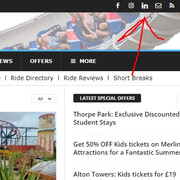
But i’m sure the developers know best..
Thank you for your reply!
Bettina Hello!
Strange. I could take a look and let you know what can be done there.
Please contact us via email at contact@tagdiv.com and provide the following:
– admin url and credentials
– a link to this topic in order to identify you
Thank you!
Bettina Hello!
Strange. I could take a look and let you know what can be done there.
Please contact us via email at contact@tagdiv.com and provide the following:
– admin url and credentials
– a link to this topic in order to identify you
Thank you!
 radupaulstefan
Hi,
I activated my license for an hostinger website. Later I decided to go for a hard reset because the website behaved strange and buggy, so I wanted to go for a fresh start.
Now I cannot activate again the theme because it is being seen as already in use for the deleted website. Can I get that restarted on your side also so I can continue using the license on my newly created website only?
Thank you.
 Merkucio
Hello,
I did not understand how the Social Counter works.
Does it show the number of Twitter, Instagram followers and Youtube followers only if you write them manually?
Can it do this automatically?
Or do I need to change this amount manually every time?
If so, it would be at least strange.
 hospitality-school
 I have observed. My site was Ok for 1 day then its again showing like this:https://www.awesomescreenshot.com/image/49284228?key=a7b171d1a9705f07fde269c7190ed41f
please visit the site now. What I have observed is that THIS IS SIMILAR TO MY MOBILE VERSION. THE MENU ON THE LEFT IS SHOWING PAGES EXACTLY LIKE MY MOBILE VERSION.
After few hours or days it started showing this version. THIS IS SUPER STUPID AND STRANGE BUT THIS IS HAPPENING EVERYDAY.
I disabled cache plugin. I HIGHLY DOUBT THERE IS SOMTHING VERY STRANGE BETWEEN DESKTOP AND MOBILE VERSION. Here are all the plugins I am using:
https://www.awesomescreenshot.com/image/49284511?key=133342e39c61518a31a3d2435c28e30e
*** Another problem I am facing is that i am keep trying to update tagDiv Opt-In Builder plugin. Every time it is showing updated and when I refresh the plugin page, it is showing There is a new version of tagDiv Opt-In Builder available.
Please help me to fix this. I am tired.
Merkucio WOW, just noticed, I can’t remove .td-hero-block because save option doesn’t work in this case.
I’m able to save this change if only I edit .td-hero-block for example to .td-hero-block-1. In this case save option works.
Strange things going on with save option in your theme, you know?
It’s not the first case.
Same issue was with social icons links too.
BUT ANYWAY, the change of % value gives nothing.

 Calin
Calin Hello,
1. To adjust this on footer you can use a custom css like this one:
html[lang="ar"] .td_block_popular_categories  a{

   display: flex;

    flex-direction: row-reverse;

    width: 100%;

}

html[lang="ar"]  .td_block_popular_categories  .td-cat-name {

    order: 2;

}

html[lang="ar"]  .td_block_popular_categories  .td-cat-no {

    order: 1;

}
This css should be set in the theme panel > custom code> custom css.
2. Please use tagDiv Composer to edit the page then use the right click on the sign element and click on delete – https://i.imgur.com/t5gPFGR.png
3. Yes, the child theme can be used. For this you can triger the language to apply that css on on that language, like this html[lang=”ar”] or on rtl like this [dir=”rtl”]. Now , most of element have options that allow you you to set the text from RTL to LTR and vice versa, but there are a few elements that do not have this option and need to be used a css.
4. Yes, the templates can be set as global per language and for each language it will be used the one set as global.
5. This is a strange situation, also that one is a page get from cloud library and it can be get for each language, but is not a page template. In that situation if you want to use that page as homepage, then you can assign it using the WordPress option from Settings > Reading – https://i.imgur.com/kxRD8Dh.png
I hope this will help you!
Anamaria Hi,
This is very strange. What version of the theme do you have? Did you scan your website for malware?
Thank you!
Anamaria Hello,
You can use a revision of the template before you added the single table of contents, but this issue you mention is strange. Can you please provide some screenshots?
Thank you!
Anamaria Hello,
This is very strange. I would like to take a look. Can you please contact us via email at contact@tagdiv.com and provide the wp-admin access? Include the link to the topic in the email.
Thank you
 iegexpo
 Another strange behavior: switching to the Home Page edit, the thumbnails are all correct and defined… :-/
Calin Hello volkanunal,
This is strange, normally the above code should apply only on the top menu bag – https://i.imgur.com/IYVckWg.png can you provide a screenshot with the crashed page?
 spookyisles
Hi, I have been having problems with Cloudflare recently – it seems to break the theme and it comes out strange. When I turn off Cloudflare, it goes back to normal. Has anyone else had a problem like this?
 Southview92
i have just done a moz report and it is coming up that i have thousands of 404 errors and they all have the same problem. my urls are adding tds-switching-plans-wizard/ can you tell me why this is happening and how to solve it please. it is destroying my site
https://www.in2town.co.uk/boston-lincs-news/tds-switching-plans-wizard/
Anamaria Hi,
This is strange. Please check if you don’t have an object cache.
Thank you!
Bettina Hello!
Strange! We would like to investigate this issue.
Please contact us via email at contact@tagdiv.com and provide the following:
– admin URL and credentials
– a link to this topic in order to identify you
Thank you!



