
- NewsmagtagDiv Composer Tutorial
- NewsmagHow to use the Visual Composer plugin
- NewsmagHow to update a plugin
- NewsmagRequirements for Newsmag
- NewsmagInstall via WordPress
- NewsmagInstall via FTP
- NewsmagBlock settings tutorial
- NewsmagPage Menu
- NewsmagCustom ad spots
- NewsmagSmart sidebar
- NewsmagVideo playlist
- NewsmagPage templates
 hellio
Hi! I think was a update of the theme or the plugin td composer, because my posts page on wordpress is “broke”.
You can see here, with tagdiv composer activate: 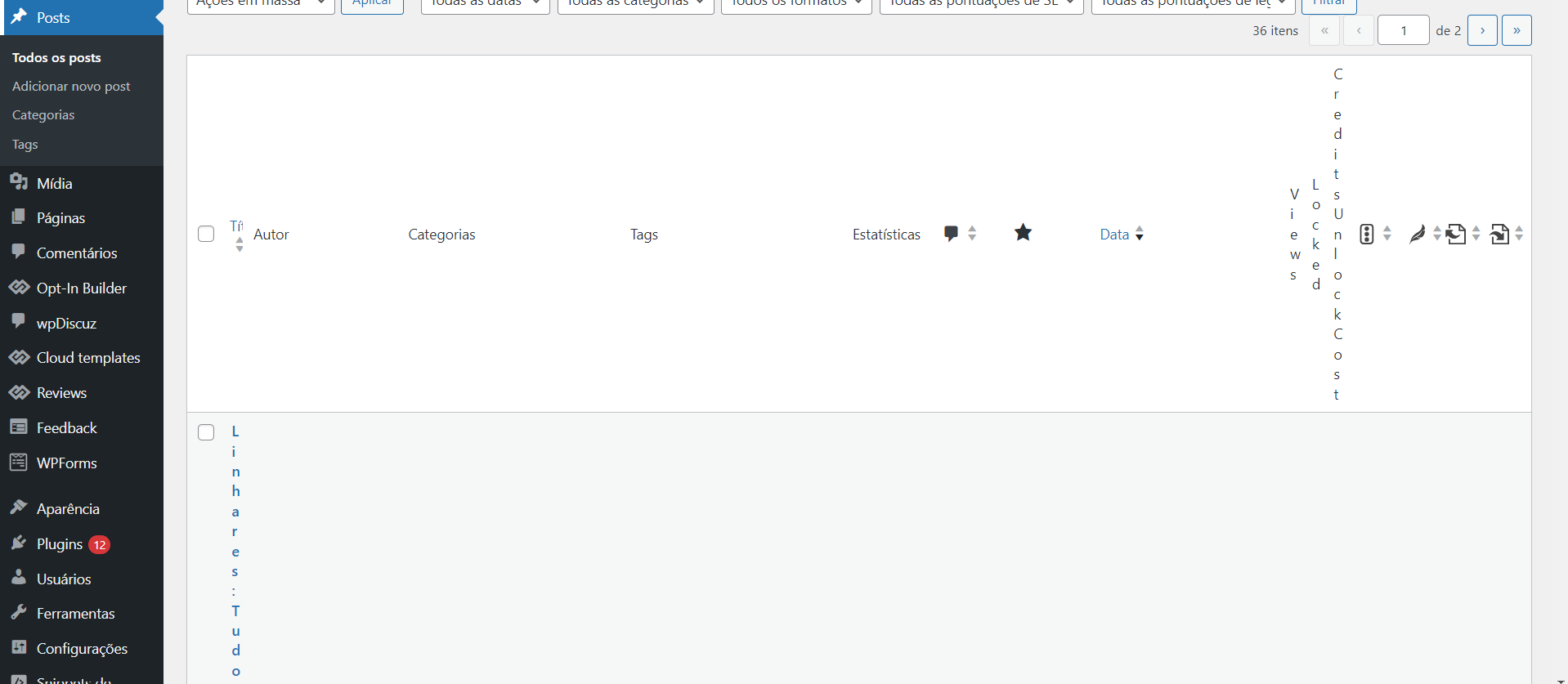
And here, with the plug in disable: 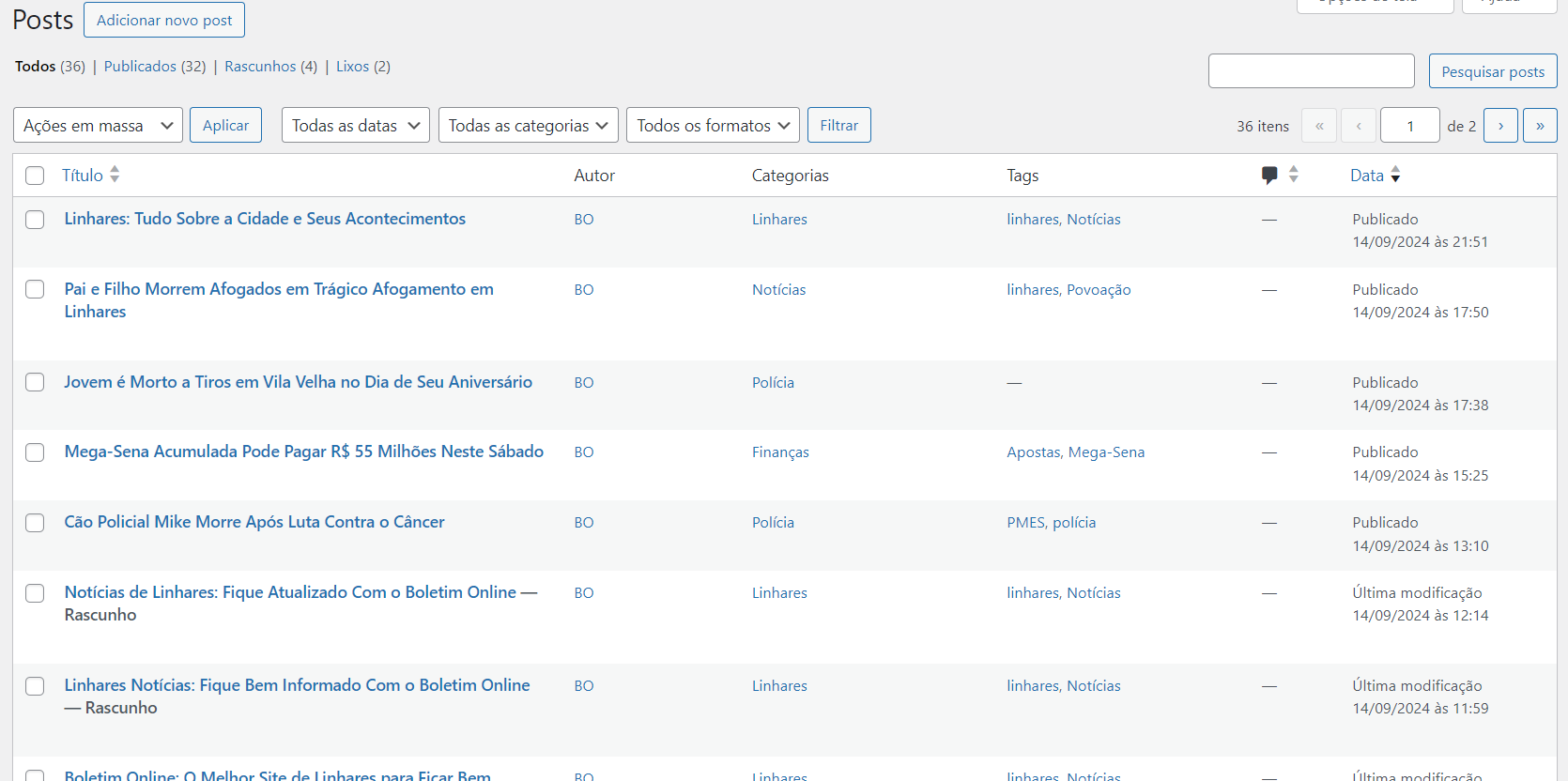
What can I do?
 simchris
 need to update install activate td composer
 Yohanndev83
 To continue this thread, here’s how I managed to achieve what I wanted.
In my custom module, I added an element of the “Column Title” type from the “Multipurpose shortcode” category, and in the title, I placed “foobar”.
Then, in the plugin file td-composer : td_multi-purpose/shortcodes/tdm_block_title_simplified.php,
I modified line 56 with the variable $buffy.
If I detect the title “foobar”, then I use do_shortcode() and call my function to add a dynamic element.
This works on the front-end, no regression, BUT it remains unstable when editing in the back-office. I will need to add a condition: if back-office, do not load do_shortcode(). Nothing difficult, but not urgent for me.
The code is well-documented, and for future updates, I’ll just need to be careful.
 declandunn
 Found the problem is with TD Composer, it’s memory usage impacts everything and I have a hard limit of 256MB for WordPress, seeing if I can adjust that temporarily.
When I turned off TD Composer plugin, the whole theme shut down of course.
Likely this means it controls the whole theme, though when I closed it I got a warning message that TD Cloud Library needed an update, and I’ve updated everything to newspaper 12.6.7
Seeing if that’s incorrect, I’m on TD Cloud Library 3.6 updated on 08/28/2024.
 Anamaria
 Hello,
Please try to delete i from here https://prnt.sc/zL_jm6l8Doc-
/wp-content/plugins/td-composer/legacy/Newspaper/header.php
Thank you!
 priyankmalvi
Hi there,
I am constantly getting issues when I open category and product pages. I tried contacting the Hosting Provider and upon debugging, they found the issue connected with the td-composer and td-cloud library plugin.
Issue says: There has been a critical error on this website.
I am attaching all the necessary screenshots and links to the pages below. Please help me solve this issue because this is important for me to solve this issue.
Links to pages:
https://fuljitrading.com/product-category/takeout-containers/mfpp-containers/
https://fuljitrading.com/product-category/takeout-containers/pp-containers/
Screenshots;
Before enabling the debug mode: https://snipboard.io/BAyV8e.jpg
After enabling debug mode: https://snipboard.io/5uJM3a.jpg
I am waiting for the response.
Thank you!
Yohanndev83 Thank you for your response.
Maybe I can modify an existing element to make it use my shortcode? My goal is to display dynamic content in addition to the default content that will appear in this module (title, excerpt, image, date) inside a loop
For example, the “Column Title” element from “Multipurpose shortcodes”—where can I find the PHP file or code to modify it? I have tried searching in td-composer folder without success.
Thank you
Anamaria Hello,
Please use this code for this issue -> https://i.imgur.com/X8SljpL.png
.td-search-icon

{

display: inline-block;

right: -10px;

}
Also, you have the mobile theme plugin enabled, so all the changes that you have done using Composer do not apply to the mobile version. Please check this topic where I explained each mobile version -> https://forum.tagdiv.com/topic/mobile-version-not-working-properly-2/
Thank you!
 Calin
Calin Hi simchris, if you just want to change the tagDiv version, then you can do it from td-composer.php -https://i.imgur.com/SrawZgH.png now in case that you updated the theme then the plugin version will change but also the composer key https://i.imgur.com/DBkWj8L.png (this is necessary only if the theme is updated to version 5.4.3.1)
Thank you!
 thiru
thiruUSING
Theme name i Newspaper
Theme version i 11.5.1
Theme database version i 11.5.1
HTTP channel test wordpress
php.ini configuration
Server software i nginx/1.17.8
PHP Version i 8.2.11
post_max_size i 10M – You cannot upload images, themes and plugins that have a size bigger than this value. To see how you can change this please check our guide here.
max_execution_time 60
max_input_vars 1000 – the max_input_vars should be bigger than 2000, otherwise it can cause incomplete saves in the menu panel in WordPress. To see how you can change this please check our guide here.
SUHOSIN installed false
PHP extensions
mbstring available
GD library available
WordPress and plugins
WP version i 6.3.5
WP multisite enabled i No
WP Language i en_US
WP Memory Limit 256 MB/request
WP_DEBUG False
Caching plugin No caching plugin detected – for best performance we recommend using WP Super Cache
I tried all chromium browsers (Chrome, Vivaldi, Brave, Edge, Opera, Safari), Firefox. But when I tried to
* edit a page with TD Composer,
* add an empty inner column,
* add column text,
* Click ‘Edit Content’ button,
* Type some short codes [postlist id=192498].
* Now I don’t see any save, so assuming just click ‘X’ on top right of the popup to close.
* Now Click on ‘Edit Content’ button, it is shows only blank box (the short code I entered doesn’t appear).
* Vivaldi, Edge shows a javascript error. – https://app.screencast.com/dblky8lh3bngJ
* Firefox no errors, but same behaviour
* Safari – Can’t even drag and drop to inner column
* Chrome – No Errors, but same behaviour.
 ottodna
hi, I just set up the theme purchased from Themforest.
I am getting an error when I log in to the WordPress admin dashboard.
“Warning: Cannot modify header information – headers already sent by (output started at /home/1324573.cloudwaysapps.com/pxhzaedpvy/public_html/wp-content/plugins/td-composer/legacy/common/wp_booster/td_util.php:2957) in /home/1324573.cloudwaysapps.com/pxhzaedpvy/public_html/wp-includes/pluggable.php on line 1435
Warning: Cannot modify header information – headers already sent by (output started at /home/1324573.cloudwaysapps.com/pxhzaedpvy/public_html/wp-content/plugins/td-composer/legacy/common/wp_booster/td_util.php:2957) in /home/1324573.cloudwaysapps.com/pxhzaedpvy/public_html/wp-includes/pluggable.php on line 1438”
my hosting company said one of the plugins is creating issues, this plugin is theme installed plugin, if I deactivate this plugin, they recommend using it and again site will break.
what i am missing?
 regio-online
Hi,
We keep getting this vulnerabilaty warning from WP Toolkit (Plesk VPS server) (severity is medium). We have the latest version of td composer (5.1) The message is:
tagDiv Composer <= 5.0 – Reflected Cross-Site Scripting via envato_code[]
The tagDiv Composer plugin for WordPress is vulnerable to Reflected Cross-Site Scripting via the ‘envato_code[]’ parameter in all versions up to, and including, 5.0 due to insufficient input sanitization and output escaping within the on_ajax_register_forum_user function. This makes it possible for unauthenticated attackers to inject arbitrary web scripts in pages that execute if they can successfully trick a user into performing an action such as clicking on a link.
Copyright text: Wordfence
Is this something we need to address ourselve, is it something in the code your team needs to fix, or is it a false positive?
If have read older posts about this kind of message on Reflected Cross-Site Scripting, but in all of them you told an update should fix it next time. It’s about a few next times further however, so I am curious if this is a returning vulnerabilaty or just an over excited Wordfence producing a non-issue?
Thanks in advance for your time and efforts regarding this issue.
Anamaria Hi,
Please block /wp-json/tdw/save_css
If an attacker wants to target this URL /wp-json/tdw/save_css they can do so. Even if the website uses a different theme, the attacker can still try that URL. We could add an option to be able to enable/disable the Live CSS, it will be considered. But for now in order to remove it this can only be done with a modification to the composer plugin. I think that all that removing it requires is to comment this line of code – https://prnt.sc/RtwvL5Nc4ikR -> https://prnt.sc/ymZmhdUfp57U But as I mentioned, the attacker can still try to access the URL.
Thank you!
 Saniya
 Ads shortcode not working in the theme panel ads section. The same shortcode is working in ad box element in tag div composer.
I’m using AdRotate Pro plugin. My website link: https://watercraftdemo.yashamsoft.com/
-
This reply was modified 2 years by
Saniya. Reason: Adding links
 darrenhive
 I’ve been through tht twice already and the prblem is still persisting. Here’s what theconsole log shows.
jquery.min.js?ver=3.7.1:2  jQuery.Deferred exception: Cannot read properties of undefined (reading 'models') TypeError: Cannot read properties of undefined (reading 'models')

    at Object.getFirstModelByZoneType (https://<removed>/wp-content/plugins/td-composer/assets/js/js_files_for_wrapper.min.js?ver=5b75a1149b707159a7e71fd3bf09ff7b:316:340)

    at Object.getShortcodeFromData (https://<removed>/wp-content/plugins/td-composer/assets/js/js_files_for_wrapper.min.js?ver=5b75a1149b707159a7e71fd3bf09ff7b:353:457)

    at Object.saveHeaderState (https://<removed>/wp-content/plugins/td-composer/assets/js/js_files_for_wrapper.min.js?ver=5b75a1149b707159a7e71fd3bf09ff7b:28:388)

    at Object.init (https://<removed>/wp-content/plugins/td-composer/assets/js/js_files_for_wrapper.min.js?ver=5b75a1149b707159a7e71fd3bf09ff7b:23:279)

    at https://<removed>/wp-admin/post.php?post_id=49498&td_action=tdc&tdbTemplateType=page&prev_url=%2F%2F<removed>%2F:1138:44

    at c (https://<removed>/wp-includes/js/jquery/jquery.min.js?ver=3.7.1:2:25304)

    at fireWith (https://<removed>/wp-includes/js/jquery/jquery.min.js?ver=3.7.1:2:26053)

    at e (https://<removed>/wp-includes/js/jquery/jquery.min.js?ver=3.7.1:2:27300)

    at https://<removed>/wp-includes/js/jquery/jquery.min.js?ver=3.7.1:2:27330 undefined

(anonymous) @ jquery.min.js?ver=3.7.1:2

(anonymous) @ jquery.min.js?ver=3.7.1:2

setTimeout

(anonymous) @ jquery.min.js?ver=3.7.1:2

c @ jquery.min.js?ver=3.7.1:2

fireWith @ jquery.min.js?ver=3.7.1:2

fire @ jquery.min.js?ver=3.7.1:2

c @ jquery.min.js?ver=3.7.1:2

fireWith @ jquery.min.js?ver=3.7.1:2

(anonymous) @ jquery.min.js?ver=3.7.1:2

c @ jquery.min.js?ver=3.7.1:2

fireWith @ jquery.min.js?ver=3.7.1:2

(anonymous) @ jquery.min.js?ver=3.7.1:2

(anonymous) @ js_files_for_wp_admin.min.js?ver=5b75a1149b707159a7e71fd3bf09ff7b:49

IndexedDB

get @ js_files_for_wp_admin.min.js?ver=5b75a1149b707159a7e71fd3bf09ff7b:49

(anonymous) @ post.php?post_id=49498&td_action=tdc&tdbTemplateType=page&prev_url=%2F%2F<removed>%2F:1108

load

(anonymous) @ post.php?post_id=49498&td_action=tdc&tdbTemplateType=page&prev_url=%2F%2F<removed>%2F:1107

(anonymous) @ post.php?post_id=49498&td_action=tdc&tdbTemplateType=page&prev_url=%2F%2F<removed>%2F:1142
That’s the warning, and here are the errors.
td_wp_admin.min.js?ver=12.6.7:1  Uncaught SyntaxError: Identifier '_extends' has already been declared (at td_wp_admin.min.js?ver=12.6.7:1:1)

    at td_wp_admin.min.js?ver=12.6.7:1:1

(anonymous) @ td_wp_admin.min.js?ver=12.6.7:1

js_files_for_wrapper.min.js?ver=5b75a1149b707159a7e71fd3bf09ff7b:400  Uncaught ReferenceError: tdDetect is not defined

    at HTMLIFrameElement.loadIframe (js_files_for_wrapper.min.js?ver=5b75a1149b707159a7e71fd3bf09ff7b:400:385)

    at HTMLIFrameElement.dispatch (jquery.min.js?ver=3.7.1:2:40035)

    at HTMLIFrameElement.<anonymous> (jquery.min.js?ver=3.7.1:2:38006)

loadIframe @ js_files_for_wrapper.min.js?ver=5b75a1149b707159a7e71fd3bf09ff7b:400

dispatch @ jquery.min.js?ver=3.7.1:2

(anonymous) @ jquery.min.js?ver=3.7.1:2

load

add @ jquery.min.js?ver=3.7.1:2

(anonymous) @ jquery-migrate.min.js?ver=3.4.1:2

(anonymous) @ jquery-migrate.min.js?ver=3.4.1:2

(anonymous) @ jquery.min.js?ver=3.7.1:2

each @ jquery.min.js?ver=3.7.1:2

each @ jquery.min.js?ver=3.7.1:2

Le @ jquery.min.js?ver=3.7.1:2

on @ jquery.min.js?ver=3.7.1:2

checkIframe @ js_files_for_wrapper.min.js?ver=5b75a1149b707159a7e71fd3bf09ff7b:406

init @ js_files_for_wrapper.min.js?ver=5b75a1149b707159a7e71fd3bf09ff7b:400

init @ js_files_for_wrapper.min.js?ver=5b75a1149b707159a7e71fd3bf09ff7b:410

(anonymous) @ js_files_for_wrapper.min.js?ver=5b75a1149b707159a7e71fd3bf09ff7b:411

(anonymous) @ js_files_for_wrapper.min.js?ver=5b75a1149b707159a7e71fd3bf09ff7b:411

post.php:1  Access to fetch at 'https://cloud.tagdiv.com/services-img/banner-composer.png' from origin 'https://<removed>' has been blocked by CORS policy: No 'Access-Control-Allow-Origin' header is present on the requested resource. If an opaque response serves your needs, set the request's mode to 'no-cors' to fetch the resource with CORS disabled.

domExtractorInjector.bundle.js:1
GET https://cloud.tagdiv.com/services-img/banner-composer.png net::ERR_FAILED 200 (OK)
C @ domExtractorInjector.bundle.js:1
(anonymous) @ domExtractorInjector.bundle.js:1
h @ domExtractorInjector.bundle.js:1
A @ domExtractorInjector.bundle.js:1
(anonymous) @ domExtractorInjector.bundle.js:1
load
(anonymous) @ domExtractorInjector.bundle.js:1
(anonymous) @ domExtractorInjector.bundle.js:1
(anonymous) @ domExtractorInjector.bundle.js:1
Show 8 more frames
Show less
This is running on a dev environment with no caching or optimization plugins
Anamaria Hello,
You have malware on the website because I can not access it. Please update to the latest version 12.6.7
If you want to update the theme, you should download the latest version of it from the Theme Forest account and download it.
I recommend that you update the theme manually https://forum.tagdiv.com/how-to-update-the-theme-2/ via FTP/cPanel/File Manager, also if possible disable extra plugins during the theme update to avoid any problems that may arise and make sure that you have activated the tagDiv Standard pack plugin to keep the website’s look. You can try to update the theme on a staging website.
After you update the theme, you need to update the theme plugins too.
In the worst cases, the settings in the theme panel may be lost (there have been isolated cases), in these cases, after the theme plugins that were previously used are activated, you will have to use a backup for the theme panel -> https://forum.tagdiv.com/import-export-theme-settings/
You could consider reinstalling the WordPress version, and checking for this plugin wp-zexit.php. It might be wise to inspect via FTP if it doesn’t appear in the WordPress -> Plugins. Additionally, using Wordfence to scan the website and remove unknown users would be prudent.
Change admin passwords and delete admin accounts you are not familiar with;
– Delete any weird/unknown plugins;
– Delete the weird/unknown themes;
– Clean unfamiliar Theme Panel injected code (example – https://i.imgur.com/4q70kCv.png);
– Clean WordPress files (example – https://i.imgur.com/stJCqiK.png)
Please block /wp-json/tdw/save_css
If an attacker wants to target this URL /wp-json/tdw/save_css they can do so. Even if the website uses a different theme, the attacker can still try that URL. We could add an option to be able to enable/disable the Live CSS, it will be considered. But for now in order to remove it this can only be done with a modification to the composer plugin. I think that all that removing it requires is to comment this line of code – https://prnt.sc/RtwvL5Nc4ikR -> https://prnt.sc/ymZmhdUfp57U But as I mentioned, the attacker can still try to access the URL.
Thank you!
darrenhiveWhat’s up crew? Interesting problem. I can’t seem to load the tag div editor, and this is what I’m experiencing.

This is on a dev site so there are no caching or optimization plugins, and the CSS/JS is always current.
I’ve tried reverting to previous versions, as well as updating from 12.6.6 to 12.6.7 and none of that is working.
Interestingly enough, there does seem to be something showing up in the debug.log and error_log files. *I THINK* this seemed to happen with the recent update of WordPress.
This is a snippet from the debug.log – those two are simply repeating over and over.
-----------y-------------

[28-Aug-2024 20:46:47 UTC] PHP Deprecated:  str_replace(): Passing null to parameter #3 ($subject) of type array|string is deprecated in <path>/wp-includes/functions.php on line 2189

-----------y------------

-----------y-------------

[28-Aug-2024 20:46:47 UTC] PHP Deprecated:  strpos(): Passing null to parameter #1 ($haystack) of type string is deprecated in <path>/wp-includes/functions.php on line 7300

-----------y------------
And this is a snippet of the error_log. I put two entries there, but it’s the same one over and over.
DATE: July 15, 2024 17:03:15

MESSAGE TYPE: (Javascript) TypeError

PROBLEM DESCRIPTION: Cannot read properties of undefined (reading \'contents\')

SCRIPT NAME: js_files_for_wrapper.min.js

LINE: 99

SCRIPT LOCATION: https://<removed>/wp-content/plugins/td-composer/assets/js

PLUGIN NAME: td-composer

------------------------

DATE: July 15, 2024 17:03:15

MESSAGE TYPE: (Javascript) TypeError

PROBLEM DESCRIPTION: Cannot read properties of undefined (reading \'contents\')

SCRIPT NAME: js_files_for_wrapper.min.js

LINE: 99

SCRIPT LOCATION: https://<removed>/wp-content/plugins/td-composer/assets/js

PLUGIN NAME: td-composer

------------------------
Please note the date on the error_log is the 15th, so I’m not sure that’s actually a problem. The first one might be though. I’ve been trying to a couple or three days now and it’s not loading.
Any help you can offer would be appreciated. In the 1st I’ll need to access the editor to update a few elements. We publish a monthly magazine and those covers will need to be updated.
 Michelle26
 Thank you, I followed the instructions and created mobile pages. However, the mobile version does not always load.
I looked it up and the recommendation clearing the cache. I did that, but a few hours later the mobile version stops loading.
We have talked to the server people and they said the error log shows its a problem with TD Composer.
These are the errors they showed me:
2024/08/28 13:18:08 [error] 936811#936811: *49657 FastCGI sent in stderr: “PHP message: PHP Warning: Undefined array key “tdb_templates” in /home/wplive/web/wp-live/wp-content/plugins/td-cloud-library/includes/tdb_functions.php on line 634″ while reading response header from upstream, client: 207.46.13.150, server: , request: “GET /iconos_gem-ai-01/ HTTP/1.0”, upstream: “fastcgi://unix:/var/run/php/php8.1-wplive.sock:”, host: “panamagemcharters.com”
2024/08/28 12:57:34 [error] 936811#936811: *49132 FastCGI sent in stderr: “PHP message: PHP Warning: Trying to access array offset on value of type bool in /home/wplive/web/wp-live/wp-content/plugins/td-composer/legacy/common/wp_booster/td_video_support.php on line 88PHP message: PHP Warning: Trying to access array offset on value of type null in /home/wplive/web/wp-live/wp-content/plugins/td-composer/legacy/common/wp_booster/td_video_support.php on line 88” while reading response header from upstream, client: 181.197.54.47, server: , request: “GET /en/offshore-fishing-tour/?gad_source=2&gclid=CjwKCAjwiaa2BhAiEiwAQBgyHtR0v0Xhz_uTK3kEoZCwEjW8kfL0CpAiIBFhnWyhtSrTMEOe9BtXIBoCHIoQAvD_BwE HTTP/1.0”, upstream: “fastcgi://unix:/var/run/php/php8.1-wplive.sock:”, host: “panamagemcharters.com”, referrer: “https://m.youtube.com/”
2024/08/28 12:36:17 [error] 936811#936811: *48843 FastCGI sent in stderr: “PHP message: PHP Warning: Trying to access array offset on value of type bool in /home/wplive/web/wp-live/wp-content/plugins/td-composer/legacy/common/wp_booster/td_video_support.php on line 88PHP message: PHP Warning: Trying to access array offset on value of type null in /home/wplive/web/wp-live/wp-content/plugins/td-composer/legacy/common/wp_booster/td_video_support.php on line 88” while reading response header from upstream, client: 190.218.50.143, server: , request: “GET /en/offshore-fishing-tour/?gad_source=2&gclid=EAIaIQobChMInZWYm_z8hwMVx-XjBx0_ey7yEAEYASAAEgIY__D_BwE HTTP/1.0”, upstream: “fastcgi://unix:/var/run/php/php8.1-wplive.sock:”, host: “panamagemcharters.com”, referrer: “https://m.youtube.com/”
could you please help?
 exakt
exaktI want to use our custom elements from tagdiv composer as shortcodes.
We use the plugin “restrict content pro”, and they have this html field for “Restricted Content Message”. Is it possible to use our content from TDC here?
 Hoàng Trí
 Hi
Yes, I have disabled all plugins installed on my website (including the theme) and only when disabling TD Composer does the Menu appear
When Disable all plug ins except theme plug ins: https://imgur.com/dD7bPN3
When Disable td composer: https://imgur.com/7EXbhsU
Thanks
Hoàng Trí Hi
I have tried this before, as I said at the beginning, unless I disable td composer, disabling other plug ins doesn’t have any effect. So I suspect that the TD Composer plug in itself is the problem.
Best regards
Hoàng TríHello
After updating to version 12.6.6 my website lost the header and there is no way to make it appear again without disabling the td composer plug in. However, if you disable it, the interface will be broken. I tried to go back to the previous stable version 12.6.5 but it still did not fix it, please check on my website https://web.addme.vn/
Thank you
 ldbdubn
 Hi,
After changing the PHP version to 8.0 I have receieved this error after trying to read any of my articles on the website:
Fatal error: Uncaught ValueError: Unknown format specifier “�” in /home/vinkoch/domains/bijeljinalive.com/public_html/wp-content/plugins/td-cloud-library/parts/tdb-comments.php:177 Stack trace: #0 /home/vinkoch/domains/bijeljinalive.com/public_html/wp-content/plugins/td-cloud-library/parts/tdb-comments.php(177): sprintf() #1 /home/vinkoch/domains/bijeljinalive.com/public_html/wp-includes/comment-template.php(1623): require(‘…’) #2 /home/vinkoch/domains/bijeljinalive.com/public_html/wp-content/plugins/td-cloud-library/state/single/tdb_state_single.php(1969): comments_template() #3 /home/vinkoch/domains/bijeljinalive.com/public_html/wp-content/plugins/td-cloud-library/shortcodes/single/tdb_single_comments.php(470): tdb_state_single->{closure}() #4 /home/vinkoch/domains/bijeljinalive.com/public_html/wp-content/plugins/td-cloud-library/shortcodes/single/tdb_single_comments.php(470): Closure->__invoke() #5 /home/vinkoch/domains/bijeljinalive.com/public_html/wp-content/plugins/td-composer/legacy/common/wp_booster/td_global_blocks.php(27): tdb_single_comments->render() #6 /home/vinkoch/domains/bijeljinalive.com/public_html/wp-includes/shortcodes.php(434): td_global_blocks::proxy_function() #7 [internal function]: do_shortcode_tag() #8 /home/vinkoch/domains/bijeljinalive.com/public_html/wp-includes/shortcodes.php(273): preg_replace_callback() #9 /home/vinkoch/domains/bijeljinalive.com/public_html/wp-content/plugins/td-composer/includes/tdc_composer_block.php(220): do_shortcode() #10 /home/vinkoch/domains/bijeljinalive.com/public_html/wp-content/plugins/td-composer/includes/shortcodes/vc_column.php(440): tdc_composer_block->do_shortcode() #11 /home/vinkoch/domains/bijeljinalive.com/public_html/wp-content/plugins/td-composer/legacy/common/wp_booster/td_global_blocks.php(27): vc_column->render() #12 /home/vinkoch/domains/bijeljinalive.com/public_html/wp-includes/shortcodes.php(434): td_global_blocks::proxy_function() #13 [internal function]: do_shortcode_tag() #14 /home/vinkoch/domains/bijeljinalive.com/public_html/wp-includes/shortcodes.php(273): preg_replace_callback() #15 /home/vinkoch/domains/bijeljinalive.com/public_html/wp-content/plugins/td-composer/includes/tdc_composer_block.php(220): do_shortcode() #16 /home/vinkoch/domains/bijeljinalive.com/public_html/wp-content/plugins/td-composer/includes/shortcodes/vc_row.php(1187): tdc_composer_block->do_shortcode() #17 /home/vinkoch/domains/bijeljinalive.com/public_html/wp-content/plugins/td-composer/legacy/common/wp_booster/td_global_blocks.php(27): vc_row->render() #18 /home/vinkoch/domains/bijeljinalive.com/public_html/wp-includes/shortcodes.php(434): td_global_blocks::proxy_function() #19 [internal function]: do_shortcode_tag() #20 /home/vinkoch/domains/bijeljinalive.com/public_html/wp-includes/shortcodes.php(273): preg_replace_callback() #21 /home/vinkoch/domains/bijeljinalive.com/public_html/wp-content/plugins/td-composer/includes/tdc_composer_block.php(220): do_shortcode() #22 /home/vinkoch/domains/bijeljinalive.com/public_html/wp-content/plugins/td-composer/includes/shortcodes/tdc_zone.php(771): tdc_composer_block->do_shortcode() #23 /home/vinkoch/domains/bijeljinalive.com/public_html/wp-content/plugins/td-composer/legacy/common/wp_booster/td_global_blocks.php(27): tdc_zone->render() #24 /home/vinkoch/domains/bijeljinalive.com/public_html/wp-includes/shortcodes.php(434): td_global_blocks::proxy_function() #25 [internal function]: do_shortcode_tag() #26 /home/vinkoch/domains/bijeljinalive.com/public_html/wp-includes/shortcodes.php(273): preg_replace_callback() #27 /home/vinkoch/domains/bijeljinalive.com/public_html/wp-includes/class-wp-hook.php(324): do_shortcode() #28 /home/vinkoch/domains/bijeljinalive.com/public_html/wp-includes/plugin.php(205): WP_Hook->apply_filters() #29 /home/vinkoch/domains/bijeljinalive.com/public_html/wp-content/plugins/td-cloud-library/wp_templates/tdb_view_single.php(139): apply_filters() #30 /home/vinkoch/domains/bijeljinalive.com/public_html/wp-includes/template-loader.php(106): include(‘…’) #31 /home/vinkoch/domains/bijeljinalive.com/public_html/wp-blog-header.php(19): require_once(‘…’) #32 /home/vinkoch/domains/bijeljinalive.com/public_html/index.php(17): require(‘…’) #33 {main} thrown in /home/vinkoch/domains/bijeljinalive.com/public_html/wp-content/plugins/td-cloud-library/parts/tdb-comments.php on line 177
I’ve switched back to the version 7.4.33.
Do you have any other suggestion?
Thank you and best regards,
Stevan
 roc-100
This plugin failed to load properly and is paused during recovery mode.
An error of type E_ERROR was caused in line 129 of the file /home3/leonjole/public_html/wp-content/plugins/td-composer-old/legacy/common/wp_booster/td_block.php. Error message: Uncaught Error: Call to a member function get_wp_query() on null in /home3/leonjole/public_html/wp-content/plugins/td-composer-old/legacy/common/wp_booster/td_block.php:129 Stack trace: #0 /home3/leonjole/public_html/wp-content/plugins/td-composer-old/legacy/Newspaper/includes/shortcodes/td_flex_block_1.php(1663): td_block->render(Array) #1 /home3/leonjole/public_html/wp-content/plugins/td-composer-old/legacy/common/wp_booster/td_global_blocks.php(27): td_flex_block_1->render(Array, ”) #2 /home3/leonjole/public_html/wp-includes/shortcodes.php(433): td_global_blocks::proxy_function(Array, ”, ‘td_flex_block_1’) #3 [internal function]: do_shortcode_tag(Array) #4 /home3/leonjole/public_html/wp-includes/shortcodes.php(273): preg_replace_callback(‘/\\[(\\[?)(vc_sep…’, ‘do_shortcode_ta…’, ‘[td_flex_block_…’) #5 /home3/leonjole/public_html/wp-content/plugins/td-composer-old/includes/tdc_composer_block.php(279): do_shortcode(‘[td_flex_block_…’) #6 /home3/leonjole/public_html/wp-content/plugins/td-composer-ol
 mattemkadia
Hi Guys, TD Composer 12.6.6, is it possible to have a 1200 wide header (and footer) with a boxed layout. At present the only options within Composer are ‘Stretch row and 1200px content’ when I’m simply looking for ‘1200px content’, with no full-width row stretch.
Thanks
Matt



