SiuSang
Hello
can i know how to hide「edit with td composer」in admin bar? thank you
 boolokam
I am using web 2.0 directory plugin with Newspaper theme. I was really cool while using VC with this plugin. After upgrading to td composer i don’t know how to add that plugin widget to my home page. i need to add it in a Row by the plugin widget or by using shortcodes. How it is possible ?
 n8training
 My site is
n8trainingsystems.com
I’ve already checked that my Super Cache is set up according to Newspaper Theme specifications, and the Yoast SEO setting that would mess up TD Composer is OFF.
Any other suggestions?
n8trainingI can’t edit any page of my site in TD composer. It gives me this error in red at the top:
“tdcIframeData.init() -> bindViewsModelsWrappers()!”
Anyone else resolved this problem?
 majorfuss
Editing a page using TD Composer, added a “Text with title” box, writing a few paragraphs in it.
To change the font of the text, I go to Theme Fonts>Body>Font. BUT although this also lets me change the line height/style/weight/transform… when I change the font size, it doesn’t change at all. So, how do I change the font size?
majorfuss Ahh, I think because I’m using TD composer to edit the page, it won’t let me adjust those settings.
 john80
Hi,
How to enable comments on selecteds where is build with TD composer?
many thanks
 SeCou
SeCou Hi,
I had approximatively the same problem. New to Newspaper, I started with 8.1 choosing to use VC (I already knew it… lazy boy:-)). The first time I used an image element beside a text element, I had a wierd result with a stretched image, full width but truncated in height. Reading the utzgurx’s experience, I’ve tried to desactivate TD Composer… and well… everything run’s norml now. I definitely would have prefered to have the ability to test your composer besides VC.
However thanks for such a brilliant theme.
 Catalin
 Hello devenkh2,
1)Errors happened during tdcIframeData.init() -> bindViewsModelsWrappers()!
Please do not use this setting in Seo by Yoast:
https://www.screencast.com/t/n8Cc35EofLh Also, if you are using the WP Super Cache plugin, please ensure that has been right setup according to our documentation here -> https://forum.tagdiv.com/cache-plugin-install-and-configure/
2)Also, the third important rule is to do not edit a page which was created with Visual Composer with TD Composer.
Also, I have inspected your website and I saw that you are using some untested plugins which can interact with the theme core files and causes a lot of unknown issues like this.
For more information about how you should use our page builder in correct way on our theme, please check the following useful tutorial here -> https://forum.tagdiv.com/visual-composer-tagdiv-composer-transition/ -> https://forum.tagdiv.com/tagdiv-composer-tutorial-2/
Clear all the caches and check the results.
Thanks for your understanding!
Catalin Hello xbass,
You should provide your website URL so I can take a closer look at it. I suppose that you are using our page builder TD COmposer and in the past, your buttons have been added with Visual Composer and most likely, that’s why you bring the shortcodes buttons because our page builder does not recognize it. Provide your website for more investigations. If is not what you mean, provide more details about your problem.
Thanks for the message!
 devenkh2
I’ve been editing my site the tagdiv composer but suddenly it has stopped working. The last thing I did was ad some ads to my sidebar. I have not installed any new plugins or anything.
Once I saw this error: Errors happened during tdcIframeData.init() -> bindViewsModelsWrappers()! but when i go to tagdiv composer, the loading animation just appears.
Site is pwmania.com
Thank you
 reunionssecretes
Hi everybody.
I’m making an upgrade of my website and i have a big problem. When i wants to put a background on a row, i have this error : array(7) { [“el_class”]=> string(0) “” [“el_id”]=> string(0) “” [“class”]=> string(27) “td_uid_2_598ed2842bef4_rand” [“css”]=> string(0) “” [“tdc_css”]=> string(52) “eyJhbGwiOnsiYmFja2dyb3VuZC1jb2xvciI6IiMxZTczYmUifX0=” [“tdc_css_class”]=> string(27) “td_uid_2_598ed2842bef4_rand” [“full_width”]=> string(0) “” }
wp booster error:
TD Composer Internal error: The system tried to use an att that does not exists! class_name: vc_row Att name: “tdc_css_class_style” The list with available atts is in tdc_composer_block::render
/(removed)/plugins/td-composer/includes/tdc_composer_block.php > get_att
I tried to disabled all plugins expect tic composer. It persist. Someone have an idea ?
Thanks to you.
Catalin Hello fgmotta,
The travel demo uses the background image a bit different. It has it set on the row in the Visual Composer or TD Composer. You need to edit your homepage and access row settings: http://screencast.com/t/9udWgjVdz http://screencast.com/t/Z2VHdgzUTuV3
Thanks for your understanding!
 rdsem
rdsemAfter updating from version 7 to the latest version 8.x, our site doesn’t look right – it’s missing most of the images and thus is mostly white background. We are using a Newspaper child theme – should all the code in the child theme be compatible with the new version of Newspaper?
I had saved the old Newspaper folder before upgrading, so I deleted the new folder and put the old one back (but keeping all of the updated plugins intact), and now all seems to be back to normal. But I’d still like to upgrade to the latest version.
Any suggestions?
Also, are there any issues in keeping both Visual Composer and TD Composer activated?
Thanks!
 simchris
 If plugins are ‘vanishing’ from your site, that is a very serious issue unrelated to theme or plug by TagDiv — stuff should never “automatically remove itself” from your install if you have the system setup correctly.
Note that TDC is new plugin; VC is old classic one. To keep using VC, install that and disable TD Composer. To switch to TDC in place of VC, you will need to redo your home page layout with the TD Composer in place of VC as the modules are different.
Sorry if that is no help; I don’t work here, but using Newsmag since 1.0.
 Sanalup
 So after reinstalling td-composer my whole site is crashed right now 🙁
This is how it looked before:

This is how it looks now:

i tried to reimport the database which i backed up 1 hour ago but it won’t work, my site is still broke.
-
This reply was modified 9 years by
Sanalup.
 SMG
SMGHello,
We are having problems of being unable to enter any content for the text when using the Text with Title in TD Composer.
We are using the latest Newspaper theme, and all plugins on the site are currently disabled, with the exception of tagDiv Composer.
Whenever we click on the ‘Edit Content’ link in the left sidebar when trying to set up a Text with title block, there is no save button or way to save the content, and there is an error in the console.
https://prnt.sc/g6u6x2 has a screenshot of what I am referring to.
Any insight on how we can address this?
 viglioh
After I updated the theme from v8.0 to 8.1 I have some problems, in fact this is the third post i wrote in the last 2 days. This time the problem is the header. I go to Theme Panel -> Header and change the style, but it doesn’t work immediatly. I have to edit the home page with TD Composer to see the changes and I have to save to view the header changed. Why?
Thanks in advance!
Catalin Hello Gee95,
Before updating your theme, please check our documentation here -> https://forum.tagdiv.com/visual-composer-tagdiv-composer-transition/ -> https://forum.tagdiv.com/tagdiv-composer-tutorial/ because there you will find all the steps which are needed to take in order to move your website on our page builder, TD Composer.
Hope this helps!
Thanks for your understanding!
 rex4media
Hi,
Our customer website was hacked. He didn’t update the website since some years and now after the attack, he is in a hurry to update. We try to make the web update from an old backup, but we have problems to go from version 4.5a to the current one. Some shortcodes like a blocks fail. Now we have wp 4.8.1 and last js_composer. If we install td_social counter plug it fails too.
Can you help us please… We can’t publish the website with this version, since it is vulnerable.
Thx a lot,
Catalin Hello emceenetwork,
1)Errors happened during tdcIframeData.init() -> bindViewsModelsWrappers()!
Please do not use this setting in Seo by Yoast:
https://www.screencast.com/t/n8Cc35EofLh Also, if you are using the WP Super Cache plugin, please ensure that has been right setup according to our documentation here -> https://forum.tagdiv.com/cache-plugin-install-and-configure/
2)Also, the third important rule is to do not edit a page which was created with Visual Composer with TD Composer.
Also, I have inspected your website and I saw that you are using some untested plugins which can interact with the theme core files and causes a lot of unknown issues like this.
Clear all the caches and check the results.
Thanks for your understanding!
 steve83
Apologies for starting a new thread on this. I’m not getting anywhere with my previous thread and need to summarise everything in hope of a solution.
5 days ago I upgraded Newspaper theme to 8.1. All my pages were created with visual composer.
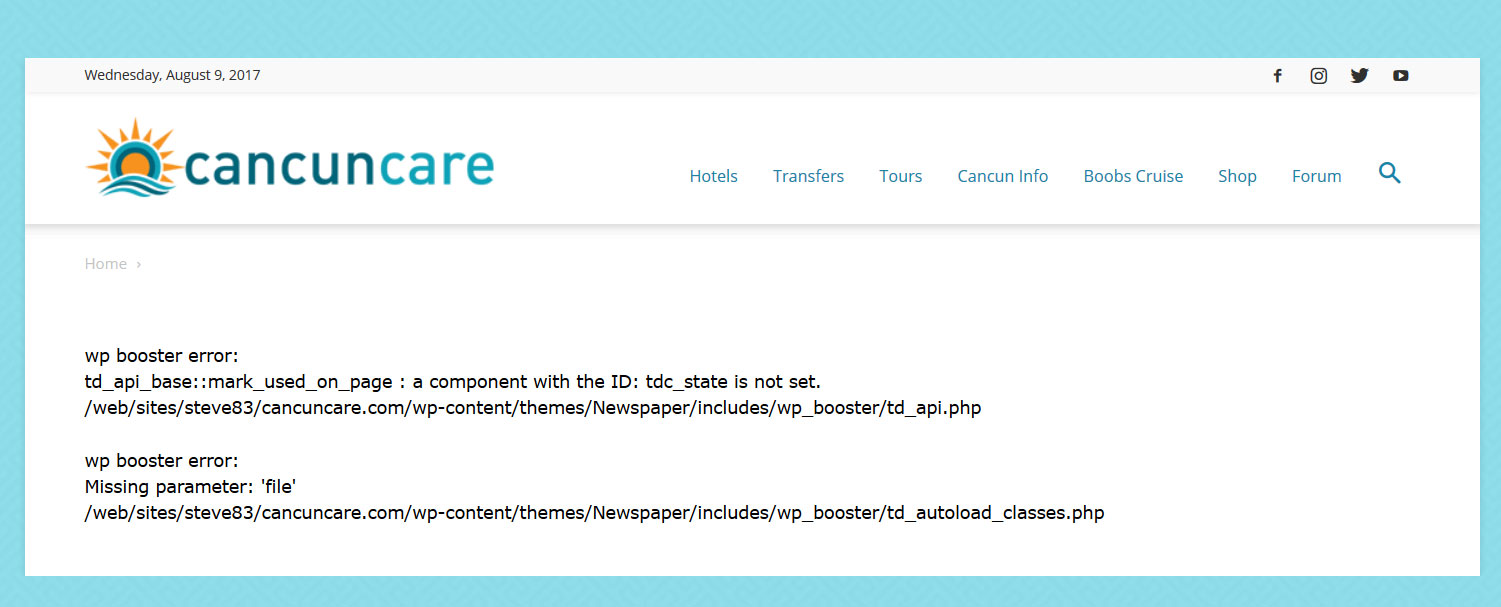
With tagdiv composer deactivated and visual composer activated my pages give the following error.
wp booster error:
td_api_base::mark_used_on_page : a component with the ID: tdc_state is not set.
/web/sites/steve83/cancuncare.com/wp-content/themes/Newspaper/includes/wp_booster/td_api.php

wp booster error:
Missing parameter: 'file'
/web/sites/steve83/cancuncare.com/wp-content/themes/Newspaper/includes/wp_booster/td_autoload_classes.php
(screenshot http://www.cancuncare.com/screenshot/homepage-with-vc.jpg)
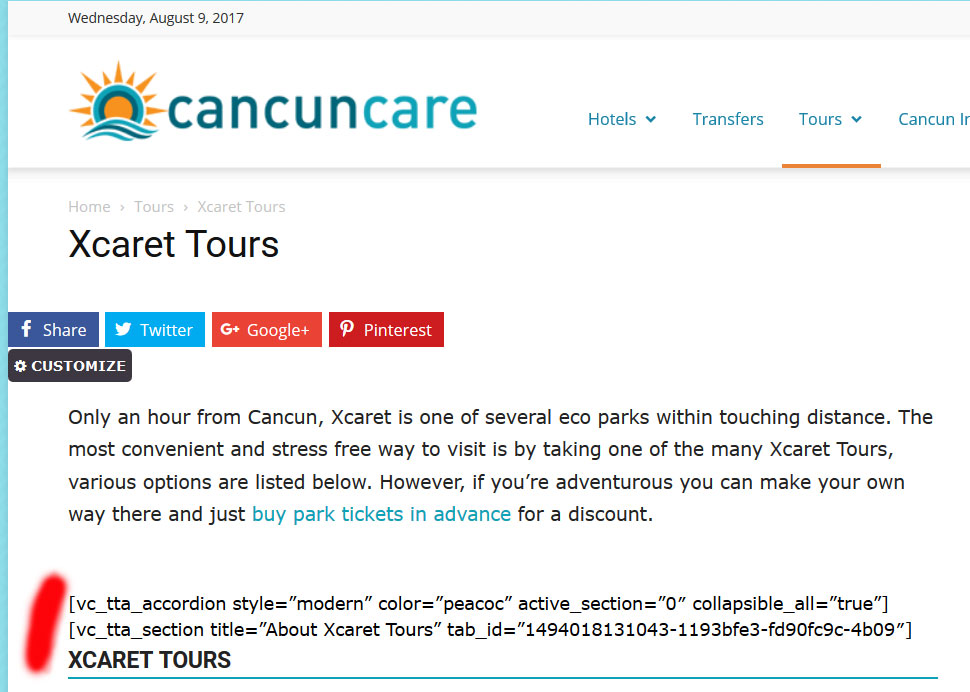
With tagdiv composer activated and visual composer deactivated many elements do not show at all, instead displaying the visual composer code.
(screenshot http://www.cancuncare.com/screenshot/page-with-tc.jpg)
The only way I have found to get the pages to show somewhat correctly is to install and activate both tagdiv composer and visual composer, which when I do so results in some page elements rendering incorrectly (images showing at an incorrect size and sidebars appearing below content). Re-making these pages from scratch results in the exact same problems. I understand having both tagdiv and visual composer enabled is not good. But disabling tagdiv results in the wp-booster error, and disabling visual composer results in elements not displaying.
I have been going round in circles for the last 5 days and am no further on than when I started. I really need a proper solution to this, the latest Newspaper update (8.1) broke my site and I need to get it fixed.
I am happy to provide wordpress login and ftp details if you could advise me on a secure way to do this.
 emceenetwork
I just installed the theme.
I tried to edit the homepage with the TagDiv Composer and immediately got this error:
Errors happened during tdcIframeData.init() -> bindViewsModelsWrappers()!
Catalin Hello bokitchan,
1)Errors happened during tdcIframeData.init() -> bindViewsModelsWrappers()!
Please do not use this setting in Seo by Yoast:
https://www.screencast.com/t/n8Cc35EofLh Also, if you are using the WP Super Cache plugin, please ensure that has been right setup according to our documentation here -> https://forum.tagdiv.com/cache-plugin-install-and-configure/
2)Also, the third important rule is to do not edit a page which was created with Visual Composer with TD Composer.
Also, I have inspected your website and I saw that you are using some untested plugins which can interact with the theme core files and causes a lot of unknown issues like this.
Clear all the caches and check the results.
Thanks for your understanding!
 Osher Shalom
I get this error
Errors happened during tdcIframeData.init() -> bindViewsModelsWrappers()!