
- NewsmagtagDiv Composer Tutorial
- NewsmagHow to use the Visual Composer plugin
- NewsmagHow to update a plugin
- NewsmagRequirements for Newsmag
- NewsmagInstall via WordPress
- NewsmagInstall via FTP
- NewsmagBlock settings tutorial
- NewsmagPage Menu
- NewsmagCustom ad spots
- NewsmagSmart sidebar
- NewsmagVideo playlist
- NewsmagPage templates
 Satish Anand
 Hi,
Thanks for the reply!!
It’s working for the primary domain (theprint.in) but we are getting issues only in sub domain website (hindi.theprint.in).
Any things specific setting for the sub domain news papper theme or TD composer plugins in server side ? please suggest
We have seperate licence key for the domain and sub domain theme.
Please help to resolve it
Thanks
 Calin
Calin Hi,
To resolve the search problem, it will be need to replace the current theme plugin tagDiv Composer with the one from here – https://cdn.tagdiv.com/wp-content/uploads/2025/11/td-composerfix.zip
Thank you!
 averimedia
I’ve updated everything on the website, turned off all plugins except the theme and the tagdiv and I’m getting this error:
Notice: Function _load_textdomain_just_in_time was called incorrectly. Translation loading for the Newsmag domain was triggered too early. This is usually an indicator for some code in the plugin or theme running too early. Translations should be loaded at the init action or later. Please see Debugging in WordPress for more information. (This message was added in version 6.7.0.) in /home/byline/public_html/wp-includes/functions.php on line 6131
Warning: Cannot modify header information – headers already sent by (output started at /home/byline/public_html/wp-includes/functions.php:6131) in /home/byline/public_html/wp-includes/functions.php on line 7182
Warning: Cannot modify header information – headers already sent by (output started at /home/byline/public_html/wp-includes/functions.php:6131) in /home/byline/public_html/wp-admin/admin-header.php on line 14
Calin Hi,
The screenshot is referring to the last code from the guide:
In some cases, the mod_substitute module default configuration may cause a timeout error on TD Composer when loading large pages. To fix this you have to add the following lines in the .htaccess file located in your website main folder: – https://forum.tagdiv.com/requirements-for-newspaper/
Calin Hi,
The search problem, it will be need to replace the current theme plugin tagDiv Composer with the one from here – https://cdn.tagdiv.com/wp-content/uploads/2025/11/td-composerfix.zip
Thank you!
 Sebshot69
I’m experiencing PHP warnings with TagDiv Newspaper 12 and td-composer when editing pages in WordPress admin:
Error messages:
Warning: Undefined array key “color-1-overlay” in /wp-content/plugins/td-composer/legacy/common/wp_booster/td_block.php on line 2679
Warning: Undefined array key “color-2-overlay” in /wp-content/plugins/td-composer/legacy/common/wp_booster/td_block.php on line 2679
Environment:
WordPress: [ta version]
Newspaper theme: 12.x
td-composer version: [ta version]
PHP version: 8.x
Issue location:
File: /wp-content/plugins/td-composer/legacy/common/wp_booster/td_block.php
Line: ~2679
Suggested fix:
Replace direct array access with null coalescing operator or isset() check:
php// Current code (causing warnings):
$overlay_color_1 = $atts[‘color-1-overlay’];
$overlay_color_2 = $atts[‘color-2-overlay’];
// Suggested fix:
$overlay_color_1 = $atts[‘color-1-overlay’] ?? ”;
$overlay_color_2 = $atts[‘color-2-overlay’] ?? ”;
This would ensure compatibility with PHP 8.x strict error reporting and prevent warnings when overlay colors are not defined in block configuration.
Current workaround:
I’ve temporarily suppressed warnings via error_reporting(), but a permanent fix in the core plugin would be appreciated.
Thank you for your attention to this matter.
Best regards,
Calin Hi,
For the category, you can set a border like this – https://i.imgur.com/6XLnF6m.png https://i.imgur.com/LysNRdO.png and for the other | you need to use a css like this one:
body .td-module-meta-info .td-post-author-name span {

    display: none;

}

 .td-module-meta-info .td-post-author-name a  {

     margin-right: 8px;

     padding-right: 10px;

    border-right: 2px solid #aaa;

}
The cs can be set in a raw css element from the tagDiv Composer and it will apply only on the page where it is set. https://i.imgur.com/cnJ0g1Q.png https://i.imgur.com/UCDbctw.png
Calin Hello,
1. That is only a notice and is not an interference or an effect on the website.
2. For that, replace teh last part of css I provided (this one)
body .tdc-content-wrap .td-module-container {

background: #f9f9f9;

border-radius: 0 0 10px 10px;

padding-bottom: 10px;

}
with this one:
body .tdc-content-wrap .td-module-container {

    background: #f9f9f9;

    border-radius: 10px;

    padding-bottom: 10px;

    border: 1px solid gray;

    box-shadow: 1px 1px 5px 1px gray;

}
you can adjust the code after your needs.
3. To align the stars and the price on the same line, it is necessary to change somewhere halfway through the css code above.
4. For this you need to use tagDiv Composer on the pages where you have blocks and see if the blocks you have on the website have the option to display the “View/read more” button https://i.imgur.com/eeiflV4.png
Thank you!
 israelru.news
Newspaper 12.7.3
File path contains typo: “blotsk” instead of “block”
Path: /wp-content/plugins/td-composer/legacy/common/wp_booster/wp-admin/panel/panel_core/td_panel_core.php
Line: 217
Expected file: td_thumbs_on_modules_and_blocks.php
Actual call: td_thumbs_on_modules_and_blotsks.php
Workaround: Created symlink to fix the issue.
 crafty
When I try to edit pages only code shows like [tdc_zone type=”tdc_content”..
although editing does work O/K with TagDivComposer.
Any advice would be great.
Thanks
 giulian
 Hi,
Fixed. Is this a know issue?
on the other had, I still have one issue while saving, especially the home page from the editor:
On save all, it saves: header, footer and content.
Header and footer save OK, but content (wp-json/td-composer/save_post?uuid=ad1d24c3-ca98-5763-2f74-8d04749032cf) gets canceled after 10s.
If it manages to save it under 10s it returns the success message, if not, the loader stays on forever.
Do you have a solution for this too? the content seems to be saved all the time, but it doesn’t return the succes confirmation.
 anankassis
Hello,
I know that removing author from posts inside the post or in the homepage is doable through the editwithtagdiv composer.
the problem is i am talking about this ( td-post-author-name )
html code :
<div class=”td-editor-date”>
<span class=”td-post-author-name”>…<span>
</span> </span> <span class=”td-post-date”</span> </div>
it is in the features section , or below in the middle of the page where it is 1 complete element which holds the article title and image and some text.
if i click on editwith tagdiv composer and try to edit these elements, it is not doable, since all of the things inside that element is 1 row and 1 columun . means i can’t chose to remove the author , or the date, or the image or the title..
I hope you understand where is the problem.
Do you have a solution for that, or I need to edit the html / php ?
Thank you
giulianHi,
While on the editor the design is as it should, the front looks broken (the slider is empty and the rest of the design is broken, with missing styles. It is as if some styles are not loading but no error on the console).
I’ve saved the tempalte again, even recreated motos from scratch, cleared cache, wp-rocket, cloudflare and server again but same result.
I’ve even disabled wp-rocket and deleted server cache and cloudflare and still the same issue.
Sometimes on save I get an error while savind the post content: wp-json/td-composer/save_post?uuid=… gets canceled after 10s. BUt even when it saves the content, sometimes id does, it still doens’t apply the corect design on the front page.
It happens only on these 2 pages:
https://soymotero.net/
https://soymotero.net/motos/
I am using the latest theme version: 12.7.3
wordpress v 6.8.3
all used plugins are updated.
I need help fast please, since this is been like this the whole mornming and we’re out of options…
Thx,
Giulian.
Calin Hi,
It will be need to use tagDiv Composer to change the menu – https://forum.tagdiv.com/main-menu/ https://i.imgur.com/BlGDAPu.png https://i.imgur.com/TDLF5iN.png please set it on mobile too – https://i.imgur.com/hHCMMoT.png
Thank you!
 emerzlyakov
Hello dear developers,
On every page of my website, in the Developer Tools console, I see the following list of errors.
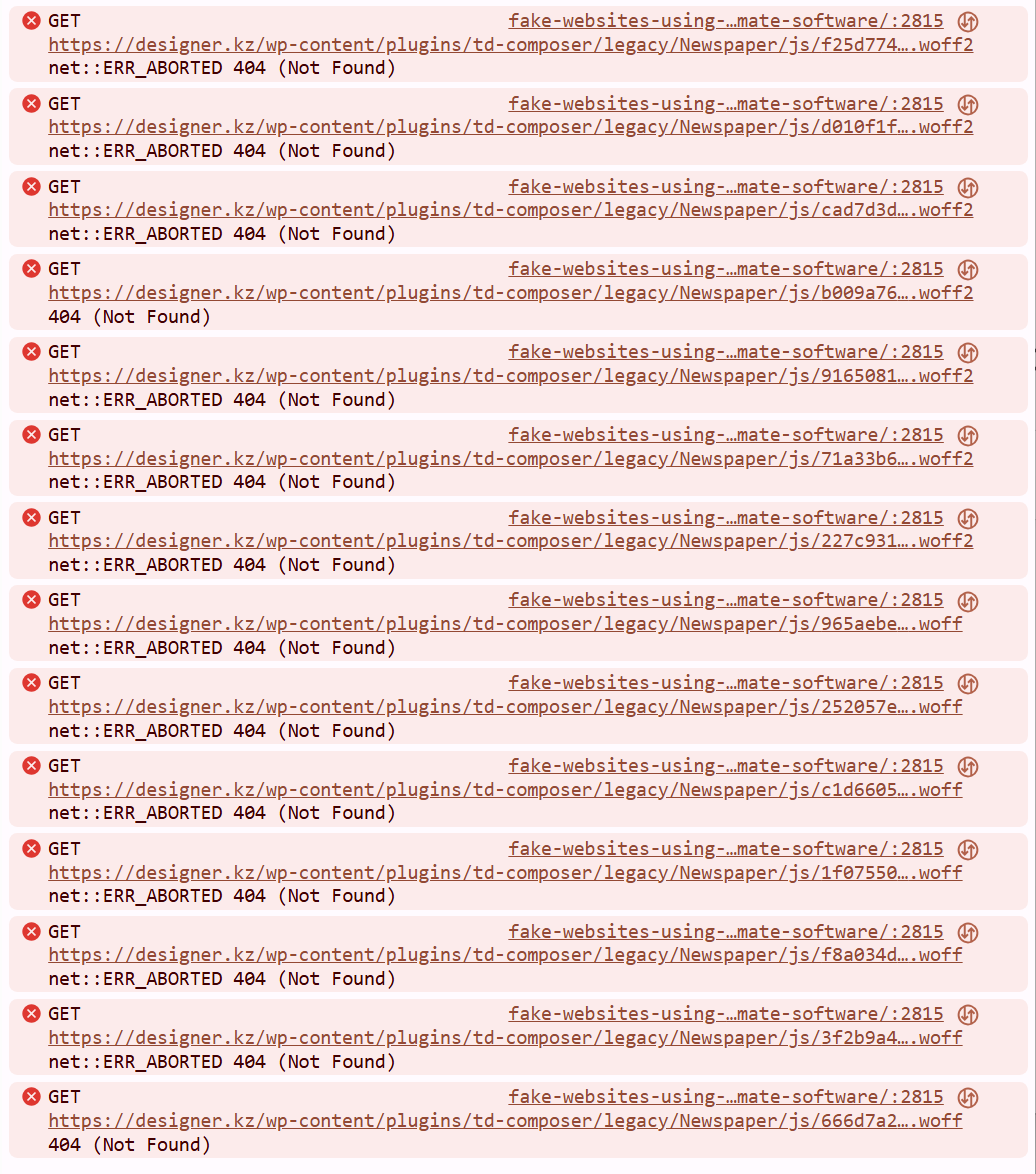
As I understand it, this means that some fonts cannot be loaded?
Here is the full path to one of the files mentioned in the error message:
https://designer.kz/wp-content/plugins/td-composer/legacy/Newspaper/js/9165081d10e1ba601384.woff2
Why is this happening? Does this slow down my website’s loading, and what should I do?
 regio-online
I am experiencing a critical issue with the Featured Image display on our Single Post Template.
The image is being cropped at the top and bottom with the Single Post Bg Featured Image, (e.g., faces are cut off) because the container height is fixed and incompatible with the image’s aspect ratio.
Also using Single Post Featured Image with custom CSS (see below) does not contain the image but cuts off below half of image:
.tdb_single_featured_image img.entry-thumb {
object-fit: contain !important;
width: 100% !important;
height: auto !important;
max-width: 100% !important;
}
.tdb_single_featured_image {
max-height: 500px !important;
overflow: hidden;
}
Good to understand that all images are served through the plugin WP Media Folder Cloud add-on from Google Drive, all images are resized offline with XN-Resize, before uploaded in media library folder in WPMF Google Drive, to be constrained to max 1400x600px size. So images have no seperate thumbnails created in Google Drive. The are coded as thumbnails automaticly inside Big Grid and Flex blocks.
Technical Cause and Conflict
Fixed Height Conflict: The core problem lies in the theme block used to display the header image. Specifically, the tdb_single_bg_featured_image block (which was previously used, or its properties are still inherited) has a hard-coded default height value (600px) that cannot be removed or set to ‘auto’ in the TagDiv Composer settings. This fixed height creates an inflexible CSS container.
Rendering Override: The theme’s rendering engine (or the WP Media Folder Cloud Add-on) applies a height constraint via an inline style or theme JavaScript (JS) that executes with the highest priority, forcing the image to fit the limited height while applying overflow: hidden.
CSS Failure: All attempts to override this constraint using standard CSS (Child Theme, Customizer, and direct Block CSS injection) fail to work against the theme’s rendering logic.
Desired Outcome and Required Solution
The required behavior is the precise inverse of the current rendering. The image must behave exactly like the CSS rule object-fit: contain.
Goal: The image must scale down proportionally based on the available width of the column, ensuring the entire image (full height and width) is visible within the container without any cropping. The container’s height must then dynamically adjust (height: auto) to accommodate the image’s resulting proportional height.
I require assistance in disabling the internal hard-coded height constraint (600px) on the Featured Image block within the TagDiv Composer’s source files, as external CSS solutions are being ignored, or have a workaround presented with custom code that can do the job.
Since Single Post Bg Featured Image is a background image this is difficult. The element is placed inside Single Post Featured Image, to be able to show caption. In the Extra Class of CSS of Single Post Featured Image we no have placed remove-image. When showing the image in this element it only shows with setting 485×360 but then doubles in height strangly.
Any help and solution in this would be much appreciated!
 simchris
 Probably want to migrate site to new hosting first using any of the modern host-provided move tools. Once moved, you’d then probably look at using something like the newsmag theme. You will need to install the new theme, disable existing plugins, back up working site on new server including server dbase, then activate new theme, then activate new copy of td-composer included with newsmag, then you will need to go in and change settings to preferred default templates for posts, archives; then make a new home page layout using the theme builder.
Calin Hi,
If you are referring to mobile version, please disable the td mobile theme plugin and use the responsive theme version, then you’ll be able to use tgaDiv Composer to edit the header version – https://forum.tagdiv.com/header-manager/
Thank you!
Calin Hello,
Related to the search problem, it will be need to replace the current theme plugin tagDiv Composer with the one from here – https://cdn.tagdiv.com/wp-content/uploads/2025/11/td-composerfix.zip
Thank you!
 mediax
Hi there,
I recently Updated Newspaper theme. After update, i tested – all worked, besides search that gave an empty white screen. Doing some troubleshooting I noticed in console that an error 500 was thrown.
Looking at logs, i see this:
[21-Nov-2025 10:37:05 UTC] PHP Fatal error: Uncaught TypeError: Illegal offset type in /var/www/html/public_html/wp-content/plugins/td-composer/legacy/common/wp_booster/td_util.php:1196
Stack trace:
#0 /var/www/html/public_html/wp-content/plugins/td-composer/legacy/common/wp_booster/td_util.php(340): td_util::get_template_id()
#1 /var/www/html/public_html/wp-content/plugins/td-composer/legacy/common/wp_booster/td_wp_booster_functions.php(513): td_util::check_header()
#2 /var/www/html/public_html/wp-includes/class-wp-hook.php(324): td_load_css_fonts()
#3 /var/www/html/public_html/wp-includes/class-wp-hook.php(348): WP_Hook->apply_filters()
#4 /var/www/html/public_html/wp-includes/plugin.php(517): WP_Hook->do_action()
#5 /var/www/html/public_html/wp-includes/script-loader.php(2299): do_action()
#6 /var/www/html/public_html/wp-includes/class-wp-hook.php(324): wp_enqueue_scripts()
#7 /var/www/html/public_html/wp-includes/class-wp-hook.php(348): WP_Hook->apply_filters()
#8 /var/www/html/public_html/wp-includes/plugin.php(517): WP_Hook->do_action()
#9 /var/www/html/public_html/wp-includes/general-template.php(3192): do_action()
#10 /var/www/html/public_html/wp-content/plugins/td-standard-pack/Newspaper/header.php(11): wp_head()
#11 /var/www/html/public_html/wp-content/plugins/td-composer/td-composer.php(254): require_once(‘/var/www/html/p…’)
#12 /var/www/html/public_html/wp-includes/class-wp-hook.php(324): {closure}()
#13 /var/www/html/public_html/wp-includes/class-wp-hook.php(348): WP_Hook->apply_filters()
#14 /var/www/html/public_html/wp-includes/plugin.php(517): WP_Hook->do_action()
#15 /var/www/html/public_html/wp-content/themes/Newspaper/header.php(2): do_action()
#16 /var/www/html/public_html/wp-includes/template.php(810): require_once(‘/var/www/html/p…’)
#17 /var/www/html/public_html/wp-includes/template.php(745): load_template()
#18 /var/www/html/public_html/wp-includes/general-template.php(48): locate_template()
#19 /var/www/html/public_html/wp-content/themes/Newspaper-child/search.php(1): get_header()
#20 /var/www/html/public_html/wp-includes/template-loader.php(106): include(‘/var/www/html/p…’)
#21 /var/www/html/public_html/wp-blog-header.php(19): require_once(‘/var/www/html/p…’)
#22 /var/www/html/public_html/index.php(17): require(‘/var/www/html/p…’)
#23 {main}
thrown in /var/www/html/public_html/wp-content/plugins/td-composer/legacy/common/wp_booster/td_util.php on line 1196
Please could you offer me some advice on how to resolve this?
Thanks
 Antonbr
When updating to PHP 8.2-4, td-composer causes a critical error and crashes the WordPress admin panel. Why doesn’t it work on PHP 8?
 habershamnews
I have a template that I’m trying to customize. I’d like to add a mobile menu to it. I open the template using the TD composer editor. Then, I chose the mobile icon. What I see is a red rectangle that says “Popup Modal”. That’s where I’m trying to drag and drop a “mobile menu” but unsuccessfully. Can you talk me through how to set it up correctly please? Thank you!
Calin Hi,
Just make sure you have the Newspaper v12.7.3 and use the composr from this link
https://cdn.tagdiv.com/wp-content/uploads/2025/11/td-composerfix.zip
Thank you!
 newspatron
Hello Team,
I’m running a local development environment of my production site newspatron.com using Docker.
The site and database were cloned from the live website.
Theme + required plugins are installed and activated:
Newspaper theme 12.7.3 (active)
Newspaper Child theme
td-composer 5.4.2
td-cloud-library 3.9.2
td-standard-pack 2.7.1
td-social-counter latest
Everything is working except:
❌ “Edit with TagDiv Composer” button is missing
❌ TagDiv frontend editor won’t load
⚠ Editing a page only shows a blank white screen
This happens only on the local site.
The live site works perfectly with the same setup.
Other info:
Local URL: http://newspatron.local
Database cloned from Jetpack backup
wp_debug enabled, no TagDiv-specific errors yet
Capabilities granted using WP-CLI
Request:
👉 Please provide any additional required settings, database flags, or licensing constraints needed to restore the TagDiv Composer button and frontend editor in a local dev environment.
Thanks.
Calin Hi,
That is a page that can be created using tagDiv Composer. If you want, you can get the page from that menu from here https://pastebin.com/tDUgJJz9, set the code in a page, and edit it with tagDiv Composer.
Thank you!



